
pengenalan
Thank you for choosing the G-MARK GLXD4 Professional Karaoke Microphone Dual UHF Cordless Dynamic Mic System. This manual provides detailed instructions for setting up, operating, and maintaining your wireless microphone system to ensure optimal performance and longevity. Please read this manual thoroughly before using the product.
Produk Selesaiview
Ciri-ciri Utama
- Frequency Adjustable: Dual UHF wireless system with selectable frequencies (520-580MHz) and PLL frequency synthesized technology for stable transmission and minimal interference. Operating range of 200-250 feet line of sight.
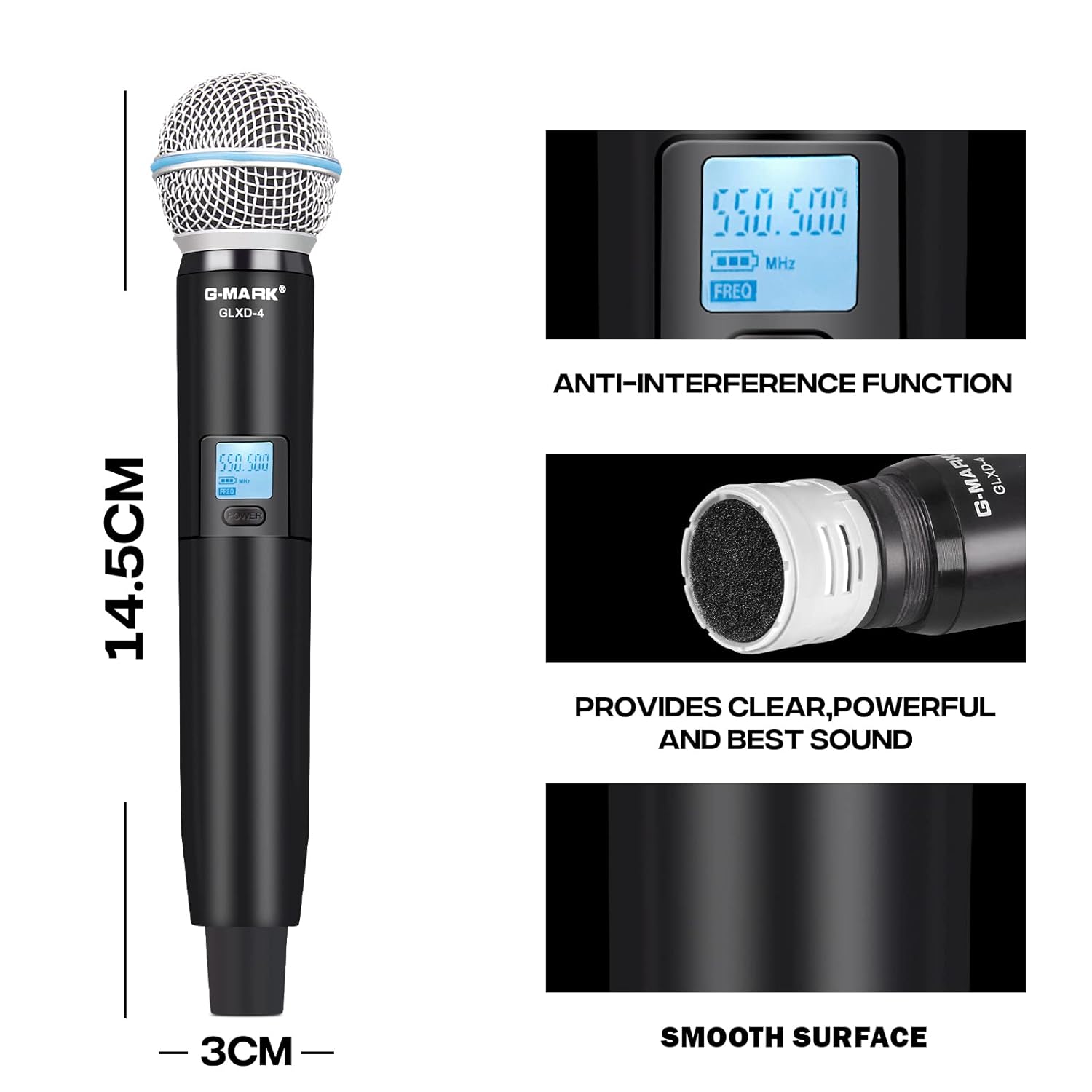
- G-MARK Proprietary Capsule: High-quality microphone capsule designed by G-MARK, effectively limiting feedback and interference, providing clear and powerful sound.
- Anti-interference Feature: Auto-scan function to find the least interference channel. Dual antenna design enhances anti-interference capabilities.
- Mudah Digunakan: Plug and play with automatic frequency synchronization between receiver and microphones. Features adjustable volume control.
Komponen Sistem

Figure 1: The G-MARK GLXD4 wireless microphone system, showing the receiver unit with two antennas and two handheld wireless microphones.
Kandungan Pakej
Apa yang ada dalam Kotak
- Host (Receiver) x 1
- Mikrofon x 2
- Bekalan Kuasa x 1
- Manual Arahan x 1
- Kabel Audio x 1

Figure 2: All components included in the G-MARK GLXD4 wireless microphone system package.
Persediaan
1. Membongkar
Carefully remove all components from the packaging and inspect them for any signs of damage. Retain the packaging for future storage or transport.
2. Menghidupkan Penerima
Connect the included power supply to the DC 12V-16V input on the rear of the receiver unit. Plug the power supply into a suitable electrical outlet. The receiver's display should illuminate.
3. Memasang Bateri Mikrofon
Each microphone requires two 1.5V AA batteries. Unscrew the bottom part of the microphone handle to access the battery compartment. Insert the batteries, ensuring correct polarity (+/-). Screw the handle back on securely.
4. Connecting to an Audio System
The receiver features XLR balanced outputs (BALANCED A, BALANCED B) and a 6.35mm AUX output. Connect the receiver to your amplifier, mixer, or karaoke machine using the appropriate audio cables. Ensure you connect to a MIC input, not an AUX input, on your audio device.
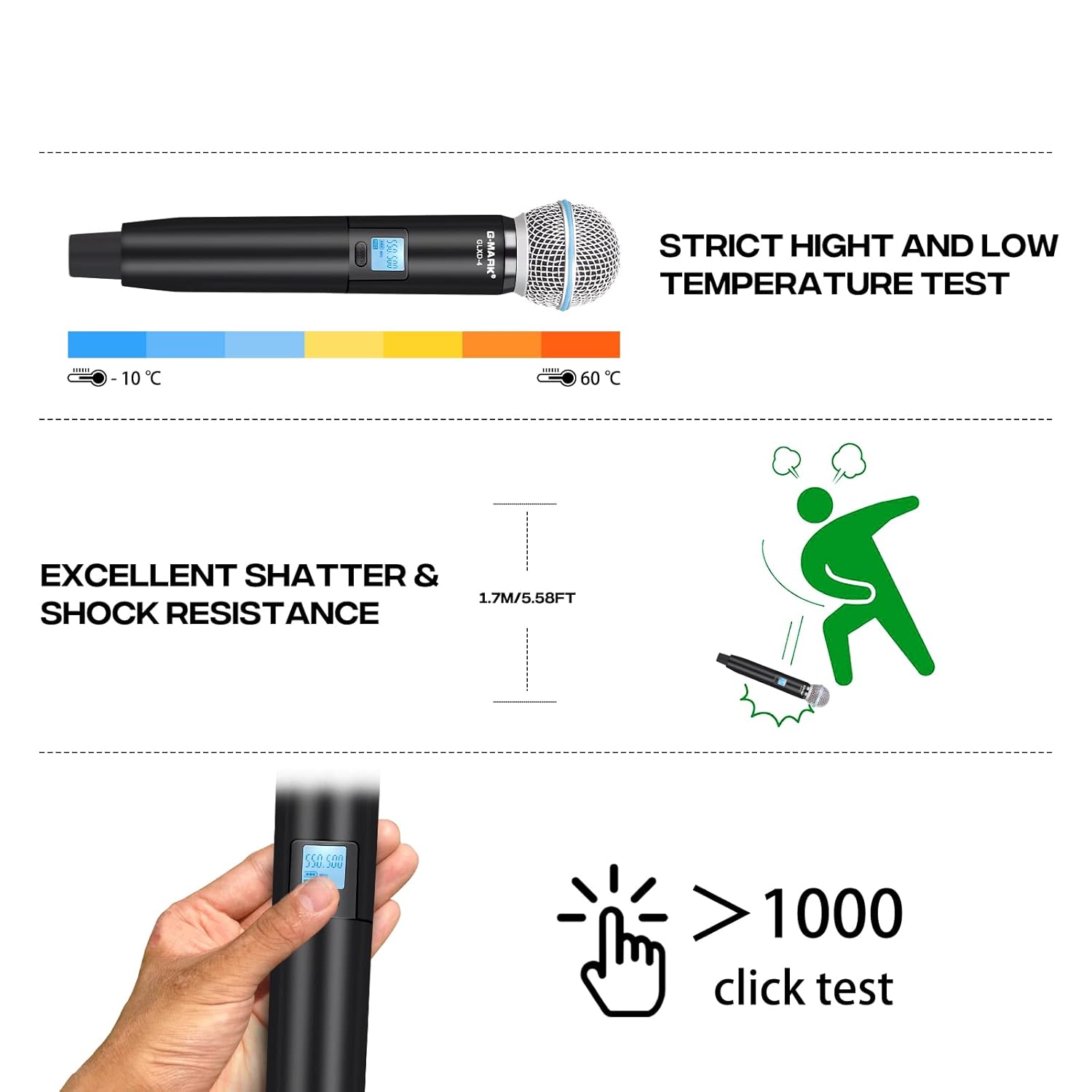
Figure 3: Connection diagram illustrating how to connect the receiver to a power supply and an audio device, and the microphones to the receiver.
Rajah 4: Terperinci view of the receiver's front and rear panels, highlighting input/output ports and controls.
Arahan Operasi
1. Hidupkan/Mati Kuasa
Press the 'POWER' button on the receiver to turn it on. For the microphones, press and hold the power button on each microphone until the display illuminates.
2. Berpasangan Automatik
Once the receiver and microphones are powered on, they will automatically synchronize their frequencies. The microphone display will show the connected frequency.
3. Frequency Adjustment (If Needed)
If interference occurs or you need to change the frequency, use the 'SET' and 'UP'/'DOWN' buttons on the receiver to select a new frequency. Then, use the IR function (infrared) on the receiver and microphone to synchronize them. Refer to the receiver's display for current frequency information.
4. Kawalan Kelantangan
Adjust the individual volume levels for each microphone using the dedicated volume controls on the receiver. Fine-tune the overall system volume using your connected amppenguat atau pengadun.

Figure 5: The system supports independent volume control for each microphone and offers a substantial operating range.

Figure 6: Key features of the microphone, including its anti-interference capabilities and sound quality.
Penyelenggaraan
Penjagaan dan Penyimpanan
- Pembersihan: Gunakan kain lembut dan kering untuk membersihkan penerima dan mikrofon. Jangan gunakan pembersih cecair atau pelarut.
- Penggantian Bateri: Replace microphone batteries when the low battery indicator appears on the microphone display to ensure uninterrupted performance.
- Storan: When not in use for extended periods, remove batteries from the microphones and store the system in a cool, dry place, away from direct sunlight and extreme temperatures.

Figure 7: The microphone is designed to withstand various environmental conditions and rigorous use.
Menyelesaikan masalah
Isu dan Penyelesaian Biasa
| Masalah | Kemungkinan Punca | Penyelesaian |
|---|---|---|
| Tiada suara dari mikrofon | Microphones not powered on; Batteries low/dead; Receiver not powered on; Receiver not connected to audio input; Frequency mismatch. | Ensure microphones and receiver are powered on. Replace batteries. Check audio cable connections to MIC input. Re-synchronize frequencies. |
| Gangguan atau bunyi statik | Other wireless devices nearby; Frequency conflict; Obstructions. | Change to a different frequency using the auto-scan function. Move away from other electronic devices. Ensure clear line of sight between microphones and receiver. |
| Julat operasi pendek | Obstructions; Weak signal; Environmental factors. | Ensure clear line of sight. Avoid placing receiver near metal objects. Check antenna positioning. |
| Paparan mikrofon tidak berfungsi | Bateri mati atau salah dimasukkan. | Gantikan bateri, pastikan polariti yang betul. |
Spesifikasi
Spesifikasi Teknikal
| Parameter | Nilai |
|---|---|
| Julat Kekerapan | UHF 500MHz-590MHz |
| Kestabilan Frekuensi | 10PPM |
| Jalur Lebar Diduduki | ±150KHz |
| Nisbah Isyarat kepada Bunyi | >105dB |
| herotan | <0.5%@1KHz |
| Menerima Sensitiviti | -105dBM |
| Respons Kekerapan | 30Hz-20KHz |
| Bekalan Kuasa Penerima | DC 12V-16V |
| Bekalan Kuasa Mikrofon | DC 3V (1.5V AA*2) |
| Microphone Power Consumption | 130mA |
| Menghantar Kuasa | 10mW |
| Julat Dinamik | >100dB |
| Jenis Mikrofon | Moving Coil Type, Unidirectional |
| Julat Operasi | 200ft – 250ft (line of sight) |
| Dimensi (Penerima) | 42 x 32 x 7 cm |
| Berat Barang | 1.32 kg |
Waranti dan Sokongan Pelanggan
The G-MARK GLXD4 Wireless Microphone System comes with a 12-month manufacturer assurance. Waranti ini melindungi kecacatan pada bahan dan mutu kerja di bawah penggunaan biasa.
For any troubleshooting assistance, replacement of discontinuous or defective parts, or general inquiries, please contact G-MARK customer service. Refer to the product packaging or official G-MARK webtapak untuk maklumat hubungan terkini.
Sila simpan bukti pembelian anda untuk tuntutan waranti.