
Easytry123 Easytry7607
Easytry123 Replacement Remote Control User Manual
Model: Easytry7607 for Integra A/V Receivers
pengenalan
This manual provides instructions for the Easytry123 Replacement Remote Control, Model Easytry7607. This remote is designed as a replacement for various Integra A/V Receiver models, including DTR-40.4, DTR-40.3, DTR-30.7, DTR-20.7, DTR-30.4, DHC-80.3, and DTR-50.3, and their corresponding original remote models like RC-833M, RC-899M, RC-838M, and RC-811M. Please read this manual carefully before use to ensure proper operation.
Persediaan
1. Pemasangan Bateri
Alat kawalan jauh memerlukan dua bateri AAA (tidak disertakan). Ikuti langkah berikut untuk memasangnya:
- Cari petak bateri di belakang alat kawalan jauh.
- Tekan ke bawah pada tab dan luncurkan penutup bateri ke bawah untuk membukanya.
- Masukkan dua bateri AAA, pastikan terminal positif (+) dan negatif (-) sejajar dengan tanda di dalam petak.
- Luncurkan penutup bateri ke tempat semula sehingga ia berbunyi dengan selamat.
Imej 1: Back of the remote control with the battery cover removed, illustrating the battery insertion process. Note the polarity markings inside the compartment.
Penting: Ensure batteries are inserted with correct polarity. Incorrect installation can damage the remote control. Do not mix old and new batteries, or different types of batteries.
Operasi
Fungsi Asas
This replacement remote control operates using infrared (IR) technology. Point the remote directly at your Integra A/V Receiver. Ensure there are no obstructions between the remote and the receiver's IR sensor.

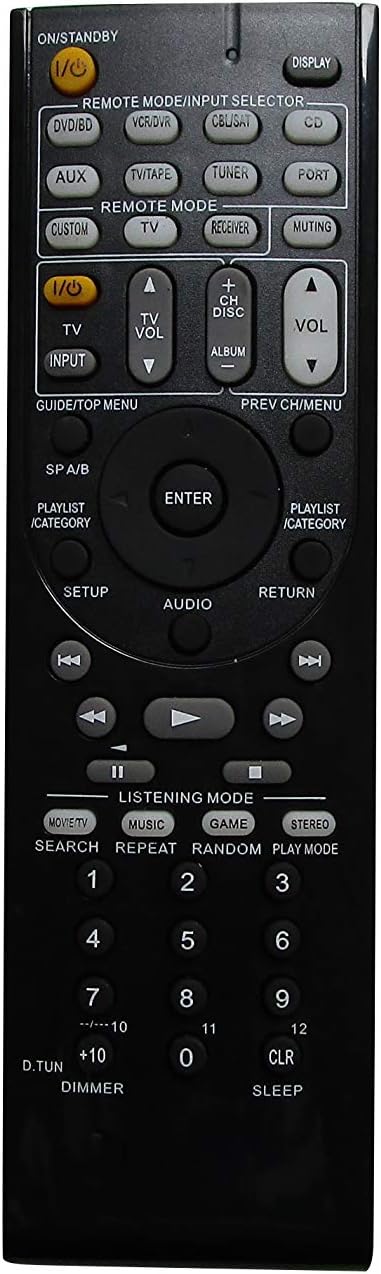
Imej 2: Depan view of the remote control, showing the layout of all buttons for various functions.
The remote features standard buttons for power, volume control, input selection, and navigation. Refer to Imej 2 for the button layout. Press the corresponding button for the desired function.
Nota Keserasian
- This remote is a replacement and may not offer all the exact same features or button functions as your original Integra remote.
- It does not support programming or learning functions. Remote codes cannot be entered or modified.
- Functionality is dependent on the specific Integra A/V Receiver model. While designed for compatibility, some advanced or model-specific functions may not be supported.
Penyelenggaraan
Pembersihan
Untuk membersihkan alat kawalan jauh, lap perlahan-lahan menggunakan kain lembut dan kering. Jangan gunakan pembersih cecair, semburan atau bahan kasar, kerana ini boleh merosakkan permukaan atau komponen dalaman alat kawalan jauh.
Penggantian Bateri
Replace batteries when the remote's response becomes sluggish or stops working. Follow the battery installation steps outlined in the Persediaan section. Always replace both batteries at the same time with new AAA alkaline batteries.
Menyelesaikan masalah
- Jauh tidak bertindak balas:
- Periksa sama ada bateri dimasukkan dengan betul dengan polariti yang betul.
- Gantikan bateri lama dengan bateri alkali AAA yang baharu.
- Ensure there is a clear line of sight between the remote control and the A/V receiver's IR sensor. Remove any obstructions.
- Verify that the remote is pointed directly at the receiver.
- Some functions do not work:
- This is a replacement remote and may not support all functions of your original Integra remote. Refer to the Nota Keserasian in the Operation section.
- The remote does not support programming or learning functions.
- Remote feels loose or rattles:
- Pastikan penutup bateri ditutup dengan selamat.
- If internal components feel loose, contact the seller for assistance.
Spesifikasi
| Jenama | Easytry123 |
| Nombor Model | Easytry7607 |
| Peranti Serasi | Integra A/V Receivers (DTR-40.4, DTR-40.3, DTR-30.7, DTR-20.7, DTR-30.4, DHC-80.3, DTR-50.3, etc.) |
| Teknologi Ketersambungan | Inframerah (IR) |
| Jenis Pengawal | Kawalan Butang |
| Jenis Bateri | 2 x Bateri Beralkali AAA (tidak termasuk) |
| warna | Hitam |
| Ciri Khas | Reka bentuk ergonomik |
Maklumat Waranti
Specific warranty details for this product are provided by the seller, Easytry123. Please refer to your purchase documentation or contact the seller directly for information regarding warranty coverage and terms.
Sokongan Pelanggan
For any questions, concerns, or technical assistance not covered in this manual, please contact the seller, Easytry123, through the platform where the purchase was made. Provide your order number and a detailed description of the issue for prompt support.
Ask a question about this manual
Ask about setup, troubleshooting, compatibility, parts, safety, or missing instructions. Manuals+ will review the question and use this page’s manual context to help answer it.