
pengenalan
This manual provides essential instructions for the setup, operation, and maintenance of your Easytry123 replacement remote control. This remote is designed to function with various ONKYO AV A/V Receiver models, including RC-745M, TX-NR1007, TX-NR807, RC-717M, RC-738M, TX-SR607, TX-SR607S, RC-742M, and TX-SR707.
Nota Penting: As a replacement unit, this remote control may not support all advanced functions or features present on your original ONKYO remote. Its primary purpose is to provide core control over your AV receiver. Please ensure your receiver model is listed above for compatibility.
Persediaan
1. Pemasangan Bateri
Alat kawalan jauh memerlukan dua bateri AAA (tidak disertakan). Ikuti langkah berikut untuk memasangnya:
- Cari penutup petak bateri di belakang alat kawalan jauh.
- Tekan ke bawah pada tab dan luncurkan penutup ke bawah untuk membuka petak.
- Insert two AAA batteries, ensuring the positive (+) and negative (-) terminals align correctly with the markings inside the compartment. Incorrect insertion can prevent the remote from functioning.
- Luncurkan penutup petak bateri kembali ke tempatnya sehingga ia berbunyi dengan selamat.
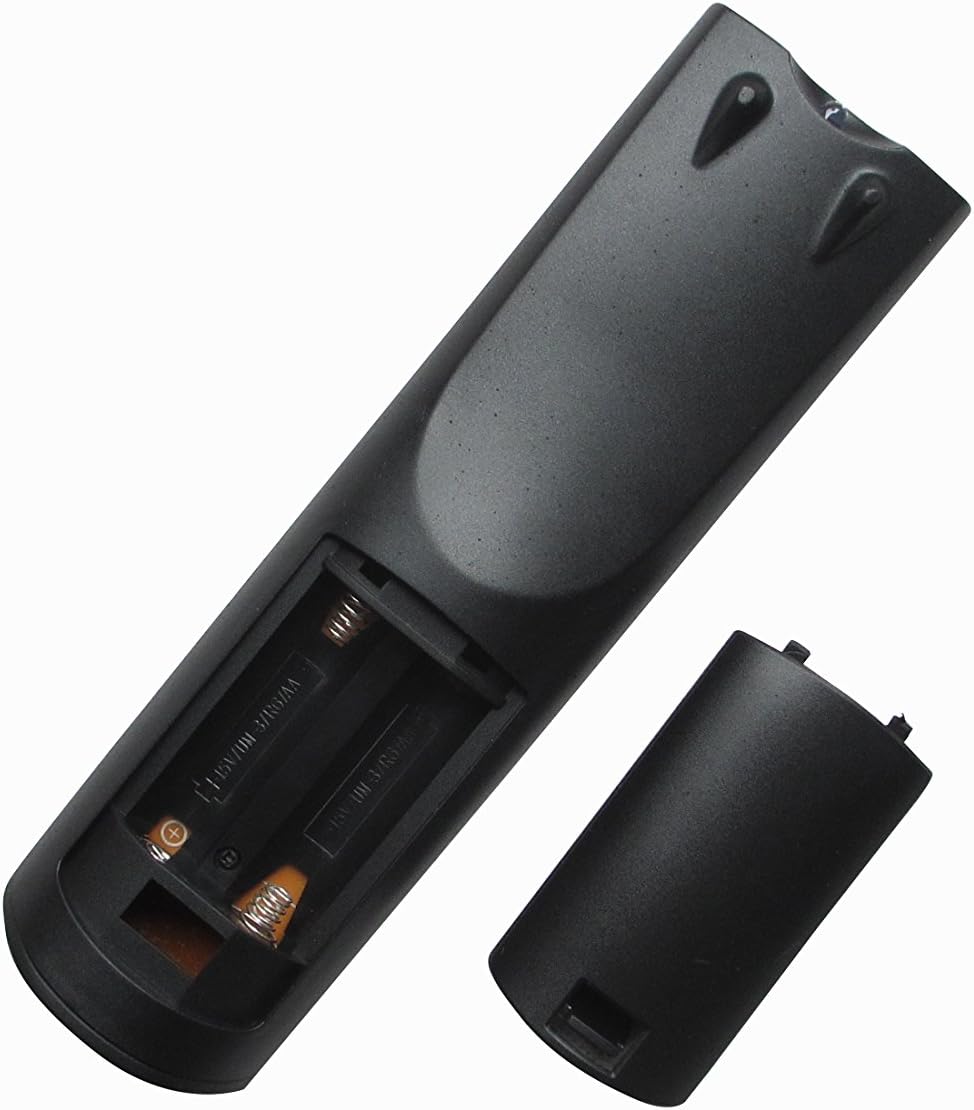
Imej 1: Belakang view of the remote control with the battery compartment open, ready for battery insertion. Note the spring contacts for the negative terminals and raised contacts for the positive terminals.

Imej 2: Satu lagi view of the remote's battery compartment, illustrating the correct orientation for AAA battery placement.
2. Penggunaan Awal
This replacement remote control is pre-programmed for the listed ONKYO AV A/V Receiver models. No additional programming or pairing steps are typically required. Once batteries are installed, the remote should be ready for immediate use with your compatible receiver.
Point the remote control directly at your ONKYO AV A/V Receiver and press the desired function button.
Arahan Operasi
The Easytry123 replacement remote control provides intuitive access to the primary functions of your ONKYO AV A/V Receiver. While the exact button layout may vary slightly from your original remote, the core functions are generally mapped to standard remote control buttons.
- Hidupkan/Mati Kuasa: Gunakan KUASA button to turn your receiver on or off.
- Kawalan Kelantangan: Laraskan tahap audio menggunakan JILID + dan JILID - butang.
- Pemilihan Input: Cycle through available audio/video inputs (e.g., HDMI 1, DVD, CD) using the INPUT or dedicated input selection buttons.
- Redam: Temporarily silence the audio output with the HILANGKAN butang.
- Navigasi: Use the directional arrow buttons and MASUK or OK button for menu navigation on your receiver's display.
For specific advanced functions or detailed operation of your ONKYO receiver's features, please refer to your receiver's original instruction manual.
Penyelenggaraan
Membersihkan Alat Jauh
Untuk mengekalkan rupa dan fungsi alat kawalan jauh:
- Lap permukaan dengan kain lembut dan kering.
- Untuk kotoran degil, ringankan dampbersihkan kain dengan air atau pencuci yang lembut dan tidak kasar. Jangan gunakan bahan kimia atau pelarut yang keras.
- Avoid getting moisture into the battery compartment or any openings.
Penggantian Bateri
Replace the batteries when the remote's response becomes sluggish or it stops functioning. Always replace both batteries at the same time with new AAA batteries. Do not mix old and new batteries, or different types of batteries.
Penyimpanan
If the remote control will not be used for an extended period, remove the batteries to prevent leakage and potential damage to the remote.
Menyelesaikan masalah
If you encounter issues with your remote control, please refer to the following common solutions:
- Jauh tidak bertindak balas:
- Periksa sama ada bateri dimasukkan dengan betul dengan polariti yang betul (+/-).
- Gantikan bateri dengan bateri AAA yang baru.
- Ensure there are no obstructions between the remote control and the ONKYO receiver's infrared sensor.
- Make sure you are within the effective range of the receiver and pointing the remote directly at it.
- Some functions do not work:
- As a replacement remote, it may not support all functions of your original ONKYO remote. Focus on core functions like power, volume, and input selection.
- Verify that your ONKYO receiver model is listed as compatible in the introduction section.
- Consult your ONKYO receiver's original manual for specific function details.
- Kerja jarak jauh berfungsi secara berselang-seli:
- Ini selalunya menunjukkan kuasa bateri rendah. Gantikan bateri.
- Ensure a clear line of sight to the receiver.
If problems persist after trying these steps, please contact the seller for further assistance.
Spesifikasi
| Nombor Model: | RM-736J |
| Jenama: | Easytry123 |
| Peranti Serasi: | ONKYO AV A/V Receivers (Models: RC-745M, TX-NR1007, TX-NR807, RC-717M, RC-738M, TX-SR607, TX-SR607S, RC-742M, TX-SR707) |
| Teknologi Ketersambungan: | Inframerah (IR) |
| Ciri Khas: | Reka bentuk ergonomik |
| Bilangan Maks Peranti yang Disokong: | 1 |
| Sumber Kuasa: | 2 x Bateri AAA (tidak termasuk) |
Waranti dan Sokongan
Specific warranty information for this replacement remote control is typically provided by the seller at the time of purchase. Please refer to your purchase documentation or contact the seller directly for details regarding warranty coverage and support.
For technical assistance or inquiries not covered in this manual, please reach out to the Easytry123 customer support or the retailer from whom you purchased the product.