
1. Pengenalan
This instruction manual provides comprehensive guidance for the setup, operation, maintenance, and troubleshooting of your VMAI 2.1 Sound Bar with Subwoofer. Please read this manual thoroughly before using the product to ensure optimal performance and longevity.
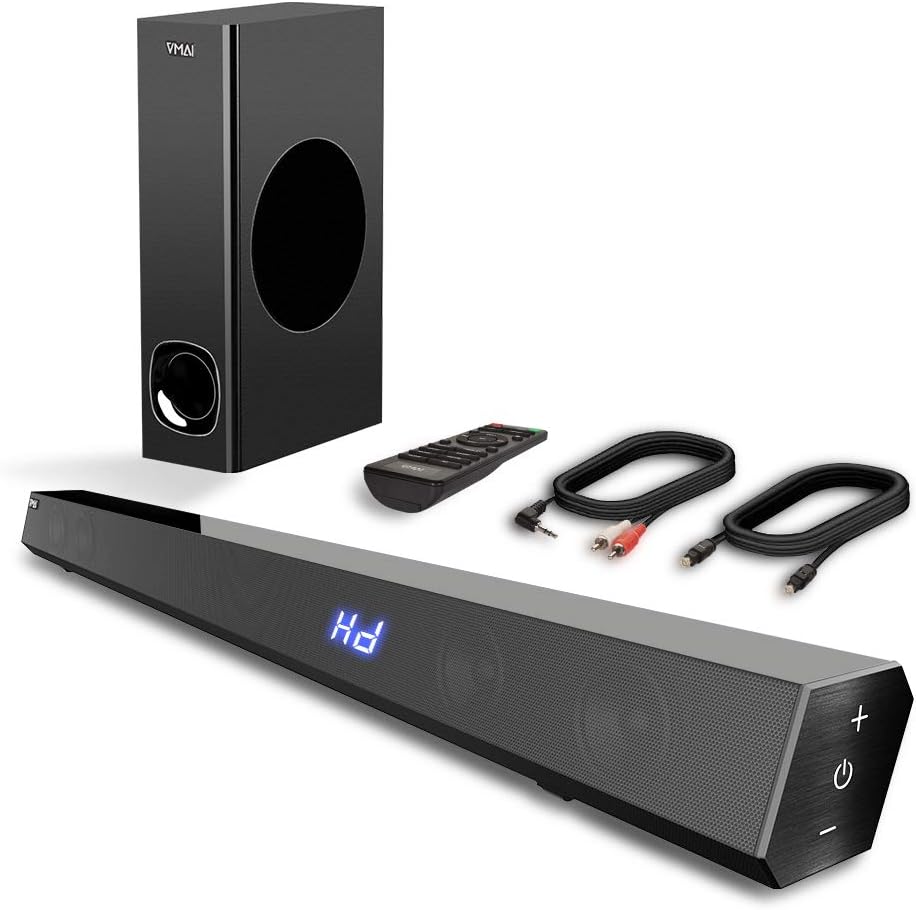
Figure 1.1: VMAI 2.1 Sound Bar with Subwoofer, remote control, and included cables.
2. Ciri-ciri Produk
- 2.1 Channel Immersive Sound: Delivers 120W of power for clear audio, powerful bass, and surround sound, enhancing your home audio experience. Features 110dB sound level pressure for detailed midrange and crisp treble.
- Kesambungan Bluetooth 5.0: Ensures faster transmission speeds, stable connectivity, and smooth transmission over long distances with low power consumption. Allows wireless streaming from smartphones, tablets, and PCs.
- Berbilang Mod Bunyi: Includes Music, Movie, News, and 3D modes, adjustable via the included remote control. Treble and bass levels can also be customized.
- Pilihan Input Serbaguna: Supports wired connections including HDMI ARC, Optical, USB (flash drive only), and AUX input, compatible with various devices like TVs, projectors, computers, and gaming consoles.
- Sleek and Mountable Design: Engineered to be less than 2.5 inches high with a jet-black surface. Features luxury touch-button controls on the side. Includes a mount bracket for wall installation.

Figure 2.1: The VMAI Sound Bar and Subwoofer provide strong bass and immersive sound for an enhanced viewpengalaman dalam.

Figure 2.2: Internal speaker configuration of the 2.1 channel sound bar, highlighting its full-range frequency speakers.
3. Kandungan Pakej
Sila tandai kotak untuk item berikut:
- VMAI 2.1 Sound Bar
- Subwufer Berwayar
- Alat Kawalan Jauh
- Penyesuai Kuasa
- 5 ft Premium Optical Cable
- 5 ft RCA to 3.5 mm Cable
- Kit Pendakap Dinding
- Manual Pengguna (dokumen ini)
4. Persediaan
4.1 Penempatan
The VMAI Sound Bar offers flexible placement options:
- Atas Meja: Letakkan bar bunyi pada permukaan rata di bawah TV anda.
- Pemasangan Dinding: Use the included mount bracket to secure the sound bar to the wall. Ensure it is securely fastened.

Gambar 4.1: Cthamples of sound bar placement: on a TV stand or wall-mounted.
4.2 Sambungan
Connect your sound bar to your audio source using one of the following methods:
- ARC HDMI: For optimal audio quality and control, connect an HDMI cable (not included) from the sound bar's HDMI (ARC) port to your TV's HDMI ARC port.
- Optik: Use the provided optical cable to connect the sound bar's OPTICAL input to your TV's optical output. Penting: When using Optical Mode, ensure PCM settings are enabled on your TV. Refer to your TV's manual for specific instructions (e.g., Audio Format settings, HDMI Audio Format settings).
- AUX: Use the provided RCA to 3.5 mm cable to connect the sound bar's AUX input to your device's audio output.
- USB: Insert a USB flash drive (formatted to FAT32, max 32GB) into the USB port to play audio files secara langsung.
- Bluetooth: For wireless connection, enable Bluetooth on your device and pair with "VMAI Sound Bar".

Figure 4.2: Available input options on the VMAI Sound Bar.
Video 4.1: An official VMAI video demonstrating the sound bar's features, including its 120W power, 2.1 channel sound, and various connectivity options like Bluetooth 5.0, HDMI (ARC), Optical, AUX, and USB. It also highlights the slim design and touch-button controls.
5. Arahan Operasi
5.1 Hidupkan/Mati Kuasa
Tekan ke Butang kuasa on the sound bar's side panel or the remote control to turn the unit On or Off.
5.2 Pemilihan Input
Tekan ke Butang input on the remote or the touch panel to cycle through available input sources: Bluetooth, HDMI ARC, Optical, AUX, and USB.
5.3 Kawalan Kelantangan
Gunakan Jilid + dan Isipadu - buttons on the sound bar or remote to adjust the master volume.
5.4 Mod Bunyi
The remote control allows you to select from four distinct sound modes:
- Mod Muzik: Dioptimumkan untuk main balik muzik.
- Mod Filem: Meningkatkan audio sinematik untuk filem.
- Mod Berita: Clarifies dialogue for news and spoken content.
- Mod 3D: Provides an immersive, three-dimensional audio experience.
5.5 Pelarasan Bes dan Treble
Gunakan yang berdedikasi Bes +/- dan Tiga kali ganda +/- butang pada alat kawalan jauh untuk melaraskan output audio mengikut pilihan anda.

Figure 5.1: Sound bar touch controls and remote control for comprehensive operation.

Figure 5.2: The VMAI Sound Bar system creating a live surround sound experience in a home environment.
6. Penyelenggaraan
To ensure the longevity and optimal performance of your VMAI Sound Bar, follow these maintenance guidelines:
- Pembersihan: Use a soft, dry cloth to wipe the surfaces of the sound bar and subwoofer. Do not use liquid cleaners or abrasive materials, as they may damage the finish.
- Pengudaraan: Ensure proper ventilation around the sound bar and subwoofer. Do not block any ventilation openings.
- Storan: Jika menyimpan unit untuk tempoh yang lama, putuskan sambungannya daripada kuasa dan simpan di tempat yang sejuk dan kering jauh daripada cahaya matahari langsung dan suhu yang melampau.
- Elakkan Kelembapan: Keep the sound bar and subwoofer away from water, humidity, and any liquids. They are not waterproof.
7. Penyelesaian masalah
If you encounter issues with your VMAI Sound Bar, please refer to the following common problems and solutions:
| Masalah | Kemungkinan Punca | Penyelesaian |
|---|---|---|
| Tiada Bunyi |
|
|
| Kegagalan Berpasangan Bluetooth |
|
|
| Alat Kawalan Jauh Tidak Berfungsi |
|
|
For further assistance, please contact VMAI customer support.
8. Spesifikasi
| Ciri | Perincian |
|---|---|
| Nama Model | 2.1 Suara Bar |
| Jenis Pembesar Suara | Subwufer |
| Kuasa Output Maksimum Pembesar Suara | 120 Watt |
| Teknologi Ketersambungan | Bluetooth, Auxiliary, USB, Optical, HDMI (ARC) |
| Teknologi Komunikasi Tanpa Wayar | Bluetooth 5.0 |
| Julat Bluetooth | 50 Kaki (lebih kurang 15 meter) |
| Mod Keluaran Audio | Keliling, Stereo |
| warna | Hitam Jet |
| Dimensi Produk | 2.7"D x 34"W x 2.5"H |
| Berat Barang | 13 paun |
| Jenis Pemasangan | Pemasangan Dinding, Bahagian Atas Meja |
| Kaedah Kawalan | Jauh, Panel Sentuh |
| Tahap Ketahanan Air | Bukan Tahan Air |
9. Waranti dan Sokongan
VMAI offers a Waranti 12 bulan for this product, covering manufacturing defects and ensuring quality performance. Every VMAI sound bar undergoes a strict quality test process before shipment.
For any questions, technical support, or warranty claims, please refer to the official VMAI support channels or the contact information provided in the original product packaging. You can also find the full user manual in PDF format di sini.