
YEASTAR S20
Yeastar S20 PBX Business Phone System User Manual
Model: S20
pengenalan
The Yeastar S20 is a compact and powerful stand-alone telephone system designed for small businesses with up to 20 users. It supports 10 concurrent calls and offers flexible combinations of telephony ports, including FXS, PSTN, ISDN BRI, and GSM/CDMA/3G. The S20 features a unique modular design, allowing for future scalability and customization of telephony interfaces to meet evolving business needs.

Imej: Depan view of the Yeastar S20 PBX system, showcasing its sleek black design and front-facing LED indicators for power, system status, WAN, LAN, and port activity.
Persediaan
Follow these steps to set up your Yeastar S20 PBX system:
- Membuka kotak dan Pemeriksaan: Carefully remove all components from the packaging. Verify that all items listed in the packing list are present and undamaged.
- Sambungan Fizikal:
- Connect the power adapter to the DC 12V port on the rear of the S20 and plug it into a power outlet.
- Connect the WAN port of the S20 to your internet router or modem using an Ethernet cable.
- Connect the LAN port of the S20 to your local network switch or directly to a computer for initial configuration.
- Install any required telephony modules (FXS, FXO, BRI, GSM/3G) into the available module slots. The S20 has 2 onboard module slots.

Imej: Belakang view of the Yeastar S20 PBX system, displaying the various network and telephony ports, including WAN, LAN, and module slots for expansion.
- Konfigurasi Awal:
- Once powered on, wait for the system LED to indicate readiness.
- Akses ke web-based management interface by entering the default IP address (usually printed on the device or found via a network scan tool) into your web pelayar.
- Log in with the default username and password (refer to the quick start guide for details).
- Follow the setup wizard to configure basic network settings, time zone, and administrator password.
Arahan Operasi
The Yeastar S20 offers a comprehensive suite of features for managing your business communications. Here are some key operational aspects:
- Extension Management: Create and manage SIP extensions for your users. Assign numbers, configure voicemail, and set call routing rules.
- Trunk Configuration: Set up and manage your telephony trunks (SIP, PSTN, ISDN, GSM) to connect to external phone lines or VoIP providers.
- Call Routing: Configure inbound and outbound call routes, IVRs (Interactive Voice Response), call queues, and time conditions to direct calls efficiently.
- Keselamatan: Implement firewall rules, manage user permissions, and enable intrusion detection to protect your system.
- Pemantauan: Utilize the system's dashboard to monitor call activity, system status, and resource usage.

Imej: Bahagian hadapan bersudut view of the Yeastar S20 PBX system, highlighting its compact form factor and front panel indicators.
Penyelenggaraan
Regular maintenance ensures the optimal performance and longevity of your Yeastar S20 system:
- Kemas kini Firmware: Periodically check for and apply firmware updates from the official Yeastar website. Updates often include new features, bug fixes, and security enhancements.
- Konfigurasi Sandaran: Regularly back up your system configuration. This allows for quick restoration in case of data loss or system issues.
- Pembersihan Fizikal: Keep the device free from dust and debris. Use a soft, dry cloth for cleaning. Ensure ventilation slots are clear to prevent overheating.
- Log Sistem: Review system logs periodically for any unusual activity or error messages that might indicate underlying issues.
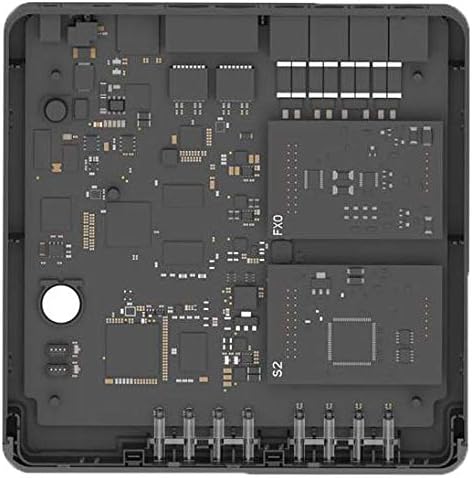
Imej: Dalaman view of the Yeastar S20 circuit board, illustrating the modular design with slots for expansion cards like FXO and S2 modules.
Menyelesaikan masalah
Berikut ialah beberapa isu biasa dan potensi penyelesaiannya:
| Masalah | Kemungkinan Punca | Penyelesaian |
|---|---|---|
| Tiada Kuasa | Power adapter disconnected or faulty. | Check power connections. Ensure the power adapter is securely plugged into the device and a working power outlet. |
| Tidak Boleh Akses Web Antara muka | Incorrect IP address, network configuration issue, or firewall blocking access. | Verify the S20's IP address. Ensure your computer is on the same network segment. Temporarily disable firewalls to test connectivity. |
| No Dial Tone on Extensions | Extension not registered, incorrect module installation, or trunk issue. | Check extension registration status in the web interface. Verify modules are correctly seated. Test trunk connectivity. |
| Kualiti Panggilan Lemah | Network congestion, insufficient bandwidth, or codec mismatch. | Ensure adequate internet bandwidth. Check network latency and jitter. Adjust audio codecs in system settings. |
Spesifikasi
Key technical specifications for the Yeastar S20 PBX system:
- model: S20
- Pengguna: Sehingga 20
- Panggilan Serentak: 10
- Slot Modul: 2 onboard
- Antara muka: Supports FXS, FXO, ISDN BRI, GSM/CDMA/3G modules
- Ketersambungan: WAN, LAN Ethernet ports
- Sumber Kuasa: Elektrik Bertali
- Bahan: plastik
- warna: Hitam
- Dimensi Pakej: 10.5 x 7.3 x 2.4 inci
- Berat Barang: 1.5 paun (0.68 Kilogram)
Waranti dan Sokongan
Information regarding product warranty and customer support is typically provided with your purchase documentation or available on the official Yeastar website. Please refer to those resources for the most accurate and up-to-date details on warranty coverage, technical support contacts, and service procedures.
Untuk bantuan lanjut, anda boleh melawati Yeastar official webtapak atau hubungi khidmat pelanggan mereka secara langsung.
Ask a question about this manual
Ask about setup, troubleshooting, compatibility, parts, safety, or missing instructions. Manuals+ will review the question and use this page’s manual context to help answer it.