Omnicharge Omni 20+ 20,000 mAh Power Bank User Manual
Model: OP2KB002
1. Pengenalan
The Omnicharge Omni 20+ 20,000 mAh Power Bank is a versatile portable power solution designed to charge a wide range of electronic devices, from smartphones and tablets to laptops and DSLR cameras. Its robust feature set includes multiple output options and intelligent power management, making it an essential tool for modern digital lifestyles, whether you are outdoors, traveling, or working remotely.
Ciri-ciri utama termasuk:
- USB-C and 2x USB-A outputs, along with a 100W AC outlet.
- Intelligent device recognition for optimal power delivery.
- Real-time power management display showing battery level, output, and input performance.
- Fast charging capability, fully charging in less than 3 hours with the included AC fast charger.
- Integrated wireless charging for compatible smartphones.
- Adjustable 100W DC output via a universal barrel connection.
- Patented multi-layer protection system for device safety.

Figure 1: Omnicharge Omni 20+ Power Bank, showcasing reka bentuk padat dan paparan digitalnya.
2. Apa yang Termasuk
Your Omnicharge Omni 20+ package includes the following items:
- Omnicharge Omni 20+ Power Bank
- Kabel USB-C ke USB-C
- Kabel USB-A ke USB-C
- AC Fast Charger (for recharging the power bank)

Figure 2: Included cables: USB-C to USB-C and USB-A to USB-C. Note that the USB-C wall charger is sold separately.
3. Persediaan dan Penggunaan Awal
3.1 Charging the Omni 20+
Before first use, it is recommended to fully charge your Omni 20+. Use the provided AC fast charger to connect the power bank to a wall outlet. The OLED screen will display the charging status and estimated time to full charge. A full charge typically takes less than 3 hours.

Figure 3: The Omni 20+ supports flexible recharging methods, including wall charging, car charging, and solar charging (accessories sold separately).
3.2 Menghidupkan/Mematikan
To power on the Omni 20+, press and hold the power button located on the front panel until the OLED screen illuminates. To power off, press and hold the power button again until the screen turns off.
4. Operating the Omni 20+
4.1 Understanding the OLED Display
The integrated OLED screen provides real-time data on the power bank's status, including battery percentage, input/output wattage, and temperature. Use the navigation buttons next to the screen to cycle through different display modes and access settings.

Figure 4: The OLED screen provides comprehensive real-time data, putting power control at your fingertips.
4.2 Mengecas Peranti
The Omni 20+ offers multiple ways to charge your devices:
- Output USB-C: Connect your USB-C compatible devices (laptops, tablets, smartphones) to the USB-C port. It provides up to 60W output.
- Output USB-A: Use the two USB-A ports for charging standard USB devices.
- Outlet AC: For devices requiring a wall plug, use the built-in 100W AC outlet. This is ideal for laptops, camera chargers, or small appliances.
- Output DC: The universal barrel connection provides an adjustable 1V-24V (70W max) DC output, suitable for specialized devices or direct laptop charging with appropriate adapters (e.g., DC to MagSafe, DC to Surface Connect).
- Pengecasan Tanpa Wayar: Place your Qi-compatible smartphone on the designated wireless charging area on top of the Omni 20+ to initiate wireless charging.

Figure 5: Power any USB-C device with max 60W output.

Figure 6: Free yourself from the wall with the 100W AC/HVDC outlet.

Figure 7: Achieve ultimate charging efficiency with the DC output for various devices.

Figure 8: Enjoy wireless charging for compatible devices, no cables needed.
5. Penyelenggaraan
To ensure the longevity and optimal performance of your Omni 20+:
- Pembersihan: Gunakan kain lembut dan kering untuk membersihkan bahagian luar power bank. Elakkan menggunakan bahan kimia yang keras atau bahan yang melelas.
- Storan: Store the Omni 20+ in a cool, dry place away from direct sunlight and extreme temperatures. For long-term storage, it is recommended to keep the battery charged to about 50-70%.
- Pengendalian: Avoid dropping or subjecting the power bank to strong impacts. While durable, excessive force can damage internal components.
- Penjagaan Bateri: Periodically fully discharge and recharge the power bank (once every 3-6 months) to calibrate the battery management system and maintain accuracy of the battery level display.
6. Penyelesaian masalah
If you encounter issues with your Omni 20+, refer to the following common problems and solutions:
| Masalah | Kemungkinan Punca / Penyelesaian |
|---|---|
| Omni 20+ does not turn on. | Battery might be completely drained. Connect to the AC fast charger and allow it to charge for a few minutes before attempting to power on. |
| Device is not charging from Omni 20+. |
|
| Pengecasan tanpa wayar tidak berfungsi. |
|
| OLED display is not working or frozen. | Attempt a soft reset by pressing and holding the power button for 10-15 seconds until the device powers off, then power it back on. If the issue persists, contact customer support. |
7. Spesifikasi
| Ciri | Perincian |
|---|---|
| Nama Model | Omni 20+ |
| Nombor Model | OP2KB002 |
| Kapasiti Bateri | 20,000 mAh (71Wh) |
| Bahan Bateri | Litium-ion |
| Dimensi Produk | 12.7 x 12.2 x 2.7 cm (5 x 4.8 x 1.1 inci) |
| Berat Barang | 500 gram (1.1 lbs) |
| warna | Hitam |
| Output USB-C | Sehingga 60W |
| Keluaran USB-A | 2x port USB-A |
| Output Keluaran AC | 100W maks |
| Keluaran DC | Adjustable 1V-24V (70W max) |
| Pengecasan Tanpa Wayar | Yes (Qi-compatible) |
| Ciri Khas | Digital Display, Real-time Power Management |
| Penggunaan yang Disyorkan | iPhones, Cameras, Laptops, Smartphones |
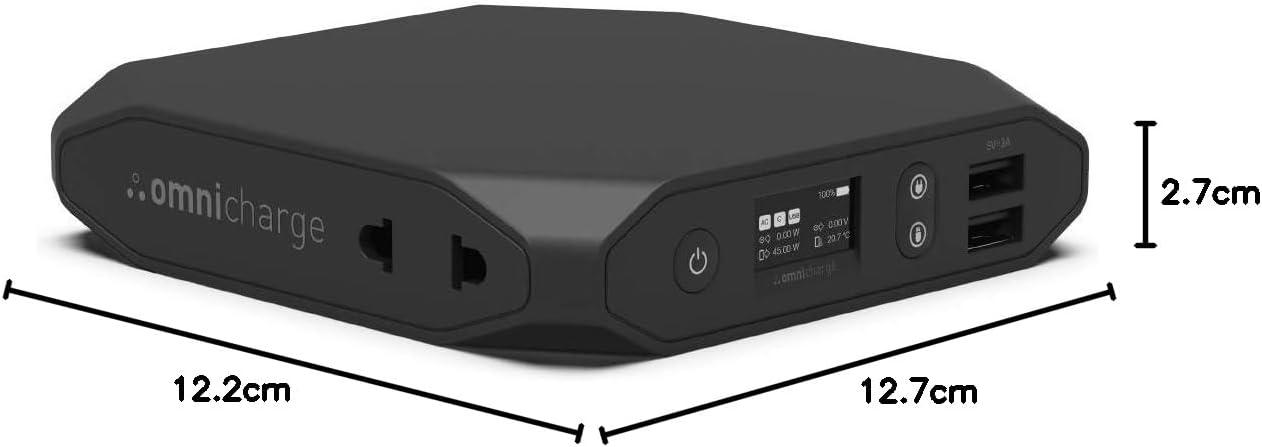
Figure 9: Physical dimensions of the Omni 20+ power bank.
8. Waranti dan Sokongan
Omnicharge products are designed for reliability and performance. For information regarding warranty coverage, technical support, or service, please refer to the official Omnicharge webtapak atau hubungi perkhidmatan pelanggan mereka secara langsung. Simpan resit pembelian anda sebagai bukti pembelian untuk tuntutan waranti.
Untuk bantuan lanjut, layari: www.omnicharge.co