
1. Pengenalan
This manual provides instructions for the installation, operation, and maintenance of your Globe Electric 34207 Wi-Fi Smart LED Light Bulb. This smart bulb offers multicolor changing (RGB) and tunable white light (2000K - 5000K), controllable via the GLOBE SUITE™ App or voice commands through compatible smart home assistants. No hub is required for operation.
2. Maklumat Keselamatan
- Risiko Renjatan Elektrik: Jangan pasang dengan tangan basah atau semasa berdiri di atas permukaan yang basah atau basah.amp permukaan.
- Penggunaan Dalaman Sahaja: This bulb is designed for indoor use in dry locations.
- Bukan untuk Lekapan Tertutup: Do not use in fully enclosed luminaires as this may limit air circulation and affect performance.
- Keserasian Dimmer: This smart bulb is dimmable via the app or voice control only. Do not use with external dimmer switches.
- Suhu Operasi: Ensure the operating environment is within the recommended temperature range for LED bulbs.
- Pelupusan: Buang mentol mengikut peraturan tempatan.
3. Kandungan Pakej
The package for the Globe Electric 34207 Wi-Fi Smart LED Light Bulb (2-Pack) typically includes:
- 2 x Globe Electric Wi-Fi Smart LED Light Bulbs (Model 34207)
- 1 x Instruction Sheet / Quick Start Guide
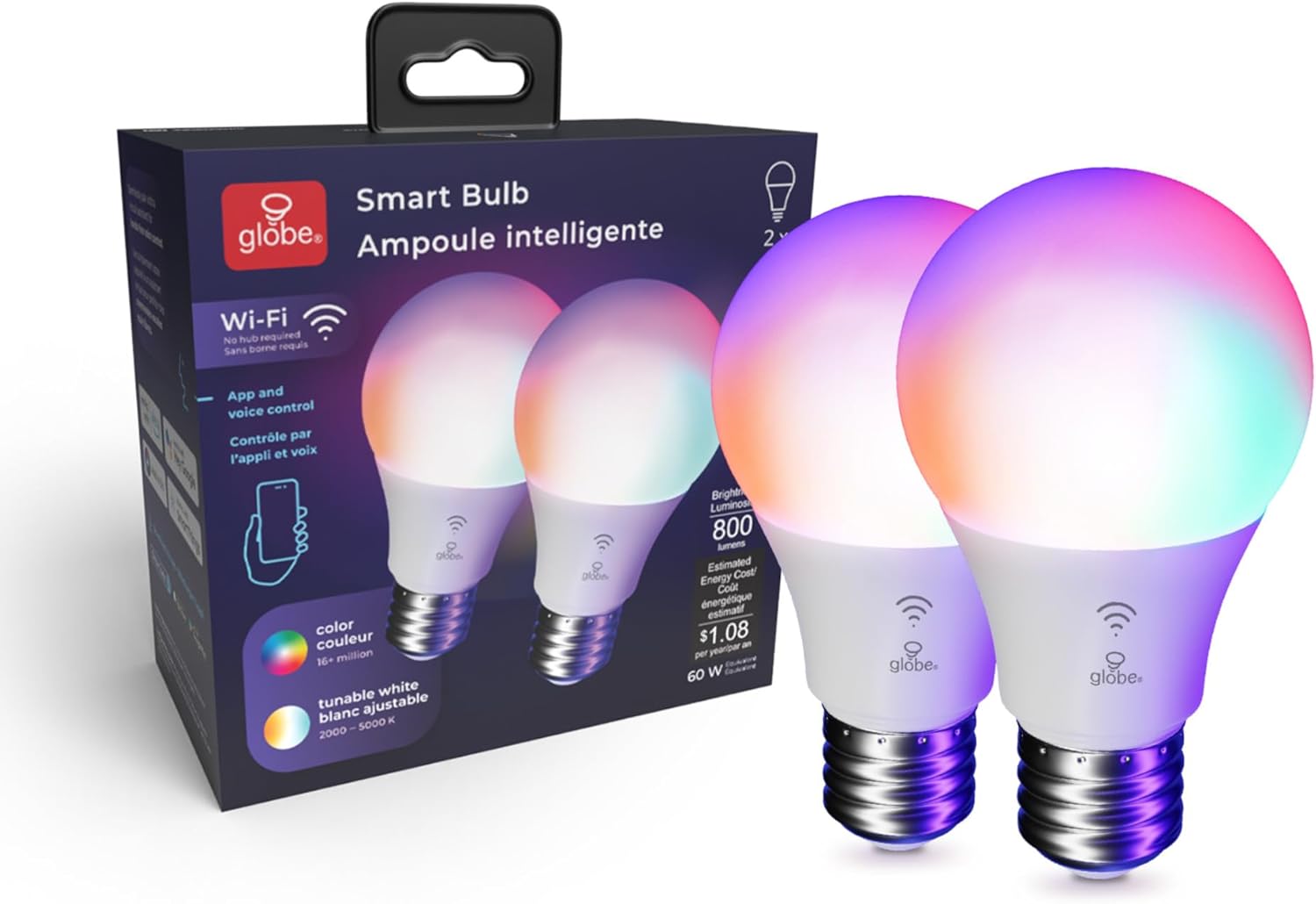
Image: Contents of the Globe Electric Smart Bulb 2-pack, showing two bulbs and the product box.
4. Persediaan
4.1 Pemasangan Fizikal
- Ensure the power to the light fixture is turned OFF at the switch before installation.
- Carefully screw the Globe Electric Smart LED Light Bulb into a standard E26 base light socket.
- Turn the power ON at the switch. The bulb should light up.
Video: Globe Electric Smart Bulb Installation Guide. This video demonstrates the physical installation and initial setup process for the smart bulb.
4.2 Muat Turun dan Pemasangan Apl
- Muat turun GLOBE SUITE™ App daripada Apple App Store atau Google Play Store.
- Daftar untuk akaun baharu atau log masuk jika anda sudah mempunyai akaun.

Image: A user interacting with the Globe Suite app on a smartphone, demonstrating remote control capabilities.
4.3 Menyambung ke Wi-Fi dan Berpasangan
The Globe Electric Smart LED Light Bulb connects directly to your home's 2.4 GHz Wi-Fi network. No separate hub is required.
- Ensure your smartphone is connected to your 2.4 GHz Wi-Fi network. (Note: 5 GHz networks are not supported for initial pairing).
- Open the GLOBE SUITE™ App and tap the "+" icon to add a new device.
- Follow the on-screen instructions in the app to put the bulb into pairing mode (usually involves turning the bulb off and on a few times until it blinks rapidly).
- Confirm the bulb is blinking and proceed with the pairing process in the app.
- Once connected, you can rename your bulb for easier control (e.g., "Living Room Light").
5. Arahan Operasi
5.1 Basic Controls (On/Off, Dimming)
Through the GLOBE SUITE™ App, you can:
- Turn the bulb ON or OFF remotely.
- Laraskan tahap kecerahan daripada 1% kepada 100%.
5.2 Color Changing (RGB)
The bulb offers millions of color options to customize your environment.
- In the app, navigate to the "Color" section.
- Select your desired color from the color wheel or choose from preset color scenes.
- Adjust the saturation and brightness for the chosen color.

Image: A user selecting a color from the color palette within the Globe Suite app to change the bulb's color.
5.3 Tunable White (2000K - 5000K)
Adjust the white light temperature to suit your mood or activity, from warm white to cool daylight.
- In the app, navigate to the "White" section.
- Slide the color temperature bar to select a range between 2000K (warm white) and 5000K (cool white).
- Preset options like "Relax" (2000K-3000K), "Comfort" (3000K-4000K), and "Focus" (4000K-5000K) are available.

Image: The Globe Suite app displaying options for tunable white light, including presets for Relax, Comfort, and Focus, with corresponding Kelvin temperatures.
5.4 Kawalan Suara
Integrasikan mentol pintar anda dengan pembantu suara untuk kawalan bebas tangan.
- Pembantu yang Serasi: Amazon Alexa, Google Assistant, Siri.
- Memautkan Akaun: Follow the instructions in your voice assistant's app to link your GLOBE SUITE™ account.
- Perintah: Use commands like "Alexa, turn on Living Room Light," "Hey Google, set Kitchen Light to blue," or "Hey Siri, dim Bedroom Light to 50%."

Image: A man in a kitchen using voice commands to control smart lighting, with a smartphone displaying Siri and smart speakers visible.
5.5 Routines and Schedules
Automate your lighting to fit your daily schedule and preferences.
- Wake Up Routine: Gradually brighten your lights in the morning.
- Bedtime Routine: Slowly dim your lights in the evening to prepare for sleep.
- Vacation Routine: Schedule lights to turn on and off randomly to simulate occupancy when you are away.
- Sync with Sun: Adjust light color and brightness automatically throughout the day to align with natural light cycles, supporting your circadian rhythm.

Image: The Globe Suite app interface showing "Wake Up Routine" and "Bedtime Routine" settings, with a person sleeping in the background.

Image: The Globe Suite app displaying "Vacation Routine" settings, with a person packing luggage in the background, indicating automated lighting for security.

Image: The Globe Suite app illustrating the "Sync with Sun" feature, showing how light changes from morning to evening to match natural light.
Video: Globe Electric Wi-Fi Smart Bulb Product Highlights. This video showcases various features of the smart bulb, including color changing, tunable white, and smart routines.
6. Penyelenggaraan
- Pembersihan: Pastikan mentol sejuk dan kuasa dimatikan sebelum membersihkan. Lap dengan kain lembut dan kering. Jangan gunakan pembersih cecair atau bahan kasar.
- Storan: Jika menyimpan mentol, simpan di tempat yang sejuk dan kering, jauh daripada cahaya matahari langsung dan suhu yang melampau.
- Penggantian: Replace the bulb if it becomes damaged or stops functioning correctly.
7. Penyelesaian masalah
| Masalah | Kemungkinan Punca | Penyelesaian |
|---|---|---|
| Mentol tidak menyala. | Power is off; bulb not screwed in properly; bulb is faulty. | Check power switch; ensure bulb is securely screwed in; test bulb in another working fixture. |
| Tidak dapat menyambung ke Wi-Fi / Apl. | Incorrect Wi-Fi band (not 2.4 GHz); incorrect password; bulb not in pairing mode; weak Wi-Fi signal. | Ensure connection to 2.4 GHz Wi-Fi; re-enter password carefully; follow app instructions to re-enter pairing mode; move bulb closer to router. |
| Kawalan suara tidak berfungsi. | Account not linked; incorrect device name; internet connectivity issue. | Verify GLOBE SUITE™ account is linked to your voice assistant; use the exact device name set in the app; check internet connection. |
| Bulb is unresponsive or lags. | Weak Wi-Fi signal; app issue. | Improve Wi-Fi signal strength; restart the GLOBE SUITE™ App; power cycle the bulb (turn off/on at switch). |
8. Spesifikasi
- Nombor Model: 34207
- Jenama: Globe Electric
- Jenis Cahaya: LED
- Wattage: 10 Watt (Setara 60W)
- Output Cahaya: 800 Lumen
- Saiz Bentuk Mentol: A19
- Pangkalan Mentol: E26
- Suhu Warna: 2000K - 5000K (Putih Boleh Diputar)
- Warna terang: RGB (Multicolor Changing), Warm White
- Voltage: 120 Volt
- Kaedah Kawalan: App (GLOBE SUITE™), Voice (Amazon Alexa, Google Assistant, Siri)
- Ketersambungan: Wi-Fi (2.4 GHz sahaja)
- Penggunaan Dalaman/Luar: Dalaman
- Jenis Bahan: plastik
- Berat Barang: 0.2 Auns
- Dimensi Item (W x H): 2.4"W x 4.33"H
9. Waranti & Sokongan
This Globe Electric product comes with a Waranti terhad pengeluar 2 tahun.
For technical support, warranty claims, or additional product information, please visit the official Globe Electric website or contact their customer service directly. Refer to the packaging or the Globe Electric webtapak untuk mendapatkan butiran hubungan yang paling terkini.
Sumber Dalam Talian:
- Globe Electric Official Webtapak: www.globe-electric.com
- GLOBE SUITE™ App Support: Available via the app's help section.