
1. Pengenalan
This manual provides detailed instructions for the installation, operation, and maintenance of your ANTOP AT-800SBS HDTV & FM Amplified Antenna. This antenna is designed to receive free over-the-air (OTA) digital TV signals and FM radio signals, offering a versatile solution for your home entertainment needs. Please read this manual thoroughly before installation and use.
2. Produk Lebihview
The ANTOP AT-800SBS is an amplified antenna featuring a Smart Boost System and dual outputs, allowing connection to multiple devices simultaneously. Its design integrates an FM antenna and includes a 4G LTE filter for clear reception. It is built for both indoor and outdoor use, with a durable, waterproof design.
Ciri-ciri Utama:
- Smart Boost System: Built-in adjustment dial for balancing reception range from 0 to 85 miles.
- Kesambungan Dwi: Connects to a second device (e.g., second TV, FM stereo, OTA-ready streaming device) via a secondary output.
- Integrated FM Antenna: Allows reception of FM radio stations.
- 4G LTE Filter: Blocks 3G and 4G signals to prevent interference, ensuring clear picture and stable channel reception.
- Multi-directional Functionality: Designed for optimal signal reception.
- VHF Enhancer Rods: Detachable rods to strengthen VHF reception.
- Pemasangan Fleksibel: Suitable for table standing, wall mounting, or outdoor pole mounting.
- Reka bentuk tahan lasak: Waterproof with UV coating, suitable for various weather conditions.
Internal Structure and Components:

The AT-800SBS incorporates advanced elements for superior performance:
- Innovative Mechanical Elements: Engineered for optimal reception and high gain.
- Jalan Pintar Amplifier & 4G LTE Filter: Ensures balanced reception and blocks unwanted 3G/4G interference.
- VHF Rods: Enhance reception for VHF channels.
Kandungan Pakej:
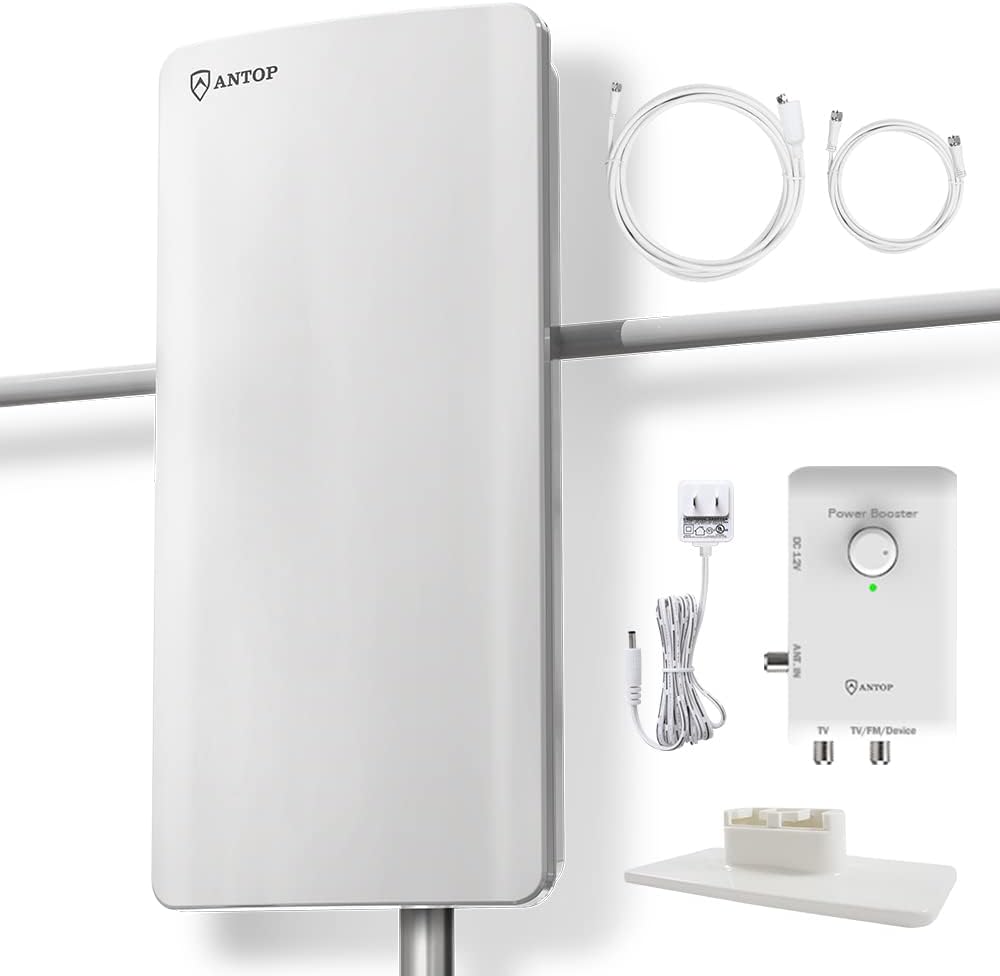
- ANTOP AT-800SBS Antenna Unit
- Smart Boost System Amplifier with Adjustment Dial
- Penyesuai Kuasa (DC 12V)
- Kabel sepaksi
- VHF Enhancer Rods
- Dudukan Desktop
- Wall/Pole Mounting Kits

3. Arahan Persediaan
Follow these steps to properly set up your ANTOP AT-800SBS antenna for optimal reception.
3.1. Site Selection and Antenna Placement
- Check Available Channels: melawat dtv.gov to confirm available channels in your area and locate broadcast towers.
- Consider Obstructions: Areas with large obstructions like valleys or mountains may reduce effective range.
- Peletakan Awal: Place the antenna on a window for initial testing. Try different locations, positioning the antenna as high as possible.
- Indoor/Outdoor Flexibility: The antenna can be used indoors (table stand, wall mount) or outdoors (pole mount).

3.2. Menyambungkan Antena
- Sambungkan Kabel Sepaksi: Connect the coaxial cable from the antenna to the 'ANT IN' port on the Smart Boost System amplebih hidup.
- Sambung ke TV: Connect another coaxial cable from the 'TV' output on the Smart Boost System to the 'Ant In' or 'Cable In' port on the back of your HDTV or TV converter box.
- Sambungkan Penyesuai Kuasa: Plug the power adapter into the Smart Boost System and then into a power outlet.
- Second Device Connection (Optional): If connecting a second device (e.g., FM stereo, second TV, streaming device), connect a coaxial cable from the 'TV/FM/Device' output on the Smart Boost System to the respective input on your second device.
3.3. TV Setup
- TV Input/Source: Set your TV's input or source to 'Antenna' or 'Air'.
- Imbasan Saluran: Access your TV's setup menu and perform a 'Channel Search' or 'Channel Scan'. This process may take several minutes.
- Rescan After Relocation: Always rescan for channels after moving the antenna to a new position.
4. Arahan Operasi
4.1. Adjusting Reception with Smart Boost System

The Smart Boost System features an adjustment dial to optimize signal reception based on your location's specific needs. Turn the dial to balance the reception range from 0 to 85 miles.
- Short Range (within 35 Miles): If you are very close to broadcast towers, a lower setting (closer to 'MIN' or '0') might be better to prevent signal overload.
- Long Range (up to 85 Miles): For greater distances from broadcast towers, adjust the dial towards 'MAX' or '85' to amplify weaker signals.
- Penalaan halus: Experiment with different dial positions and perform a channel scan after each adjustment to find the optimal setting for the best picture quality and number of channels.
4.2. Using the FM Antenna Feature
The integrated FM antenna allows you to receive local FM radio stations. Connect the 'TV/FM/Device' output of the Smart Boost System to your FM stereo receiver's antenna input. Tune your FM receiver to scan for available radio stations.
5. Penyelenggaraan
The ANTOP AT-800SBS antenna is designed for durability and requires minimal maintenance.
- Pembersihan: Wipe the antenna unit with a soft, damp kain. Jangan gunakan bahan kimia yang keras atau pembersih yang kasar.
- Pemasangan Luaran: Periodically check outdoor mounted antennas for secure mounting and cable integrity, especially after severe weather. The antenna features a waterproof design with UV coating for protection.
- Pemeriksaan Kabel: Ensure all coaxial cable connections are tight and free from damage.
6. Penyelesaian masalah
If you experience issues with your antenna, refer to the following common solutions:
| Masalah | Kemungkinan Punca / Penyelesaian |
|---|---|
| Tiada isyarat atau kualiti gambar yang lemah |
|
| Missing specific channels |
|
| Interference from mobile signals |
|

7. Spesifikasi
| Ciri | Perincian |
|---|---|
| Nombor Model | AT-800SBS |
| Jenama | ANTOP |
| Julat Penerimaan | Up to 85 Miles (adjustable) |
| Julat Kekerapan | VHF: 47-230MHz, UHF: 470-700MHz |
| Impedans | 75 Ohm |
| Keluaran | Dual (TV, TV/FM/Device) |
| Penapis | Built-in 4G LTE Filter |
| Bekalan Kuasa | DC 12V (via Smart Boost System) |
| Dimensi | lebih kurang 23 x 11.5 x 7 inci (Saiz Pakej) |
| Berat badan | lebih kurang 8.13 paun |
| warna | putih |
| UPC | 682604901183, 682604901336 |
8. Waranti dan Sokongan
ANTOP provides customer support for its products. For warranty information, technical assistance, or any installation issues, please contact ANTOP customer service.

Sokongan E-mel: support@antopantenna.com
Please refer to the product packaging or the official ANTOP website for the most current warranty details and support contact information.