
pengenalan
Welcome to the user manual for your Kingbox X55 MP3 Player. This guide provides detailed instructions on how to set up, operate, and maintain your device. Please read this manual thoroughly to ensure optimal performance and longevity of your MP3 player.
Kandungan Pakej
Setelah membuka kotak, sila sahkan bahawa semua item berikut disertakan:
- Kingbox X55 MP3 Player
- Kabel Pengecas USB/Data
- Kabel Audio 3.5mm
- Manual Pengguna (dokumen ini)
- Clip (pre-attached or separate)

Image: Contents of the Kingbox X55 MP3 Player package, including the player, USB cable, audio cable, and gift box.
Peranti Lebihview
Familiarize yourself with the buttons and ports of your Kingbox X55 MP3 Player:
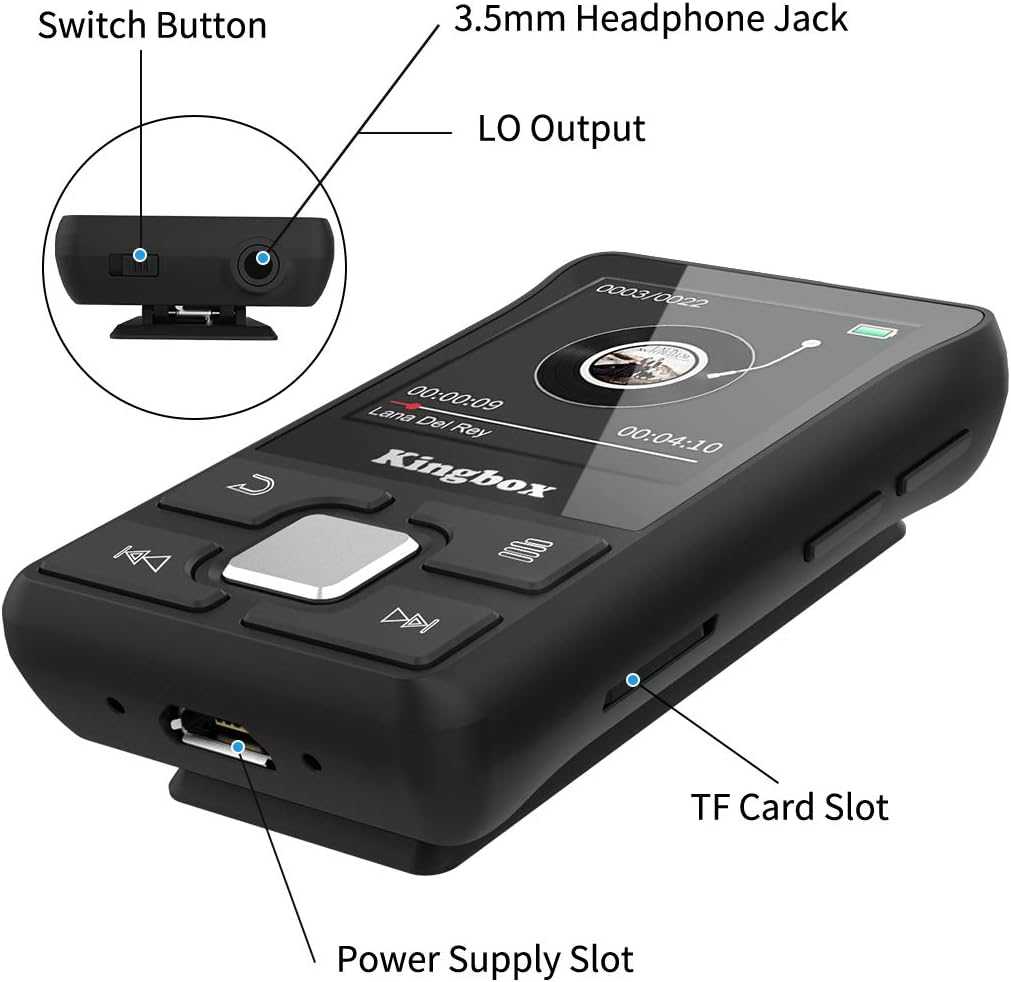
Imej: A terperinci view of the Kingbox X55 MP3 Player, highlighting the Switch Button, 3.5mm Headphone Jack, LO Output, Power Supply Slot (USB port), and TF Card Slot.
- Butang Tukar: Hidupkan/matikan peranti.
- Bicu Fon Kepala 3.5mm: Connect wired headphones.
- Keluaran LO: Line Out for connecting to external audio systems.
- Power Supply Slot (USB): Untuk pengecasan dan pemindahan data.
- Slot Kad TF: Masukkan kad Micro SD untuk storan yang diperluaskan.
- Butang Kawalan: Navigation and playback controls on the front panel.
Persediaan
1. Mengecas Peranti
Before first use, fully charge the MP3 player. Connect the USB charging cable to the Power Supply Slot on the device and the other end to a USB power adapter (not included) or a computer's USB port. The battery indicator on the screen will show charging status.
2. Hidupkan/Mati Kuasa
- Untuk Menghidupkan: Press and hold the Switch Button until the screen lights up.
- Untuk Mematikan: Press and hold the Switch Button until the screen turns off.
3. Loading Music and Files
Connect the MP3 player to your computer using the provided USB cable. The device will appear as a removable disk. You can then drag and drop music files, videos, e-books, and photos into the appropriate folders on the player's internal storage.
4. Memasukkan Kad SD Mikro
The Kingbox X55 supports Micro SD cards up to 128GB for additional storage. Locate the TF Card Slot and gently insert the Micro SD card until it clicks into place. Ensure the card is inserted in the correct orientation.
Arahan Operasi
1. Navigasi Asas
Use the control buttons on the front panel to navigate through menus and select options. The central button typically acts as 'Enter' or 'Confirm', while surrounding buttons are for directional movement or specific functions (e.g., back, menu).
2. Main balik Muzik
From the main menu, select 'Music'. Browse your stored audio files and select a track to play. The player supports various audio formats including MP3, WMA, APE, FLAC, WAV, DRM, and ACELP.

Image: The Kingbox X55 MP3 Player screen displaying music playback, surrounded by icons representing supported audio formats like MP3, WMA, APE, WAV, and FLAC.
3. Sambungan Bluetooth
The Kingbox X55 features Bluetooth 4.1 for wireless audio streaming. To connect to Bluetooth headphones or speakers:
- Pergi ke menu 'Bluetooth' pada pemain MP3 anda.
- Pastikan peranti Bluetooth anda berada dalam mod berpasangan.
- Pilih 'Cari untuk devices' on the MP3 player.
- Pilih peranti anda daripada senarai untuk dipasangkan.

Image: The Kingbox X55 MP3 Player with a Bluetooth 4.1 icon, showing various compatible Bluetooth devices such as earbuds, headphones, and a Bluetooth speaker.
4. Radio FM
To use the FM radio function, connect wired headphones to the 3.5mm jack, as they act as the antenna. Navigate to the 'FM Radio' menu. You can auto-scan for stations or manually tune to frequencies within the 87.8-108 MHz band.
5. Pedometer Function
The built-in pedometer tracks your steps, distance, and calories. Activate this function from the main menu. It can operate while music is playing, making it suitable for fitness activities.

Image: A woman running outdoors with the Kingbox X55 MP3 Player clipped to her clothing, displaying the pedometer function with step count, distance, calories, and time.
6. Fungsi Lain
The Kingbox X55 offers several additional features:
- E-buku: Baca teks files.
- Rakaman: Use the built-in microphone to record audio.
- Video: Play supported video formats (AMV, AVI).
- Jam randik: A basic timing function.
- Jam loceng: Tetapkan penggera.
- Penjimat Skrin Masa: Display time when idle.
- Resume Playback: Continues from where you left off.
- Penyegerakan Lirik: Display lyrics for supported music files.

Image: The Kingbox X55 MP3 Player alongside icons representing its various functions: Music, Bluetooth, FM-Radio, E-Book, Video, Recording, Stopwatch, A-B Repeat, Alarm Clock, Time Screensaver, Resume Playback, and Lyrics Synchronization.
Penyelenggaraan
1. Pembersihan
Wipe the device with a soft, dry cloth. Avoid using liquid cleaners or abrasive materials, as they may damage the screen or casing.
2. Penjagaan Bateri
To prolong battery life, avoid fully discharging the battery frequently. Charge the device regularly, even if not in use for extended periods. Store the device in a cool, dry place.
3. Penyimpanan
When not in use, store the MP3 player in a protective case or pouch to prevent scratches and damage from dust or impacts.
Menyelesaikan masalah
1. Poor FM Reception
If FM reception is weak or unclear, try the following:
- Adjust the direction and position of the player.
- Ensure the headphone cable is fully extended, as it functions as the antenna.
- Check for nearby electronic devices that might cause interference.
2. Peranti Tidak Membalas
If the device becomes unresponsive, try performing a soft reset by pressing and holding the power button for approximately 10-15 seconds until it restarts.
3. Cannot Connect to PC
Ensure the USB cable is securely connected to both the player and the computer. Try a different USB port or cable. Verify that your computer's operating system recognizes new USB devices.
Spesifikasi
| Ciri | Perincian |
|---|---|
| Jenama | Kingbox |
| Nama Model | X55 |
| Storan Dalaman | 32 GB (Flash Memory) |
| Storan Boleh Dikembangkan | Up to 128 GB (Micro SD/TF Card) |
| Versi Bluetooth | 4.1 |
| Saiz Skrin | 1.44 inci |
| Format Audio yang Disokong | MP3, WMA, APE, FLAC, WAV, DRM, ACELP |
| Format Video yang Disokong | AMV, AVI |
| Kekerapan Radio FM | 87.8-108 MHz |
| Jenis Bateri | Litium-polimer |
| Ketersambungan | Bluetooth, USB |
| Ciri Khas | FM Radio, Pedometer, E-book, Recording, Photo Viewer, Stopwatch, Alarm Clock |
| Dimensi Produk | 8.99 x 3.81 x 12.5cm; 38g |
Waranti dan Sokongan
Untuk maklumat waranti dan sokongan pelanggan, sila rujuk dokumentasi yang diberikan semasa pembelian atau hubungi peruncit anda. Simpan bukti pembelian anda untuk sebarang tuntutan waranti.