
1. Pengenalan
Terima kasih kerana membeliasing the Flylinktech 22000mAh 2000A Peak 12V Jump Starter, Model CF100. This device is designed to provide reliable jump-starting for your vehicle and serve as a portable power bank for your electronic devices. Please read this manual thoroughly before use to ensure safe and effective operation. Keep this manual for future reference.
2. Maklumat Keselamatan Penting
Kegagalan mematuhi arahan keselamatan ini boleh mengakibatkan renjatan elektrik, kebakaran atau kecederaan serius.
- Sentiasa pakai pelindung mata dan pakaian pelindung apabila bekerja dengan bateri.
- Do not allow the jump starter clamps to touch each other or connect to the same metal piece.
- Jangan cuba melompat memulakan bateri beku.
- Ensure the vehicle is in park (P) or neutral (N) and the parking brake is engaged before jump starting.
- Jauhkan daripada kanak-kanak.
- Jangan dedahkan produk kepada hujan atau kelembapan.
- Do not disassemble, modify, or attempt to repair the unit.
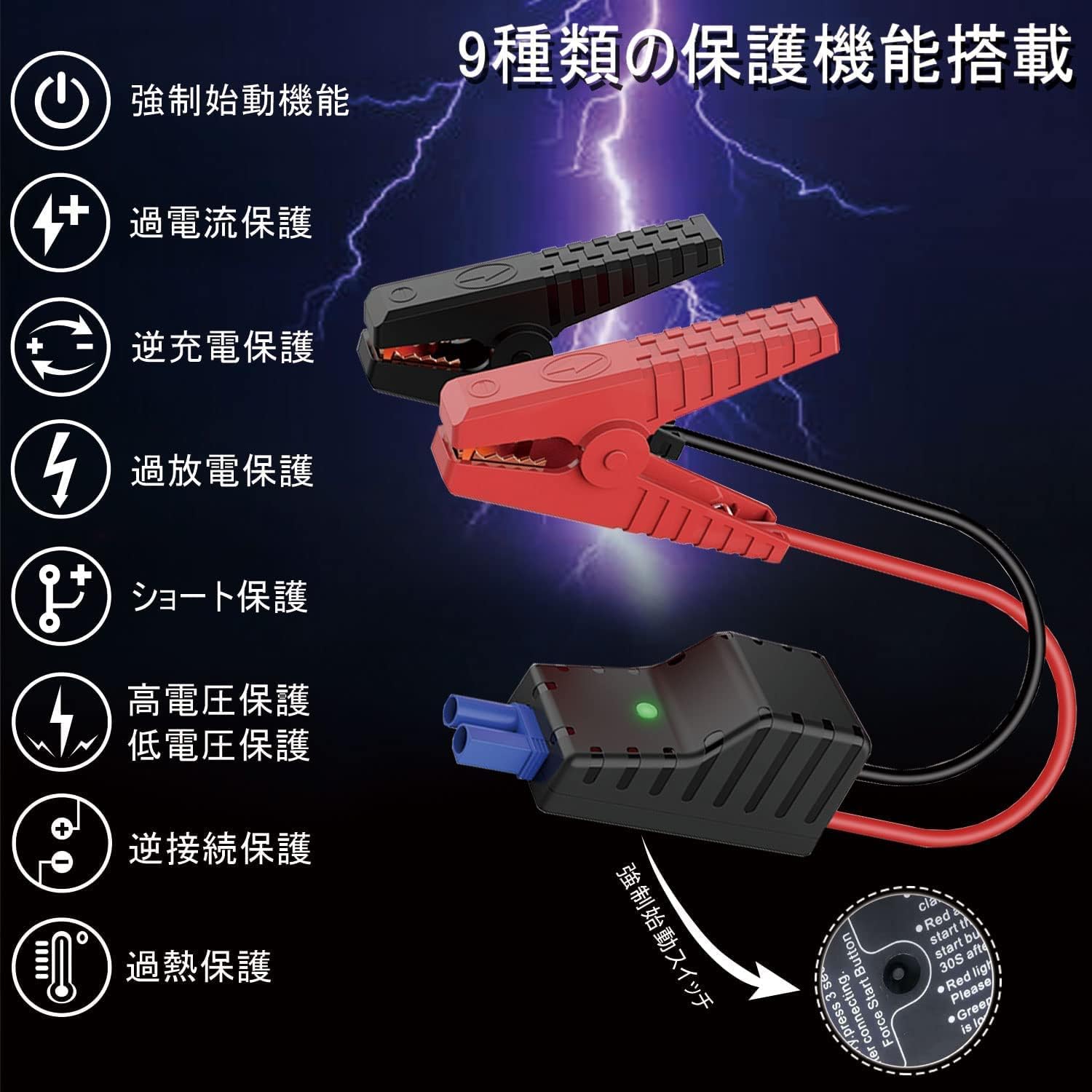
- This jump starter is equipped with 9 protection functions: short circuit protection, reverse connection protection, over-discharge protection, over-current protection, reverse charge protection, high voltage perlindungan, vol rendahtage protection, forced start function, and overheat protection. These features are designed to prevent various dangers and ensure safe operation.
3. Kandungan Pakej
Sahkan bahawa semua item terdapat dalam pakej anda:
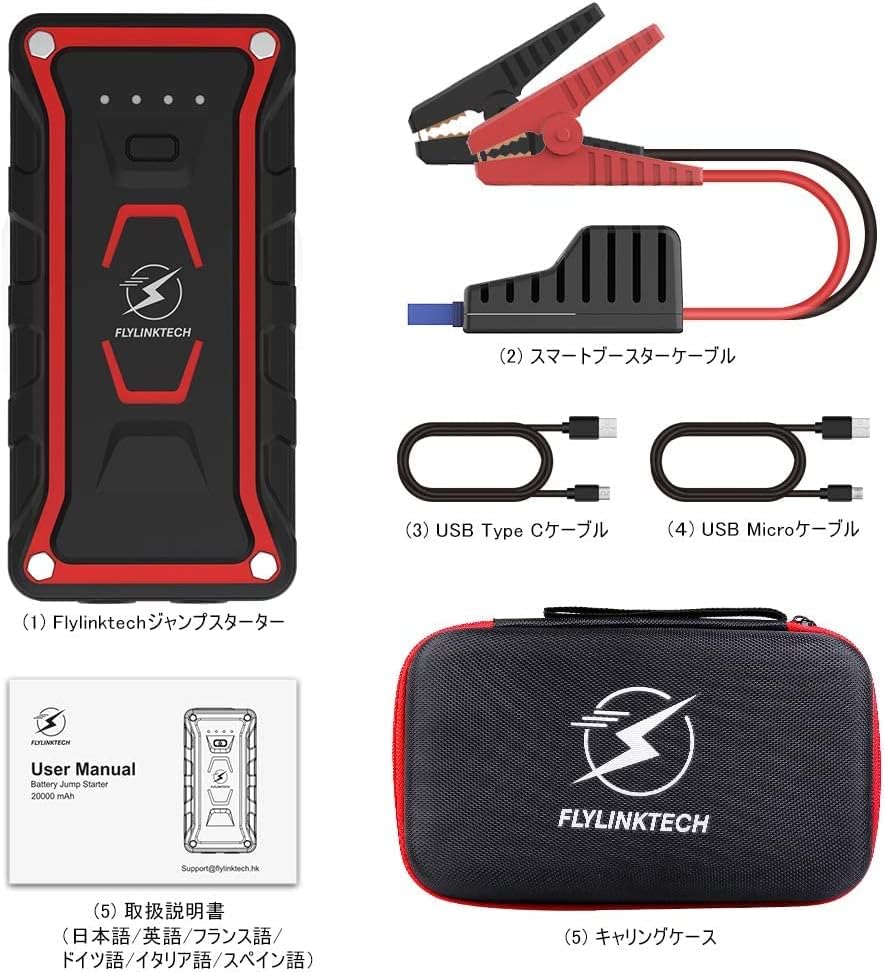
- Flylinktech Jump Starter Unit (1)
- Smart Jump Starter Cables (1 set)
- USB Type-C Cable (1)
- Kabel USB Mikro (1)
- Dedicated Carrying Case (1)
- Manual Arahan (1)
4. Ciri-ciri Produk
- High Capacity & Peak Current: 22000mAh battery capacity with 2000A peak current, capable of jump-starting all gasoline vehicles and diesel vehicles up to 7.0L.
- Multi-functional LED Light: Equipped with 2 high-brightness LEDs, offering three modes: illumination, strobe, and SOS signal.
- Penilaian Kalis Air IP68: Complies with IP68 protection class (dustproof class: 6, waterproof class: 8) based on IEC and JIS standards, protecting the unit from water and dust when terminal covers are closed.
- Bank Kuasa Mudah Alih: Features two USB output ports for simultaneous fast charging of two USB devices, including smartphones, tablets, cameras, and more.

5. Setup and Charging the Jump Starter
5.1 Pengecasan Awal
Before using the jump starter for the first time, ensure it is fully charged. It is recommended to fully charge the unit every 3-6 months to maintain battery health, even when not in use.
5.2 Mengecas Unit
The jump starter can be charged using either the Micro USB input port or the USB Type-C input port. Connect the provided USB cable to a 5V/3A, 9V/2A, or 12V/1.5A USB charger (not included). The indicator lights on the unit will show the charging status.

6. Arahan Pengendalian: Menghidupkan Kenderaan Secara Langsung
Ikuti langkah-langkah ini dengan teliti untuk menghidupkan kenderaan anda secara automatik:
- Pastikan pemula lompat dicas sepenuhnya.
- Turn off your vehicle's ignition and all accessories (lights, radio, etc.).
- Sambungkan cl merah (+).amp of the smart jump starter cable to the positive (+) terminal of your vehicle's battery.
- Sambungkan cl hitam (-).amp of the smart jump starter cable to the negative (-) terminal of your vehicle's battery.
- Plug the smart jump starter cable connector into the jump starter unit's output port. Ensure a secure connection.
- Once connected, the indicator on the smart cable should turn green, indicating it's ready to start. If it's red, check connections or refer to troubleshooting.
- Start your vehicle's engine. If it doesn't start immediately, wait 30 seconds and try again. Do not crank for more than 3 seconds per attempt.
- Once the vehicle starts, immediately disconnect the smart jump starter cable from the jump starter unit.
- Then, disconnect the black (-) clamp dari bateri kenderaan, diikuti dengan lampu merah (+)amp.

7. Arahan Operasi: Fungsi Power Bank
The Flylinktech jump starter can also function as a portable power bank to charge your electronic devices.
- Connect your electronic device (smartphone, tablet, etc.) to one of the two USB output ports on the jump starter using an appropriate USB cable.
- The jump starter will automatically begin charging your device. The unit supports QC3.0 fast charging for compatible devices.
- Anda boleh mengecas dua peranti secara serentak.
8. Operating Instructions: LED Light Function
Lampu LED bersepadu menyediakan pencahayaan untuk pelbagai situasi:
- Press and hold the power button for 3 seconds to turn on the LED light (illumination mode).
- Tekan butang kuasa sekali lagi untuk bertukar kepada mod Strob.
- Press the power button again to switch to SOS signal mode.
- Press the power button one more time to turn off the LED light.

9. Penyelesaian masalah
Jika anda menghadapi masalah, rujuk kepada masalah dan penyelesaian biasa berikut:
- Jump Starter tidak dihidupkan: Ensure the unit is charged. If the battery is completely depleted, it may take a few minutes of charging before it responds.
- Kenderaan tidak boleh dihidupkan:
- Check that the smart jump starter cable clampdisambungkan dengan selamat ke terminal bateri yang betul (merah ke positif, hitam ke negatif).
- Ensure the smart cable connector is fully inserted into the jump starter unit.
- Verify the jump starter has sufficient charge.
- If the smart cable indicator is red, refer to the cable's specific error codes (if any) or recheck connections.
- Do not attempt to crank the engine for too long. Allow the jump starter to cool down between attempts.
- Device not charging via USB: Ensure the jump starter is powered on and has sufficient battery. Try a different USB cable or port.
Jika masalah berterusan, sila hubungi sokongan pelanggan.
10. Spesifikasi
| Ciri | Spesifikasi |
|---|---|
| Jenama | FLYLINKTECH |
| Nombor Model | CF100 |
| Kapasiti Bateri | 22000 mAh |
| Arus Puncak | 2000 A |
| Voltage | 12 Volt |
| Jenis Bateri | Litium-ion |
| Jenis Kenderaan yang Serasi | All Gasoline Vehicles, Diesel Vehicles up to 7.0L |
| Penilaian Kalis Air | IP68 (Dustproof: 6, Waterproof: 8) |
| Output USB | 2 Ports (QC3.0 Fast Charging) |
| Input Pengecasan | Micro USB, USB Type-C (5V/3A, 9V/2A, 12V/1.5A) |
11. Penyelenggaraan dan Penyimpanan
- Bersihkan unit dengan kain kering dan lembut. Jangan gunakan pembersih atau pelarut yang melelas.
- Simpan pemula lompat di tempat yang sejuk dan kering, jauh dari cahaya matahari langsung dan suhu yang melampau.
- For optimal battery life, fully charge the unit every 3-6 months, even if it has not been used.
- Keep the terminal covers closed when not in use to maintain the IP68 rating.
12. Waranti dan Sokongan Pelanggan
This Flylinktech jump starter comes with a Waranti pengilang 24 bulan dari tarikh pembelian. Waranti ini melindungi kecacatan pada bahan dan mutu kerja di bawah penggunaan biasa.
For any questions, concerns, or warranty claims, please do not hesitate to contact our customer support team:
e-mel: Support@flylinktech.hk
Please have your purchase details and model number (CF100) ready when contacting support.