
1. Pengenalan
This manual provides essential information for the safe and effective use of your WORKPRO Rotary Tool Set W124003. This versatile tool is designed for various applications including grinding, engraving, sanding, polishing, and cutting. Please read this manual thoroughly before operation and keep it for future reference.
2. Kandungan Produk
The WORKPRO Rotary Tool Set W124003 includes a comprehensive collection of accessories for various tasks. Please verify that all items listed below are present in your kit.
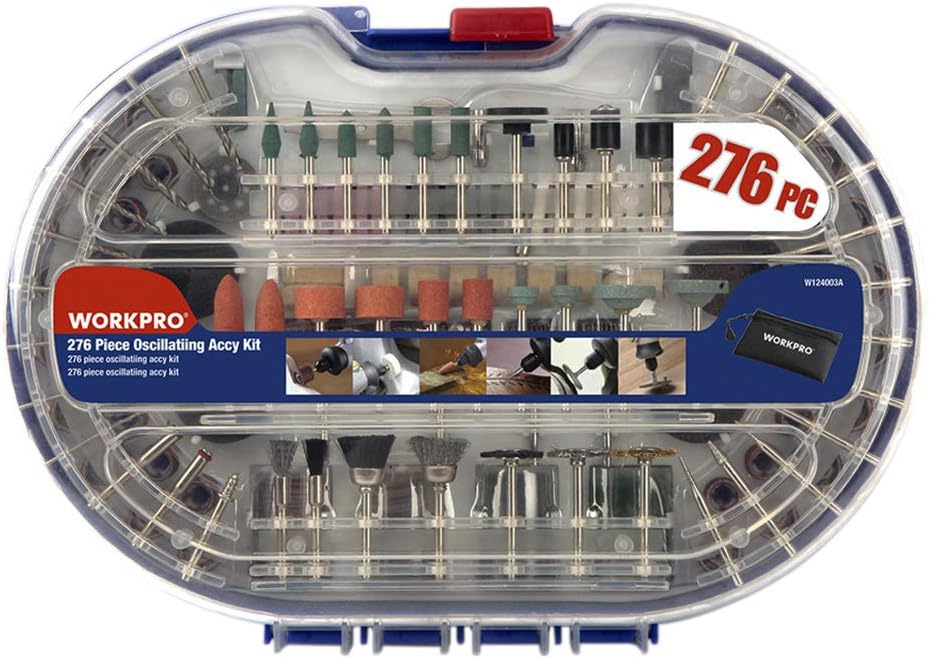
Gambar 2.1: Lebihview of the WORKPRO Rotary Tool Set W124003, showcasing the complete 276-piece kit within its transparent storage case.
- Sanding Bands: 52 pieces
- Sanding Discs: 40 pieces
- Emery Cut-off Wheels: 36 pieces
- Grinding Compound: 1 piece
- Fiberglass Cut-off Wheels: 16 pieces
- Flap Wheels: 4 pieces
- Felt Polishing Wheels: 8 pieces
- Felt Tip: 1 piece
- Silicon Carbide Grinding Stones: 6 pieces
- Aluminum Oxide Grinding Stones: 6 pieces
- White Aluminum Oxide Wheels: 6 pieces
- Diamond Wheels: 2 pieces
- Dressing Stone: 1 piece
- Collets: 3 pieces
- Sepana: 1 keping
- Rubber Emery Wheels: 2 pieces
- Diamond Cutters: 9 pieces
- HSS Twist Drill Bits: 9 pieces
- Mandrel Wheels: 3 pieces
- Sanding Shanks: 3 pieces
- Suction Cup: 1 piece
- Rubber Grinding Stones: 6 pieces
- Silicon Carbide Grinding Stones: 4 pieces

Figure 2.2: The rotary tool set opened, displaying the organized arrangement of various accessories in both the top and bottom compartments.

Rajah 2.3: Satu terperinci view of the grinding and sanding accessories, including various grit sizes and shapes for different applications.

Figure 2.4: The upper tray of the accessory kit, featuring an assortment of bits such as grinding stones, diamond cutters, and brushes.
3. Arahan Keselamatan
Always follow basic safety precautions when using this rotary tool to reduce the risk of injury or damage. Failure to do so may result in serious injury.
- Perlindungan Mata: Always wear ANSI-approved safety goggles or safety glasses with side shields when operating the tool.
- Perlindungan Pernafasan: Wear a dust mask or respirator, especially when working with materials that produce fine dust.
- Kawasan Kerja: Keep your work area clean, well-lit, and free of clutter. Ensure adequate ventilation.
- Bahan Kerja Selamat: Always secure the workpiece with clamps or a vise. Never hold the workpiece by hand.
- Pakaian yang sesuai: Do not wear loose clothing, jewelry, or long hair that can get caught in moving parts.
- Sumber Kuasa: Ensure the power source matches the tool's requirements. Unplug the tool when not in use or when changing accessories.
- Elakkan melampaui batas: Kekalkan pijakan dan keseimbangan yang betul pada setiap masa.
- Keadaan alat: Inspect the tool and accessories for damage before each use. Do not use damaged tools or accessories.
- Kanak-kanak dan Penonton: Jauhkan kanak-kanak dan orang ramai dari kawasan operasi.
- Bahan mudah terbakar: Do not operate the tool near flammable liquids, gases, or dust.
4. Persediaan
Before operating your rotary tool, follow these steps for proper setup:
- Bongkar: Keluarkan semua komponen dari pembungkusan dengan berhati-hati. Simpan bungkusan untuk penyimpanan atau pengangkutan.
- Periksa: Check the tool and all accessories for any signs of damage from shipping. Do not use if damaged.
- Select Accessory: Choose the appropriate accessory for your task (e.g., grinding stone, sanding band, cutting wheel).
- Sisip Aksesori:
- Press and hold the shaft lock button on the rotary tool.
- Tanggalkan nat collet.
- Masukkan batang aksesori sepenuhnya ke dalam collet.
- Tighten the collet nut securely with the provided wrench. Do not overtighten.
- Lepaskan butang kunci aci.
- Sambungan Kuasa: Ensure the tool's power switch is in the "OFF" position before plugging it into a suitable power outlet.
5. Arahan Operasi
Once set up, you can begin using your WORKPRO Rotary Tool. Always practice on scrap material first.
- Hidupkan kuasa: Plug the tool into the power outlet. Turn the power switch to the "ON" position.
- Pelarasan Kelajuan: If your model has variable speed control, adjust the speed according to the material and accessory being used. Higher speeds are generally for harder materials and smaller accessories, while lower speeds are for softer materials and larger accessories.
- Permohonan:
- Grinding/Engraving: Apply light, consistent pressure. Let the tool do the work. Move the tool smoothly across the workpiece.
- Pengamplasan: Use appropriate grit sanding bands/discs. Move the tool in a circular or back-and-forth motion to achieve an even finish.
- Memotong: Use cut-off wheels for cutting. Ensure the workpiece is stable. Apply gentle pressure and allow the wheel to cut through the material.
- Menggilap: Use felt wheels with polishing compound. Apply a small amount of compound to the wheel and polish the surface with light pressure.
- Matikan: When finished, turn the power switch to the "OFF" position and unplug the tool from the power outlet.
6. Penyelenggaraan
Regular maintenance ensures the longevity and optimal performance of your rotary tool.
- Pembersihan: After each use, unplug the tool and use a soft brush or compressed air to remove dust and debris from the ventilation openings and around the collet.
- Storan Aksesori: Store accessories in their designated compartments within the case to prevent damage and loss.
- Penyimpanan Alat: Store the rotary tool in a dry, secure location, out of reach of children.
- Pemeriksaan Kord: Regularly inspect the power cord for any cuts, fraying, or damage. Do not use the tool if the cord is damaged.
- Penggantian berus: (If applicable for this model) Refer to a qualified service technician for carbon brush inspection and replacement if the tool experiences reduced power or intermittent operation.
7. Penyelesaian masalah
If you encounter issues with your WORKPRO Rotary Tool, refer to the following common problems and solutions:
| Masalah | Kemungkinan Punca | Penyelesaian |
|---|---|---|
| Alat tidak dihidupkan. | No power supply; Faulty power switch; Damaged cord. | Check power outlet; Ensure switch is ON; Inspect cord for damage. |
| Accessory wobbles or vibrates excessively. | Accessory not properly inserted; Collet nut loose; Bent accessory shank. | Re-insert accessory fully and tighten collet nut; Replace bent accessory. |
| Alat menjadi terlalu panas. | Blocked ventilation; Excessive pressure during operation; Prolonged use. | Clean ventilation slots; Reduce pressure; Allow tool to cool down. |
| Poor performance (e.g., slow grinding). | Worn accessory; Incorrect speed setting; Inappropriate accessory for material. | Replace worn accessory; Adjust speed; Select correct accessory for task. |
8. Spesifikasi
Key technical specifications for the WORKPRO Rotary Tool Set W124003:
- Jenama: WORKPRO
- Nombor Model: W124003
- Dimensi Produk (Anggaran): Panjang 240mm x Lebar 290mm x Tebal 57mm
- Product Weight (Approx.): 838 g
- Total Weight (Approx.): 860 g (including packaging)
- Sumber Kuasa: Elektrik Bertali
- Kuantiti: 1 Set
9. Waranti dan Sokongan
According to the product information, there is no specific warranty provided for this item. For any product inquiries, technical assistance, or support, please contact the seller or WORKPRO customer service directly through their official channels.
You can visit the official WORKPRO store on Amazon for more information: Kedai WORKPRO