
EMAY EMO-80
Manual Pengguna Monitor Ketepuan Oksigen Tidur EMAY
Model: EMO-80
Brand: EMAY
pengenalan
The EMAY Sleep Oxygen Saturation Monitor (Model EMO-80) is designed to continuously track and record your oxygen levels and heart rate, particularly during sleep. This device provides granular data and comprehensive reports to help users understand their overnight physiological trends. It is a stand-alone device capable of storing data for up to 40 hours, which can then be synced to a smartphone app for detailed review dan analisis.
Nota Penting: This device is intended for Sport, Aviation & Wellness Use Only, and is not for medical use. It is not a medical device and should not be used for diagnosis or treatment of any medical condition.
Maklumat Keselamatan
Please read all instructions carefully before using the device. Keep this manual for future reference. This device is intended for use in Sport/Aviation only, for sports enthusiasts like mountain climbers, skiers, and bikers. It is not for medical use and should not be used to diagnose, treat, cure, or prevent any disease or health condition.
Ensure the device is clean and dry before each use. Do not immerse the device in water or other liquids. Keep out of reach of children. If you experience any discomfort or adverse reactions, discontinue use immediately and consult a healthcare professional.
Apa yang ada dalam Kotak
- EMAY Sleep Oxygen Saturation Monitor (Model EMO-80)
- 2 bateri AAA (termasuk)
- Manual Pengguna
- Lanyard (for convenient carrying)

Image: The product packaging for the EMAY Sleep Oxygen Saturation Monitor, including the device and indications for app compatibility.
Persediaan
1. Pemasangan Bateri
- Buka penutup petak bateri di belakang peranti.
- Masukkan dua bateri AAA, pastikan kekutuban (+/-) betul.
- Tutup penutup petak bateri dengan selamat.
2. Muat Turun dan Pemasangan Apl
The EMAY Sleep Oxygen Monitor requires the companion app for data review and analysis. The app is available for both iOS and Android devices.
- For iOS devices, search for "EMAY" in the Apple App Store.
- For Android devices, search for "EMAY" in the Google Play Store.
- Pasang aplikasi pada telefon pintar atau tablet anda.

Image: The EMAY app is available for both iOS and Android, allowing easy data review dan perkongsian.
Arahan Operasi
1. Memakai Peranti
- Pastikan jari anda bersih dan kering.
- Buka penutup dengan lembutamp daripada monitor.
- Insert one of your fingers (preferably the index or middle finger) into the device, ensuring it is fully inserted and rests comfortably on the sensor.
- Lepaskan clamp. The device will automatically turn on and begin measuring.

Image: The EMAY monitor worn on a finger for continuous sleep oxygen monitoring.

Image: The device can be used for both spot checks and continuous overnight tracking.
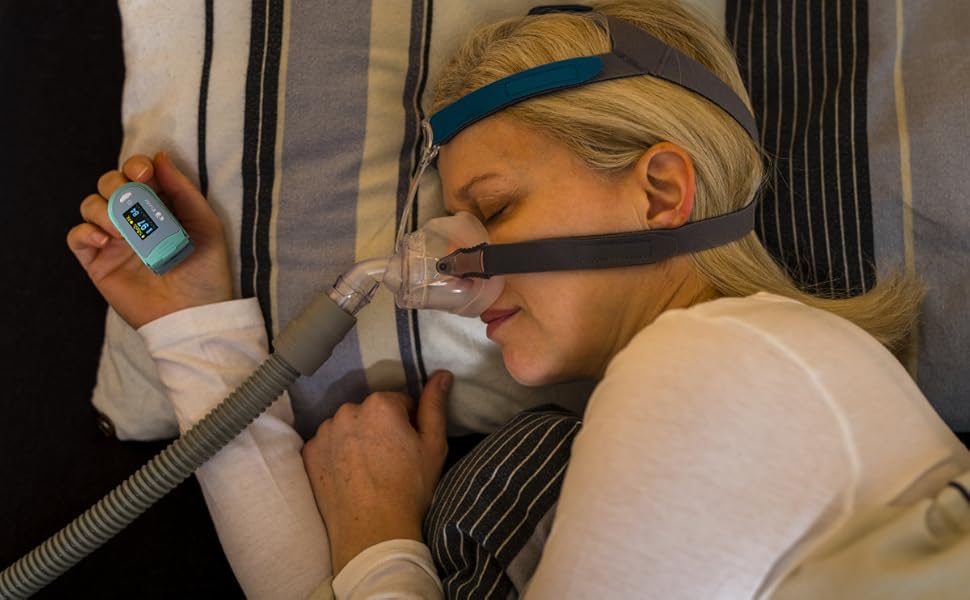
Image: The monitor is designed for comfortable wear during sleep for continuous monitoring.
2. Continuous Recording and Data Storage
The EMO-80 is a stand-alone device that records oxygen saturation (SpO2) and pulse rate (PRbpm) continuously, every second, throughout the night. It does not require a smartphone to be connected during the recording period. The device has an internal memory capable of storing up to 40 hours of data.
Video: Tamatview of the EMAY Sleep Oxygen Monitor (EMO-80), demonstrating its ease of use, continuous data storage, and app synchronization features. It highlights how the device records oxygen and heart rate overnight without needing a phone, and how data can be reviewed and shared via the EMAY app.
3. Syncing Data to the EMAY App
- After your recording session, open the EMAY app on your smartphone.
- Ensure Bluetooth is enabled on your phone and the EMO-80 device is nearby.
- Follow the in-app instructions to connect to your device and download the recorded data.
4. Reviewing and Analyzing Data
The EMAY app provides detailed graphs and reports of your SpO2 and pulse rate data. You can review the data second by second, or view summary reports for an overview of your trends.

Image: The device paired with a computer displaying a comprehensive sleep oxygen report for in-depth analysis.

Image: Detailed data analysis is available through the powerful PC software, providing in-depth insights into your oxygen and heart rate trends.
5. Exporting and Sharing Reports
The app allows you to export granular data in CSV format for further study or share informative sleep oxygen reports easily with one press. This feature is useful for personal record-keeping or for sharing with wellness professionals.
Penyelenggaraan
1. Membersihkan Peranti
Bersihkan permukaan peranti dengan kain lembut dampened with medical alcohol (75% ethanol or isopropanol). Do not use abrasive cleaners or immerse the device in water. Ensure the device is completely dry before storage or next use.
2. Penyimpanan
Store the device in a cool, dry place away from direct sunlight and extreme temperatures. If not in use for an extended period, remove the batteries to prevent leakage and damage.
Menyelesaikan masalah
| Masalah | Kemungkinan Punca | Penyelesaian |
|---|---|---|
| Peranti tidak dihidupkan. | Bateri mati atau tidak dipasang dengan betul. | Gantikan bateri dengan bateri AAA baharu, memastikan kekutuban yang betul. |
| Bacaan yang tidak tepat atau tidak menentu. | Improper finger placement, movement during measurement, cold fingers, or nail polish. | Ensure finger is fully inserted and still. Warm hands if cold. Remove nail polish. |
| Tidak dapat menyambung ke aplikasi melalui Bluetooth. | Bluetooth is off, device is too far, or app issue. | Ensure Bluetooth is on. Keep device close to phone. Restart app and device. |
| Data not syncing or missing. | Device memory full, or sync interruption. | Sync data regularly to prevent memory overflow. Ensure stable Bluetooth connection during sync. |
| Hayat bateri pendek. | Low quality batteries or frequent use. | Use high-quality alkaline AAA batteries. Replace as needed. |
Spesifikasi
| Ciri | Perincian |
|---|---|
| Nama Model | EMO-80 |
| Jenama | EMAY |
| Julat Pengukuran (SpO2) | 70-100% |
| Sumber Kuasa | 2 bateri AAA (termasuk) |
| Penyimpanan Data | Sehingga 40 jam |
| Ketersambungan | Bluetooth (for app sync) |
| Keserasian | iOS & Android App |
| Dimensi | 5.04 x 3.9 x 2.05 inci (Saiz Pakej) |
| Berat badan | 0.35 auns |
Waranti dan Sokongan
EMAY provides local customer service support for this product. For any inquiries, technical assistance, or warranty claims, please contact EMAY customer service through the contact information provided on their official website or within the EMAY app. Please retain your proof of purchase for warranty purposes.
Untuk maklumat lanjut, lawati EMAY Store on Amazon.