
1. Pengenalan
This manual provides detailed instructions for the installation, operation, and maintenance of your SANSI 18W LED Motion Sensor Outdoor Flood Light, Model C2440-GW. Please read this manual thoroughly before installation and use to ensure proper function and safety.
2. Maklumat Keselamatan
- Sentiasa matikan kuasa pada pemutus litar sebelum memasang atau menservis lekapan.
- Rujuk juruelektrik bertauliah jika anda tidak pasti tentang proses pemasangan.
- Pastikan semua sambungan elektrik mematuhi kod dan ordinan tempatan.
- Do not install on surfaces that are unstable or prone to vibration.
- This product is designed for outdoor use and is IP65 waterproof.
- Jangan memandang terus ke sumber cahaya LED semasa dinyalakan, kerana ia boleh menyebabkan ketegangan mata.
3. Kandungan Pakej
Sahkan bahawa semua komponen hadir sebelum memulakan pemasangan:
- 1x SANSI 18W LED Security Light (White)
- 1x Installation Kit (screws, wire nuts)
- 1x Manual Arahan
4. Ciri-ciri Produk
The SANSI 18W LED Motion Sensor Outdoor Flood Light is designed for efficient and reliable outdoor illumination with advanced features:
- Penjimatan Tenaga: 18 Watts, 1800 Lumens, equivalent to 200W traditional halogen lights, reducing electricity consumption by over 90%.
- Pelbagai Mod: AUTO (Motion Sensor), Dusk to Dawn, and On-Time modes for versatile control.
- Jangka hayat yang lebih lama: Utilizes SANSI's patented ceramic temperature control system for superior heat dissipation, extending product life to over 50,000 hours.
- Tahan Lama & Tahan Cuaca: Constructed with high-quality PC material, offering good anti-ultraviolet, flame-retardant, and anti-corrosion properties. IP65 waterproof rating ensures stable operation in various weather conditions.
- Reka bentuk boleh laras: Light heads and motion sensor are adjustable for optimal coverage and detection.

Image: Comparison of SANSI's ceramic heat dissipation technology with traditional designs.

Imej: Selesaiview of key features including adjustability, sensing distance, brightness, and waterproof rating.

Imej: Cthamples of the flood light installed in different outdoor environments.
5. Panduan Pemasangan
Follow these steps for proper installation of your SANSI flood light:
- Sediakan untuk Pemasangan: Turn off power at the circuit breaker. Ensure the mounting surface is secure and can support the fixture.
- Fix the Mounting Plate: Secure the mounting plate onto the junction box using the provided screws.
- Sambungkan Wayar: Connect the black (hot) wire, white (negative) wire, and green (ground) wire from the fixture to your household wiring using wire nuts. Ensure connections are tight and secure.
- Pasang Lekapan Lampu: Attach the LED light fixture to the mounting plate.
- Choose the Working Mode: Select your desired operating mode (Auto, On-Time, D2D) using the switch on the motion sensor.
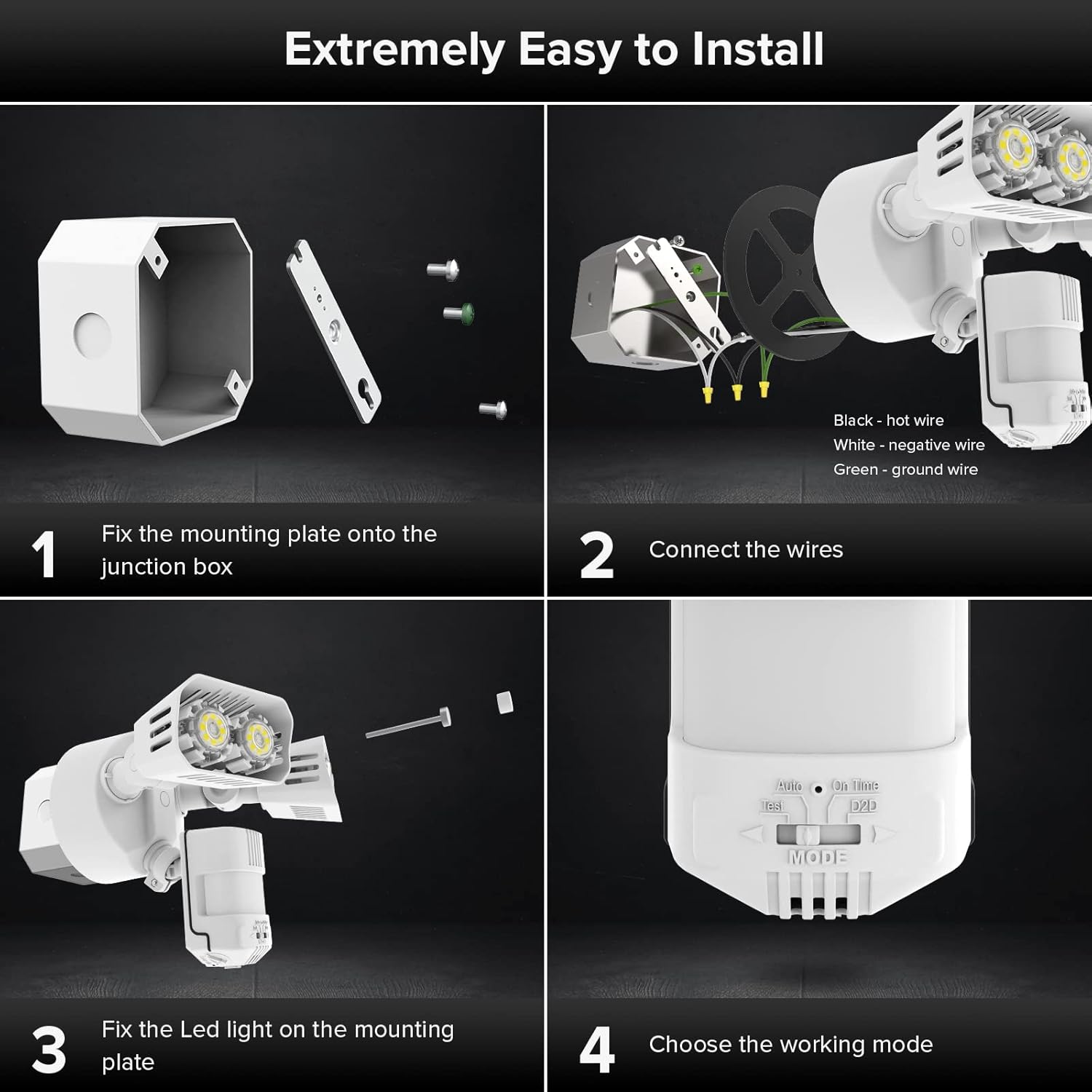
Image: Visual guide for the installation process.
6. Mod Operasi
The SANSI flood light offers three primary operating modes, selectable via a switch on the motion sensor:
- AUTO (Motion Sensor Mode): The light turns on for 1-10 minutes at night when motion is detected. It stays off during the day.
- Mod Senja hingga Subuh: The light automatically turns on at dusk and turns off at dawn, providing continuous illumination throughout the night.
- Mod On-Time: The light functions like a normal light, controlled manually by a wall switch. It stays on until manually turned off.
- Mod percubaan: For verifying proper function during installation. The light turns on for 5 seconds during daytime or night once it detects motion.

Image: Visual representation of Auto and Dusk to Dawn operating modes.
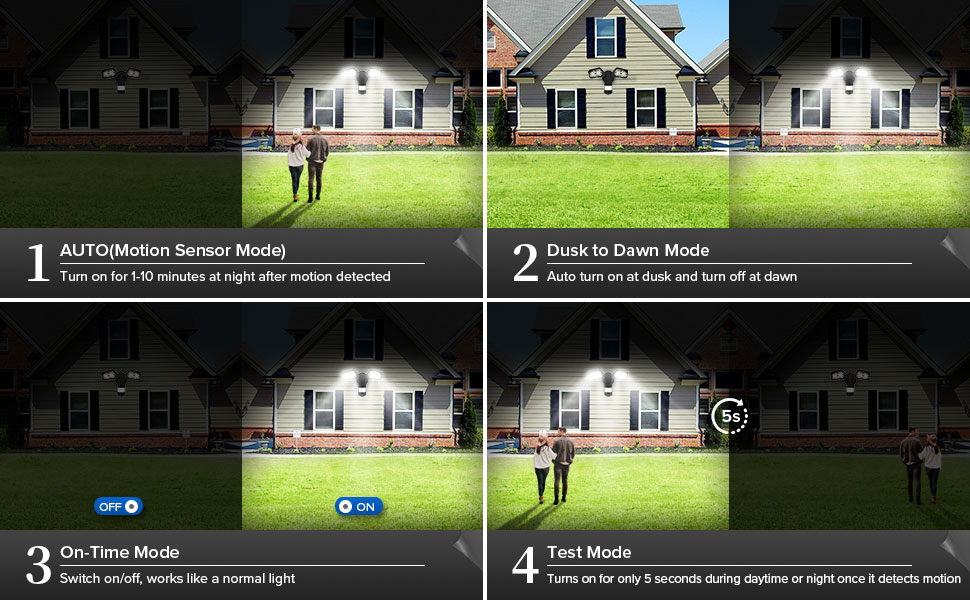
Image: Close-up of the mode selection switch.
Video: Official SANSI video demonstrating the operating modes of the 18W Motion Sensor Outdoor Light.
7. Pelarasan
The motion sensor and light heads are adjustable to customize performance:
- Pelarasan Penderia Gerakan: The sensor head can be adjusted 180° horizontally and 90° vertically to optimize detection area. Use the adjustment screws to loosen, position, and tighten.
- Pelarasan Kepala Cahaya: Each light head can be adjusted 180° horizontally and 90° vertically to direct illumination where needed. Loosen the screws, position the heads, and tighten securely.
- LUX (Brightness Sensitivity): Adjusts the ambient light level at which the motion sensor becomes active. Turn towards '0' for activation in darker conditions, towards 'infinity' for activation in brighter conditions. A halfway setting is often recommended.
- Masa: Sets the duration the light stays on after motion is detected, typically from 1 to 10 minutes.
- Julat: Adjusts the motion detection distance, up to a maximum of 72 feet.

Image: Motion sensor detection range and adjustment dials.

Imej: Terperinci view of the LUX, Time, and Range adjustment controls.
8. Penyelenggaraan
To ensure optimal performance and longevity of your flood light:
- Pembersihan: Bersihkan lekapan secara berkala dengan lembut, damp kain. Jangan gunakan pembersih atau pelarut yang melelas.
- Pemeriksaan: Regularly check for any loose connections, damaged wiring, or signs of wear. Address any issues promptly.
- Kawasan Sensor: Keep the motion sensor lens clear of obstructions (e.g., dirt, spiderwebs) to maintain accurate detection.
9. Penyelesaian masalah
| Masalah | Kemungkinan Punca | Penyelesaian |
|---|---|---|
| Cahaya tidak menyala. | No power; incorrect wiring; sensor setting too low (LUX); bulb failure. | Check circuit breaker. Verify wiring connections. Adjust LUX setting. Contact support if LEDs are faulty. |
| Lampu kekal menyala secara berterusan. | Mode set to On-Time or D2D; continuous motion detected; sensor malfunction. | Check mode switch. Ensure no constant motion in detection area. Adjust sensitivity. |
| Light turns on for no apparent reason (false triggers). | High sensitivity; environmental factors (wind, small animals, heat sources); sensor obstructed. | Reduce Range and/or LUX sensitivity. Clear obstructions from sensor. Reposition sensor if necessary. |
| Motion detection range is too short. | Low sensitivity; sensor obstructed; incorrect sensor angle. | Increase Range sensitivity. Clear obstructions. Adjust sensor angle. |
10. Spesifikasi
| Ciri | Perincian |
|---|---|
| Jenama | SANSI |
| Nombor Model | C2440-GW |
| Wattage | 18 Watt |
| Kecerahan | 1800 Lumen |
| Warna Cerah | 5000K (Putih Siang) |
| Voltage | 120 Volt |
| bahan | Ceramic, Plastic (Acrylonitrile Butadiene Styrene) |
| Penggunaan Dalaman/Luar | Luar |
| Tahap Ketahanan Air | IP65 Kalis Air |
| Julat Pengesanan Penderia Gerakan | Max 72 FT |
| Sudut Pengesanan Penderia Gerakan | 120° |
| Jangka hayat | 50,000 Jam |
| Berat Barang | 1.5 paun |
| Dimensi Item (L x W x H) | 13.7"L x 21.1"W x 29.2"H |
11. Waranti dan Sokongan
SANSI provides a Waranti 5 tahun for this product, ensuring quality and safety. Additionally, a 30-day refund or replacement policy is available. For any issues or inquiries, please contact the professional customer service team via Amazon Message. Your satisfaction is our priority.
Untuk bantuan lanjut, lawati SANSI Store on Amazon.