
pengenalan
This manual provides detailed instructions for the installation, operation, and maintenance of your LoraTap WIFI Smart Roller Shutter Timer. Please read this manual carefully before installation and use to ensure proper function and safety.
Maklumat Keselamatan
- Pastikan bekalan kuasa diputuskan sambungannya sebelum pemasangan atau penyelenggaraan bagi mengelakkan kejutan elektrik.
- Pemasangan hendaklah dilakukan oleh juruelektrik yang berkelayakan atau mengikut kod elektrik tempatan.
- Jangan kendalikan peranti dengan tangan yang basah.
- Jauhkan peranti daripada air dan persekitaran kelembapan tinggi.
- Jangan cuba membuka atau membaiki peranti ini sendiri. Hubungi sokongan jika timbul masalah.
- Peranti ini direka untuk kegunaan dalaman sahaja.
Ciri-ciri Produk
- Kawalan Pintar: Upgrade traditional electric roller shutters or awnings for smart control via smartphone app or voice commands.
- Remote Access & Scheduling: Control your blinds from anywhere and set custom schedules for automatic opening and closing.
- Group Control & Family Sharing: Group multiple roller shutters for simultaneous control and share access with family members.
- Reka bentuk tahan lasak: Features a scratch-resistant tempered crystal glass panel, safe to touch with wet hands and easy to clean.
- Adjustable Motor Run Time: Configure the motor's operating time for precise control over shutter position (e.g., 50% open/close).
- Keserasian Kawalan Suara: Works with Google Home and Amazon Alexa for hands-free operation.
Kandungan Pakej
Sahkan bahawa semua item terdapat dalam pakej:
- 1 x LoraTap WIFI Smart Roller Shutter Timer
- 1 x User Manual (German/English)
- 1 x Pemutar skru
- 4 x Skru
- 1 x Wiring Clamp
Spesifikasi
| Parameter | Nilai |
|---|---|
| Dimensi | 86 x 86 x 34 mm (with cover frame) |
| Bahan Panel | Kaca Kristal Terbaja |
| Bahan Bawah | Fire-retardant Polycarbonate (Plastic) |
| Vol Operasitage | AC 100-250 V 50/60 Hz |
| Rated/Maximum Current | 3 A / 10 A |
| Power per Speed | 300 W |
| Wi-Fi Standard | 2.4 GHz, 802.11b/g/n |
| Arus Tunggu Sedia | 0.001 A |
| Penggunaan Siap Sedia | 0.25 W |
| Kaedah Pemasangan | Screw-mounted, fits standard 60mm flush-mounted box |
| Perisian yang Serasi | Smart Life App (Android 4.4+, iOS 8+) |
| Pensijilan | CE |
Persediaan dan Pemasangan
1. Diagram Pendawaian
The smart roller shutter timer requires a neutral conductor for proper operation. Ensure your existing wiring includes a neutral wire. This switch is suitable for already motorized roller shutters.

Image: Detailed wiring diagram showing connections for Live (L), Neutral (N), and motor control wires (L1 for Up, L2 for Down). The diagram also indicates the input voltagjulat 100-250VAC.
- Input: Connect the Neutral (N) and Live (L) wires from your power supply to the corresponding terminals on the switch.
- Output to Motor: Connect the motor's Neutral (N), Up (L1), and Down (L2) wires to the respective terminals on the switch.
- Nota Penting: A neutral conductor must be present.
2. Pemasangan Fizikal
- Putuskan Kuasa: Before starting, turn off the main power supply to the circuit where you will install the switch.
- Prepare Mounting Box: The switch fits a standard 60mm diameter flush-mounted box.
- Sambung wayar: Follow the wiring diagram carefully. Use the provided wiring clamp jika perlu.
- Pasang Suis: Secure the switch into the flush-mounted box using the two provided screws (one on the left, one on the right).
- Attach Panel: Carefully attach the crystal glass panel to the switch module.
- Pulihkan Kuasa: Setelah pemasangan selesai dan selamat, kembalikan kuasa ke litar.
3. Pemasangan Apl dan Berpasangan
- Muat turun Aplikasi: Download the "Smart Life" application from the App Store (iOS 8 or higher) or Google Play Store (Android 4.4 or higher).
- Daftar/Log Masuk: Buka aplikasi dan daftar akaun baharu atau log masuk dengan akaun sedia ada.
- Tambah Peranti: In the Smart Life app, tap the "+" icon to add a new device. Select "Curtain Switch" or a similar category.
- Masukkan Butiran Wi-Fi: Follow the on-screen instructions to connect the switch to your 2.4 GHz Wi-Fi network. Ensure your phone is connected to the same 2.4 GHz network during pairing.
- Pengesahan: Once successfully paired, the device will appear in your app, ready for control.
Arahan Operasi
1. Kawalan Manual
The touch panel allows for direct control of your roller shutters:
- Anak panah ke atas: Tap to open the roller shutter.
- Anak panah ke bawah: Tap to close the roller shutter.
- Stop Button (Circle): Tap to pause the roller shutter at its current position.

Imej: Depan view of the LoraTap Smart Roller Shutter Timer showing the touch-sensitive Up, Stop, and Down buttons. Also displays product dimensions (86x86x34mm) and a detailed wiring diagram on the back of the unit.
2. App Control (Smart Life)
After successful pairing, you can control your roller shutters via the Smart Life app:
- Buka tutup: Use the virtual buttons in the app to open, close, or stop the roller shutter.
- Set Motor Run Time: The latest version of the switch allows you to set the motor's operating time. This enables partial opening or closing (e.g., 50%).

Image: Screenshot of the Smart Life app interface demonstrating the new function to set the motor's operating time in seconds (e.g., 10s, 120s) for precise control of roller shutter position.
3. Penjadualan dan Pemasa
Set up automated schedules for your roller shutters:
- In the Smart Life app, navigate to the device settings and select "Schedule" or "Timer."
- Add new schedules by specifying the time, action (open/close), and repetition days.
- This feature allows for automatic operation, such as opening blinds in the morning.

Image: Demonstrates the Smart Life app's scheduling feature with various set times for opening and closing. Also highlights voice control compatibility with Amazon Alexa and Google Assistant.
4. Kawalan Suara
Integrate your LoraTap switch with voice assistants:
- Amazon Alexa: Enable the "Smart Life" skill in the Alexa app and link your account. You can then use commands like "Alexa, open the roller shutter" or "Alexa, close the roller shutter."
- Laman Utama Google: Link your Smart Life account in the Google Home app. Use commands such as "Hey Google, open the blinds" or "Hey Google, close the blinds."
5. Group Control and Family Sharing
- Kawalan Kumpulan: In the Smart Life app, you can create groups of multiple LoraTap roller shutter timers to control them simultaneously with a single command.
- Perkongsian Keluarga: Share control of your devices with family members through the Smart Life app, allowing everyone in the household to manage the roller shutters.
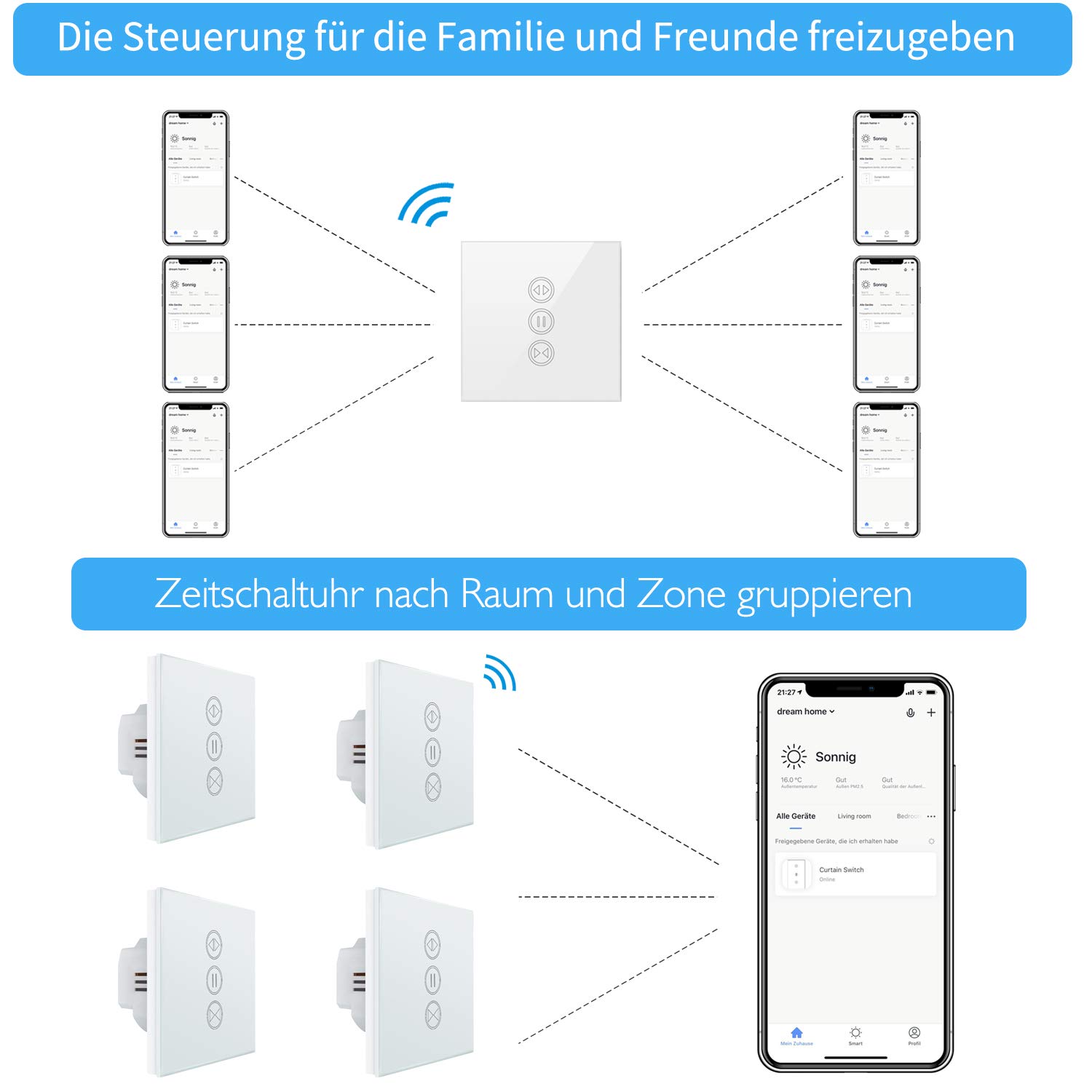
Image: Illustration of how multiple users can control the LoraTap Smart Roller Shutter Timer via the Smart Life app, demonstrating family sharing and the ability to group devices by room or zone for unified control.
Penyelenggaraan
- Pembersihan: The crystal glass panel is easy to clean. Use a soft, damp kain untuk mengelap permukaan. Elakkan pembersih yang kasar atau bahan kimia yang keras.
- Pemeriksaan biasa: Periksa sambungan pendawaian secara berkala untuk memastikan ia selamat.
Menyelesaikan masalah
- Peranti Tidak Membalas:
- Check if the power supply to the switch is active.
- Ensure the switch is properly connected to your Wi-Fi network (2.4 GHz only).
- Mulakan semula suis dengan mematikan dan menghidupkan pemutus litar.
- Verify that the Smart Life app is up to date.
- Roller Shutter Not Moving:
- Confirm that the motor is receiving power and is functioning correctly.
- Check the motor wiring connections to the switch.
- Ensure the motor run time is correctly configured in the app if using partial open/close functions.
- Kawalan Suara Tidak Berfungsi:
- Ensure your Smart Life account is correctly linked to Alexa or Google Home.
- Periksa sambungan internet anda dan status peranti pembantu suara anda.
- Try re-discovering devices in the Alexa or Google Home app.
- Automatic Stop Issue: This issue has been resolved in newer versions. If you experience unexpected stops, ensure your device firmware is updated via the Smart Life app.
Waranti dan Sokongan
LoraTap specializes in the research, development, and manufacturing of wireless switches. All LoraTap products are CE certified, ensuring compliance with European safety, health, and environmental protection requirements.
For technical support or warranty inquiries, please contact your retailer or visit the official LoraTap website for further assistance. Please have your product model number (5d4cddd3-8a52-4746-8937-9fbf21a20273) ready when contacting support.