
1. Pengenalan
Thank you for choosing the UBISHENG U-003 Digital TV Converter Box. This device is designed to convert over-the-air ATSC digital broadcast signals for display on analog and digital televisions. It features 1080P output, DVR recording capabilities, Electronic Program Guide (EPG), and a USB media player. Please read this manual thoroughly before operation to ensure proper setup and usage.

Figure 1: UBISHENG U-003 Digital TV Converter Box and included remote control.
2. Produk Lebihview
2.1 Panel Depan
The front panel of the U-003 converter box features essential controls and indicators:
- Butang kuasa: Menghidupkan atau mematikan unit.
- Butang VOL+ / VOL-: Melaraskan tahap kelantangan.
- Butang MENU: Mengakses menu utama untuk tetapan dan ciri.
- Butang CH+ / CH-: Menukar saluran ke atas atau ke bawah.
- Butang OK: Mengesahkan pilihan dalam menu.
- Port USB 2.0: For connecting USB storage devices for DVR recording and media playback.
- Paparan led: Menunjukkan nombor atau masa saluran semasa.
2.2 Panel Belakang
The rear panel provides various connection ports for your television and antenna:
- SEMUT DALAM: Menyambung ke antena luaran anda.
- SEMUT KELUAR: Passes through the antenna signal to another device (e.g., TV tuner).
- CH3/CH4 Switch: Selects the RF output channel for older TVs.
- HDMI1080: High-Definition Multimedia Interface output for digital TVs and projectors.
- VIDEO (Yellow RCA): Composite video output for analog TVs.
- L (White RCA): Left audio output for analog TVs.
- R (Red RCA): Right audio output for analog TVs.
- Input Kuasa AC: Menyambung kepada penyesuai kuasa.

Rajah 2: Terperinci view of the front and rear panels, highlighting controls and connection ports.
3. Arahan Persediaan
3.1 Connecting the Converter Box
- Sambungkan Antena: Sambungkan antena luar atau dalam rumah anda ke SEMUT DALAM port on the rear of the converter box.
- Sambung ke TV:
- For Digital TVs (HDTVs): Sambungkan kabel HDMI (tidak disertakan) daripada HDMI 1080 port on the converter box to an available HDMI input on your TV.
- For Analog TVs (Older TVs): Connect an AV cable (red, white, yellow RCA) from the VIDEO, L, dan R ports on the converter box to the corresponding AV input ports on your TV. Alternatively, you can use a coaxial cable from the LUAR BIASA port to your TV's antenna input and set the converter box's CH3/CH4 switch to match your TV's input.
- Sambungkan Kuasa: Plug the power cord into the AC Power Input on the converter box and then into a standard electrical outlet.
- Hidupkan kuasa: Turn on your TV and the converter box. Select the correct input source on your TV (e.g., HDMI 1, AV, or TV/Antenna if using coaxial output).
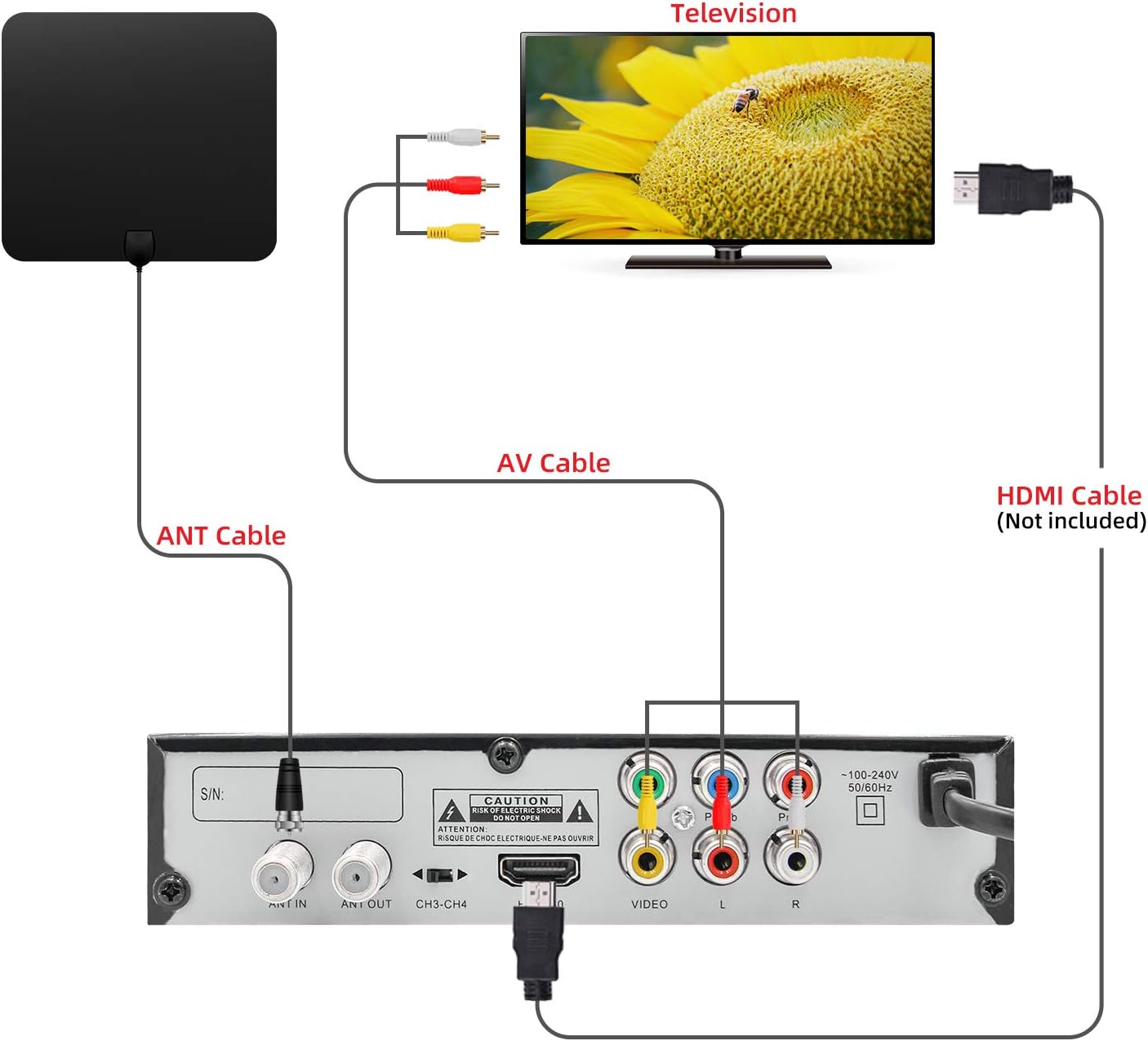
Figure 3: Connection diagram illustrating how to connect the converter box to an antenna and a television using either AV or HDMI cables.
3.2 Imbasan Saluran Awal
Upon first power-on or after connecting a new antenna, you will need to perform a channel scan:
- Use the remote control to navigate to the MENU.
- Pilih Carian Saluran or Auto Scan daripada menu.
- Confirm your country/region settings.
- Initiate the scan. The converter box will search for available digital channels. This process may take several minutes.
- Once the scan is complete, the channels will be saved, and you can begin watching TV.
4. Arahan Operasi
4.1 TV Asas Viewing
- Pemilihan Saluran: Gunakan CH+ / CH- butang pada alat kawalan jauh atau panel hadapan untuk menukar saluran. Anda juga boleh memasukkan nombor saluran secara langsung menggunakan pad kekunci berangka pada alat kawalan jauh.
- Kawalan Kelantangan: Gunakan VOL + / VOL- butang untuk melaraskan tahap audio.
- Redam: Tekan ke HILANGKAN button on the remote to silence the audio.
- Paparan Maklumat: Tekan ke INFO butang ke view current program details, channel number, and time.
4.2 Rakaman DVR
To record live TV, a USB storage device (not included) must be connected to the USB 2.0 port.
- Sambungkan Peranti USB: Insert a formatted USB flash drive or external hard drive into the USB port on the front panel.
- Rakaman Segera: Semasa menonton rancangan, tekan butang REKOD button on the remote to start recording. Press it again to stop.
- Scheduled Recording (EPG): Akses ke EPG (Panduan Program Elektronik) from the menu. Navigate to the desired program and press the REKOD button to schedule a recording.
- Rakaman Main semula: Pergi ke Multimedia section from the main menu, then select PVR to access and play your recorded files.

Figure 4: Recording TV programs by plugging in a USB flash drive and accessing the PVR function.
4.3 USB Media Player
The U-003 supports playback of various media files daripada peranti storan USB yang disambungkan.
- Sambungkan Peranti USB: Ensure your USB device is connected to the USB port.
- Access Multimedia: Daripada menu utama, pilih Multimedia pilihan.
- Select Media Type: Pilih antara Muzik, Foto, atau Filem to browse your files.
- Main balik: Navigasi ke yang anda inginkan file dan tekan OK untuk memulakan main balik.
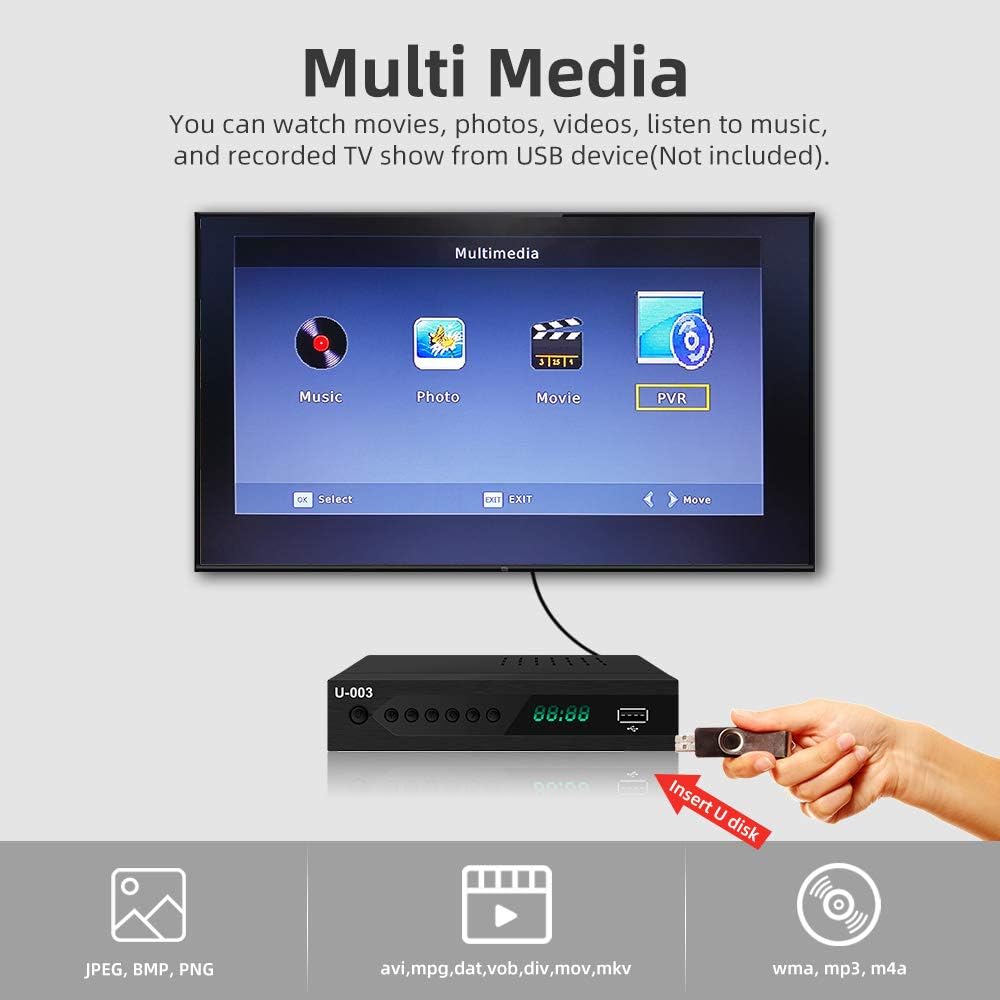
Figure 5: The Multimedia interface allows playback of various file types from a USB device.
4.4 Panduan Program Elektronik (EPG)
The EPG provides a schedule of upcoming programs.
- Tekan ke EPG button on the remote to access the program guide.
- Use the arrow keys to navigate through channels and program listings.
- Select a program to view more details or to schedule a recording.
5. Penyelenggaraan
- Pembersihan: Use a soft, dry cloth to clean the exterior of the converter box. Do not use liquid cleaners or abrasive materials.
- Pengudaraan: Ensure the ventilation slots on the top and sides of the unit are not blocked to prevent overheating.
- Storan: Jika menyimpan unit untuk tempoh yang lama, putuskan sambungannya daripada kuasa dan simpan di tempat yang sejuk dan kering.
6. Penyelesaian masalah
6.1 Tiada Gambar/Bunyi
- Semak Sambungan: Ensure all cables (antenna, HDMI/AV, power) are securely connected.
- Input TV: Verify your TV is set to the correct input source (e.g., HDMI 1, AV).
- Kuasa: Confirm the converter box is powered on and the power indicator light is active.
- Imbasan Saluran: Perform a channel scan if you haven't done so or if channels are missing.
6.2 Poor Signal Reception
- Kedudukan Antena: Adjust your antenna's position or direction. Try different locations for better signal strength.
- Jenis Antena: Consider upgrading to a more powerful outdoor antenna if you are in a weak signal area.
- Imbas Semula Saluran: After adjusting the antenna, perform another channel scan.
6.3 Alat Kawalan Jauh Tidak Berfungsi
- Bateri: Gantikan bateri pada alat kawalan jauh (memerlukan 2 bateri AAA).
- Garis penglihatan: Ensure there are no obstructions between the remote and the converter box.
- Jarak: Operate the remote within the effective range of the converter box.
7. Spesifikasi
| Ciri | Spesifikasi |
|---|---|
| Jenama | UBISHENG |
| Nombor Model | U-003 |
| Jenis Pemasangan | Coaxial, HDMI Cable, Plug Mount, Surface Mount |
| Jenis Antaramuka | Coaxial, HDMI, USB |
| Dimensi Produk | 6.6 x 3.9 x 1.4 inci |
| Berat Barang | 10.6 auns |
| Bateri Diperlukan | 2 bateri AAA (untuk alat kawalan jauh) |
8. Waranti dan Sokongan
For warranty information or technical support, please refer to the documentation included with your purchase or contact UBISHENG customer service. Keep your purchase receipt as proof of purchase.