
pengenalan
This manual provides essential information and instructions for the proper use and maintenance of your Easytry123 RAV491 replacement remote control. This remote is designed to function as a direct replacement for various Yamaha AV receiver models. Please note that while it replicates most primary functions, some advanced or specific features of your original remote may not be fully supported.
Persediaan
1. Pemasangan Bateri
The Easytry123 RAV491 remote control requires two (2) AAA batteries (not included). Follow these steps to install them:
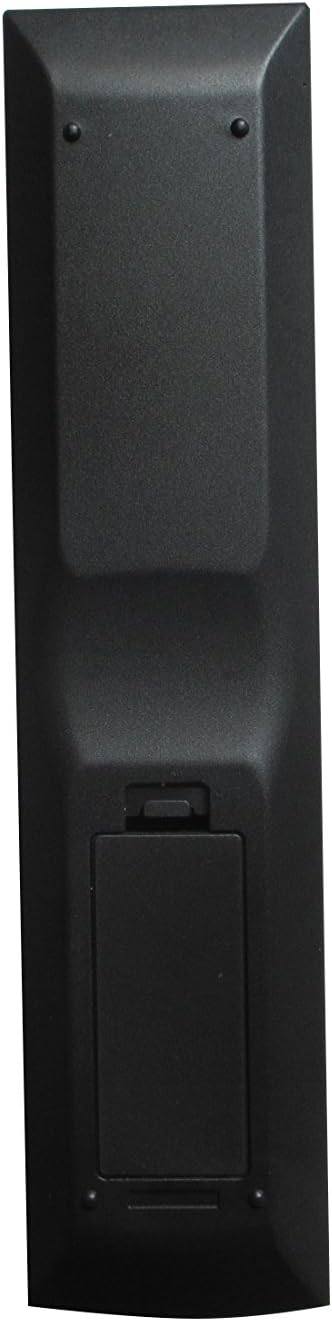
- Cari petak bateri di belakang alat kawalan jauh.
- Luncurkan penutup petak bateri ke bawah atau ke luar untuk membukanya.
- Masukkan dua bateri AAA, pastikan terminal positif (+) dan negatif (-) sejajar dengan tanda di dalam petak.
- Luncurkan penutup petak bateri kembali ke tempatnya sehingga ia berbunyi dengan selamat.

Imej: Belakang view of the Easytry123 RAV491 remote control, illustrating the battery compartment location. The compartment is a rectangular section at the bottom of the remote's back, designed for easy access to insert or replace batteries.
2. Penggunaan Awal
This replacement remote control is pre-programmed and typically requires no additional setup or pairing. Once batteries are installed, it should be ready for immediate use with compatible Yamaha AV receiver models. Point the remote directly at your AV receiver and press a function button to test its operation.
Arahan Operasi
The Easytry123 RAV491 remote control features a standard layout for common AV receiver functions. Refer to the image below for a visual guide to the buttons.
Imej: Depan view of the Easytry123 RAV491 remote control, displaying its full array of buttons. Key sections include power, input selection (HDMI, AV, Audio), tuner controls, scene buttons, navigation, volume, and numeric keypad.
- Power (Transmit/Code Set): Use the 'Transmit' button (usually red, top left) to power on/off your receiver. The 'Code Set' button (top right) is for advanced programming, which is generally not required for this pre-programmed replacement remote.
- Input Selection (HDMI, AV, Audio, USB, V-AUX): Dedicated buttons allow you to switch between various audio/video input sources connected to your receiver.
- Kawalan Kelantangan: Use the 'VOLUME' up (+) and down (-) buttons to adjust the audio output level. The 'MUTE' button silences the audio.
- Tuner Controls (FM, AM, Preset, Tuning): Navigate radio stations and presets if your receiver has a built-in tuner.
- Scene Buttons (BD/DVD, TV, CD, Radio): These buttons may activate pre-configured settings or switch to specific inputs on your receiver, depending on your receiver's capabilities.
- Navigation and Menu (Setup, Option, Return, Enter, Display, Top Menu, Pop-up Menu): These buttons are used to navigate your receiver's on-screen menus and settings.
- Papan kekunci angka: For direct input of numbers, such as channel selection or specific settings.
Note: The functionality of certain buttons may vary slightly depending on the specific Yamaha AV receiver model you are using. If a button does not perform as expected, consult your receiver's original manual.
Penyelenggaraan
- Pembersihan: Gunakan kain lembut dan kering untuk membersihkan alat kawalan jauh. Jangan gunakan pembersih cecair atau bahan yang melelas, kerana ia boleh merosakkan permukaan atau komponen dalaman.
- Penggantian Bateri: Replace batteries when the remote's response becomes sluggish or stops working. Always replace both batteries at the same time with new ones of the same type (AAA). Dispose of used batteries responsibly.
- Storan: If the remote control will not be used for an extended period, remove the batteries to prevent leakage and potential damage. Store the remote in a cool, dry place away from direct sunlight and extreme temperatures.
Menyelesaikan masalah
- Jauh tidak bertindak balas:
- Pastikan bateri dipasang dengan betul dan tidak habis. Gantikan jika perlu.
- Check for any obstructions between the remote control and the AV receiver's infrared sensor.
- Ensure you are within the effective range and pointing the remote directly at the receiver.
- Beberapa fungsi tidak berfungsi:
- This replacement remote may not support all advanced or specific functions of your original Yamaha remote. Refer to your receiver's original manual for specific feature requirements.
- Verify that your AV receiver model is listed as compatible in the product description.
Spesifikasi
| Nombor Model | RAV491 |
| Jenama | Easytry123 |
| Sumber Kuasa | 2 x Bateri AAA (tidak termasuk) |
| Teknologi Ketersambungan | Inframerah (IR) |
| Jenis Pengawal | Kawalan Butang |
| Ciri Khas | Reka bentuk ergonomik |
Waranti dan Sokongan
Warranty information for this Easytry123 RAV491 replacement remote control is not provided in this manual. For details regarding warranty coverage, returns, or technical support, please contact the seller directly through your purchase platform.