
Awei A780BL
Manual Pengguna Fon Kepala Atas Telinga Bluetooth 5.0 Awei A780BL
Model: A780BL | Jenama: Awei
pengenalan
This manual provides comprehensive instructions for the Awei A780BL Bluetooth 5.0 Over-Ear Headphones. Please read this manual carefully before using the product to ensure proper operation and to maximize your listening experience. These headphones offer high-quality audio, a built-in microphone, and a comfortable over-ear design, suitable for various uses including gaming, music, and calls.
Kandungan Pakej
Pastikan semua item ada dalam pakej:
- 1 x Awei A780BL Bluetooth Headset
- 1 x Kabel Pengecas USB
- 1 x Manual Pengguna (dokumen ini)

Image: The Awei A780BL headphones shown alongside their retail packaging, highlighting the included components.
Produk Selesaiview

Imej: Depan view of the Awei A780BL Over-Ear Headphones in black, showcasing reka bentuk mereka.
The Awei A780BL headphones are designed for comfort and superior sound quality. They feature a foldable design for portability and intuitive controls for ease of use.
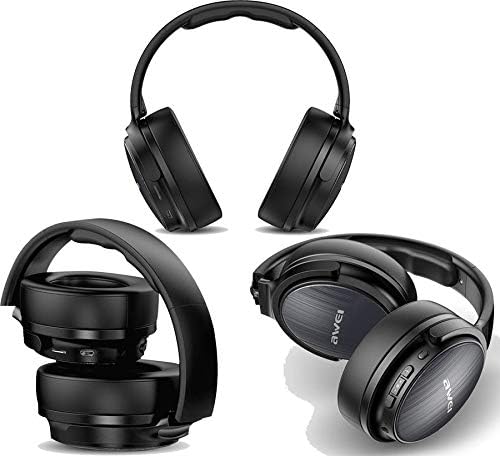
Imej: Berbilang views of the Awei A780BL headphones, demonstrating their foldable earcups and compact storage capability.
Ciri-ciri Utama:
- Bluetooth V5.0 for stable and efficient wireless connection.
- Dynamic 40mm drivers for powerful and clear audio.
- Built-in microphone for hands-free calls and gaming communication.
- IPX5 water and sweat resistance, suitable for sports and outdoor activities.
- Supports both wireless (Bluetooth) and wired (3.5mm AUX) connectivity.
- Long battery life: Up to 15 hours of music/talk time.
- Comfortable over-ear design with soft earcups.

Image: A graphic highlighting the "All-Around Stereo Sound" feature of the Awei A780BL headphones, noting the 40mm driver, 32 Ohm impedance, and 122dB sensitivity.
Persediaan
Mengecas Fon Kepala:
- Cari port pengecasan USB pada fon kepala.
- Connect one end of the provided USB charging cable to the headphone's charging port.
- Sambungkan hujung kabel USB yang satu lagi ke sumber kuasa USB yang serasi (cth., port USB komputer, penyesuai dinding USB).
- The indicator light will illuminate during charging and turn off or change color once fully charged.
- Pengecasan penuh mengambil masa kira-kira 2 jam.
Menghidupkan/Mematikan:
- Untuk Menghidupkan: Press and hold the Power button (usually the Multi-function button) for a few seconds until the indicator light flashes and you hear a power-on prompt.
- Untuk Mematikan: Press and hold the Power button for a few seconds until the indicator light turns off and you hear a power-off prompt.
Arahan Operasi
Pairing Bluetooth:
- Pastikan fon kepala dicas sepenuhnya dan dimatikan.
- Press and hold the Power button for approximately 5-7 seconds until the indicator light flashes red and blue alternately, indicating pairing mode.
- Pada peranti anda (telefon pintar, tablet, komputer), dayakan Bluetooth dan cari peranti yang tersedia.
- Pilih "AWEI A780BL" daripada senarai peranti yang ditemui.
- Once paired, the indicator light will typically turn solid blue or flash slowly, and you will hear a connection confirmation.
- Jika digesa untuk kata laluan, masukkan "0000".
Wired Connection (AUX Mode):
The headphones can also be used with a 3.5mm audio cable (not included) when the battery is low or for devices without Bluetooth.
- Connect one end of a 3.5mm audio cable to the AUX port on the headphones.
- Sambungkan hujung satu lagi ke bicu audio 3.5mm peranti anda.
- In wired mode, the headphone's battery is not consumed, and the power button is not required for operation.
Kawalan Asas:
| Fungsi | Tindakan |
|---|---|
| Main/Jeda Muzik | Tekan butang Pelbagai fungsi sekali. |
| Trek Seterusnya | Tekan lama butang Naikkan Kelantangan (+). |
| Trek Sebelumnya | Tekan lama butang Kelantangan Turun (-). |
| Kelantangan Naik | Tekan pendek butang Kelantangan Naik (+). |
| Kelantangan Kurang | Tekan pendek butang Kelantangan Turun (-). |
| Jawab/Tamatkan Panggilan | Tekan butang Berbilang fungsi sekali semasa panggilan masuk. |
| Tolak Panggilan | Long press the Multi-function button during an incoming call. |
| Dail Semula Nombor Terakhir | Tekan dua kali butang Berbilang fungsi. |
| Aktifkan Pembantu Suara | Tekan tiga kali butang Berbilang fungsi (jika disokong oleh peranti anda). |
Penyelenggaraan
- Pembersihan: Gunakan kain lembut dan kering untuk membersihkan fon kepala. Jangan gunakan pembersih atau pelarut yang melelas.
- Storan: Apabila tidak digunakan, simpan fon kepala di tempat yang sejuk dan kering, jauh dari cahaya matahari langsung dan suhu yang melampau. Reka bentuk boleh lipat membolehkan storan padat.
- Penjagaan Bateri: Untuk memanjangkan hayat bateri, elakkan daripada menyahcas sepenuhnya fon kepala dengan kerap. Mengecasnya dengan kerap, walaupun tidak digunakan secara berterusan.
- Tahan Air: The headphones are IPX5 water resistant, meaning they can withstand splashes and sweat. Do not submerge them in water or expose them to heavy rain.
Menyelesaikan masalah
| Masalah | Penyelesaian yang Mungkin |
|---|---|
| Fon kepala tidak dihidupkan. | Ensure the headphones are fully charged. Press and hold the Power button for a longer duration. |
| Tidak boleh berpasangan dengan peranti. |
|
| Tiada bunyi atau kelantangan rendah. |
|
| Mikrofon tidak berfungsi. |
|
| Hayat bateri pendek. |
|
Spesifikasi
| Ciri | Perincian |
|---|---|
| Nama Model | A780BL |
| Jenama | Awei |
| Teknologi Ketersambungan | Wireless (Bluetooth V5.0), Wired (3.5mm AUX) |
| Protokol Bluetooth | HSP/A2DP/HFP/AVRCP |
| Jarak Operasi | Up to 10 meters (barrier-free space) |
| Faktor Bentuk Fon Kepala | Atas Telinga |
| Saiz Pemandu | 40mm |
| Impedans | 32 Ohm |
| Sensitiviti | 122 dB |
| Julat Kekerapan | 2.402 GHz - 2.480 GHz |
| Mikrofon | ya |
| Kawalan Bunyi | None (No Active Noise Cancellation) |
| Penilaian Ketahanan Air | IPX5 (Kalis Air dan Peluh) |
| Jenis Bateri | Polimer Litium |
| Kapasiti Bateri | 250 mAh |
| Masa Mengecas | Lebih kurang 2 jam |
| Masa Main semula Muzik | Sehingga 15 jam |
| Masa Berbual | Sehingga 12 jam |
| Masa Tunggu Sedia | Sehingga 300 jam |
| Berat Bersih | 270 gram |
| warna | Hitam |
| Dimensi Produk | 4 x 10 x 16.5 cm |
Waranti dan Sokongan
Specific warranty information for the Awei A780BL headphones is not provided in this manual. Please refer to the product packaging or the retailer's website for details regarding warranty coverage and support options.
For technical assistance or customer service, please contact the vendor or manufacturer directly through their official channels.
Ask a question about this manual
Ask about setup, troubleshooting, compatibility, parts, safety, or missing instructions. Manuals+ will review the question and use this page’s manual context to help answer it.