
1. Pengenalan
The LAUNCH CR319 is a handheld On-Board Diagnostics II (OBD2) code reader designed to assist in diagnosing vehicle engine issues. It provides access to various diagnostic functions to help users identify and clear trouble codes, monitor vehicle performance data, and check emission readiness status. This manual provides detailed instructions for the proper use and maintenance of your CR319 device.
2. Produk Lebihview
2.1 Ciri-ciri Utama
- Fungsi OBD2 Penuh: Supports all 10 OBD2 test modes.
- Pustaka Carian DTC: Built-in database with over 3000 code definitions.
- Sokongan berbilang bahasa: Available in English, Portuguese, Russian, Italian, Spanish, French, and German.
- Pasang dan Main: No batteries or charger required; powered directly from the vehicle's OBD2 port.
- Reka bentuk padat: Mudah dikendalikan dan disimpan.
2.2 Komponen Peranti
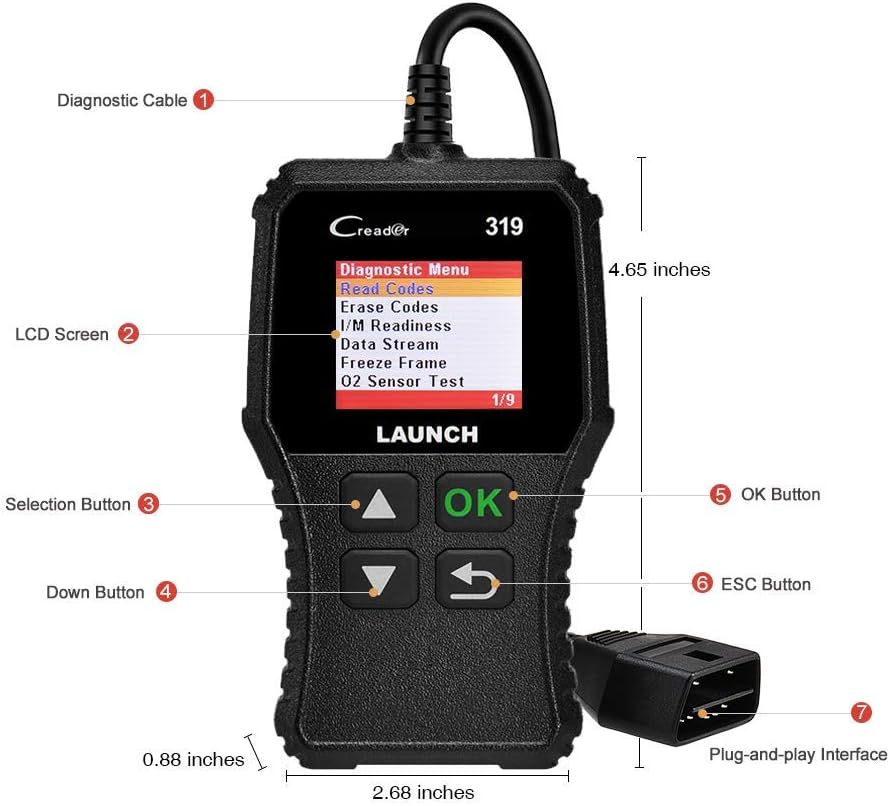
The image above illustrates the main components of the LAUNCH CR319 OBD2 Scanner. Key parts include the Diagnostic Cable (1) for connecting to the vehicle, the LCD Screen (2) for displaying information, Selection Buttons (3) for navigation, the Down Button (4), the OK Button (5) for confirmation, the ESC Button (6) to return to the previous screen, and the Plug-and-Play Interface (7) which is the OBD2 connector.
3. Persediaan
- Cari Port OBD2: Port OBD2 biasanya terletak di bawah papan pemuka di bahagian pemandu kenderaan. Rujuk manual pemilik kenderaan anda jika anda tidak dapat menemuinya.
- Sambungkan Pengimbas: Plug the CR319's diagnostic cable connector firmly into the vehicle's OBD2 port. The device will power on automatically.
- Mulakan Kenderaan: Turn the vehicle's ignition to the 'ON' position (engine off) or start the engine, depending on the diagnostic function you intend to perform.
4. Arahan Operasi
After connecting the CR319 to your vehicle, the main menu will appear. Use the Up/Down selection buttons to navigate through the options and the OK button to confirm a selection. The ESC button returns to the previous screen.
4.1 Membaca Kod
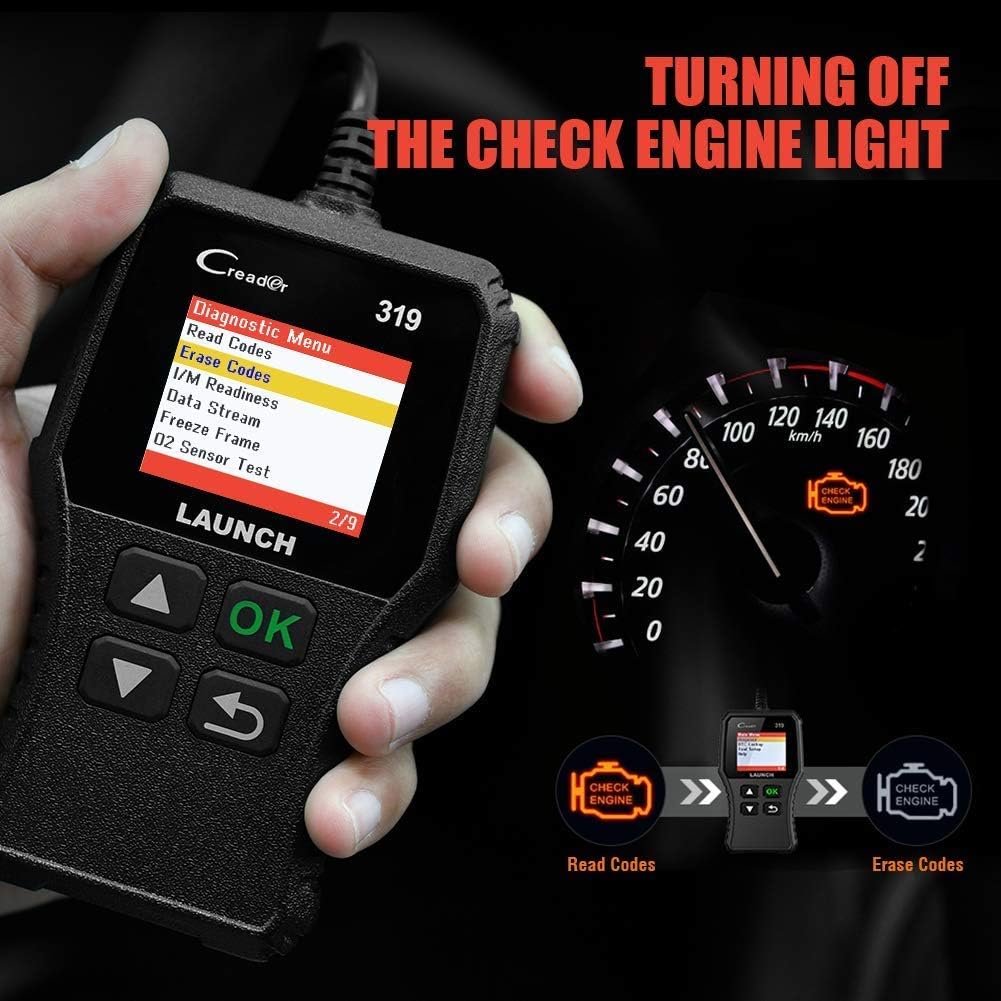
This function retrieves Diagnostic Trouble Codes (DTCs) from the vehicle's computer. These codes indicate specific issues detected by the vehicle's self-diagnostic system.
- Daripada menu utama, pilih 'Diagnose'.
- Pilih 'Read Codes'.
- The scanner will display any stored, pending, or permanent codes along with their descriptions.
4.2 Kod Jelas
This function erases DTCs from the vehicle's computer and turns off the Check Engine Light (MIL). Ensure any underlying issues are resolved before clearing codes, as they may reappear.
- Daripada menu utama, pilih 'Diagnose'.
- Pilih 'Erase Codes'.
- Confirm the action when prompted. The Check Engine Light should turn off.
4.3 Kesediaan I / M
Fungsi ini menyemak status sistem pemantauan berkaitan emisi kenderaan untuk menentukan sama ada ia bersedia untuk ujian emisi.
- Daripada menu utama, pilih 'Diagnose'.
- Pilih 'Kesediaan Saya'.
- The screen will display the status of various monitors (e.g., Misfire Monitor, Fuel System Monitor). 'OK' or 'Complete' indicates the monitor has run and passed; 'INC' or 'Incomplete' means the monitor has not yet run or completed its diagnostic cycle.
4.4 Data Stream (Live Data)

This function displays real-time operational data from the vehicle's engine control unit (ECU). This data can include engine RPM, vehicle speed, oxygen sensor readings, coolant temperature, and more.
- Daripada menu utama, pilih 'Diagnose'.
- Pilih 'Strim Data'.
- Use the Up/Down buttons to scroll through the various data parameters.
4.5 Bingkai Pembekuan
When an emission-related fault occurs, the vehicle's computer records a snapshot of operating conditions at the time of the fault. This data is called Freeze Frame data.
- Daripada menu utama, pilih 'Diagnose'.
- Pilih 'Freeze Frame'.
- Review the recorded parameters to understand the conditions under which the fault occurred.
4.6 Pencarian DTC

This feature allows you to manually enter a Diagnostic Trouble Code and view its definition from the scanner's internal database.
- Daripada menu utama, pilih 'DTC Lookup'.
- Use the navigation buttons to input the desired DTC.
- Tekan 'OK' kepada view the code definition.
4.7 Other OBD2 Functions
The CR319 also supports the following OBD2 functions, accessible through the 'Diagnose' menu:
- Ujian Sensor O2: Retrieves oxygen sensor monitor test results for the most recently completed tests.
- Ujian Sistem EVAP (Mod 8): Memulakan ujian Sistem Kawalan Pelepasan Sejatan.
- Ujian Monitor Atas Papan (Mod 6): Mendapatkan semula keputusan ujian untuk komponen powertrain berkaitan pelepasan dan sistem yang tidak dipantau secara berterusan.
- Maklumat Kenderaan: Memaparkan nombor pengenalan kenderaan (VIN), ID penentukuran (CALID) dan nombor pengesahan penentukuran (CVN).
5. Keserasian

The LAUNCH CR319 OBD2 Scanner is compatible with most American, European, and Asian vehicles manufactured from 1996 and newer that are OBDII-compliant. It supports all standard OBDII protocols, including KWP2000, ISO9141, J1850 VPW, J1850 PWM, and CAN (Controller Area Network).
5.1 Supported Vehicles
- 12V Gasoline cars.
- Vehicles compliant with OBDII standards (1996 US-based, 2000 EU-based, and newer Asian cars).
5.2 Not Supported Vehicles
- Diesel cars.
- 24V Heavy duty vehicles.
- Hybrid vehicles.
- Electric vehicles.
6. Spesifikasi
| Ciri | Spesifikasi |
|---|---|
| Model | CR319 |
| Paparan | LCD berwarna |
| Vol Operasitage | 9-18V (via OBD2 port) |
| Protokol yang Disokong | KWP2000, ISO9141, J1850 VPW, J1850 PWM, CAN |
| Dimensi (L x W x H) | 1.5 x 6 x 10.8 inci |
| Berat badan | 7.4 auns |
| Suhu Operasi | 0°C hingga 50°C (32°F hingga 122°F) |
| Suhu Penyimpanan | -20°C hingga 70°C (-4°F hingga 158°F) |
| Bahasa yang Disokong | English, Portuguese, Russian, Italian, Spanish, French, German |
7. Penyelesaian masalah
7.1 Peranti Tidak Menghidupkan
- Ensure the diagnostic cable is securely connected to the vehicle's OBD2 port.
- Verify the vehicle's ignition is in the 'ON' position or the engine is running.
- Periksa fius kenderaan untuk port OBD2 (rujuk manual pemilik kenderaan anda).
7.2 Ralat Komunikasi dengan Kenderaan
- Confirm the vehicle is OBDII-compliant (generally 1996 and newer for gasoline vehicles).
- Ensure the diagnostic cable is properly connected.
- Turn off the ignition, wait 10 seconds, then turn it back to 'ON' and try again.
- If possible, test the scanner on another compatible vehicle to rule out a device malfunction.
7.3 Codes Cannot Be Cleared
- Ensure the vehicle's ignition is in the 'ON' position (engine off).
- If the underlying fault that triggered the code is still present, the code may not clear or will reappear immediately. Address the vehicle's issue first.
8. Penyelenggaraan
- Pembersihan: Gunakan kain lembut dan kering untuk membersihkan peranti. Elakkan pembersih atau pelarut yang kasar.
- Storan: Simpan pengimbas di persekitaran yang bersih dan kering, jauh daripada suhu ekstrem dan cahaya matahari langsung.
- Penjagaan Kabel: Do not pull the cable forcefully or bend it sharply. Inspect the cable for damage before each use.
9. Waranti dan Sokongan
For warranty information, technical support, or service inquiries, please contact LAUNCH customer support. Refer to the product packaging or the official LAUNCH webtapak untuk butiran hubungan terkini.