
1. Pengenalan
Terima kasih kerana membeliasing the ELEPHAS RD-606 Mini Projector. This compact and portable projector is designed to provide a versatile home theater experience with features like Wi-Fi connectivity, 3D support, and a built-in battery. This manual provides essential information for setting up, operating, and maintaining your projector to ensure optimal performance and longevity.
The RD-606 utilizes advanced DLP technology to deliver clear images with a 1000:1 contrast ratio and up to 1080P resolution. Its lightweight design and integrated battery allow for flexible use in various environments.

Image: High-Definition Display Comparison. The ELEPHAS projector delivers superior image clarity and color reproduction.
2. Maklumat Keselamatan
Sila baca semua arahan keselamatan dengan teliti sebelum menggunakan projektor. Simpan manual ini untuk rujukan pada masa hadapan.
- Jangan lihat terus ke dalam kanta projektor apabila lamp sedang dihidupkan, kerana cahaya terang boleh menyebabkan kerosakan mata.
- Pastikan pengudaraan yang betul di sekitar projektor. Jangan halang bukaan pengudaraan.
- Gunakan hanya penyesuai kuasa yang dibekalkan dengan projektor.
- Jangan dedahkan projektor kepada hujan, lembapan atau suhu yang melampau.
- Elakkan meletakkan projektor pada permukaan yang tidak stabil.
- Jangan cuba membuka atau mengubah suai projektor. Rujuk semua servis kepada kakitangan yang berkelayakan.
3. Kandungan Pakej
Sahkan bahawa semua item terdapat dalam pakej anda:
- ELEPHAS Mini Projector (RD-606) x1
- Penyesuai Kuasa x1
- Alat kawalan jauh x1
- Micro USB Wire x1
- Free Tripod x1
- Membawa Beg x1
- Manual Pengguna x1
4. Persediaan
4.1 Menghidupkan/Mematikan
- Connect the power adapter to the projector's charging port (DC 5V) and then to a power outlet.
- Slide the Power Switch to the 'ON' position. The projector will power on.
- To power off, slide the Power Switch to the 'OFF' position.
4.2 Pelarasan Fokus
Rotate the focus ring on the side of the projector until the projected image appears clear and sharp.
4.3 Pembetulan Auto Keystone
The RD-606 features an automatic keystone correction function. The projected image will adjust automatically to optimize the angle, correcting distortion up to ±40 degrees. No manual adjustment is typically required for this feature.
4.4 Ketersambungan
Projektor ini menyokong pelbagai sumber input:
- HDMI: Connect devices like laptops, gaming consoles (PS4), or streaming sticks (Fire TV, Roku Stick, Apple TV) using an HDMI cable.
- USB: Masukkan pemacu kilat USB untuk memainkan media files secara langsung.
- USB mikro: For charging or connecting compatible devices.
- Audio 3.5mm: Sambungkan pembesar suara atau fon kepala luaran.
- Wi-Fi: Connect to your wireless network for online content and screen mirroring.

Image: Projector Ports and Compatible Devices. This image illustrates the various input ports and devices that can be connected to the RD-606 projector.
5. Arahan Operasi
5.1 Navigasi Asas
Use the included remote control to navigate the projector's on-screen menu. The directional buttons allow you to move through options, and the 'OK' or 'Enter' button confirms selections. 'Back' or 'Return' buttons typically exit menus.
5.2 Sambungan Wi-Fi
- Access the projector's settings menu.
- Pilih 'Rangkaian' atau 'Tetapan Wi-Fi'.
- Pilih rangkaian Wi-Fi yang anda inginkan daripada senarai.
- Masukkan kata laluan Wi-Fi menggunakan papan kekunci pada skrin.
- Once connected, you can access built-in apps like YouTube and Koala (if available) for online content.
5.3 Wireless Screen Mirroring (Airplay/Miracast)
The projector supports wireless mirroring from compatible smartphones and tablets via Airplay (for iOS devices) or Miracast (for Android devices).
- Ensure your projector and smart device are connected to the same Wi-Fi network.
- Pada projektor, pilih pilihan 'Pencerminan Skrin' atau 'Paparan Tanpa Wayar' daripada menu utama.
- On your smart device, activate its screen mirroring feature (e.g., 'Screen Mirroring', 'Smart View', 'Airplay', 'Cast').
- Select the projector's name from the list of available devices on your smart device.
- The device's screen content will now be projected.

Image: Screen Mirroring with Phone/Tablet. This image demonstrates how to wirelessly share content from mobile devices to the projector.
5.4 3D Mode Operation
The RD-606 Series supports multiple 3D modes. To experience 3D content:
- You will need a pair of active DLP Link 3D glasses (sold separately).
- Play 3D content from a compatible source.
- Turn on your DLP Link 3D glasses. They should automatically synchronize with the projected image.
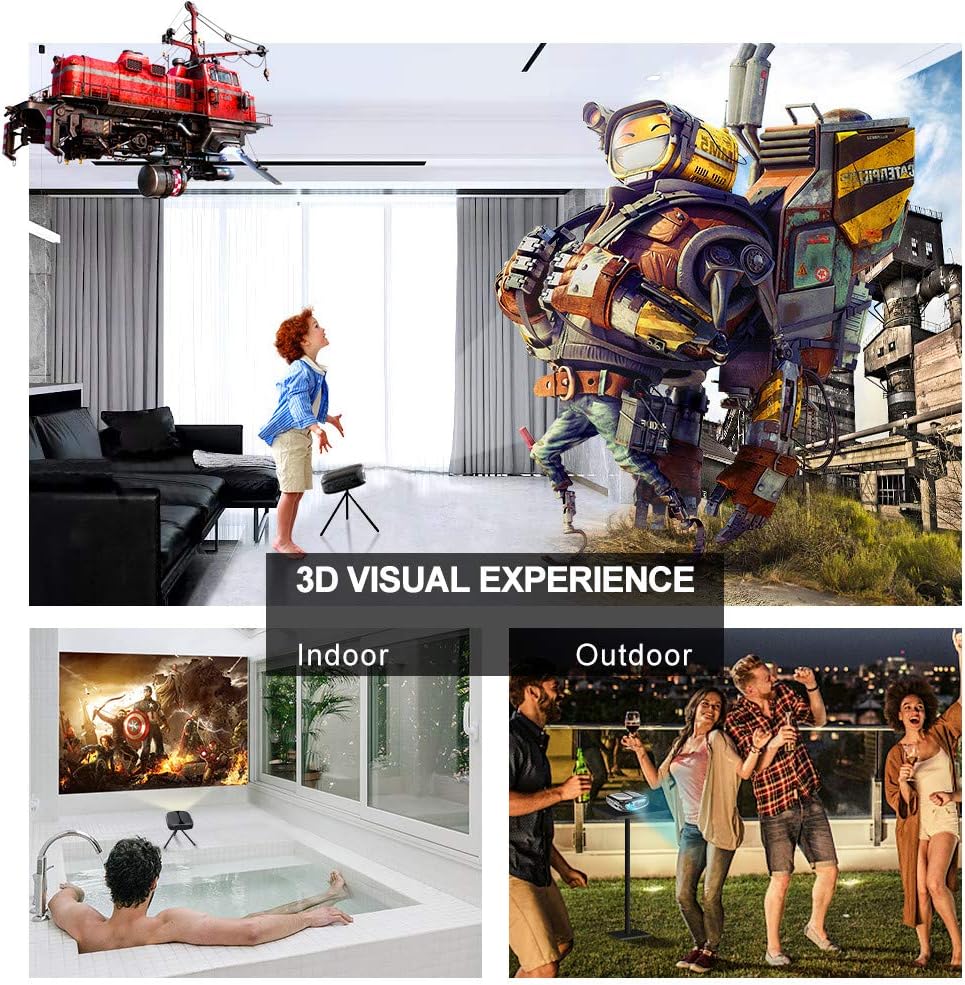
Image: 3D Visual Experience. The projector offers immersive 3D viewing for both indoor and outdoor settings.
5.5 Battery Operation and Portability
The built-in battery provides approximately two hours of continuous video playback, offering flexibility for use without a constant power source. For extended use, the projector can also be charged via a power bank.

Image: Embedded Battery for Portable Use. The projector's battery allows for convenient outdoor entertainment.

Image: Pocket Size and Lightweight Design. The projector's compact form factor makes it highly portable.
6. Penyelenggaraan
6.1 Membersihkan Lensa
Gently wipe the projector lens with a soft, lint-free cloth specifically designed for optical surfaces. Do not use abrasive cleaners or harsh chemicals.
6.2 Pembersihan Am
Use a soft, dry cloth to clean the projector's casing. For stubborn dirt, a slightly damp cloth can be used, followed by a dry cloth. Ensure no liquid enters the device.
6.3 Penyimpanan
When not in use for extended periods, store the projector in a cool, dry place, away from direct sunlight and extreme temperatures. Use the provided carrying bag for protection against dust and physical damage.
7. Penyelesaian masalah
- Tiada Kuasa:
- Ensure the power adapter is securely connected to both the projector and a working power outlet.
- Periksa sama ada suis kuasa berada dalam kedudukan 'ON'.
- Sahkan alur keluar kuasa berfungsi.
- Tiada gambar:
- Check the input source selection on the projector to ensure it matches your connected device (e.g., HDMI, USB).
- Verify that the connected device is powered on and outputting a signal.
- Pastikan semua kabel disambungkan dengan selamat.
- Imej Kabur:
- Laraskan gelang fokus pada projektor sehingga imej tajam.
- Pastikan permukaan projektor rata dan projektor berada pada jarak yang sesuai.
- Tiada Bunyi:
- Periksa tetapan kelantangan pada kedua-dua projektor dan peranti sumber yang disambungkan.
- Jika menggunakan pembesar suara luaran, pastikan ia disambungkan dengan betul dan dihidupkan.
- Verify that the audio output settings on your source device are correct.
- Wi-Fi/Screen Mirroring Issues:
- Ensure both the projector and your smart device are connected to the same Wi-Fi network.
- Check for strong Wi-Fi signal strength.
- Restart both the projector and your smart device.
- Ensure your smart device's operating system is up to date.
8. Spesifikasi
| Ciri | Spesifikasi |
|---|---|
| Model | RD-606 |
| Teknologi Paparan | DLP |
| Kecerahan Imej | 2600 Lumen |
| Nisbah Kontras Imej | 1000:1 |
| Resolusi Asli | 1920 x 1080 (Supports 1080P) |
| Ciri Khas | Auto Keystone, HDMI Connectivity, Portable, Built-in Wi-Fi, 3D Ready |
| Teknologi Ketersambungan | HDMI, USB, Wi-Fi |
| Peranti Serasi | Laptops, Smartphones, Media Players |
| Jenis Bateri | Litium Ion (1 termasuk) |
| Hayat Bateri | Approx. 2 hours video playback |
| Dimensi Produk | 9.91 x 10.67 x 4.06 cm |
| Berat Barang | 793.79 g (0.66 lb) |
| Jenis Pemasangan | Pemasangan Atas Meja |
9. Waranti dan Sokongan
ELEPHAS provides lifetime professional customer service and technical support for the RD-606 Mini Projector. If you encounter any issues or have questions regarding your product, please do not hesitate to contact our support team.
Maklumat Hubungan:
- e-mel: support@elephas.com.hk
Please have your product model number (RD-606) and purchase details ready when contacting support to facilitate a quicker resolution.