
auna 388-BT
auna 388-BT Stereo System
Manual Pengguna
Arahan Keselamatan Penting
Please read these instructions carefully before operating the unit and retain them for future reference. Adhere to all warnings and instructions provided with the product.
- Sumber Kuasa: Sambungkan unit hanya kepada bekalan kuasa daripada jenis yang diterangkan dalam arahan pengendalian atau seperti yang ditandakan pada perkakas.
- Pengudaraan: Pastikan pengudaraan yang betul. Jangan sekat sebarang bukaan pengudaraan. Pasang mengikut arahan pengilang.
- Air dan Kelembapan: Jangan gunakan radas ini berhampiran air atau dalam damp persekitaran.
- Pembersihan: Clean only with a dry cloth. Unplug the unit from the wall outlet before cleaning.
- haba: Jangan pasang berhampiran mana-mana sumber haba seperti radiator, daftar haba, dapur, atau radas lain (termasuk amppenghidup) yang menghasilkan haba.
- Perlindungan Kord Kuasa: Lindungi kord kuasa daripada berjalan atau tersepit, terutamanya pada palam, bekas kemudahan dan tempat keluar dari radas.
- Servis: Jangan cuba servis sendiri produk ini kerana membuka atau menanggalkan penutup boleh mendedahkan anda kepada vol berbahayatage atau bahaya lain. Rujuk semua servis kepada kakitangan perkhidmatan yang berkelayakan.
- Objek dan Kemasukan Cecair: Jangan sekali-kali menolak objek dalam apa jua bentuk ke dalam produk ini melalui bukaan kerana ia boleh menyentuh vol berbahayatagmata e atau bahagian pendek yang boleh mengakibatkan kebakaran atau kejutan elektrik. Jangan sekali-kali menumpahkan sebarang jenis cecair pada produk.
Produk Selesaiview
The auna 388-BT is a versatile stereo system designed to play various audio formats, including vinyl records, CDs, cassette tapes, and digital audio via USB, SD card, and Bluetooth. It features an integrated FM radio tuner and includes two external speakers for stereo sound.

Rajah 1: Depan view of the auna 388-BT stereo system with turntable, main unit, and two external speakers.
Komponen Utama:
- Unit Utama: Houses the turntable, CD player, cassette decks, radio tuner, and control panel.
- External Speakers (x2): Provide stereo audio output.
- Kawalan Jauh: Untuk memudahkan operasi dari jauh.
- Penutup habuk: Protects the turntable from dust.
Front Panel Controls and Features:

Rajah 2: Terperinci view of the main unit's front panel, showing the display, control buttons, and input ports.
- Butang Kuasa: Menghidupkan atau mematikan unit.
- Function/Source Selector: Switches between Phono/BT, Tape, CD/USB/SD, and Tuner modes.
- Kawalan Kelantangan: Adjusts the overall audio output level.
- Paparan LCD: Menunjukkan mod semasa, maklumat trek, frekuensi radio, dsb.
- Port USB: Untuk menyambung pemacu kilat USB.
- Slot Kad SD/MMC: For inserting SD or MMC memory cards.
- Bicu Fon Kepala (3.5mm): Untuk mendengar secara peribadi.
- Dulang CD: For inserting audio CDs and MP3-CDs.
- Cassette Decks (Deck 1 & Deck 2): Untuk memainkan dan merakam pita kaset.
- Kawalan Main Semula: Play, Pause, Stop, Fast Forward, Rewind, Skip Track.
- Butang Rekod: Initiates recording to cassette or USB.
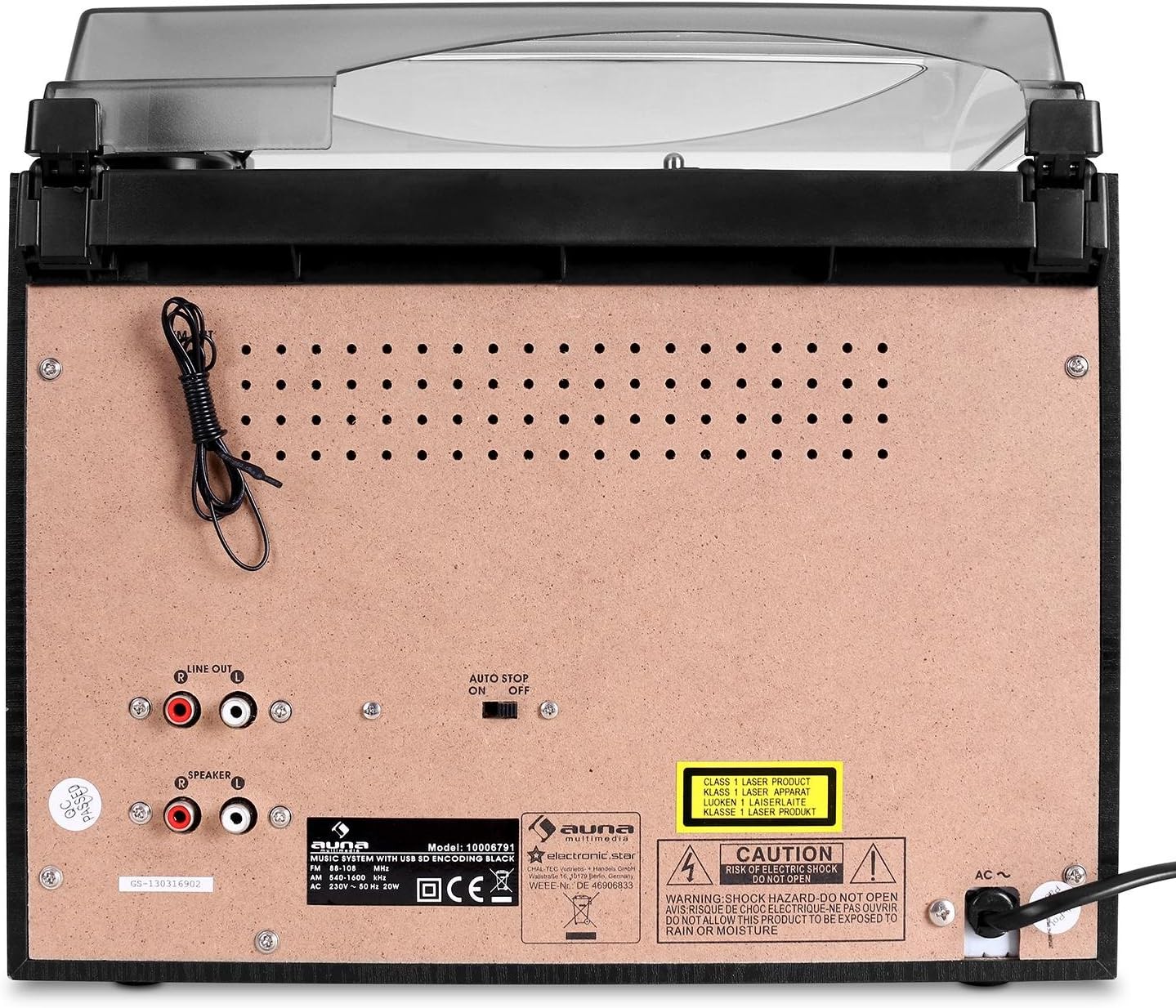
Sambungan Panel Belakang:

Figure 3: Rear panel of the main unit, displaying speaker outputs, line out, and power input.
- Speaker Outputs (RCA): Connect the included external speakers.
- Garis Keluar (RCA): Untuk menyambung ke luaran amppembesar atau pembesar suara berkuasa.
- Antena FM: Integrated wire antenna for radio reception.
- Input Kuasa AC: Sambungkan kord kuasa.
- Suis Berhenti Automatik: For turntable auto-stop function.
Persediaan
1. Membongkar dan Meletakkan:
- Keluarkan semua komponen dari pembungkusan dengan berhati-hati.
- Place the main unit on a stable, flat surface, away from direct sunlight, heat sources, and excessive dust or moisture.
- Pastikan terdapat ruang yang mencukupi di sekeliling unit untuk pengudaraan.
2. Menyambung Pembesar Suara:
The auna 388-BT comes with two external speakers. Connect them to the main unit using the provided speaker cables.

Rajah 4: Belakang view of the external speakers, showing the integrated audio cables for connection to the main unit.
- Locate the RCA speaker output jacks on the rear of the main unit.
- Connect the RCA plugs from the speaker cables into the corresponding speaker output jacks (Left and Right) on the main unit.
- Position the speakers to the left and right of the main unit for optimal stereo separation.
3. Sambungan Kuasa:
- Ensure the unit's power switch is in the "OFF" position.
- Plug the AC power cord into the AC power input on the rear of the main unit.
- Plug the other end of the power cord into a standard AC wall outlet (230V, 50Hz).
Arahan Operasi
Operasi Am:
- Hidupkan/Mati Kuasa: Tekan ke KUASA butang pada panel hadapan atau alat kawalan jauh untuk menghidupkan atau mematikan unit.
- Pelarasan Kelantangan: Putar JILID tombol pada panel hadapan atau gunakan VOL + / VOL- butang pada alat kawalan jauh.
- Pemilihan Sumber: Tekan ke FUNGSI button repeatedly on the front panel or use the dedicated source buttons on the remote control (PHONO/BT, TAPE, CD/USB/SD, TUNER) to select the desired audio source.
Operasi Meja Putar:
- Angkat penutup habuk.
- Letakkan rekod vinil pada pinggan meja putar.
- Select the appropriate speed (33 or 45 RPM) using the speed selector switch. For 45 RPM records, place the included adapter on the spindle.
- Move the tone arm from its rest and gently place the stylus on the desired groove of the record. The platter will start spinning automatically.
- To stop playback, lift the tone arm and return it to its rest. The platter will stop spinning.
- The AUTO BERHENTI switch on the rear panel controls whether the turntable stops automatically at the end of a record.
Operasi Pemain CD:
- Tekan ke CD/USB/SD butang untuk memilih mod CD.
- Tekan ke BUKA/TUTUP butang untuk membuka dulang CD.
- Place a CD (audio CD or MP3-CD) with the label side facing up into the tray.
- Tekan BUKA/TUTUP again to close the tray. The unit will read the disc and begin playback automatically.
- Gunakan MAIN/JEDA, BERHENTI, Langkau ke Hadapan, dan SKIP KE BELAKANG butang untuk kawalan main balik.
- Main Program: Refer to the detailed instructions in the full manual for programming specific track orders.
Cassette Player/Recorder Operation:
- Tekan ke PITA button to select cassette mode.
- Open the cassette deck door (Deck 1 or Deck 2) and insert a cassette tape.
- Gunakan kawalan main balik (BERMAIN, BERHENTI/EJECT, CEPAT KE HADAPAN, REWIND) to control tape playback.
- Rakaman: To record from the radio or turntable to a cassette, select the desired source (TUNER or PHONO), then press the REKOD button on the cassette deck. Ensure a blank tape is inserted.
- High-Speed Dubbing: Use Deck 1 for playback and Deck 2 for recording to dub tapes at high speed.
Radio (FM) Operation:
- Tekan ke TUNER button to select radio mode.
- Extend the FM wire antenna on the rear of the unit for better reception.
- Gunakan MENALA tombol atau TUNE+ / TUNE- butang pada alat kawalan jauh untuk menala stesen secara manual.
- Imbasan Auto: Tekan dan tahan butang MAIN/JEDA button (or similar on remote) to automatically scan and save available stations.
Operasi Bluetooth:
- Tekan ke PHONO/BT butang untuk memilih mod Bluetooth. Paparan akan menunjukkan "BT" dan berkelip, menunjukkan ia berada dalam mod berpasangan.
- Enable Bluetooth on your external device (smartphone, tablet, etc.) and search for "auna 388-BT" or similar.
- Select the unit from the list of available devices to pair. Once connected, the "BT" indicator will stop flashing.
- You can now play audio from your Bluetooth device through the stereo system. Use your device's controls for playback.
USB/SD Playback and Digitalization:
Rajah 5: Terperinci view of the USB port and SD/MMC card slot on the front panel.
- Masukkan pemacu kilat USB ke dalam port USB atau kad SD/MMC ke dalam slot kad.
- Tekan ke CD/USB/SD button to select USB or SD mode. The unit will automatically detect and begin playing MP3 files.
- Gunakan kawalan main balik untuk menavigasi trek.
- Digitalization (Recording to USB/SD):
- Select the source you wish to record from (Turntable, CD, or Radio).
- Ensure a USB drive or SD card is inserted.
- Begin playback of the source material.
- Tekan ke REKOD button on the main unit. The recording indicator will light up.
- Tekan REKOD again to stop recording. The recorded audio will be saved as an MP3 file on the USB drive or SD card.
Penyelenggaraan
- Membersihkan Unit:
- Sentiasa cabut plag unit daripada salur keluar kuasa sebelum membersihkan.
- Gunakan kain lembut dan kering untuk mengelap permukaan luar.
- Jangan gunakan pembersih, lilin atau pelarut yang melelas kerana ia boleh merosakkan kemasan.
- Penjagaan Stylus:
- Gently clean the stylus tip periodically with a soft brush, brushing from back to front.
- Elakkan daripada menyentuh stylus dengan jari anda.
- Replace the stylus when sound quality deteriorates or if the stylus is visibly damaged.
- Penutup habuk: Pastikan penutup habuk ditutup apabila meja putar tidak digunakan untuk mengelakkan pengumpulan habuk.
- Penjagaan CD/Kaset: Handle CDs and cassettes by their edges. Store them in their cases to prevent scratches and dust.
Menyelesaikan masalah
| Masalah | Kemungkinan Punca | Penyelesaian |
|---|---|---|
| Tiada kuasa | Kord kuasa tidak disambungkan; Salur keluar kuasa tidak aktif. | Ensure power cord is securely plugged in. Check if the power outlet is working. |
| Tiada suara dari pembesar suara | Volume too low; Speakers not connected; Incorrect source selected. | Increase volume. Check speaker connections to the main unit. Select the correct audio source. |
| Turntable not spinning or distorted sound | Speed setting incorrect; Stylus dirty or damaged; Auto Stop switch off. | Check if 33/45 RPM switch matches the record. Clean or replace stylus. Ensure Auto Stop switch is set correctly. |
| CD melangkau atau tidak dimainkan | CD kotor atau tercalar; CD dimasukkan dengan salah. | Clean the CD with a soft cloth. Ensure the CD is inserted label-side up. Try another CD. |
| Bluetooth tidak bersambung | Unit not in pairing mode; Device too far; Bluetooth disabled on external device. | Ensure unit is in Bluetooth pairing mode (BT flashing). Move device closer. Enable Bluetooth on your device. |
| USB/SD not recognized or playing | tak betul file format; USB/SD card corrupted; Card inserted incorrectly. | pastikan files are MP3 format. Try reformatting the USB/SD card (backup data first). Reinsert the card correctly. |
Spesifikasi
| Jenama: | auna |
| model: | 388-BT |
| Bekalan Kuasa: | AC 230V, 50Hz |
| Penggunaan Kuasa: | 25W |
| Main Unit Dimensions (W x H x D): | 31.8 x 28.5 x 28.5 cm |
| Speaker Dimensions (W x H x D): | 14.7 x 22.5 x 14.2 cm |
| Berat Unit Utama: | lebih kurang 3.8 kg |
| Speaker Weight (each): | lebih kurang 950 g |
| Ketersambungan: | Bluetooth, USB, SD/MMC, Stereo RCA Line In, Stereo RCA Line Out, 3.5mm Headphone Jack |
| Media yang Disokong: | Vinyl Records (33/45 RPM), Audio CD, MP3-CD, Cassette Tapes, MP3 (USB/SD) |
| Kuasa Keluaran Pembesar Suara: | 2 x 5W / 4 ohms |
| Digitalization Format: | MP3 (128 kbps, 44.1 kHz) |
Waranti dan Sokongan
This product is covered by a manufacturer's warranty. Please refer to the warranty card included with your purchase or contact your retailer for specific warranty terms and conditions.
For technical support or service inquiries, please contact the auna customer service department or your local distributor. Contact information can typically be found on the manufacturer's webtapak atau dokumentasi pembelian anda.
Ask a question about this manual
Ask about setup, troubleshooting, compatibility, parts, safety, or missing instructions. Manuals+ will review the question and use this page’s manual context to help answer it.