
1. Pengenalan
Thank you for choosing the OneDer V12 4.2 Bluetooth Speaker. This manual provides essential instructions for setting up, operating, and maintaining your speaker. Please read it carefully before use to ensure optimal performance and longevity of your device.
2. Kandungan Pakej
Sahkan bahawa semua item terdapat dalam pakej anda:
- OneDer V12 Bluetooth Speaker
- Kabel Pengecas USB Mikro
- Manual Pengguna (dokumen ini)
- Kantung Pelindung
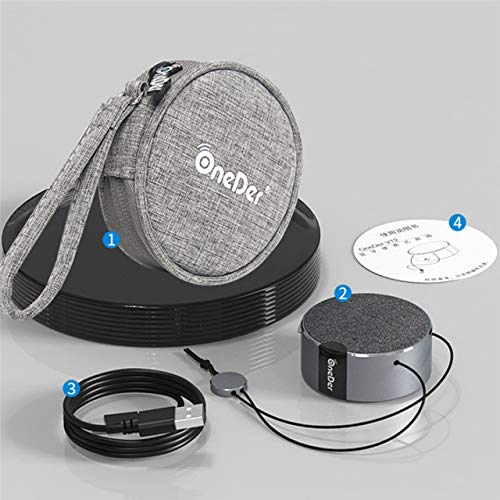
Rajah 2.1: The OneDer V12 speaker, micro USB cable, and protective pouch included in the package.
3. Produk Lebihview
The OneDer V12 is a compact and portable Bluetooth speaker designed for wireless audio playback and hands-free calling. It features a durable metal construction and a convenient lanyard for portability.

Rajah 3.1: Atas ke bawah view of the OneDer V12 Bluetooth Speaker, showcasing its compact design and integrated lanyard.
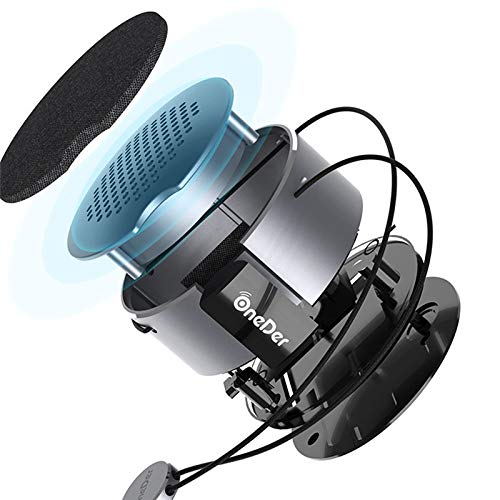
Rajah 3.2: An exploded diagram illustrating the internal components and construction of the OneDer V12 speaker.
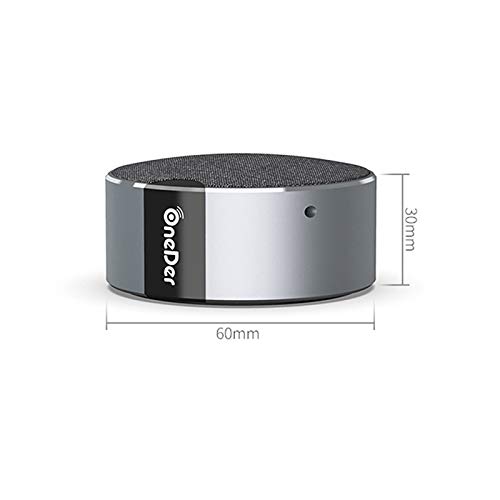
Rajah 3.3: Diagram showing the compact dimensions of the OneDer V12 speaker: 60mm diameter and 30mm height.
4. Persediaan
4.1. Hidupkan kuasa
Press and hold the power button to turn on the speaker. A prompt tone will sound, and the speaker will automatically enter Bluetooth pairing mode, indicated by a rapidly flashing blue light.
4.2. Device Connection (Bluetooth Pairing)
- Ensure the OneDer V12 speaker is powered on and in Bluetooth pairing mode (blue light flashing).
- On your mobile device (smartphone, tablet, or laptop), enable Bluetooth.
- Cari untuk 'OneDer V12' in the list of available Bluetooth devices.
- Select 'OneDer V12' to connect. A prompt tone will confirm successful pairing, and the blue light on the speaker will become solid.
The speaker will automatically disconnect when powered off and attempt to reconnect to the last paired device when powered on again for convenient use.
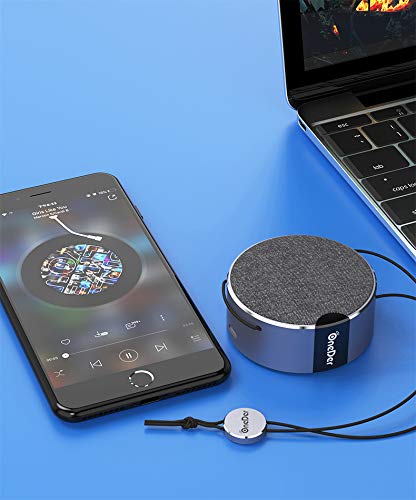
Rajah 4.1: The OneDer V12 speaker connected wirelessly to a smartphone and a laptop, demonstrating its versatile connectivity.
5. Arahan Operasi
5.1. Main semula Bluetooth
When your mobile device is connected to the speaker via Bluetooth, you can control media playback (e.g., play, pause, skip tracks) directly from your mobile device. The speaker acts as the audio output.
5.2. Fungsi TWS (True Wireless Stereo).
The TWS function allows you to pair two OneDer V12 speakers together for a stereo audio experience.
5.2.1. TWS Berpasangan
- Ensure both OneDer V12 speakers are powered on and in Bluetooth pairing mode.
- Short press the Power Button on sama ada speaker. The speakers will interconnect, and a prompt tone will sound. The blue lights on both speakers will become solid.
- On your mobile device, search for 'OneDer V12' in the Bluetooth device list and connect. Audio will now play in stereo through both speakers.
5.2.2. TWS Disconnection
After two speakers are successfully paired in TWS mode, short press the Power Button on sama ada speaker again. A prompt tone will indicate that the speakers have disconnected from TWS mode.
5.3. Calling Function
The OneDer V12 speaker includes a built-in microphone for hands-free calling when connected to your mobile device.
- Menjawab Panggilan: When the speaker is connected via Bluetooth and a call is received, a prompt tone will sound. Short press the power button to answer the call.
- Menamatkan Panggilan: During a call, short press the power button again to end the call.
- Menolak Panggilan: When an incoming call is received, press and hold the power button for approximately 2 seconds to reject the call.
6. Spesifikasi
| Ciri | Penerangan |
|---|---|
| Nama Model | OneDer V12 4.2 |
| Jenama | OneDer |
| Teknologi Ketersambungan | Bluetooth 4.2, Tanpa Wayar |
| Ciri Khas | Bluetooth speaker with built-in microphone |
| Penggunaan yang Disyorkan | Untuk Telefon Pintar atau Tablet |
| Peranti Serasi | Telefon Pintar, Tablet |
| Sumber Kuasa | Dikuasakan Bateri |
| Berat Barang | 67 Gram |
| bahan | logam |
| Adakah Kalis Air | ya |
| Jenis Pemasangan | Pemasangan Atas Meja |

Rajah 6.1: The OneDer V12 speaker demonstrating its portability, attached to clothing during outdoor activity.
7. Penyelenggaraan
To ensure the longevity and optimal performance of your OneDer V12 speaker, follow these maintenance guidelines:
- Pembersihan: Use a soft, dry cloth to clean the speaker's exterior. Avoid using abrasive cleaners, solvents, or harsh chemicals.
- Storan: Store the speaker in a cool, dry place away from direct sunlight and extreme temperatures. Use the provided protective pouch when not in use or during travel.
- Penjagaan Bateri: To preserve battery life, avoid fully discharging the speaker frequently. Charge the speaker regularly, even if not in use for extended periods.
- Tahan Air: While the speaker is waterproof, avoid prolonged submersion in water. Ensure the charging port cover is securely closed before exposure to water.
8. Penyelesaian masalah
If you encounter issues with your OneDer V12 speaker, refer to the following common troubleshooting steps:
- Speaker tidak menghidupkan: Ensure the battery is charged. Connect the speaker to a power source using the micro USB cable and try again.
- Tidak boleh berpasangan dengan peranti Bluetooth:
- Ensure the speaker is in pairing mode (blue light flashing).
- Pastikan Bluetooth didayakan pada peranti mudah alih anda.
- Gerakkan pembesar suara lebih dekat dengan peranti anda.
- Turn off and on both the speaker and your mobile device's Bluetooth.
- Clear the 'OneDer V12' entry from your device's Bluetooth history and attempt to pair again.
- Tiada bunyi atau kelantangan rendah:
- Tingkatkan kelantangan pada kedua-dua pembesar suara dan peranti anda yang disambungkan.
- Pastikan pembesar suara disambungkan dengan betul melalui Bluetooth.
- Check if the speaker's battery is low.
- Gandingan TWS gagal: Ensure both speakers are fully charged and in Bluetooth pairing mode before attempting TWS pairing. Try resetting both speakers by powering them off and on.
9. Waranti dan Sokongan
The OneDer V12 Bluetooth Speaker comes with a standard manufacturer's warranty. Please refer to the warranty card included in your package for specific terms and conditions, including warranty duration and coverage details.
For technical support, troubleshooting assistance beyond this manual, or warranty claims, please contact OneDer customer service through the contact information provided on the product packaging or the official OneDer website. Please have your product model number (V12) and proof of purchase ready when contacting support.