
pengenalan
The Classy Caps SLX772B Oxford Solar Post Cap provides ambient lighting for your outdoor posts. Manufactured from durable cast aluminum with a powder-coated satin finish and a decorative glass lens, this solar light is designed for longevity and performance. It features two high-output surface mount LEDs that emit a warm natural light, automatically illuminating at dusk and turning off at dawn. The design includes adaptors to fit various post sizes, making it a versatile lighting solution for fences, porches, or decks.
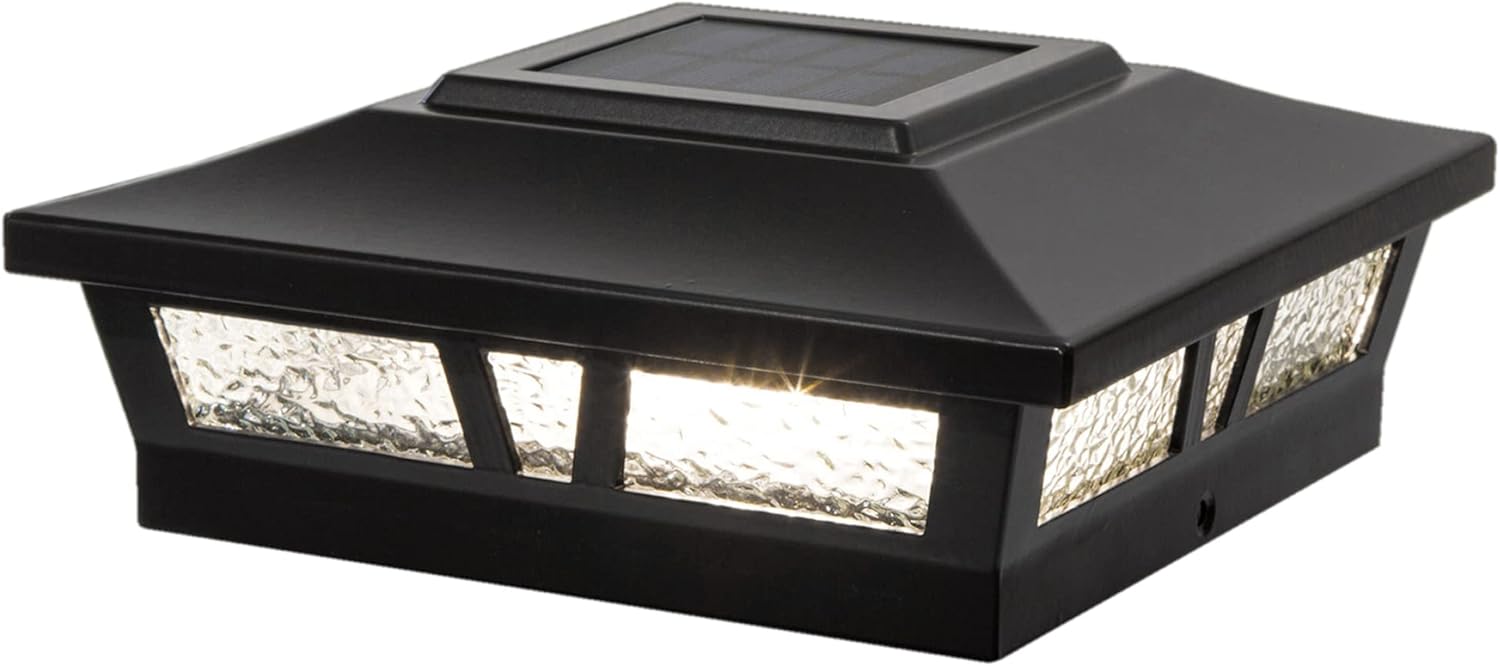
Image: The Classy Caps SLX772B Oxford Solar Post Cap, showcasing reka bentuk dan pencahayaannya.
Ciri-ciri Utama:
- High-performance solar operation, providing light for up to 12 hours on a full charge.
- Automatic dusk-to-dawn illumination with an auto-off switch.
- Equipped with 2 high-output surface mount LEDs for warm natural light (2700-3200 Kelvin).
- Constructed from heavy-duty cast aluminum with a durable powder coat finish.
- Features a real decorative glass lens.
- Includes one long-life AA Ni-MH rechargeable battery.
- Designed to fit over actual 6"x6", 5.5"x5.5", or 5"x5" posts (adaptor included).
- Quick and easy Do-It-Yourself installation.
- Light output: 10 Lumens.
Kandungan Pakej
Sila sahkan bahawa semua komponen hadir sebelum memulakan pemasangan:
- 1 x Classy Caps SLX772B Oxford Solar Post Cap
- 1 x AA Ni-MH Rechargeable Battery (pre-installed or separate)
- Post Size Adaptors (for 5.5"x5.5" and 5"x5" posts)
- Mounting Screws (typically included for securing the base)
Persediaan dan Pemasangan
Follow these steps for proper installation of your solar post cap. Ensure the installation location receives ampcahaya matahari langsung untuk pengecasan optimum.
Langkah Pemasangan:
- Pemasangan Bateri: Carefully remove the top section of the solar post cap to access the battery compartment. Insert the included AA Ni-MH rechargeable battery, ensuring correct polarity.
- Aktifkan Suis: Locate the ON/OFF switch, usually near the battery compartment. Set the switch to the 'ON' position.
- Select Adaptor (if needed): The post cap is designed to fit over an actual 6"x6" post directly. If your post is 5.5"x5.5" or 5"x5", select the appropriate adaptor and place it onto your post.
- Mount the Post Cap: Place the solar post cap (with or without adaptor) onto the top of your post. Secure it in place using the provided mounting screws through the designated holes in the base of the cap.

Image: Step-by-step visual guide for installing the solar post cap.
Post Sizing Compatibility:
The solar post cap is designed to fit over three standard post sizes using the included adaptors:
- Actual 6" x 6" (15.2cm x 15.2cm)
- Actual 5.5" x 5.5" (14cm x 14cm)
- Actual 5" x 5" (12.7cm x 12.7cm)

Image: Post Sizing compatibility chart for the Oxford Solar Post Cap.

Image: The solar post cap securely mounted on a wooden post.
Video Pemasangan:
Video: An official video demonstrating the features and potentially the installation of the Classy Caps SLX772B Oxford Solar Post Cap.
Arahan Operasi
The Classy Caps Oxford Solar Post Cap is designed for simple, automatic operation.
- Pengecasan Automatik: During daylight hours, the integrated solar panel on top of the cap absorbs sunlight and converts it into electrical energy, which is stored in the rechargeable AA Ni-MH battery.
- Pencahayaan automatik: As dusk approaches, a built-in light sensor detects the decrease in ambient light and automatically turns on the LEDs.
- Matikan automatik: The light will remain illuminated for up to 12 hours or until dawn, at which point the light sensor will detect increasing light levels and automatically turn off the LEDs, initiating the charging cycle again.
- Pembatalan Manual: The ON/OFF switch allows you to manually turn off the light if desired, preventing it from illuminating at night. Ensure the switch is in the 'ON' position for automatic operation.

Image: Visual representation of the solar charging process during the day and automatic illumination at night.
Penyelenggaraan
Regular maintenance ensures optimal performance and extends the lifespan of your solar post cap.
Pembersihan:
- Periodically clean the solar panel and glass lens with a soft, damp kain untuk mengeluarkan habuk, kotoran atau serpihan. Panel solar yang bersih memastikan pengecasan yang cekap.
- Avoid using abrasive cleaners or harsh chemicals, as these can scratch the surface or damage the solar panel.
Penggantian Bateri:
- The included AA Ni-MH rechargeable battery has a long lifespan, but its capacity will diminish over time. If the light duration significantly decreases, it may be time to replace the battery.
- To replace, carefully remove the top section of the post cap to access the battery compartment. Replace the old battery with a new, high-quality AA Ni-MH rechargeable battery. Ensure correct polarity.
- Buang bateri lama mengikut peraturan tempatan.
Menyelesaikan masalah
If your solar post cap is not functioning as expected, try the following solutions:
| Masalah | Kemungkinan Punca | Penyelesaian |
|---|---|---|
| Lampu tidak menyala pada waktu malam. | 1. ON/OFF switch is in 'OFF' position. 2. Cahaya matahari yang tidak mencukupi untuk mengecas. 3. Battery is not properly connected or is depleted/faulty. 4. Panel solar kotor. | 1. Ensure the switch is in the 'ON' position. 2. Pindahkan lampu ke kawasan yang mendapat cahaya matahari langsung selama 6-8 jam setiap hari. 3. Check battery connection. Replace battery if old or not holding a charge. 4. Bersihkan panel solar. |
| Cahaya malap atau hanya menyala untuk masa yang singkat. | 1. Pengecasan tidak mencukupi disebabkan oleh cuaca mendung atau teduh. 2. Kapasiti bateri telah berkurangan dari semasa ke semasa. | 1. Allow several sunny days for a full charge. Ensure no obstructions are shading the panel. 2. Replace the rechargeable AA Ni-MH battery. |
| Cahaya berkelip-kelip. | Loose battery connection or internal wiring issue. | Periksa sambungan bateri. Jika masalah berterusan, hubungi khidmat pelanggan. |
Spesifikasi
| Ciri | Perincian |
|---|---|
| Nombor Model | SLX772B |
| Dimensi Produk | 7.5 x 7.5 x 2.8 inci (19 x 19 x 7.1 cm) |
| Berat Barang | 1 paun (0.45 kg) |
| Output Cahaya | 10 Lumen |
| Suhu Warna | 2700-3200 Kelvin (Warm Natural Light) |
| LED | 2 High output surface mount LEDs |
| Bateri | 1 x AA Ni-MH Rechargeable Battery (included) |
| bahan | Durable Cast Aluminum, Decorative Glass Lens |
| Post Compatibility | Fits over actual 6"x6", 5.5"x5.5", or 5"x5" posts (adaptor included) |
| Masa Operasi | Sehingga 12 jam dengan cas penuh |

Image: Detailed dimensions of the Oxford Solar Post Cap.
Maklumat Waranti
This Classy Caps SLX772B Oxford Solar Post Cap comes with a Waranti 1 Tahun from the date of purchase. This warranty covers defects in materials and workmanship under normal use. Please retain your proof of purchase for any warranty claims. The warranty does not cover damage caused by improper installation, misuse, abuse, or natural disasters.

Image: Warranty seal indicating a 1-year warranty period.
Sokongan Pelanggan
For further assistance, technical support, or warranty inquiries, please contact Classy Caps customer service. Refer to the product packaging or the official Classy Caps webtapak untuk maklumat hubungan terkini.
Sumber Dalam Talian: You may find additional information, FAQs, and support resources on the official Classy Caps webtapak.