
1. Pengenalan
Thank you for choosing the Hoco E30 Wireless Earphone. This manual provides essential information for setting up, operating, and maintaining your earphone. Please read it carefully before use to ensure optimal performance and longevity of your device.
2. Maklumat Keselamatan
To prevent damage to your device or injury to yourself and others, please observe the following safety precautions:
- Elakkan pendedahan berpanjangan kepada paras volum tinggi untuk mengelakkan kerosakan pendengaran.
- Do not use the earphone while driving or in situations where you need to be aware of your surroundings.
- Jauhkan peranti daripada air, kelembapan dan suhu yang melampau.
- Do not attempt to disassemble, repair, or modify the earphone. This will void the warranty.
- Gunakan hanya kabel dan penyesuai pengecasan yang disediakan atau diperakui.
- Jauhkan daripada kanak-kanak dan haiwan peliharaan.
3. Kandungan Pakej
Sila tandai kotak untuk item berikut:
- Hoco E30 Wireless Earphone
- Kabel Pengecas USB
- Manual Pengguna
4. Produk Lebihview
Familiarize yourself with the components of your Hoco E30 Wireless Earphone:

Rajah 4.1: sebelah view of the Hoco E30 Wireless Earphone, highlighting its sleek design and ear hook.

Rajah 4.2: The Hoco E30 Wireless Earphone positioned next to a smartphone, illustrating its compact size and wireless connectivity.
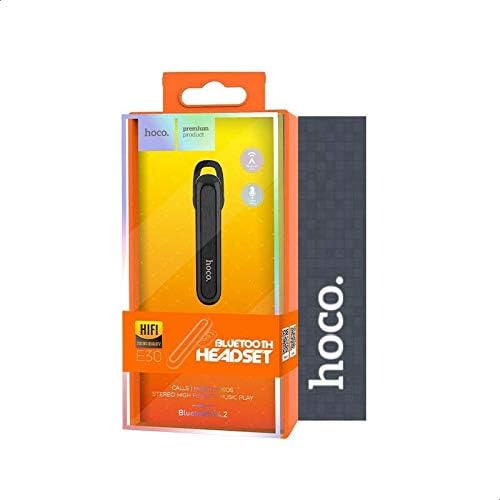
Rajah 4.3: The retail packaging for the Hoco E30 Wireless Earphone, displaying branding and key features.
5. Persediaan
5.1 Mengecas Fon Telinga
Before first use, fully charge your Hoco E30 earphone.
- Connect the provided USB charging cable to the charging port on the earphone.
- Connect the other end of the USB cable to a DC 5V power source (e.g., a USB wall adapter or computer USB port).
- Lampu penunjuk pengecasan akan menyala.
- Charging typically takes approximately 2 hours. The indicator light will change or turn off once charging is complete.
5.2 Berpasangan dengan Peranti
To connect your Hoco E30 earphone to your smartphone or other Bluetooth-enabled device:
- Ensure the earphone is fully charged and turned off.
- Tekan dan tahan butang berbilang fungsi pada fon telinga sehingga lampu penunjuk berkelip merah dan biru secara berselang-seli, menunjukkan ia berada dalam mod berpasangan.
- Pada peranti anda, dayakan Bluetooth dan cari peranti yang tersedia.
- Select "Hoco E30" from the list of found devices.
- Once paired, the indicator light on the earphone will flash blue slowly, and you will hear a confirmation tone.
- The earphone has a transmission range of up to 10 meters (33 feet).
6. Arahan Operasi
6.1 Hidupkan/Mati Kuasa
- Hidupkan kuasa: Press and hold the multi-function button for approximately 3 seconds until the blue indicator light flashes and you hear a power-on tone.
- Matikan: Press and hold the multi-function button for approximately 5 seconds until the red indicator light flashes and you hear a power-off tone.
6.2 Pengurusan Panggilan
- Jawab Panggilan: Briefly press the multi-function button when an incoming call rings.
- Tamatkan Panggilan: Briefly press the multi-function button during a call.
- Tolak Panggilan: Press and hold the multi-function button for 2 seconds when an incoming call rings.
- Dail Semula Nombor Terakhir: Tekan dua kali butang berbilang fungsi apabila tidak dalam panggilan.
6.3 Main balik Muzik
- Main/Jeda: Briefly press the multi-function button to play or pause music.
- Lagu Seterusnya: Press and hold the multi-function button for 2 seconds to skip to the next track.
- Trek Sebelumnya: Press and hold the multi-function button for 2 seconds (during playback) to go to the previous track.
Note: The Hoco E30 supports A2DP and AVRCP protocols for high-quality audio streaming and remote control. Volume control is typically managed via the connected device.
6.4 Battery Status Display
The Hoco E30 earphone supports battery level display on compatible Apple iOS devices and some Android smartphones. Check your device's notification bar or Bluetooth settings for this feature.
7. Penyelenggaraan
- Pembersihan: Use a soft, dry cloth to clean the earphone. Do not use harsh chemicals or abrasive materials.
- Storan: Simpan fon telinga di tempat yang sejuk dan kering, jauh daripada cahaya matahari langsung dan suhu yang melampau.
- Penjagaan Bateri: To prolong battery life, avoid fully discharging the earphone frequently. Charge it regularly, even if not in use for extended periods.
8. Penyelesaian masalah
If you encounter issues with your Hoco E30 earphone, try the following solutions:
| Masalah | Penyelesaian |
|---|---|
| Fon telinga tidak boleh dihidupkan. | Ensure the earphone is fully charged. Connect it to a power source and try again. |
| Tidak boleh berpasangan dengan peranti. |
|
| Tiada bunyi atau kualiti bunyi yang buruk. |
|
| Mengecas tidak berfungsi. |
|
9. Spesifikasi
| Ciri | Perincian |
|---|---|
| Model | E30 |
| Versi Bluetooth | V4.2 WT |
| Protokol yang Disokong | Alat dengar, Bebas tangan, A2DP, AVRCP |
| Julat Penghantaran | 10 meter (33 kaki) |
| Kekerapan Penghantaran | 2.4 GHz |
| Mengecas Voltage | DC 5V |
| Masa Mengecas | lebih kurang 2 jam |
| Kapasiti Bateri | 60 mAh |
| Masa Berbual | lebih kurang 3.5 jam |
| Masa Main semula Muzik | lebih kurang 3.5 jam |
| Masa Tunggu Sedia | lebih kurang 110 jam |
| Berat Produk Bersih | 6 gram |
| Dimensi (L x W x H) | 58mm x 14mm x 25mm |
| bahan | plastik |
| Kaedah Kawalan | Sentuh |
| warna | Hitam dan Perak |
10. Waranti dan Sokongan
Hoco products are designed and manufactured to the highest quality standards. This product is covered by a limited warranty from the date of purchase. Please refer to the warranty card included in your package for specific terms and conditions.
For technical support or warranty claims, please contact your local Hoco distributor or visit the official Hoco weblaman web untuk maklumat lebih lanjut.