
1. Pengenalan
This manual provides detailed instructions for the installation, operation, and maintenance of your HOMELY LC-5 5-Band EQ Guitar Preamp with Tuner and Microphone. Please read this manual thoroughly before using the product to ensure proper function and longevity.
2. Ciri-ciri Produk
- Penyama 5 Band: Adjust Bass, Midd1, Midd2, Treble, and Presence for precise tone shaping.
- Integrated Digital Tuner: Convenient LCD display tuner for accurate guitar tuning.
- Pengambilan Mikrofon: Enhances sound capture, especially for acoustic nuances.
- Kawalan Kelantangan: Master volume adjustment.
- Penunjuk Bateri Rendah: Makluman apabila penggantian bateri diperlukan.
- Kawalan Campuran: Mixes the signal from the piezo pickup and the microphone.

Figure 2.1: The HOMELY LC-5 preamp unit highlighting the LCD display and 5-band equalizer controls.
3. Persediaan dan Pemasangan
Proper installation is crucial for optimal performance. If you are unfamiliar with guitar electronics, professional installation is recommended.
3.1 Komponen Selesaiview
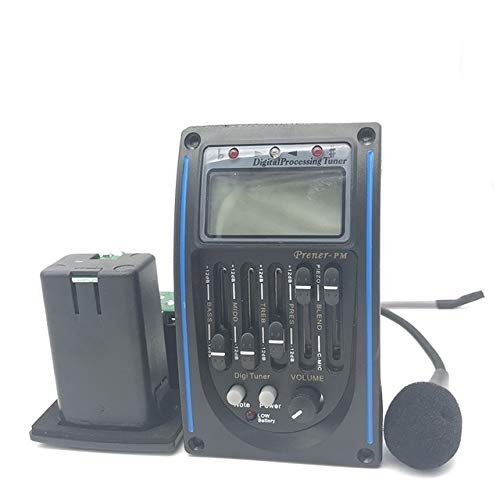
Gambar 3.1: Lebihview of the LC-5 preamp unit, including the main control panel, separate battery compartment, and attached microphone.
3.2 Langkah Pemasangan
- Sediakan Gitar: Carefully cut the necessary openings in your guitar body for the preamp unit and the endpin jack. Ensure precise measurements to avoid damage.
- Install the Preamp Unit: Secure the main preamp control panel into its designated opening.
- Install the Endpin Jack: Mount the endpin jack assembly, which includes the output jack and battery compartment, at the bottom of the guitar.
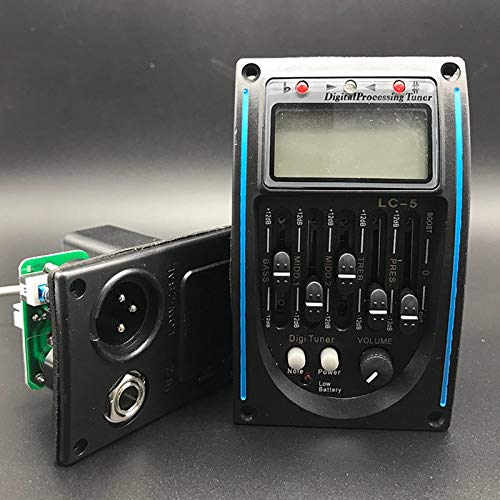
Rajah 3.2: Sisi view of the LC-5 preamp unit, illustrating the output jacks (XLR and 1/4-inch) and the integrated battery compartment.
- Connect the Piezo Pickup: Route the piezo pickup wire from the bridge saddle to the preamp unit and connect it to the designated input.
- Sambungkan Mikrofon: Ensure the attached microphone is positioned correctly inside the guitar body for optimal sound capture.
- Pasang Bateri: Open the battery compartment (usually located within the endpin jack assembly) and insert a 9V battery, observing correct polarity.
- Sambungan Ujian: Before fully securing, connect the guitar to an amplifier and test all functions to ensure proper wiring and operation.
4. Arahan Operasi
Familiarize yourself with the controls for effective sound management.
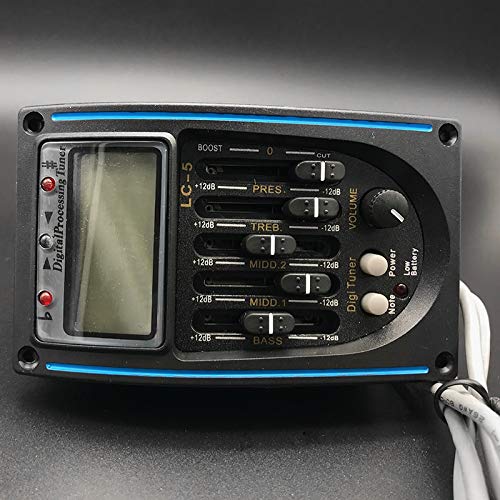
Rajah 4.1: Terperinci view of the LC-5 preamp's control panel, showing the 5-band EQ sliders, volume knob, digital tuner display, and control buttons.
4.1 Hidupkan/Mati Kuasa
Praamp typically powers on automatically when a guitar cable is plugged into the endpin jack. Disconnect the cable to power off and conserve battery life.
4.2 Kawalan Kelantangan
- Tombol VOLUME: Rotate to adjust the overall output level of your guitar. Start with a low setting and gradually increase to avoid sudden loud sounds.
4.3 Penyama 5-Jalur
Use the five slider controls to shape your guitar's tone:
- ASAS: Adjusts low-frequency response (0-80 Hz). Boost for a fuller, warmer sound; cut for clarity.
- MIDD 1 & MIDD 2: Adjusts mid-range frequencies (250 Hz - 2 kHz). These are crucial for the guitar's presence and projection. Experiment to find your desired tone.
- TREB: Adjusts high-frequency response (2 kHz - 20 kHz). Boost for brightness and sparkle; cut to reduce harshness.
- PRES (Kehadiran): Adjusts upper mid-range frequencies (around 3-5 kHz) for added clarity and attack.
4.4 Penala Digital
- DIGI TUNER Button: Press this button to activate the built-in digital tuner. The LCD display will show the note being played.
- tuning: Pluck each string individually. The display will indicate if the note is flat, sharp, or in tune. Adjust your guitar's tuning pegs until the display shows the correct note and indicates it is in tune.
- Note Button: Some models may have a 'Note' button to cycle through different tuning modes (e.g., chromatic, guitar). Refer to the display for current mode.
- Power Button (Tuner): This button typically controls the tuner's power, separate from the main preamp kuasa.
4.5 Blend Control (if applicable)
The "BLEND" slider allows you to mix the signal from the piezo pickup and the internal microphone. Slide towards "PIEZO" for a direct, punchy sound, or towards "MIC" for a more natural, ambient acoustic tone. Adjust to find the desired balance.
4.6 Penunjuk Bateri Rendah
A "LOW BATTERY" LED or indicator on the LCD will illuminate when the 9V battery needs replacement. Replace the battery promptly to ensure consistent performance.
5. Penyelenggaraan
5.1 Penggantian Bateri
When the low battery indicator activates, replace the 9V battery. Open the battery compartment, remove the old battery, and insert a new one, ensuring correct polarity. Always use a fresh alkaline 9V battery.
5.2 Pembersihan
Wipe the preamp's control panel with a soft, dry cloth. Avoid using abrasive cleaners or solvents, as they may damage the finish or electronic components.
5.3 Penyimpanan
When not in use for extended periods, disconnect the guitar cable from the output jack to prevent battery drain. Store the guitar in a stable environment, away from extreme temperatures and humidity.
6. Penyelesaian masalah
- Tiada Keluaran Bunyi:
- Check if the guitar cable is fully inserted into both the guitar's output jack and the amplebih hidup.
- Memastikan amplifier is powered on and its volume is up.
- Sahkan praamp's volume knob is not set to minimum.
- Check the battery. Replace if the low battery indicator is on or if the battery is old.
- Inspect all internal wiring connections (professional inspection recommended).
- Poor Sound Quality / Buzzing / Hum:
- Check for loose connections inside the guitar.
- Ensure the piezo pickup is correctly seated under the bridge saddle.
- Adjust EQ settings; extreme boosts can introduce unwanted noise.
- Test with a different guitar cable and amppenyahkod untuk menolak isu luaran.
- Ensure the microphone is not touching any vibrating parts of the guitar body that could cause feedback.
- Tuner Not Working:
- Ensure the tuner is activated by pressing the "DIGI TUNER" button.
- Periksa tahap bateri.
- Pluck strings firmly and clearly.
- Low Battery Indicator Always On:
- Gantikan bateri 9V dengan yang baharu.
- If the issue persists with a new battery, there might be an internal circuit issue requiring professional service.
7. Spesifikasi
| Model | LC-5 |
| Jenama | HOMELY |
| Band Penyama | 5-Band (Bass, Midd1, Midd2, Treble, Presence) |
| Paparan | LCD Digital Tuner |
| Bekalan Kuasa | Bateri 9V (tidak termasuk) |
| Jenis Pickup | Piezo and Microphone |
8. Waranti dan Sokongan
For warranty information or technical support, please contact HOMELY customer service through their official channels. Keep your purchase receipt as proof of purchase.
Manufacturer: Homely
Date First Available: 26 March 2019