
OneDer V6
Manual Pengguna Pembesar Suara Bluetooth Mudah Alih Tanpa Wayar OneDer V6
Model: V6 | Brand: OneDer
pengenalan
This manual provides comprehensive instructions for the safe and efficient operation of your OneDer V6 Wireless Portable Bluetooth Speaker. The OneDer V6 is a versatile audio device featuring Bluetooth connectivity, an integrated microphone for hands-free calls, and support for various media inputs including TF card, USB drive, AUX, and FM radio. It also includes clock and alarm functions, powered by a rechargeable Li-ion battery.
Please read this manual thoroughly before using the product to ensure proper usage and to maximize its lifespan.
Produk Selesaiview

Rajah 1: Bersudut hadapan view of the OneDer V6 Bluetooth Speaker, showcasing vinnyatage design and front grille.
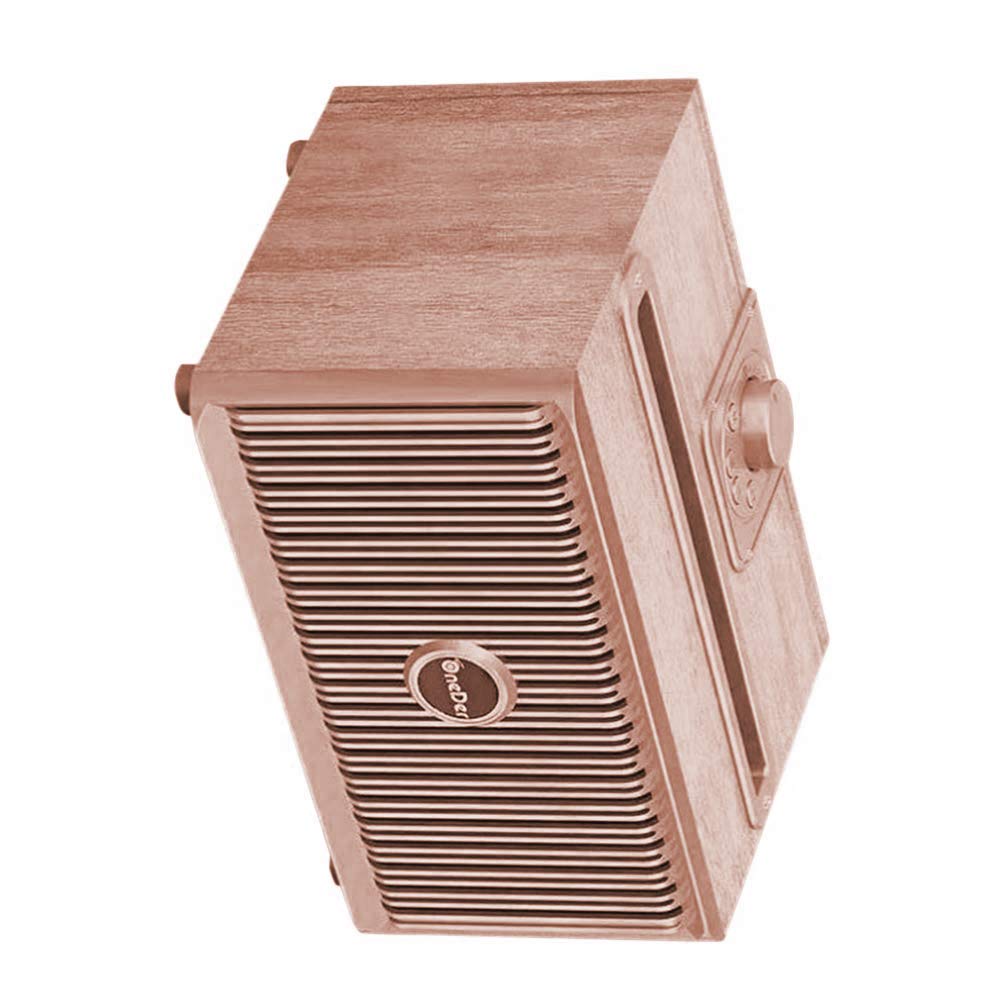
Rajah 2: Bersudut atas ke bawah view of the OneDer V6 Bluetooth Speaker, highlighting the control knob and top slot.
Ciri-ciri Utama:
- Kesambungan Bluetooth Wayarles: Seamlessly connect to your devices.
- Mikrofon Bersepadu: Membolehkan panggilan bebas tangan.
- Multi-Input Support: Play audio from TF Card, USB drive, AUX input, and FM radio.
- Fungsi Jam dan Penggera: Added utility for daily use.
- Bateri boleh dicas semula: Built-in Li-ion battery for portable use.
- Pengecasan USB Mikro: Convenient charging port.
- Masa Main Dilanjutkan: Provides 4-8 hours of audio playback on a single charge.
- Vintage Collection Design: Secara estetikasing reka bentuk.
Kandungan Pakej
Upon opening the package, verify that all items are present and in good condition. The standard package for the OneDer V6 speaker typically includes:
- OneDer V6 Wireless Portable Bluetooth Speaker
- Kabel Pengecas USB Mikro
- Manual Pengguna (dokumen ini)
- (Optional: AUX cable, depending on specific package variant)

Figure 3: The OneDer V6 speaker alongside its retail packaging, demonstrating the product's presentation.
Persediaan
1. Mengisi Speaker
Before first use, fully charge the speaker. Connect the provided Micro USB charging cable to the speaker's charging port and the other end to a USB power adapter (not included) or a computer's USB port. The charging indicator light will illuminate during charging and turn off or change color when fully charged.
Port Pengecasan: USB Mikro
Charging Time: Approximately 2-3 hours (may vary).
2. Menghidupkan/Mematikan
To power on the speaker, press and hold the Power button (location typically on the back or top panel) for a few seconds until you hear an audible prompt or see an indicator light. To power off, repeat the same action.
3. Berpasangan Bluetooth
- Ensure the speaker is powered on and in Bluetooth pairing mode. The Bluetooth indicator light will typically flash rapidly.
- Pada peranti mudah alih anda (telefon pintar, tablet, dll.), dayakan Bluetooth dan cari peranti yang tersedia.
- Select "OneDer V6" from the list of found devices.
- Sebaik sahaja dipasangkan, pembesar suara akan memberikan pengesahan yang boleh didengar dan lampu penunjuk Bluetooth akan menjadi pekat.
- Jika diminta kata laluan, masukkan "0000" (empat sifar).
The speaker will automatically attempt to reconnect to the last paired device when powered on, if that device is within range and has Bluetooth enabled.
Arahan Operasi
1. Mod Bluetooth
After successful pairing, you can play audio from your connected device. Use your device's controls for playback (play/pause, next/previous track) and volume adjustment. The speaker may also have physical buttons for these functions.
Panggilan Bebas Tangan: When a call comes in, press the Play/Pause button to answer. Press again to end the call. Press and hold to reject a call.
2. TF Card / USB Drive Mode
Insert a TF (MicroSD) card or USB flash drive into the corresponding slot on the speaker. The speaker will automatically switch to the appropriate mode and begin playing audio files (MP3, WAV, etc.) stored on the media.
- Gunakan Seterusnya/Sebelumnya butang untuk menavigasi trek.
- Gunakan Main/Jeda butang untuk mengawal main balik.
3. Mod AUX
Connect an external audio device (e.g., MP3 player, laptop) to the speaker's AUX input port using a 3.5mm audio cable (not included). The speaker will automatically switch to AUX mode. Control playback and volume from the connected device.
4. Mod Radio FM
Switch the speaker to FM radio mode (often by pressing a "Mode" button). For best reception, extend the antenna if available, or ensure the charging cable is connected as it can act as an antenna.
- Auto-Imbas: Tekan dan tahan butang Main/Jeda untuk memulakan imbasan automatik untuk stesen FM yang tersedia. Pembesar suara akan menyimpan stesen yang dikesan.
- Lagu: Use the Next/Previous buttons to switch between saved stations.
5. Clock and Alarm Functions
Refer to the specific button layout on your speaker for setting the clock and alarm. Typically, there will be dedicated buttons or a combination of existing buttons used for these functions. Consult the quick start guide often included with the product for precise instructions on setting time and alarms.
Penyelenggaraan
- Pembersihan: Use a soft, dry cloth to clean the speaker's surface. Do not use abrasive cleaners, alcohol, or chemical solvents, as these may damage the finish.
- Storan: Apabila tidak digunakan untuk tempoh yang lama, simpan pembesar suara di tempat yang sejuk dan kering, jauh dari cahaya matahari langsung dan suhu yang melampau.
- Penjagaan Bateri: Untuk memanjangkan hayat bateri, elakkan daripada kerap mencas sepenuhnya bateri. Cas pembesar suara secara berkala, walaupun tidak digunakan, untuk mengekalkan kesihatan bateri.
- Tahan Air: The product is listed as "Is Waterproof: TRUE" in specifications. However, this typically refers to splash resistance (e.g., IPX4) and not full submersion. Avoid exposing the speaker to heavy rain or submerging it in water. Always ensure charging port covers are securely closed if present.
Menyelesaikan masalah
| Masalah | Kemungkinan Punca | Penyelesaian |
|---|---|---|
| Speaker tidak dihidupkan. | Bateri lemah. | Cas pembesar suara sepenuhnya. |
| Tidak boleh berpasangan melalui Bluetooth. | Pembesar suara tidak dalam mod berpasangan; Bluetooth peranti dimatikan; terlalu jauh. | Ensure speaker is in pairing mode. Turn Bluetooth on/off on your device. Move devices closer. |
| Tiada bunyi. | Volume too low; incorrect mode; media issue. | Increase volume on speaker and device. Ensure correct mode (BT, AUX, TF, USB). Check media files. |
| Penerimaan radio FM kurang baik. | Weak signal; no antenna. | Relocate the speaker. Ensure charging cable is connected (acts as antenna). Perform auto-scan again. |
| Speaker freezes or becomes unresponsive. | Gangguan perisian. | Press and hold the Power button for 10-15 seconds to force a restart. If issue persists, allow battery to fully drain then recharge. |
Spesifikasi
| Nama Model | OneDer V6 |
| Jenama | OneDer |
| Jenis Pembesar Suara | Subwufer |
| Ciri Khas | Radio, Subwoofer |
| Penggunaan yang Disyorkan | Luar |
| Peranti Serasi | Telefon Pintar, Tablet |
| warna | Gangsa |
| Hayat Bateri | 8 Jam |
| Kalis air | TRUE (Note: Typically splash resistant, not submersible) |
| Teknologi Ketersambungan | Auxiliary, Bluetooth, USB, Wireless |
| Mod Keluaran Audio | Stereo |
| Jenis Pemasangan | Pemasangan Atas Meja |
| Berat Barang | 1 kg 60 g |
| Dimensi Pakej | 21.4 x 15.6 x 12.9 cm |
Waranti dan Sokongan
Specific warranty information for the OneDer V6 Wireless Portable Bluetooth Speaker is not provided within this manual. For details regarding warranty coverage, return policies, or technical support, please refer to the product packaging, the retailer's website where the product was purchased, or contact OneDer customer service directly.
Adalah disyorkan untuk menyimpan resit pembelian anda sebagai bukti pembelian bagi sebarang tuntutan jaminan.