1. Produk Lebihview
The JOWAY H32 is a wireless Bluetooth earphone designed for audio playback and communication. It features Bluetooth connectivity for seamless pairing with compatible devices, active noise cancellation for an enhanced listening experience, and an in-ear design for comfortable wear.
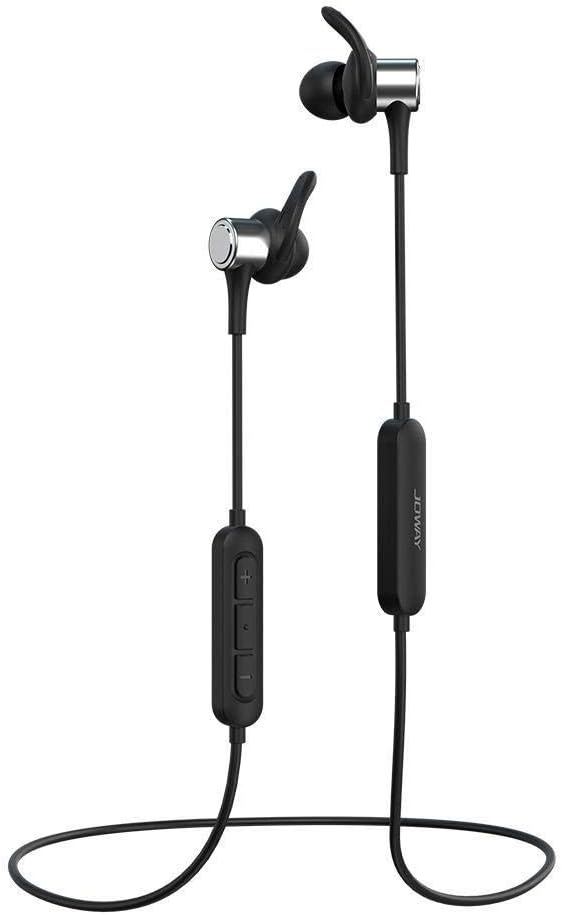
Image 1.1: The JOWAY H32 Bluetooth Earphones, showcasing their in-ear design and inline control panel.
2. Kandungan Pakej
Sila sahkan bahawa semua item terdapat dalam pakej anda:
- JOWAY H32 Bluetooth Earphones
- Kusyen Telinga (pelbagai saiz untuk kesesuaian optimum)
- USB Charging Cable (typically included, for charging the earphones)
- Manual Pengguna (dokumen ini)
3. Persediaan
3.1. Mengecas Fon Telinga
Before first use, fully charge the earphones. Connect the USB charging cable to the charging port on the earphone's inline control panel and plug the other end into a USB power source (e.g., computer USB port, wall adapter). The indicator light will typically show red during charging and turn blue or off when fully charged. A full charge usually takes approximately 1-2 hours.
3.2. Berpasangan Bluetooth
- Pastikan fon telinga dimatikan.
- Press and hold the multi-function button (usually the center button on the inline control) for approximately 5-7 seconds until the indicator light flashes red and blue alternately. This indicates pairing mode.
- Pada peranti anda (telefon pintar, tablet, komputer), dayakan Bluetooth dan cari peranti yang tersedia.
- Select "JOWAY H32" from the list of found devices.
- Once paired, the indicator light on the earphones will typically flash blue slowly or turn off, and you will hear an audible confirmation.
- Jika digesa untuk kata laluan, masukkan "0000".

Image 3.1: The JOWAY H32 earphones featuring the inline control panel for power, volume, and call management.
4. Mengendalikan Fon Telinga
4.1. Fungsi Asas
- Hidupkan kuasa: Tekan dan tahan butang pelbagai fungsi selama 3 saat.
- Matikan: Press and hold the multi-function button for 3-5 seconds.
- Main/Jeda: Tekan butang pelbagai fungsi sekali.
- Kelantangan: Tekan butang '+'.
- Perlahankan suara: Tekan butang '-'.
- Lagu Seterusnya: Tekan dan tahan butang '+'.
- Trek Sebelumnya: Tekan dan tahan butang '-'.
4.2. Pengurusan Panggilan
- Jawab/Tamatkan Panggilan: Tekan butang pelbagai fungsi sekali.
- Tolak Panggilan: Tekan dan tahan butang pelbagai fungsi selama 2 saat.
- Dail Semula Nombor Terakhir: Tekan dua kali butang berbilang fungsi.
4.3. Pembatalan Bunyi
The JOWAY H32 earphones feature active noise cancellation to reduce ambient sounds, providing a clearer audio experience. This function is typically activated automatically or via a dedicated button (refer to specific product markings if available). The DSP (Digital Signal Processing) technology further enhances sound quality.

Image 4.1: The JOWAY H32 earphones, illustrating their advanced sound processing capabilities for an immersive audio experience.

Imej 4.2: Perincian view of the JOWAY H32 earphone's design, showing how the ear tip and ear hanger provide a secure fit and contribute to sound insulation within the ear canal.
5. Penyelenggaraan
5.1. Pembersihan
Regularly clean your earphones to maintain optimal performance and hygiene. Use a soft, dry, lint-free cloth to wipe the exterior. For ear tips, remove them and clean with a mild soap solution, then rinse thoroughly and allow to dry completely before reattaching. Avoid using harsh chemicals or abrasive materials.
5.2. Penyimpanan
When not in use, store the earphones in a cool, dry place, away from direct sunlight and extreme temperatures. Avoid tangling the cable to prevent damage. The cable is designed for durability, as shown in Image 5.1.

Image 5.1: An illustration demonstrating the tensile strength of the JOWAY H32 earphone cable, indicating its robust construction.
6. Penyelesaian masalah
If you encounter issues with your JOWAY H32 earphones, refer to the following common solutions:
- Tiada Kuasa: Pastikan fon telinga dicas sepenuhnya. Sambungkannya ke sumber kuasa dan periksa penunjuk pengecasan.
- Tidak boleh berpasangan: Make sure the earphones are in pairing mode (flashing red and blue). Turn off and on your device's Bluetooth. Ensure the earphones are within range (typically 10 meters) and not connected to another device.
- Tiada Bunyi: Check the volume level on both the earphones and your connected device. Ensure the earphones are properly paired and connected. Try playing audio from a different application or device.
- Kualiti Bunyi Lemah: Ensure the earphones are fully charged. Move closer to your connected device to reduce interference. Check for any physical obstructions between the earphones and the device.
7. Spesifikasi
| Jenama | JOWAY |
| Nombor Model | H32 |
| Teknologi Ketersambungan | Wayarles (Bluetooth) |
| Penempatan Telinga | On Ear (In-Ear design with ear hangers) |
| Faktor Bentuk | Di Telinga |
| Kawalan Bunyi | Pembatalan Bunyi Aktif |
| Mikrofon Termasuk | ya |
| Serasi Dengan | Semua peranti berdaya Bluetooth |
| warna | Hitam |
| Dimensi Pakej | 18 x 12 x 4.2 cm |
| Berat Barang | 89.99 g |
| Komponen yang Disertakan | Kusyen Telinga |
8. Waranti dan Sokongan
Untuk maklumat waranti dan sokongan pelanggan, sila rujuk dokumentasi yang diberikan semasa pembelian atau hubungi peruncit anda. Simpan bukti pembelian anda untuk sebarang tuntutan waranti.