
1. Pengenalan
This manual provides detailed instructions for the installation, operation, and maintenance of your EMANER Model 7042-WH Dual-Head LED Security Light. Please read this manual thoroughly before installation and retain it for future reference.

Depan view of the EMANER Dual-Head LED Security Light, highlighting its two rotatable light heads and motion sensor. A 120V warning label is visible.
2. Maklumat Keselamatan
AMARAN: Risk of electric shock. Disconnect power at the fuse or circuit breaker before installation or servicing. All wiring connections must be in accordance with local and national electrical codes.
- Ensure the power supply is 120V AC.
- Jangan pasang berhampiran bahan mudah terbakar.
- This product is designed for outdoor use and is IP65 waterproof rated.
- Rujuk juruelektrik bertauliah jika anda tidak pasti tentang proses pemasangan.
- Jangan melihat terus ke sumber cahaya LED apabila diterangi.
3. Produk Lebihview dan Komponen
The EMANER Model 7042-WH is a dual-head LED security light featuring a rotatable design and multiple intelligent control modes. Key components include:
- Rotatable Light Heads: Two adjustable LED light panels.
- Sensor Gerakan PIR: Sensor Inframerah Pasif untuk pengesanan gerakan.
- Dail Kawalan: For adjusting time delay and sensitivity.
- Perkakasan Pemasangan: Includes mounting strap, screws, and wire nuts.

A diagram providing precise measurements of the security light's length, width, height, and the dimensions of the rotatable light heads and PIR motion sensor.
4. Spesifikasi
| Ciri | Spesifikasi |
|---|---|
| Jenama | EMANER |
| Nombor Model | 7042-WH |
| warna | Lekapan Putih |
| bahan | ABS Plastic + Aluminum internal |
| Jenis Sumber Cahaya | LED |
| Wattage | 28 Watt |
| Kecerahan | 2800 Lumen |
| Suhu Warna | 5000K Siang Putih |
| Voltage | 120 Volt |
| Tahap Ketahanan Air | IP65 Kalis Air |
| Sudut Penderiaan | 180 darjah |
| Jarak Pengesanan | 20-70 feet (adjustable) |
| Jenis Pemasangan | Wall mount, Eave/Soffit mount |
| Dimensi Produk | 9"L x 7.4"W x 6.4"H |
| Berat Barang | 1.74 paun |
5. Persediaan dan Pemasangan
This LED security light is designed for easy installation. Follow these steps carefully:
5.1 Pra-Pemasangan
- Matikan kuasa: Disconnect power at the circuit breaker or fuse box before beginning installation.
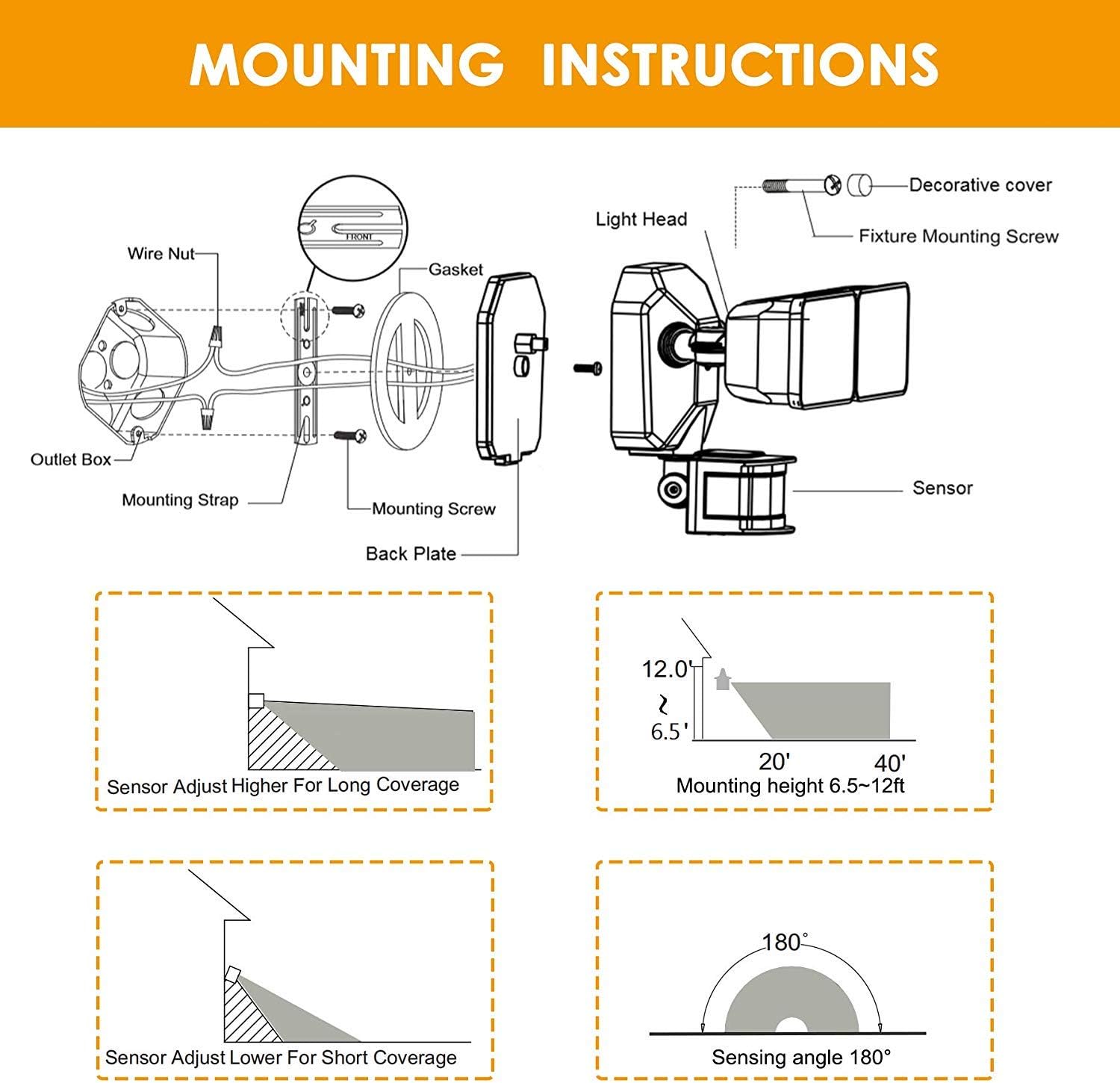
- Select mounting location: Choose a wall or eave/soffit location that provides the desired coverage and is within reach of existing wiring. Recommended mounting height is 6.5-12 feet.
- Buka bungkusan kandungan: Ensure all components are present: light fixture, mounting strap, screws, and wire nuts.
5.2 Pendawaian dan Pemasangan
- Attach the mounting strap to your existing electrical outlet box using the provided screws.
- Sambungkan wayar elektrik:
- Sambungkan hitam Wayar (hidup) dari lekapan ke hitam Wayar (hidup) dari kotak alur keluar.
- Sambungkan putih Wayar (Neutral) dari lekapan ke putih wayar (Neutral) daripada kotak keluar.
- Sambungkan tembaga hijau/telanjang Wayar (Ground) dari lekapan ke tembaga hijau/telanjang Wayar (Ground) dari kotak keluar.
- Carefully tuck the wires into the outlet box.
- Align the light fixture with the mounting strap and secure it with the decorative cover and fixture mounting screw.
- Adjust the light heads and motion sensor to your desired angles.
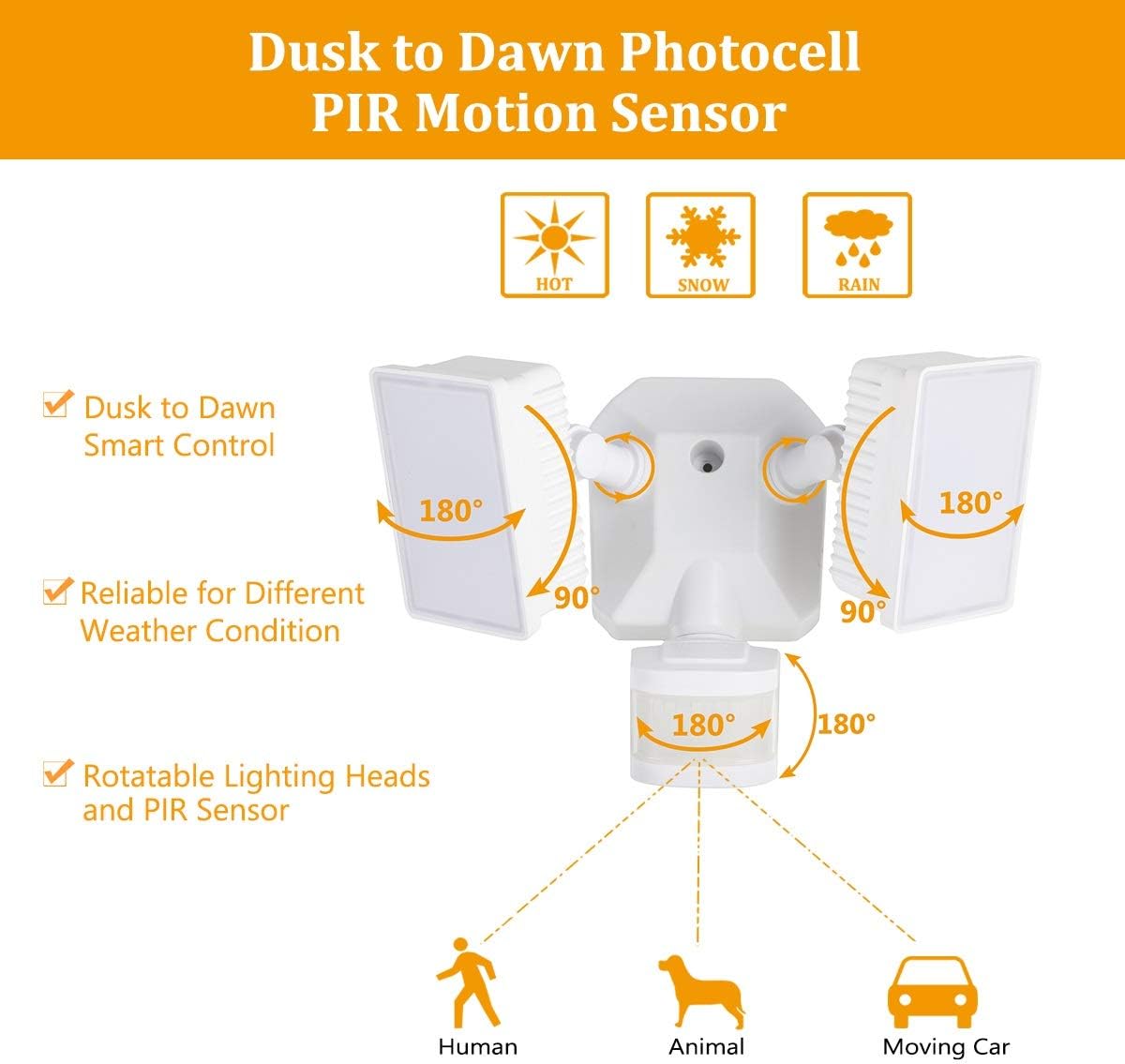
Diagram for installing the security light, detailing wire connections, mounting strap, back plate, and attaching the light head and sensor.
Illustrations showing two common installation methods: mounting the light under an eave or soffit, and mounting it directly onto a wall.
6. Mod Pengendalian dan Tetapan
The security light features a control panel with dials for TIME and SENSITIVITY, and a slide switch for selecting operating modes. All modes operate only at night or in dark environments, automatically turning off at dawn.

An infographic explaining the various operating modes: TEST, AUTO, Motion Sensor, 6 Hours, and Dusk to Dawn (PC) modes, along with their respective time delay and sensitivity settings.
6.1 Panel Kawalan Selesaiview

Terperinci view of the control panel, showing the 'TIME' dial (5S, 3MIN, TEST) and 'SENSITIVITY' dial (+/-) for adjusting light duration and motion detection range.
- TIME Dial: Adjusts how long the light stays on after motion is detected (5 seconds to 3 minutes). The 'TEST' setting is for initial setup.
- SENSITIVITY Dial: Adjusts the motion sensor's detection range (Low to High sensitivity, 20-70 feet).
- Suis Slaid Mod: Selects between AUTO, OFF (Motion Sensor), 6H (6 Hours), and PC (Dusk to Dawn Stay On) modes.
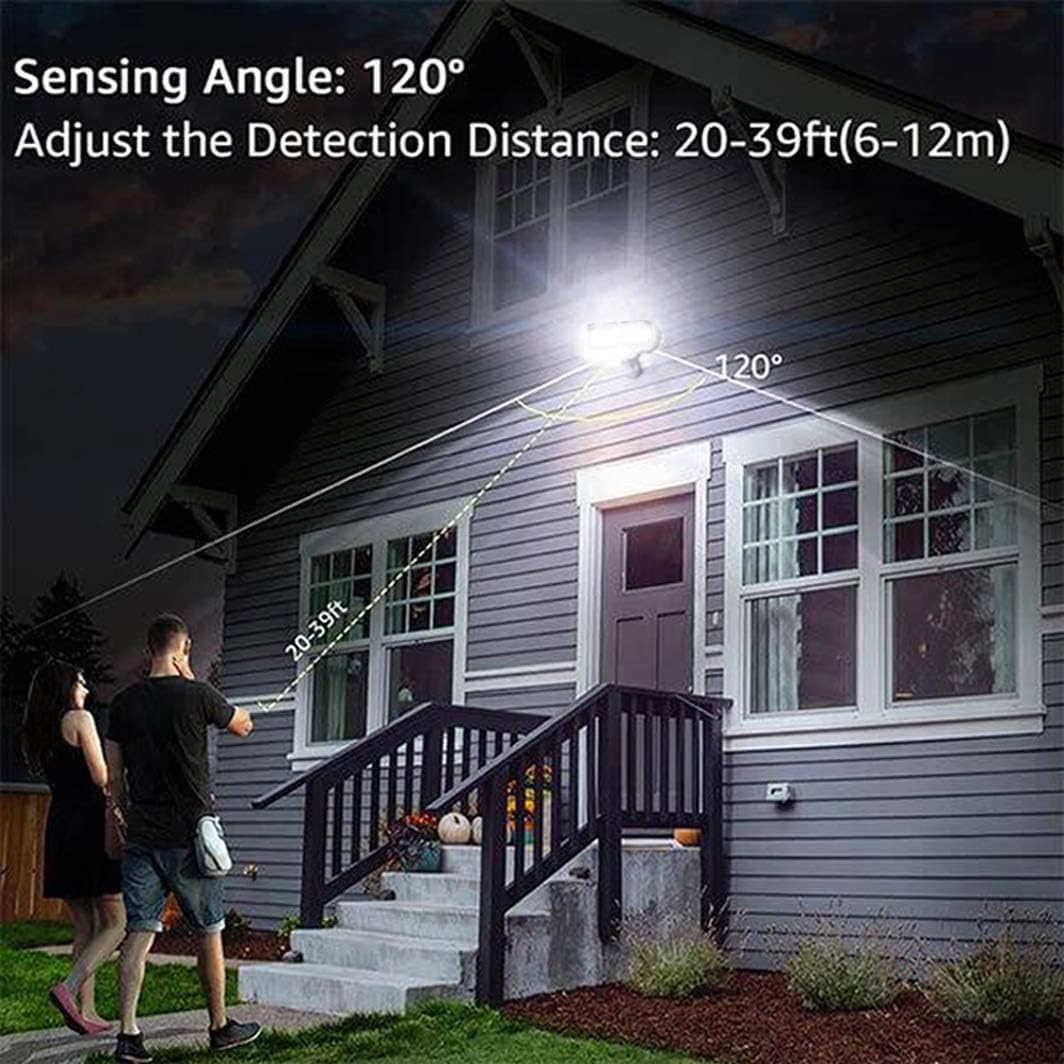
An illustration demonstrating the motion sensor's 120-degree sensing angle and adjustable detection distance of 20-39 feet (6-12 meters) from a mounting height of 6.5-12 feet.
6.2 Mod Pengendalian
- Mod UJIAN: (Slide switch to 'TEST' on TIME dial) This mode is for testing after installation. When connected to AC power, the light will turn on for 5 seconds based on the time delay setting.
- AUTO Dim Light Mode: (Slide switch to 'AUTO') The security light turns on with dim light at dusk. When motion is detected, it switches to 100% brightness. After no motion is detected for the set time delay (5 seconds to 3 minutes), it returns to dim light. Automatically turns off at dawn.
- Motion On/Off Mode: (Slide switch to 'OFF') The security flood light only turns on at 100% brightness when motion is activated. It automatically turns off when no motion is detected for the set time delay. Automatically turns off at dawn.
- 6 Hours Mode: (Slide switch to '6H') The flood light turns on at 100% brightness and stays on for 6 hours. After 6 hours, it automatically switches to 'AUTO Dim Light Mode'. Automatically turns off at dawn.
- Dusk to Dawn Stay On Mode (PC Mode): (Slide switch to 'PC') The motion security light turns on with bright light (100% brightness) and stays on all night. It automatically turns off in the daytime.
7. Penyelenggaraan
Regular maintenance ensures optimal performance and longevity of your EMANER LED Security Light.
- Pembersihan: Periodically clean the light heads and motion sensor lens with a soft, damp kain. Jangan gunakan pembersih atau pelarut yang melelas.
- Pemeriksaan: Periksa pendawaian dan pemasangan setiap tahun untuk sebarang tanda haus, kerosakan atau sambungan yang longgar.
- Tiada Bahagian Boleh Servis Pengguna: The LED light source is non-removable and not user-serviceable. Do not attempt to open the light heads.
8. Penyelesaian masalah
If you encounter issues with your security light, refer to the following common problems and solutions:
| Masalah | Kemungkinan Punca | Penyelesaian |
|---|---|---|
| Lampu tidak menyala pada waktu malam. | 1. Kuasa dimatikan. 2. Photocell sensor is detecting ambient light. 3. Isu pendawaian. | 1. Periksa pemutus litar/fius. 2. Ensure the sensor is not obstructed or exposed to other light sources. 3. Verify all wiring connections are secure. |
| Lampu kekal menyala secara berterusan. | 1. Mode set to 'PC' (Dusk to Dawn Stay On). 2. Constant motion detected. 3. Wiring error. | 1. Change mode to 'AUTO' or 'OFF'. 2. Adjust sensor sensitivity or angle to avoid constant triggers. 3. Periksa semula pendawaian. |
| Light flashes or cycles on/off rapidly. | 1. Intermittent power supply. 2. Sensor interference. 3. Unit rosak. | 1. Check power connections. 2. Ensure no objects are moving within the sensor's range. 3. Hubungi sokongan pelanggan jika masalah berterusan. |
| Penderia gerakan tidak mengesan. | 1. Sensitiviti ditetapkan terlalu rendah. 2. Sensor obstructed or misaligned. 3. Temperature too high (reduces PIR effectiveness). | 1. Increase SENSITIVITY setting. 2. Clear obstructions and adjust sensor angle. 3. This is normal behavior in very hot weather. |
9. Maklumat Waranti
The EMANER Model 7042-WH LED Security Light comes with a Waranti pengilang selama 2 tahun. Waranti ini melindungi kecacatan pada bahan dan mutu kerja di bawah penggunaan biasa. Sila simpan bukti pembelian anda untuk tuntutan waranti.
10. Sokongan Pelanggan
For technical assistance, warranty claims, or any questions regarding your EMANER product, please contact EMANER customer service. You can typically find contact information on the product packaging or through the retailer where the product was purchased.
Alternatively, you may visit the official EMANER brand store online or use the 'Ask a question' feature on the product's retail page.