
1. Pengenalan
This manual provides detailed instructions for the setup, operation, and maintenance of your Ipega PG-9076 Wireless Game Controller. Please read this manual carefully before use to ensure proper functionality and to maximize your gaming experience. This controller is designed for compatibility with Android, iOS, and Windows devices.
2. Produk Lebihview
The Ipega PG-9076 controller features a design similar to an Xbox controller, incorporating standard gaming buttons along with additional multimedia controls. It includes a retractable phone holder for mobile gaming.
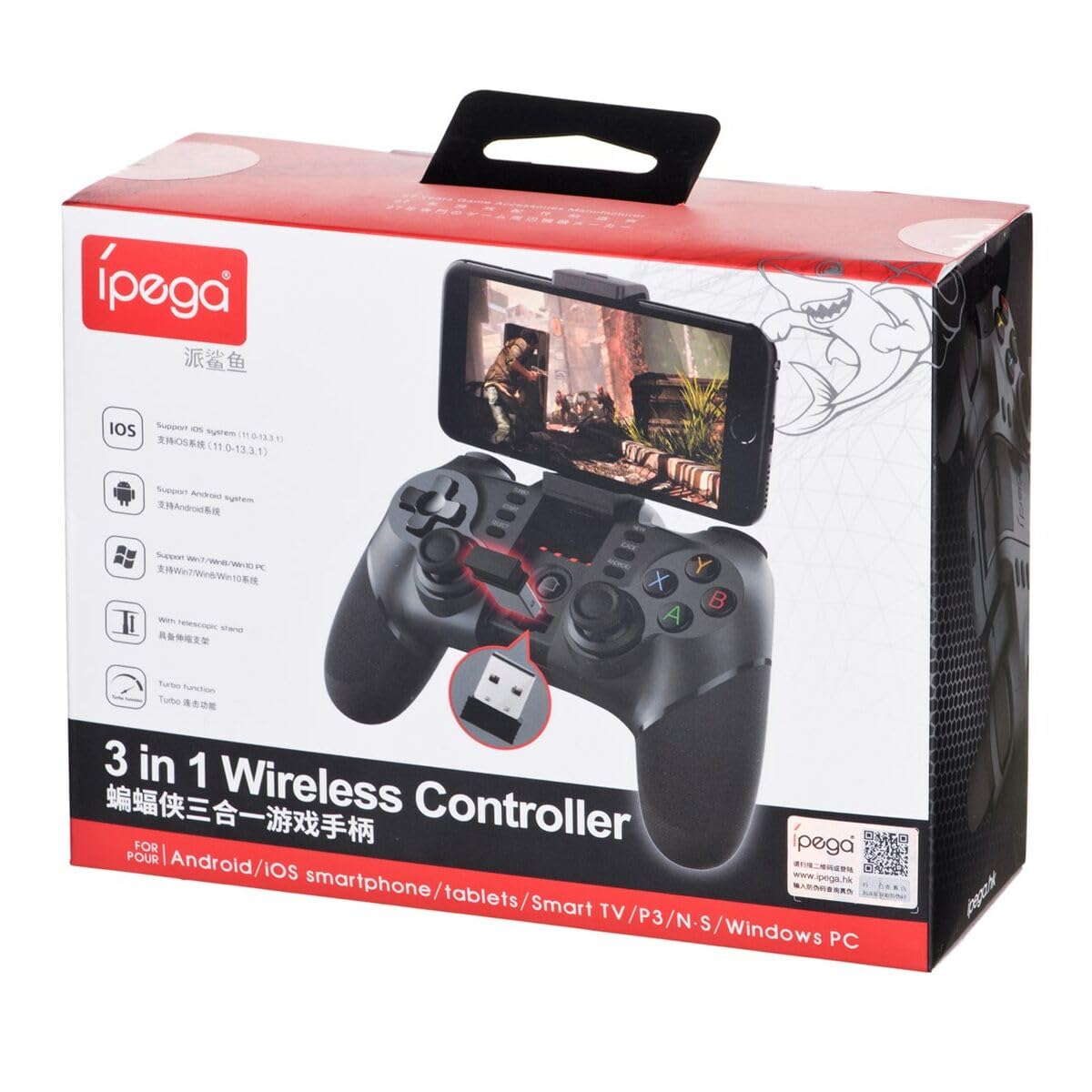
Figure 2.1: Ipega PG-9076 controller with a smartphone mounted, showcasing its mobile gaming capability.

Rajah 2.2: Depan view of the controller, highlighting the dual analog sticks, D-pad, action buttons (A, B, X, Y), and mode selection buttons (SELECT, START, ANDROID, IOS, TURBO, CLEAR).

Rajah 2.3: Belakang view of the controller, displaying the product label with model number, input specifications, and a QR code for additional information or support.
Ciri-ciri Utama:
- Bluetooth 3.0 connectivity for wireless operation.
- Integrated multimedia buttons (volume, play/pause, track control).
- Retractable phone holder, accommodating devices up to 9 cm wide.
- Compatible with Android (3.2+), iOS (4.3+), and Windows.
- Built-in 380 mAh rechargeable battery.
3. Persediaan dan Sambungan
Before first use, ensure the controller is fully charged. Refer to Section 5 for charging instructions.
3.1. Pairing with Android Devices
- Ensure your Android device's Bluetooth is enabled.
- Pada pengawal, tekan dan tahan butang ANDROID butang serentak dengan RUMAH button until the indicator light flashes rapidly.
- On your Android device, search for Bluetooth devices and select "PG-9076" to pair.
- Once paired, the indicator light on the controller will remain solid.
3.2. Pairing with iOS Devices
- Ensure your iOS device's Bluetooth is enabled.
- Pada pengawal, tekan dan tahan butang IOS butang serentak dengan RUMAH button until the indicator light flashes rapidly.
- On your iOS device, search for Bluetooth devices and select "PG-9076" to pair.
- Once paired, the indicator light on the controller will remain solid.
3.3. Menyambung ke Windows PC
The controller can be connected to a Windows PC via Bluetooth or USB cable.
3.3.1. Bluetooth Connection (PC)
- Pastikan PC anda telah mengaktifkan Bluetooth.
- Pada pengawal, tekan dan tahan butang MULAKAN butang serentak dengan RUMAH button until the indicator light flashes rapidly.
- On your PC, go to Bluetooth settings, search for devices, and select "PG-9076" to pair.
- Once paired, the indicator light on the controller will remain solid.
3.3.2. USB Cable Connection (PC)
- Connect the controller to your PC using the provided USB cable.
- PC sepatutnya mengesan dan memasang pemacu yang diperlukan secara automatik.
- Configuration within the operating system and individual games may be required for optimal performance.

Figure 3.1: The USB dongle (if included with your model) can be inserted into the controller for wireless connection to devices that do not have built-in Bluetooth, such as some PCs or Smart TVs.

Figure 3.2: The included USB cable is used for charging the controller and can also be used for a wired connection to a PC.
4. Mod Operasi
The PG-9076 supports various gaming modes depending on the connected device and game type.
4.1. Android Gaming
- Supports most games with 'Arcade Mode' (often indicated by a controller symbol).
- Compatible with various simulator games.
- Ensure your Android OS is version 3.2 or newer.
4.2. iOS Gaming
- Compatible with games that support 'iCade' mode.
- Ensure your iOS is version 4.3 or newer.
4.3. Windows PC Gaming
- Can be used via Bluetooth or USB cable.
- System and in-game configuration may be necessary for full compatibility and optimal control mapping.
4.4. Fungsi Multimedia
The controller includes dedicated multimedia buttons for:
- Volume control (up/down)
- Main/Jeda
- Fast forward/Rewind
5. Mengecas dan Bateri
The controller is equipped with a rechargeable internal battery.
5.1. Arahan Mengecas
- Connect the provided USB cable to the micro-USB port on the controller.
- Connect the other end of the USB cable to a USB power source (e.g., PC, USB wall adapter).
- Lampu penunjuk pengecasan akan menyala semasa pengecasan dan padam apabila dicas sepenuhnya.
5.2. Spesifikasi Bateri
- Kapasiti Bateri: 380 mAh
- Charging Time: Approximately 2 to 5 hours (may vary based on charger output).
- Operating Autonomy: Up to 12 hours of continuous gameplay.
- Standby Time: Up to 30 days when fully charged.
6. Penyelenggaraan
Untuk memastikan jangka hayat dan prestasi optimum pengawal anda, ikuti garis panduan penyelenggaraan ini:
- Pastikan pengawal kering dan jauh daripada kelembapan.
- Avoid exposing the controller to extreme temperatures.
- Bersihkan pengawal dengan kain lembut dan kering. Jangan gunakan bahan kimia yang keras atau pembersih yang kasar.
- Simpan pengawal di tempat yang selamat apabila tidak digunakan untuk mengelakkan kerosakan fizikal.
7. Penyelesaian masalah
If you encounter issues with your Ipega PG-9076 controller, refer to the following common problems and solutions:
7.1. Controller Does Not Turn On
- Ensure the battery is charged. Connect the controller to a power source and allow it to charge for at least 30 minutes.
- Press and hold the HOME button for a few seconds to attempt to power on.
7.2. Unable to Pair via Bluetooth
- Make sure the controller is in the correct pairing mode for your device (Android, iOS, or PC).
- Ensure Bluetooth is enabled on your device and it is discoverable.
- Move the controller closer to your device (within 8 meters).
- Matikan dan hidupkan Bluetooth peranti anda, kemudian cuba pasangkan semula.
- Clear any previous pairings of the controller from your device's Bluetooth list.
7.3. Buttons or Joysticks Not Responding Correctly
- Ensure the controller is fully charged. Low battery can affect performance.
- Mulakan semula pengawal dan peranti anda.
- For PC, check in-game settings and system controller configurations.
- Some games, especially those designed for touchscreens, may not fully support external controllers.
8. Spesifikasi
| Ciri | Spesifikasi |
|---|---|
| Model | PG-9076 |
| Jenama | Ipega |
| Teknologi Ketersambungan | Bluetooth 3.0 |
| Jarak Operasi | Sehingga 8 meter (tanpa halangan) |
| Input Kuasa | DC 5V 500 mAh |
| Vol Operasitage | DC 3.7V |
| Arus Operasi | 30 mAh |
| Kapasiti Bateri | 380 mAh |
| Masa Mengecas | 2-5 jam |
| Battery Autonomy (Gameplay) | Sehingga 12 jam |
| Masa Tunggu Sedia | Sehingga 30 hari |
| Peranti Clamp Lebar | Sehingga 9 cm |
| Dimensi Produk | 19.1 x 7.5 x 7.4 cm |
| Berat Produk | 304 g |
| Platform yang Serasi | Android, iOS, Windows |
9. Waranti dan Sokongan
For warranty information, please refer to the terms provided by your retailer at the time of purchase. Extended warranty options may be available from third-party providers.
For technical support or further inquiries, you may scan the QR code located on the back of your controller or visit the official Ipega support channels. The QR code on the product label links to http://weixin.qq.com/r/uUUHHyPERX46rWd89xCr.