
Ipega PG-9068
Manual Pengguna Pengawal Permainan Tanpa Wayar Bluetooth IPEGA PG-9068 Gamepad
Model: PG-9068 | Brand: Ipega
pengenalan
This manual provides detailed instructions for the IPEGA PG-9068 Bluetooth Wireless Game Controller Gamepad. It covers setup, operation, maintenance, and troubleshooting to ensure optimal performance and longevity of your device. This gamepad is designed for use with Android, iOS, and PC systems, as well as Smart TVs and set-top boxes.
Produk Selesaiview

Rajah 1: Depan view of the IPEGA PG-9068 Bluetooth Wireless Game Controller, showing the dual analog sticks, D-pad, action buttons (A, B, X, Y), and central function buttons.

Rajah 2: Bersudut view of the IPEGA PG-9068, highlighting the ergonomic grip and shoulder buttons.
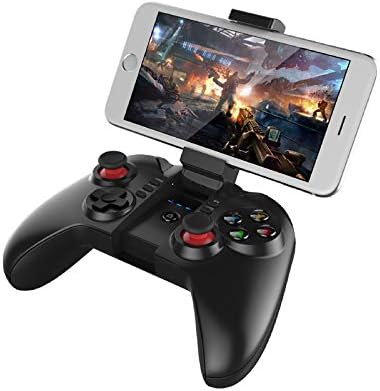
Figure 3: The IPEGA PG-9068 with a smartphone securely mounted in its integrated holder, demonstrating its mobile gaming capability.
Persediaan dan Sambungan
Mengecas Gamepad
Before initial use, fully charge the gamepad. Connect the provided USB charging cable to the gamepad's charging port and to a DC5V power source (e.g., computer USB port, USB wall adapter). The charging indicator light will show the charging status.
- Mengecas Voltage/Semasa: DC5V/500mA
- Kapasiti Bateri: 350mAh
- Penggunaan Berterusan: Approximately 10 hours on a full charge
- Masa Siap sedia: Up to 30 days when fully charged
Arahan Berpasangan Bluetooth
The PG-9068 supports various connection modes for different devices. Ensure the gamepad is sufficiently charged before attempting to pair.
- Hidupkan kuasa: Tekan dan tahan butang RUMAH button for 3 seconds to power on the gamepad.
- Masukkan Mod Berpasangan:
- Mod Standard Android: Tekan dan tahan X + RUMAH until the indicator light flashes rapidly.
- iOS Standard Mode: Tekan dan tahan Y + RUMAH until the indicator light flashes rapidly.
- PC/Direct Play Mode: Tekan dan tahan A + RUMAH until the indicator light flashes rapidly.
- Aktifkan Bluetooth pada Peranti: On your smartphone, tablet, or PC, go to Bluetooth settings and enable Bluetooth.
- Cari untuk Peranti: Scan for available Bluetooth devices. The gamepad will appear as "PG-9068" or "IPEGA-9068".
- Sambung: Select "PG-9068" to pair. Once connected, the indicator light on the gamepad will become solid.
- Bekerja Voltage: DC3.7V
- Jarak Penghantaran Bluetooth: ≤8 meter
If pairing fails, turn off the gamepad, disable Bluetooth on your device, and repeat the steps. For PC connection, a Bluetooth adapter may be required if your PC does not have built-in Bluetooth.
Arahan Operasi
Game Modes and Compatibility
The IPEGA PG-9068 supports various gaming platforms and modes:
- Android: Compatible with most Android smartphones, tablets, Smart TVs, and set-top boxes. Supports games that have native gamepad support.
- iOS: Compatible with iOS devices (iPhone, iPad). Supports MFi (Made For iPhone/iPad) games and other games with gamepad compatibility.
- PC: Supports Windows and Mac OS X systems. May require specific drivers or software for certain games, though many modern games support XInput or DirectInput controllers natively.
Susun Atur dan Fungsi Butang
Familiarize yourself with the gamepad's button layout:
| Button/Component | Fungsi |
|---|---|
| Tongkat Analog Kiri | Movement, camera control (game dependent) |
| Tongkat Analog Kanan | Camera control, aiming (game dependent) |
| D-Pad (Directional Pad) | Directional input, menu navigation |
| Butang A, B, X, Y | Action buttons (jump, attack, interact, etc.) |
| L1/R1 (Shoulder Buttons) | Commonly used for actions like shooting, aiming, or menu navigation |
| L2/R2 (Triggers) | Analog input for acceleration, braking, or precise actions |
| SELECT/BACK Button | Menu, map, or specific game functions |
| Butang MULA | Pause, start game, confirm actions |
| Butang RUMAH | Power on/off, return to home screen (device dependent), pairing mode activation |
| Butang TURBO | Enables rapid fire for selected action buttons. Press TURBO + Action Button to activate/deactivate. |
Penyelenggaraan dan Penjagaan
Proper maintenance ensures the longevity and optimal performance of your IPEGA PG-9068 gamepad.
- Pembersihan: Gunakan kain lembut dan kering untuk mengelap permukaan pad permainan. Untuk kotoran degil, sedikit dampen kain dengan air. Elakkan daripada menggunakan bahan kimia yang keras, pelarut atau pembersih yang melelas.
- Storan: Simpan pad permainan di tempat yang sejuk dan kering jauh dari cahaya matahari langsung, suhu yang melampau dan kelembapan yang tinggi.
- Penjagaan Bateri:
- Elakkan menyahcas sepenuhnya bateri dengan kerap.
- If storing for extended periods, charge the battery to about 50% to prevent deep discharge.
- Jangan dedahkan bateri kepada api atau haba melampau.
- Pengendalian: Avoid dropping the gamepad or subjecting it to strong impacts. Do not attempt to disassemble the gamepad, as this will void the warranty.
Menyelesaikan masalah
If you encounter issues with your IPEGA PG-9068, refer to the following common problems and solutions:
| Masalah | Kemungkinan Punca | Penyelesaian |
|---|---|---|
| Gamepad does not power on. | Bateri lemah. | Charge the gamepad fully. |
| Tidak boleh berpasangan dengan peranti. | Incorrect pairing mode; Bluetooth off on device; interference. | Ensure correct pairing mode (X+HOME for Android, Y+HOME for iOS, A+HOME for PC). Verify Bluetooth is enabled on your device. Move closer to the device. Restart both gamepad and device. |
| Gamepad disconnects frequently. | Bateri lemah; terlalu jauh dari peranti; gangguan. | Recharge the gamepad. Stay within 8 meters of the connected device. Reduce wireless interference from other devices. |
| Buttons/sticks are unresponsive. | Gangguan perisian; kerosakan fizikal. | Restart the gamepad and the connected device. Test in a different game or application. If problem persists, contact customer support. |
| Gamepad tidak dikenali oleh PC. | Missing Bluetooth adapter/drivers; incorrect mode. | Ensure PC has Bluetooth and drivers are installed. Try A+HOME pairing mode. Some games may require specific controller emulation software. |
Spesifikasi Teknikal
| Parameter | Nilai |
|---|---|
| Model | PG-9068 |
| Jenama | Ipega |
| Ketersambungan | Wayarles Bluetooth |
| Bekerja Voltage | DC3.7V |
| Bekerja Semasa | <10mA |
| Masa Penggunaan Berterusan | lebih kurang 10 jam |
| Arus Dorman | <10uA |
| Caj Voltage / Semasa | DC5V/500mA |
| Jarak Penghantaran Bluetooth | ≤8 meter |
| Kapasiti Bateri | 350mAh |
| Masa Tunggu Sedia | Up to 30 days (full power) |
| Sistem yang Serasi | Android, iOS, Windows, Mac OS X |
| Peranti Serasi | Smartphones, Tablets, Smart TVs, Set-top Boxes, PC Computers |
Waranti dan Sokongan
For warranty information or technical support, please refer to the documentation provided with your purchase or visit the official Ipega webtapak. Simpan bukti pembelian anda untuk tuntutan waranti.
Ask a question about this manual
Ask about setup, troubleshooting, compatibility, parts, safety, or missing instructions. Manuals+ will review the question and use this page’s manual context to help answer it.