
1. Pengenalan
This manual provides instructions for the Zerone Universal Remote Control, designed as a replacement for various Haier TV models. It is compatible with Haier HTR-A18M, 55D3550, 40D3500M, and 48D3500 series televisions. This remote control offers direct access to digital TV functions without complex programming.

Image 1.1: The Zerone Universal Remote Control in use, demonstrating its compatibility with Haier HTR-A18M, 55D3550, 40D3500M, and 48D3500 TV models.
2. Persediaan
2.1 Pemasangan Bateri
Alat kawalan jauh memerlukan dua (2) bateri AAA (tidak termasuk) untuk operasi. Ikuti langkah ini untuk memasang bateri:
- Cari petak bateri di belakang alat kawalan jauh.
- Tekan selak ke bawah dan luncurkan penutup bateri sehingga terbuka.
- Masukkan dua bateri AAA, pastikan terminal positif (+) dan negatif (-) sejajar dengan tanda di dalam petak.
- Luncurkan penutup bateri ke tempat semula sehingga ia berbunyi dengan selamat.
The remote is ready for use immediately after battery installation; no additional programming is required for compatible Haier TV models.

Imej 2.1: Terperinci view of the remote control, highlighting the battery compartment for AAA battery installation.
3. Arahan Operasi
3.1 Fungsi Asas
This remote control provides standard functions for your Haier TV. Point the remote directly at your television's infrared receiver for optimal performance.
- Butang kuasa (U): Menghidupkan atau mematikan TV.
- Input: Memilih sumber input video (HDMI, AV, dsb.).
- Butang Nombor (0-9)Pemilihan saluran langsung.
- VOL +/-: Melaraskan kelantangan naik atau turun.
- CH +/-: Menukar saluran ke atas atau ke bawah.
- HILANGKAN: Membisukan atau menyahredamkan audio TV.
- MENU: Mengakses menu utama TV.
- Butang Navigasi (Atas, Bawah, Kiri, Kanan, OK): Menavigasi melalui menu dan mengesahkan pilihan.
- BACK / EXIT: Returns to the previous screen or exits the current menu.
- PAPARAN: Shows current channel information.
- SAP / AUDIO: Selects audio language or mode.
- TIDUR: Menetapkan pemasa tidur.
- PICTURE / WIDE: Adjusts picture mode or aspect ratio.
- CH.LIST / FAVORITE: Accesses channel list or favorite channels.
- Media Control Buttons (Play, Pause, Fast Forward, Rewind): Mengawal main balik media.
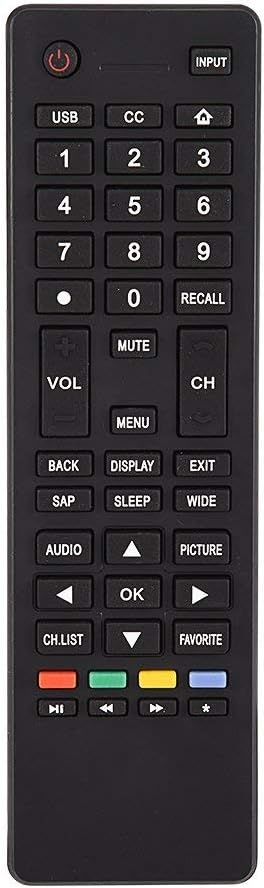
Imej 3.1: Selesaiview of the remote control's button layout for easy identification of functions.
3.2 Julat Operasi
The remote control has a stable signal transmission distance of up to 10 meters (33 feet). Actual remote distance may vary depending on environmental factors and the specific model of your TV.
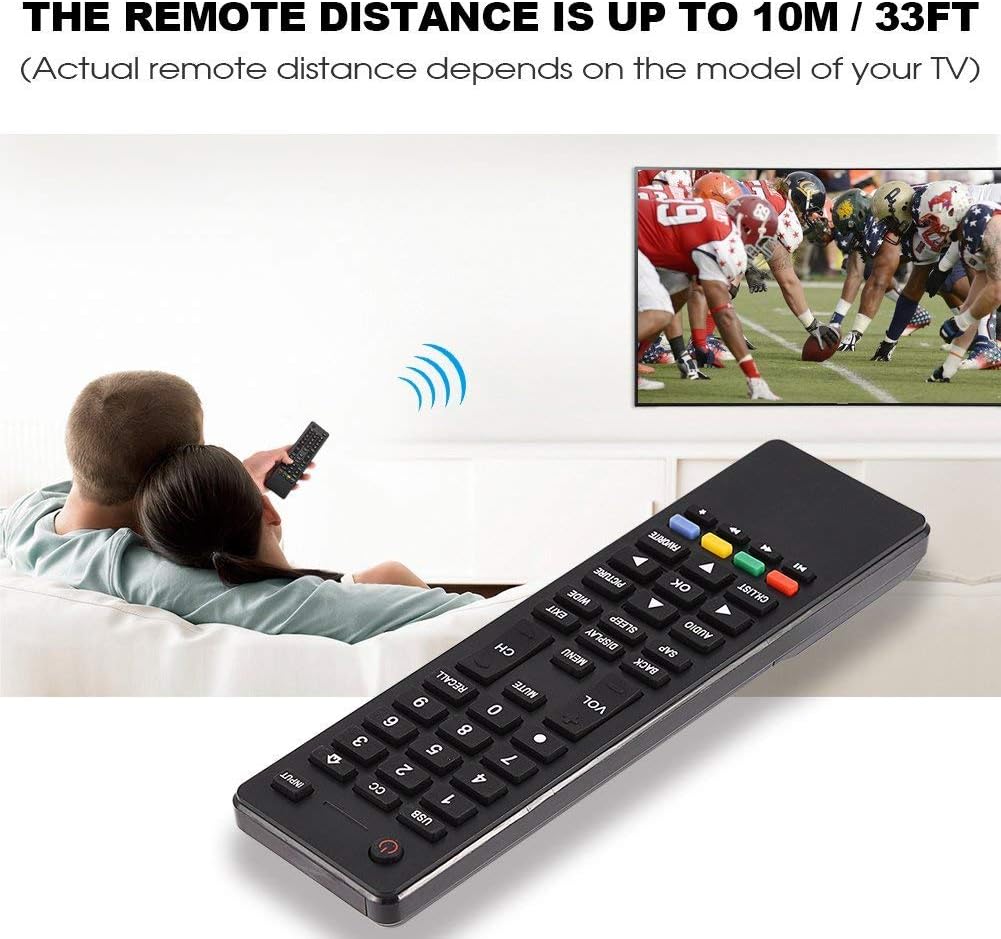
Image 3.2: Visual representation of the remote control's effective operating distance to the television.
4. Penyelenggaraan
4.1 Pembersihan
Untuk membersihkan alat kawalan jauh, gunakan kain lembut dan kering. Untuk kotoran degil, ringankan dampen the cloth with water or a mild cleaning solution. Avoid using harsh chemicals or abrasive cleaners, as these can damage the remote's surface or internal components.
4.2 Penjagaan Bateri
- Gantikan bateri apabila tindak balas alat kawalan jauh menjadi perlahan atau berhenti berfungsi.
- Jangan campurkan bateri lama dan baharu, atau jenis bateri yang berlainan.
- Tanggalkan bateri jika alat kawalan jauh tidak akan digunakan untuk tempoh yang lama untuk mengelakkan kebocoran.
- Buang bateri terpakai secara bertanggungjawab mengikut peraturan tempatan.
5. Penyelesaian masalah
5.1 Alat Jauh Tidak Menjawab
- Periksa Bateri: Ensure batteries are inserted correctly with the correct polarity (+/-) and are not depleted. Replace with fresh AAA batteries if necessary.
- Garisan Penglihatan: Make sure there are no obstructions between the remote control and the TV's infrared sensor.
- Jarak: Confirm you are within the effective operating range (up to 10 meters / 33 feet).
- Keserasian TV: Verify that your TV model is listed as compatible (Haier HTR-A18M, 55D3550, 40D3500M, 48D3500).
5.2 Buttons Not Working Correctly
- Bersihkan Jauh: Dust or debris under buttons can cause malfunction. Refer to the Maintenance section for cleaning instructions.
- Pemeriksaan Bateri: Weak batteries can lead to inconsistent button responses. Replace batteries.
6. Spesifikasi
| Ciri | Perincian |
|---|---|
| Jenama | Zerone |
| Peranti Serasi | Haier HTR-A18M, 55D3550, 40D3500M, 48D3500 TVs |
| Teknologi Ketersambungan | Inframerah |
| Julat Maksimum | 10 meter (33 kaki) |
| Jenis Bateri | 2 x AAA (tidak termasuk) |
| Jenis Pengawal | Kawalan Butang |
| bahan | ABS |
| Nombor Model | Zerone9rnag3b5y4-cr |
| UPC | 647213811490 |

Image 6.1: Physical dimensions of the Zerone Universal Remote Control.
7. Maklumat Waranti
Produk ini ditawarkan sebagai item Amazon Renewed. Produk Amazon Renewed diperiksa dan diuji secara profesional untuk berfungsi dan kelihatan seperti baru. Jika anda tidak berpuas hati dengan pembelian anda, produk yang diperbaharui layak untuk penggantian atau bayaran balik di bawah Jaminan Amazon Renewed.
Additionally, the manufacturer provides a Waranti terhad 90 hari. For specific details regarding the terms and conditions of this warranty, please refer to the documentation provided at the time of purchase or contact customer support.
8. Sokongan Pelanggan
If you encounter any issues or have questions regarding your Zerone Universal Remote Control that are not addressed in this manual, please contact the seller or Amazon Renewed customer service for assistance.
For Amazon Renewed Guarantee claims, please visit the Amazon Renewed program page or contact Amazon customer support directly.