
1. Pengenalan
The MOXA MGate MB3660-16-2DC is a high-performance 16-port Modbus gateway designed for converting between Modbus TCP and Modbus RTU/ASCII protocols. This device facilitates seamless communication between Modbus TCP hosts and Modbus RTU/ASCII serial devices. It features dual DC power inputs for enhanced reliability and redundancy, making it suitable for critical industrial automation applications.
This manual provides essential information for the proper installation, configuration, operation, and maintenance of your MGate MB3660-16-2DC gateway.
2. Maklumat Keselamatan
Sila baca dan fahami semua arahan keselamatan sebelum mengendalikan peranti ini. Kegagalan berbuat demikian boleh mengakibatkan kecederaan atau kerosakan pada peralatan.
- Pastikan bekalan kuasa voltage matches the device's requirements (dual DC input).
- Disconnect power before performing any installation or maintenance procedures.
- Pasang peranti di kawasan yang mempunyai pengudaraan yang baik untuk mengelakkan terlalu panas.
- Avoid exposing the device to moisture, extreme temperatures, or corrosive environments.
- Hanya kakitangan yang berkelayakan sahaja yang perlu melakukan pemasangan dan servis.
3. Kandungan Pakej
Sahkan bahawa pakej anda mengandungi item berikut:
- MOXA MGate MB3660-16-2DC Modbus Gateway
- Panduan Pemasangan Pantas
- Kad Waranti
- Blok terminal untuk input kuasa
- DIN-rail mounting kit (if applicable)
If any of these items are missing or damaged, please contact your sales representative immediately.
4. Penerangan Perkakasan
The MGate MB3660-16-2DC features multiple ports and indicators for easy setup and monitoring.
4.1 Panel Depan
The front panel typically includes LED indicators for power, network activity, and serial port status.
- LED PWR1/PWR2: Indicates status of primary/secondary DC power input.
- LED FAULT: Indicates system errors or warnings.
- LAN1/LAN2 LEDs: Indicate Ethernet link and activity.
- Serial Port LEDs (1-16): Indicate data transmission/reception on each serial port.
4.2 Rear/Side Panels
These panels house the connection ports:
- Input Kuasa: Dual DC power input terminal blocks for redundant power.
- Port Ethernet: RJ45 ports for Modbus TCP network connection.
- Pelabuhan Bersiri: 16 DB9 or terminal block connectors for Modbus RTU/ASCII devices.
- Butang Tetapkan Semula: For restoring factory default settings.
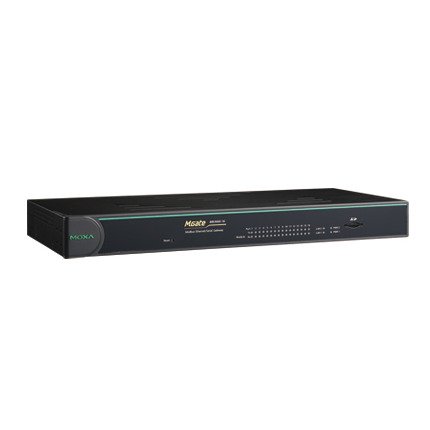
Rajah 1: Depan view of the MOXA MGate MB3660-16-2DC Modbus Gateway, showing LED indicators and general form factor.
5. Persediaan
5.1 Pemasangan
The MGate MB3660-16-2DC can be mounted on a DIN-rail or wall-mounted using the provided kit.
- Pemasangan DIN-rel: Attach the DIN-rail clip to the back of the device and snap it onto a standard DIN-rail.
- Pemasangan Dinding: Secure the wall-mount plates to the device, then use screws to fix the device to a wall or panel.
5.2 Sambungan Kuasa
Connect two independent DC power sources to the dual power input terminal blocks for redundancy. Ensure correct polarity.
- Connect the positive (+) wire to the V+ terminal.
- Connect the negative (-) wire to the V- terminal.
- Connect the ground wire to the ⊗ terminal.
5.3 Sambungan Rangkaian
Connect the Ethernet ports to your Modbus TCP network using standard RJ45 Ethernet cables.
5.4 Sambungan Peranti Siri
Connect your Modbus RTU/ASCII serial devices to the 16 serial ports. Configure the serial port settings (baud rate, data bits, parity, stop bits, mode) via the device's web console or utility to match your serial devices.
5.5 Tatarajah Awal
Akses peranti web-based management interface by connecting a computer to the same network segment and entering the default IP address (refer to the Quick Installation Guide for the default IP). Configure network settings, Modbus mapping, and serial port parameters as required for your application.
6. Mengendalikan Gerbang
Once configured, the MGate MB3660-16-2DC operates as a transparent Modbus gateway, converting requests between Modbus TCP masters and Modbus RTU/ASCII slaves.
6.1 Modbus Communication Flow
- Modbus TCP master sends a request to the gateway's IP address and configured TCP port.
- The gateway translates the Modbus TCP request into a Modbus RTU/ASCII request.
- The gateway sends the serial request to the designated Modbus RTU/ASCII slave device via the appropriate serial port.
- The slave device responds to the gateway.
- The gateway translates the serial response back to Modbus TCP and forwards it to the Modbus TCP master.
6.2 Status Pemantauan
Regularly check the LED indicators on the front panel to monitor the device's operational status:
- PWR1/PWR2: Should be solid green when power is supplied.
- FAKTA: Should be off during normal operation. A red light indicates an error.
- LED LAN: Solid green for link, blinking for activity.
- Serial Port LEDs: Blink when data is being transmitted or received on that port.
7. Penyelenggaraan
To ensure optimal performance and longevity of your MGate MB3660-16-2DC, follow these maintenance guidelines:
- Pembersihan: Periodically clean the device's exterior with a soft, dry cloth. Do not use liquid or aerosol cleaners.
- Kemas kini Firmware: Check the MOXA website for the latest firmware versions. Apply updates as recommended to enhance features and security.
- Pemeriksaan Alam Sekitar: Pastikan persekitaran operasi kekal dalam julat suhu dan kelembapan yang ditetapkan.
- Pemeriksaan Kabel: Regularly inspect all connected cables for damage or loose connections.
8. Penyelesaian masalah
Bahagian ini menyediakan penyelesaian kepada isu biasa yang mungkin anda hadapi.
| Masalah | Kemungkinan Punca | Penyelesaian |
|---|---|---|
| Device not powering on (PWR LEDs off) | No power supply; faulty power adapter; incorrect wiring. | Check power connections and source; verify power adapter functionality. |
| No network connectivity (LAN LEDs off) | Faulty Ethernet cable; incorrect network settings; switch/router issue. | Check Ethernet cable; verify IP settings; test with another network port. |
| Kegagalan komunikasi bersiri | Incorrect serial port settings (baud rate, parity); wrong wiring; slave device issue. | Verify serial port settings match slave device; check serial cable wiring; test slave device independently. |
| FAULT LED is red | System error; hardware malfunction. | Consult the product manual for specific FAULT codes or contact technical support. Try power cycling the device. |
8.1 Tetapan Semula Kilang
If issues persist, you may need to perform a factory reset. Locate the reset button (usually a small pinhole) and press it for 5-10 seconds while the device is powered on. This will restore all settings to their default values.
9. Spesifikasi
| Ciri | Spesifikasi |
|---|---|
| Model | MGate MB3660-16-2DC |
| Pelabuhan Bersiri | 16 (RS-232/422/485, software selectable) |
| Pelabuhan Ethernet | 2 x 10/100BaseT(X) auto-sensing RJ45 (typically for redundancy) |
| Protokol Disokong | Modbus TCP, Modbus RTU, Modbus ASCII |
| Input Kuasa | Dual DC Power Input (e.g., 12-48 VDC, specific range may vary by model revision) |
| Lebihan | Dual power inputs |
| Suhu Operasi | Typically -40 to 75°C (Industrial Grade) |
| Suhu Penyimpanan | Typically -40 to 85°C |
| Kelembapan | 5 hingga 95% RH (tidak pemeluwapan) |
| Dimensi (W x D x H) | Specific dimensions vary, refer to product datasheet for exact measurements. |
| Berat badan | Kira-kira 22 paun (10 kg) |
| Pengeluar | MOXA |
10. Waranti dan Sokongan
10.1 Waranti Produk
MOXA products typically come with a standard manufacturer's warranty. Please refer to the warranty card included in your package or visit the official MOXA website for detailed warranty terms and conditions specific to the MGate MB3660-16-2DC.
10.2 Sokongan Teknikal
For technical assistance, troubleshooting, or further inquiries, please contact MOXA's technical support team. Support resources, including FAQs, drivers, and documentation, are available on the official MOXA webtapak.
- MOXA Webtapak: www.moxa.com
- Hubungan Sokongan: Refer to the 'Support' section on the MOXA webtapak untuk maklumat hubungan serantau.


