
1. Pengenalan
This manual provides essential information for the safe and efficient operation of your Strong SRT 32HB3003 32-inch HD LED TV. Please read these instructions carefully before using the television and retain them for future reference.
2. Maklumat Keselamatan
Sentiasa patuhi langkah keselamatan berikut untuk mengelakkan kejutan elektrik, kebakaran atau kerosakan pada televisyen:
- Jangan dedahkan TV kepada hujan atau lembapan.
- Jangan buka TV casing; merujuk semua perkhidmatan kepada kakitangan yang berkelayakan.
- Pastikan pengudaraan yang betul di sekeliling TV.
- Cabut palam TV semasa ribut petir atau apabila tidak digunakan untuk tempoh yang lama.
- Jauhkan TV daripada sumber haba dan cahaya matahari langsung.
3. Kandungan Pakej
Sahkan bahawa semua item terdapat dalam pembungkusan:
- Strong SRT 32HB3003 LED TV
- Alat Kawalan Jauh
- 2x Bateri AAA
- Pendirian TV
- Manual Pengguna

Image: The Strong SRT 32HB3003 TV packaging, highlighting key features such as DVB-T2/C/S2 tuner, HDMI, USB, and Dolby Audio.
4. Persediaan
4.1 Pemasangan Stand
Untuk memasang pendirian TV:
- Letakkan TV menghadap ke bawah dengan berhati-hati pada permukaan yang lembut dan bersih untuk mengelakkan kerosakan skrin.
- Sejajarkan tapak penyangga dengan slot yang sepadan di bahagian bawah TV.
- Selamatkan dirian menggunakan skru yang disediakan.
4.2 Sambungan
Sambungkan peranti luaran anda ke TV menggunakan port yang sesuai.
- Antena/Kabel: Connect your DVB-T2 or DVB-C antenna/cable to the 'ANT IN' port.
- Satelit: Connect your satellite dish to the 'SATELLITE IN' port for DVB-S2 reception.
- Peranti HDMI: Use HDMI ports for high-definition devices like Blu-ray players, game consoles, or set-top boxes. HDMI 1 supports ARC (Audio Return Channel).
- Peranti USB: Masukkan pemacu USB ke dalam port USB 2.0 untuk main balik media.
- CI+ Module: Insert a CI+ module (Common Interface) into the CI+ slot for encrypted channels.
- Output Audio: Use the Headphone jack for private listening or the Digital Optical Output (TOS-Link) for external audio systems.
- AV DI: For older devices, use the AV IN port.

Imej: Belakang view of the Strong SRT 32HB3003 TV, illustrating the placement of connection ports including HDMI, USB, and antenna inputs.

Image: A diagram detailing the Common Interface (CI) slot and other connectivity options such as USB, headphone jack, AV IN, HDMI 1, HDMI 2, Satellite IN, and S/PDIF (digital optical audio out).
4.3 First Time Installation
After connecting the power cable and turning on the TV, the First Time Installation wizard will guide you through initial setup steps, including language selection, country, and channel scanning for DVB-T2, DVB-C, or DVB-S2.
5. Beroperasi
5.1 Alat Kawalan Jauh Lebihview
Alat kawalan jauh membolehkan anda mengakses semua fungsi TV. Masukkan dua bateri AAA ke dalam alat kawalan jauh, memastikan polariti yang betul.

Image: The remote control for the Strong SRT 32HB3003 TV, featuring buttons for power, numerical input, volume control, channel selection, menu access, source input, and media playback functions.
5.2 Fungsi Asas
- Kuasa: Tekan ke red power button to turn the TV on or off.
- Kelantangan: Gunakan VOL +/- butang untuk melaraskan kelantangan.
- Saluran: Gunakan CH +/- butang untuk menukar saluran.
- Redam: Tekan ke HILANGKAN butang untuk menyenyapkan audio buat sementara waktu.
5.3 Pemilihan Sumber
Tekan ke SUMBER button on the remote control to select the desired input source (e.g., HDMI 1, HDMI 2, DVB-T2, DVB-C, DVB-S2, AV).
5.4 Menu Navigasi
Tekan ke MENU button to access the main menu. Use the arrow buttons to navigate and OK to confirm selections. The KEMBALI button returns to the previous menu or exits the current menu.
5.5 Media Playback (USB)
Insert a USB storage device into one of the USB ports. The TV supports playback of photos, videos, and music files. Access the media player through the main menu or by selecting the USB source.
5.6 Panduan Program Elektronik (EPG)
Tekan ke EPG butang ke view the Electronic Program Guide, which displays program schedules for digital channels.
5.7 Mod Hotel
The TV features a Hotel Mode, which allows for restricted access to certain settings and functions, ideal for hospitality environments. Consult the advanced settings menu for Hotel Mode configuration.
6. Penyelenggaraan
6.1 Pembersihan
- Sentiasa cabut plag TV sebelum membersihkan.
- Gunakan kain lembut dan kering untuk mengelap skrin dan kabinet.
- Untuk tanda degil, ringankan dampen kain dengan air atau pembersih lembut dan tidak kasar yang direka khusus untuk elektronik.
- Never spray cleaning liquids directly onto the TV.
6.2 Penyimpanan
If storing the TV for an extended period, ensure it is kept in a cool, dry place, protected from dust and extreme temperatures. It is recommended to use the original packaging for storage.
7. Penyelesaian masalah
Jika anda menghadapi masalah dengan TV anda, rujuk kepada penyelesaian biasa berikut:
| Masalah | Kemungkinan Punca / Penyelesaian |
|---|---|
| Tiada kuasa | Check if the power cable is securely connected. Ensure the power outlet is functional. |
| Tiada gambar, tetapi bunyi hadir | Semak pemilihan sumber input. Pastikan peranti luaran dihidupkan dan disambungkan dengan betul. |
| Tiada bunyi, tetapi ada gambar | Check volume level and mute status. Verify audio settings in the menu. |
| Alat kawalan jauh tidak berfungsi | Check and replace batteries. Ensure no obstructions between remote and TV sensor. |
| Kualiti gambar yang buruk | Check antenna/cable connection. Adjust picture settings in the menu. |
8. Spesifikasi
Detailed technical specifications for the Strong SRT 32HB3003 HD LED TV:
| Ciri | Spesifikasi |
|---|---|
| Nombor Model | SRT 32HB3003 |
| Saiz Skrin | 32 inci (80 cm) |
| Resolusi | 1366 x 768 pixels (HD-Ready) |
| Teknologi Paparan | LED |
| Kadar Segar Semula | 60 Hz |
| Teknologi Penala | DVB-C, DVB-S2, DVB-T2 |
| Port HDMI | 2 (1x HDMI ARC) |
| Port USB 2.0 | 2 |
| Antara muka lain | Headphone, Digital Optical Out (TOS-Link), CI+ interface, AV IN |
| Ciri Khas | Electronic Program Guide (EPG), USB Media Playback, Parental Control, Hotel Mode |
| Penggunaan Kuasa | 50 Watt |
| Kelas Kecekapan Tenaga | A+ |
| Penggunaan Tenaga Tahunan | 45 kWj / setahun |
| Dimensi Produk (W x H x D) | 73.2 x 43.5 x 7.78 cm |
| Berat badan | 4.15 kg |

Image: The energy efficiency label for the Strong SRT 32HB3003, indicating an A+ rating and an annual energy consumption of 45 kWh.
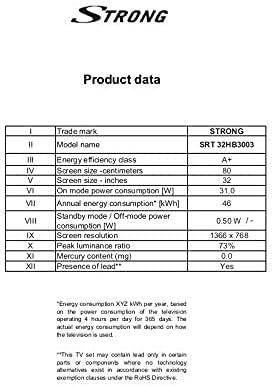
Image: A product data table providing detailed specifications for the Strong SRT 32HB3003, including screen size, resolution, and power consumption.
9. Waranti dan Sokongan
Your Strong SRT 32HB3003 TV comes with a limited warranty. For specific warranty terms and conditions, please refer to the warranty card included in your product packaging or visit the official Strong website. For technical support, troubleshooting assistance, or service inquiries, please contact Strong customer service through their official channels.
Untuk bantuan lanjut, sila layari Strong official webtapak.