
1. Pengenalan
This manual provides essential information for the safe and efficient operation of your Green Cell UPS USV 3000VA (2700W) Pure Sine Wave Online. Please read this manual thoroughly before installation and use, and retain it for future reference. This Uninterruptible Power Supply (UPS) is designed to protect your electronic equipment from power outages, surges, and fluctuations, ensuring continuous and stable power delivery.
Langkah-langkah Keselamatan
- Jangan buka UPS casing. Tiada bahagian yang boleh diservis pengguna di dalamnya. Rujuk semua servis kepada kakitangan perkhidmatan yang berkelayakan.
- Pastikan UPS disambungkan ke soket kuasa yang dibumikan.
- Do not block ventilation openings. Proper airflow is crucial for cooling.
- Elakkan memasang UPS di kawasan yang mempunyai kelembapan berlebihan, habuk atau suhu yang melampau.
- Putuskan sambungan UPS daripada sumber kuasa sebelum melakukan sebarang penyelenggaraan atau pembersihan.
2. Produk Lebihview
The Green Cell UPS USV 3000VA (2700W) is an online UPS system providing continuous power protection. It features a pure sine wave output, ensuring compatibility with sensitive electronic equipment. The unit is designed for both tower and rack-mounted configurations.
Panel Depan

Rajah 2.1: Depan view of the Green Cell UPS USV 3000VA, featuring the LCD display and control buttons.

Rajah 2.2: Terperinci view of the UPS LCD display, showing power status, voltage, and battery level indicators, along with ON/MUTE, SELECT, and OFF/ENTER buttons.
Panel Belakang
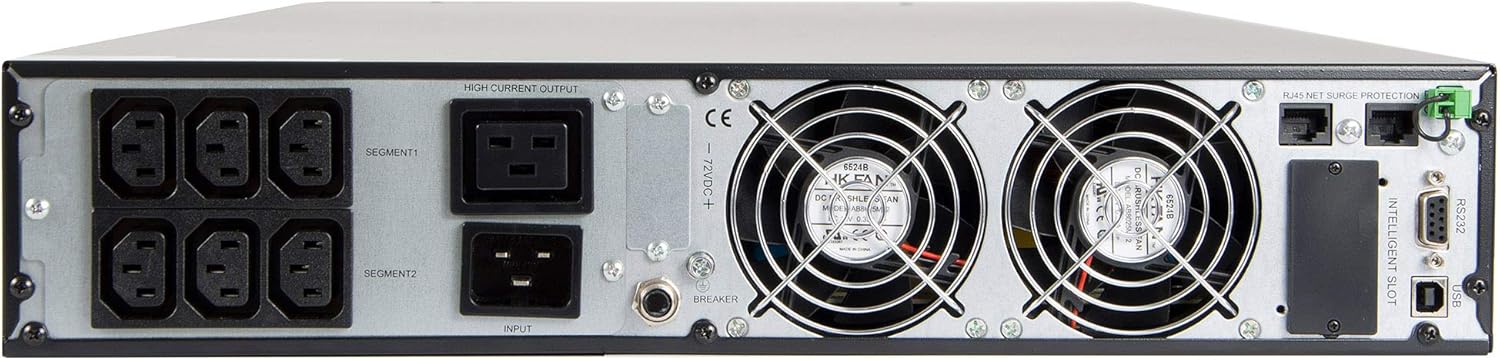
Figure 2.3: Rear panel of the UPS, illustrating the six IEC320 C13-10A output sockets, main power input, cooling fans, USB, RS232, and intelligent slot communication ports.
Video Ciri-ciri Produk
Video 2.1: An official product video demonstrating the features of the Green Cell UPS, including its rack-mount capability, communication ports, and internal components. This video highlights the high-availability design and powerful charger for battery longevity.
Video 2.2: 360 darjah view of the Green Cell UPS, showcasing its design and various angles for a comprehensive visual understanding of the product.
3. Kandungan Pakej
Verify that all items listed below are included in your package. If any items are missing or damaged, please contact Green Cell customer support.

Figure 3.1: The image displays the Green Cell UPS unit along with its included accessories: power cables, USB cable, RS232 cable, and rack-mount brackets.
- Green Cell UPS USV 3000VA (2700W) Unit
- Kabel Input Kuasa
- Output Power Cables (IEC320 C13-10A)
- Kabel Komunikasi USB
- Kabel Komunikasi RS232
- Rack Mount Brackets (for rack installation)
- Manual Pengguna (dokumen ini)
- Software CD (for monitoring and management)
4. Persediaan
4.1 Penempatan
- Place the UPS in a well-ventilated area, away from direct sunlight, heat sources, and moisture.
- Ensure sufficient clearance around the UPS for proper airflow, especially around the front and rear ventilation grilles.
- The UPS can be used in a tower configuration (with included stands) or rack-mounted (using included brackets).
4.2 Menyambung ke Kuasa
- Connect the main power input cable to the UPS input port on the rear panel.
- Plug the other end of the main power cable into a grounded wall outlet.
- Biarkan UPS dicas sekurang-kurangnya 8 jam sebelum penggunaan awal untuk memastikan prestasi bateri yang optimum.
4.3 Peralatan Penyambung
- Connect your critical equipment (e.g., servers, computers, network devices) to the IEC320 C13-10A output sockets on the rear panel of the UPS.
- Ensure that the total power consumption of all connected devices does not exceed the UPS's rated capacity (2700W).
- For communication and monitoring, connect the USB or RS232 cable from the UPS to your computer or network device.
5. Arahan Operasi
5.1 Turning On the UPS
- Tekan dan tahan butang HIDUP/BISU button on the front panel for approximately 2 seconds until you hear a beep.
- Paparan LCD akan menyala dan UPS akan menjalankan ujian kendiri.
- Once the self-test is complete, the UPS will enter online mode, providing power to connected devices.
5.2 Turning Off the UPS
- To turn off the UPS, first ensure all connected equipment is safely shut down.
- Tekan dan tahan butang MATI/MASUK button for approximately 2 seconds until the UPS powers down.
- If the UPS is still connected to the main power, it will continue to charge its batteries. To completely power off, disconnect the main power cable.
5.3 Paparan LCD dan Butang Kawalan
The LCD display provides real-time information about the UPS status, including input/output voltage, battery level, load percentage, and operating mode. Use the PILIH button to cycle through different display screens and the HIDUP/BISU dan MATI/MASUK buttons for control and menu navigation.
- ON/MUTE: Powers on the UPS; mutes audible alarms.
- PILIH: Navigates through display information or menu options.
- OFF/ENTER: Powers off the UPS; confirms menu selections.
6. Penyelenggaraan
6.1 Penjagaan Bateri
- The UPS contains six 12V/9Ah batteries. These are high-rate discharge batteries designed for excellent support under high power consumption loads.
- To maximize battery lifespan, avoid frequent deep discharges.
- Store the UPS in a cool, dry environment when not in use.
- Perform a battery calibration (if available via software) or a full discharge/recharge cycle every 3-6 months to maintain battery health.
6.2 Pembersihan
- Ensure the UPS is turned off and disconnected from all power sources before cleaning.
- Gunakan kain lembut dan kering untuk mengelap bahagian luar UPS.
- Do not use liquid cleaners or aerosol sprays, as they may damage the unit.
- Periodically clean the ventilation grilles to prevent dust buildup, which can impede airflow and cause overheating.
7. Penyelesaian masalah
This section addresses common issues you might encounter with your UPS. If the problem persists after following these steps, please contact Green Cell customer support.
| Masalah | Kemungkinan Punca | Penyelesaian |
|---|---|---|
| UPS tidak dihidupkan. | No input power; low battery. | Check power cable connection; ensure wall outlet has power; allow UPS to charge for several hours. |
| UPS berbunyi bip berterusan. | Overload; battery low/fault. | Reduce connected load; check battery status on LCD. |
| Peralatan yang disambungkan kehilangan kuasa semasatage. | UPS not in online mode; battery fault; overload. | Verify UPS operating mode; check battery health; ensure load is within capacity. |
| Paparan LCD kosong. | UPS is off; display sleep mode. | Press any button to wake the display; ensure UPS is powered on. |
8. Spesifikasi
| Ciri | Nilai |
|---|---|
| Jenama | Sel Hijau |
| Nombor Model | UPS15_IT_1 |
| Topologi | dalam talian |
| Kuasa (VA/W) | 3000VA (2700W) |
| Input Voltage | 220/230/240 V |
| Keluaran Voltage | 230 V (AC) |
| bentuk gelombang | Gelombang Sinus Tulen |
| Bateri | 6 x 12V/9Ah |
| Soket Keluaran | 6x IEC320 C13-10A |
| Pelabuhan Komunikasi | USB, RS232, Intelligent Slot |
| Dimensi (W x H x D) | 44 cm x 8.65 cm x 72 cm |
| Berat badan | 23 kg |
| Julat Kekerapan | 50 Hz |
| bahan | logam |
9. Waranti dan Sokongan
Green Cell products are designed for reliability and performance. This product comes with a standard manufacturer's warranty. For detailed warranty terms and conditions, please refer to the warranty card included in your package or visit the official Green Cell webtapak.
For technical assistance, troubleshooting, or service inquiries, please contact Green Cell customer support. Have your product model number (UPS15_IT_1) and purchase information ready when contacting support.
Nota: Pembaikan atau pengubahsuaian yang tidak dibenarkan akan membatalkan jaminan produk.