
Other BTI-010
Other BTI-010 2-in-1 Bluetooth Audio Transmitter and Receiver User Manual
Model: BTI-010
1. Pengenalan
Terima kasih kerana membeliasing the Other BTI-010 2-in-1 Bluetooth Audio Transmitter and Receiver. This device is designed to add Bluetooth functionality to your audio equipment, allowing you to wirelessly transmit audio from non-Bluetooth devices or receive audio on non-Bluetooth devices. Please read this manual carefully to ensure proper use and optimal performance.
2. Kandungan Pakej
- 1 x BTI-010 Bluetooth Transmitter and Receiver Unit
- 1 x Kabel Pengecas USB
- Kabel Audio 1 x 3.5mm
- 1 x Manual Pengguna
3. Produk Lebihview
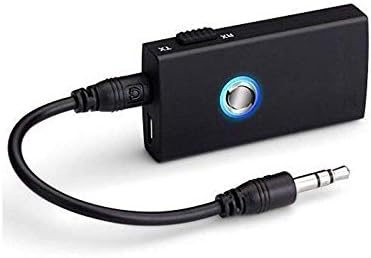
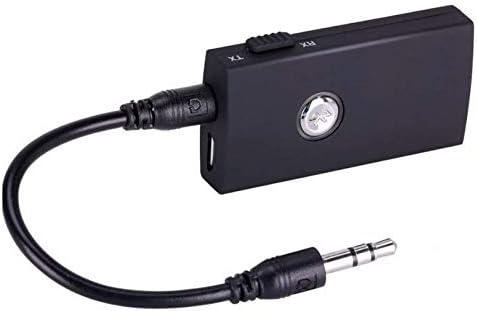
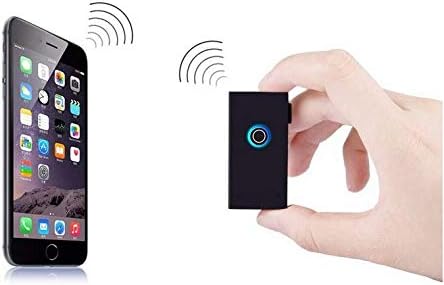
The BTI-010 is a versatile audio adapter that functions as both a Bluetooth transmitter (TX) and a Bluetooth receiver (RX). It features a compact design, a multi-function button, a mode switch, and standard audio and charging ports.

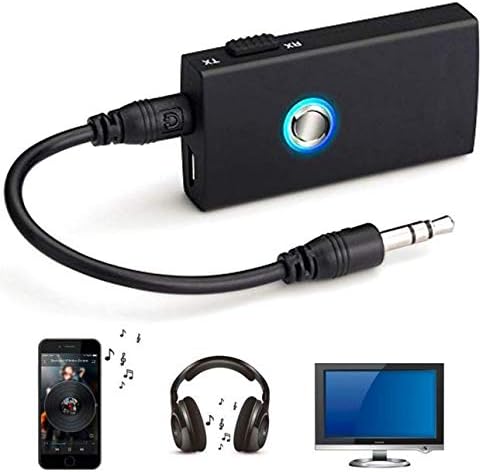
4. Persediaan dan Operasi
4.1. Mengecas Peranti
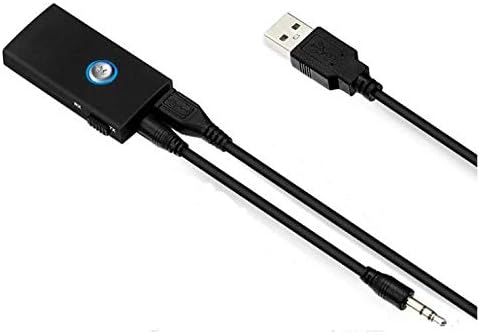
- Connect the supplied USB charging cable to the micro USB port on the BTI-010.
- Palamkan hujung kabel USB yang satu lagi ke dalam penyesuai kuasa USB (tidak disertakan) atau port USB komputer.
- The LED indicator will illuminate during charging and turn off when fully charged. Charging typically takes about 2 hours.
4.2. Mod Pemancar (TX)
Use TX mode to transmit audio wirelessly from a non-Bluetooth device (e.g., TV, PC, MP3 player) to a Bluetooth-enabled receiving device (e.g., Bluetooth headphones, Bluetooth speaker).
- Slide the mode switch on the BTI-010 to the TX kedudukan.
- Connect the BTI-010 to your non-Bluetooth audio source (e.g., TV's audio out jack) using the 3.5mm audio cable.
- Power on the BTI-010 by pressing and holding the multi-function button until the LED indicator flashes blue rapidly, indicating pairing mode.
- Place your Bluetooth receiving device (headphones, speaker) into pairing mode.
- The BTI-010 will automatically search for and connect to nearby Bluetooth receiving devices. Once connected, the LED will flash blue slowly.
- Adjust the volume on your receiving device.
4.3. Mod Penerima (RX)
Use RX mode to receive audio wirelessly from a Bluetooth-enabled device (e.g., smartphone, tablet) and play it through a non-Bluetooth audio system (e.g., car stereo, home stereo, wired headphones).
- Slide the mode switch on the BTI-010 to the RX kedudukan.
- Connect the BTI-010 to your non-Bluetooth audio system (e.g., AUX input of a car stereo) using the 3.5mm audio cable.
- Power on the BTI-010 by pressing and holding the multi-function button until the LED indicator flashes blue and red alternately, indicating pairing mode.
- On your Bluetooth-enabled device (smartphone, tablet), enable Bluetooth and search for new devices.
- Select "BTI-010" from the list of available devices to pair. Once connected, the LED will flash blue slowly.
- Play audio on your Bluetooth-enabled device, and it will be streamed to your connected audio system. Adjust volume as needed.
5. Arahan Operasi
5.1. Hidupkan/Mati Kuasa
- Hidupkan kuasa: Tekan dan tahan butang berbilang fungsi selama lebih kurang 3 saat sehingga penunjuk LED menyala.
- Matikan: Tekan dan tahan butang berbilang fungsi selama lebih kurang 3 saat sehingga penunjuk LED padam.
5.2. Berpasangan
- In TX mode, the device automatically enters pairing mode upon power-on if not connected. The LED flashes blue rapidly.
- In RX mode, the device automatically enters pairing mode upon power-on if not connected. The LED flashes blue and red alternately.
5.3. Penukaran Mod
To switch between Transmitter (TX) and Receiver (RX) modes, slide the TX/RX switch located on the side of the device. Ensure the device is powered off before changing modes for optimal performance.
6. Penyelesaian masalah
- Tiada Kuasa: Pastikan peranti dicas sepenuhnya. Sambungkannya ke sumber kuasa menggunakan kabel USB.
- Tidak boleh berpasangan:
- Ensure the BTI-010 is in the correct TX or RX mode for your intended use.
- Make sure both the BTI-010 and the target Bluetooth device are in pairing mode.
- Move the devices closer to each other (within 10 meters).
- Turn off and restart both devices, then attempt pairing again.
- Tiada Audio:
- Verify that the 3.5mm audio cable is securely connected to both the BTI-010 and the audio source/destination.
- Check the volume levels on both the BTI-010 (if applicable) and the connected audio device.
- Ensure the BTI-010 is successfully paired and connected (LED flashes blue slowly).
- Confirm the audio source is playing and outputting sound.
- Kualiti Audio Lemah:
- Reduce the distance between the BTI-010 and the connected Bluetooth device.
- Remove any obstacles that may be interfering with the Bluetooth signal.
- Ensure there are no other strong wireless signals nearby causing interference.
7. Spesifikasi Teknikal
| Model | BTI-010 |
| Versi Bluetooth | 3.0 (Class II) |
| Bluetooth Profiles | A2DP, AVRCP |
| Jarak Operasi | Sehingga 10 meter (33 kaki) |
| Kekerapan Bekerja | 2.402 GHz - 2.480 GHz |
| Masa Kerja (Mod TX) | Sehingga 8 Jam |
| Masa Bekerja (Mod RX) | Sehingga 6 Jam |
| Masa Mengecas | Lebih kurang 2 Jam |
| Kapasiti Bateri | Bateri Litium 160mAH |
| Teknologi Ketersambungan | AUX, Bluetooth, USB |
| Sumber Kuasa | Dikuasakan Bateri |
| Peranti Serasi | Smartphone, Tablet, Audio Systems |
| Berat Barang | 68 g |
| Dimensi Pakej | 15.01 x 7.19 x 5 cm |
8. Maklumat Keselamatan
- Jangan dedahkan peranti kepada suhu yang melampau, cahaya matahari langsung atau persekitaran lembap.
- Jangan buka atau cuba membaiki peranti itu sendiri. Ini boleh membatalkan jaminan dan menyebabkan kerosakan.
- Jauhkan peranti daripada air dan cecair lain.
- Gunakan hanya kabel USB yang disediakan untuk mengecas.
- Buang peranti dan baterinya secara bertanggungjawab mengikut peraturan tempatan.
9. Waranti dan Sokongan
This product comes with a standard manufacturer's warranty. For specific warranty details, please refer to the documentation provided at the time of purchase or contact your retailer. For technical support or inquiries, please reach out to the customer service department of your point of purchase.
Ask a question about this manual
Ask about setup, troubleshooting, compatibility, parts, safety, or missing instructions. Manuals+ will review the question and use this page’s manual context to help answer it.