
1. Pengenalan
Thank you for choosing the mcdodo Smart LED Auto Disconnect and Auto Recharge Nylon Braided Sync Charge USB Data Cable. This cable is designed to provide efficient and safe charging for your compatible devices, featuring intelligent power management to protect your device's battery life. It incorporates an auto-disconnect function upon full charge and an auto-recharge mechanism to maintain optimal battery levels.
This manual will guide you through the proper setup, operation, and maintenance of your new cable.
2. Ciri-ciri Produk
- Penunjuk LED Pintar: Two-color LED light to indicate charging status (orange for quick charge, green for trickle charge, off for full charge).
- Auto Putus Sambungan: Automatically stops charging when your device reaches 100% battery to prevent overcharging.
- Auto Recharge: Initiates charging again after approximately 120 minutes if the device's battery level drops, ensuring your device remains fully charged.
- Pembinaan Tahan Lama: Features a nylon braided exterior and alloy shell for enhanced durability and resistance to bending.
- Pemindahan Data: Supports data synchronization between your device and a computer.

Gambar 1: Lebihview of the mcdodo Smart LED Auto Disconnect USB Data Cable.
3. Arahan Persediaan
- Sambungkan ke Sumber Kuasa: Insert the USB-A end of the cable into a compatible USB power adapter (not included) or a computer's USB port. Ensure the power source provides adequate current (e.g., 2.4 Amps for optimal charging).
- Sambung ke Peranti: Insert the Lightning connector end of the cable into your compatible smartphone or tablet's charging port.
- Initial Indication: Upon connection, the LED indicator on the Lightning connector will illuminate, typically orange, indicating that charging has begun.
4. Arahan Operasi
4.1 Proses Pengecasan
The cable's intelligent LED indicator provides visual feedback on the charging status:
- Orange Light Flashing: Indicates the device is undergoing quick charging.
- Lampu Hijau Hidup: Indicates the device is in trickle charge mode, nearing full capacity.
- Light Off Automatically: Indicates the device has reached 100% charge, and the auto-disconnect feature has activated.

Figure 2: LED indicator states for charging status.
4.2 Auto Disconnect and Auto Recharge
The cable features a second-generation intelligent control IC that manages the charging cycle:
- When your device reaches 100% charge, the cable will automatically stop power delivery to prevent overcharging, indicated by the LED turning off.
- After approximately 120 minutes (2 hours) of being fully charged and disconnected, the cable will automatically identify the power status and initiate a cycle charge if the battery level has dropped, ensuring your device remains fully charged without continuous power flow.
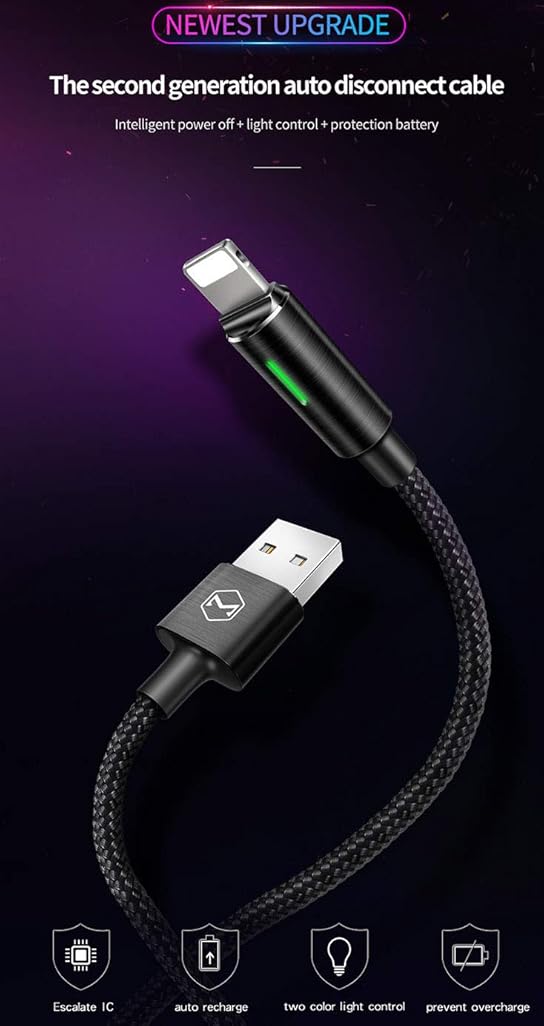
Figure 3: Smart IC for safe overnight charging.
4.3 Pemindahan Data
To transfer data, connect the USB-A end of the cable to a computer's USB port and the Lightning end to your compatible device. Your device should then be recognized by the computer for data synchronization.
Video 1: Demonstration of the Second Generation Smart Auto Disconnect and Auto Recharge feature.
5. Penyelenggaraan
- Pembersihan: Gunakan kain lembut dan kering untuk mengelap kabel dan penyambung perlahan-lahan. Elakkan menggunakan pembersih cecair atau bahan yang melelas.
- Storan: Store the cable in a cool, dry place away from direct sunlight and extreme temperatures. Avoid tightly coiling the cable or placing heavy objects on it.
- Pengendalian: Always grasp the connector head when plugging or unplugging the cable. Avoid pulling directly on the cable itself to prevent damage to the internal wires. Do not bend the cable sharply, especially near the connectors.
6. Penyelesaian masalah
- Peranti Tidak Mengecas:
- Pastikan kedua-dua hujung kabel disambungkan dengan selamat.
- Verify that the power adapter or USB port is functional.
- Periksa sama ada port pengecasan peranti anda bersih dan bebas daripada serpihan.
- Pengecasan perlahan:
- Confirm that your power adapter provides sufficient output (e.g., 2.4A). Lower current adapters may result in slower charging.
- Avoid using the device extensively while charging, as this can slow down the process.
- Penunjuk LED Tidak Berfungsi:
- If the LED does not light up when connected, ensure the cable is properly plugged into both the power source and the device.
- If the device is already fully charged, the LED will turn off as part of the auto-disconnect feature.
- Cable Not Compatible with All Boxes: Some power adapters may not be fully compatible. Ensure you are using a standard USB-A power adapter.
7. Spesifikasi
| Ciri | Perincian |
|---|---|
| Jenama | mcdodo |
| Nombor Model | 694536541795 |
| Jenis Penyambung | USB Type A to Lightning |
| Jenis Kabel | USB Data and Charge Cable |
| Peranti Serasi | Smartphones, Tablets (e.g., Phone XS Max/XS/8/7/6/5/Pod/Pad and More) |
| Ciri Khas | Braided, Data Transfer, Auto Disconnect, Auto Recharge, Smart LED Indicator |
| warna | Hitam |
| Panjang | 4FT/1.2M |
| Bahan Luar | nilon |
| Vol Maksimumtage | 5 Volt |
| Arus Penyesuai AC | 2.4 Amps |
| Wattage | 12 watt |
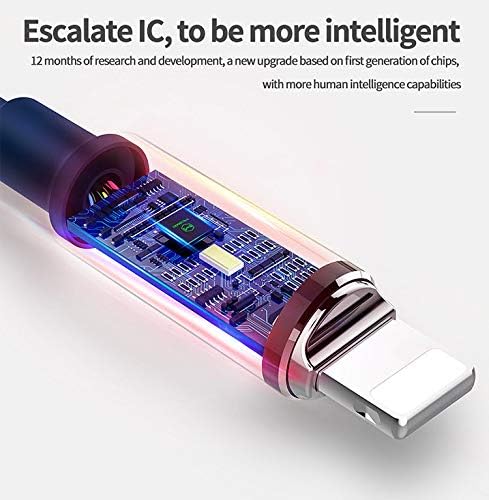
Gambar 4: Dalaman view of the intelligent control IC.
8. Waranti dan Sokongan
Specific warranty information for this product is not provided in the available data. For detailed warranty terms and customer support, please refer to the official mcdodo weblaman web atau hubungi penjual secara langsung.
You can visit the mcdodo store for more information: mcdodo Store