
1. Pengenalan
This manual provides instructions for the Macally BTDYNAMOUSE Wireless Bluetooth Mouse. This device is designed for comfortable and quiet operation across various platforms.
The Macally BTDYNAMOUSE is a slim, ambidextrous Bluetooth mouse featuring silent click buttons and adjustable DPI settings. It connects wirelessly to compatible devices, offering a clutter-free workspace.
2. Apa yang ada di dalam Kotak
- Macally BTDYNAMOUSE Wireless Bluetooth Mouse
- 2 x Bateri AAA
3. Ciri-ciri Produk
- DPI boleh laras: Switch between 800, 1200, and 1600 DPI for precise cursor control.
- Butang Klik Senyap: Designed for quiet operation, reducing click noise by 90% compared to traditional mice.
- Slim and Ambidextrous Design: Comfortable for both left and right-handed users, with a low-profile faktor bentuk.
- Kesambungan Wayarles Bluetooth: Connects wirelessly up to 10 meters (30 feet).
- Hayat Bateri yang Panjang: Two AAA batteries provide up to 3 months of use (based on 8 hours daily use). Battery life may vary.
- Keserasian: Works with Windows and macOS operating systems.
4. Arahan Persediaan
4.1. Pasang Bateri
1. Locate the battery compartment on the underside of the mouse.
2. Buka penutup petak bateri.
3. Insert two AAA batteries, ensuring correct polarity (+/-).
4. Tutup penutup petak bateri.

Rajah 1: Pemasangan Bateri
4.2. Berpasangan Bluetooth
1. Turn on the mouse using the ON/OFF switch located on the underside.
2. Press and hold the Bluetooth pairing button (usually a small button near the ON/OFF switch or sensor) for 2-3 seconds until the LED indicator starts blinking, indicating it's in pairing mode.
3. On your computer or device (Mac, Windows, iPad, Tablet):
- Pergi ke tetapan Bluetooth.
- Cari untuk peranti baru.
- Select "Macally BTDYNAMOUSE" from the list of available devices.
- Ikuti mana-mana gesaan pada skrin untuk melengkapkan proses berpasangan.
Once successfully paired, the LED indicator on the mouse will stop blinking and remain solid or turn off, depending on the mouse model.

Figure 2: Mouse with Laptop, indicating multi-device compatibility
5. Arahan Operasi
The Macally BTDYNAMOUSE features a standard 3-button layout with a scroll wheel for intuitive navigation.
- Klik Kiri: Primary action, typically used for selecting items or opening links.
- Klik kanan: Secondary action, typically used to open context menus.
- Roda Tatal: Digunakan untuk menatal menegak melalui dokumen dan web pages. The scroll wheel can also be pressed for a middle-click action, depending on software configuration.

Rajah 3: Reka Bentuk Ergonomik untuk Penggunaan yang Selesa

Figure 4: Quiet Click Buttons in Action
6. Pelarasan DPI
The mouse features a DPI switch button to adjust cursor sensitivity. This allows you to fine-tune the mouse's responsiveness to your preference.
To change the DPI setting, press the small button located behind the scroll wheel. Each press cycles through the available DPI levels: 800, 1200, and 1600.
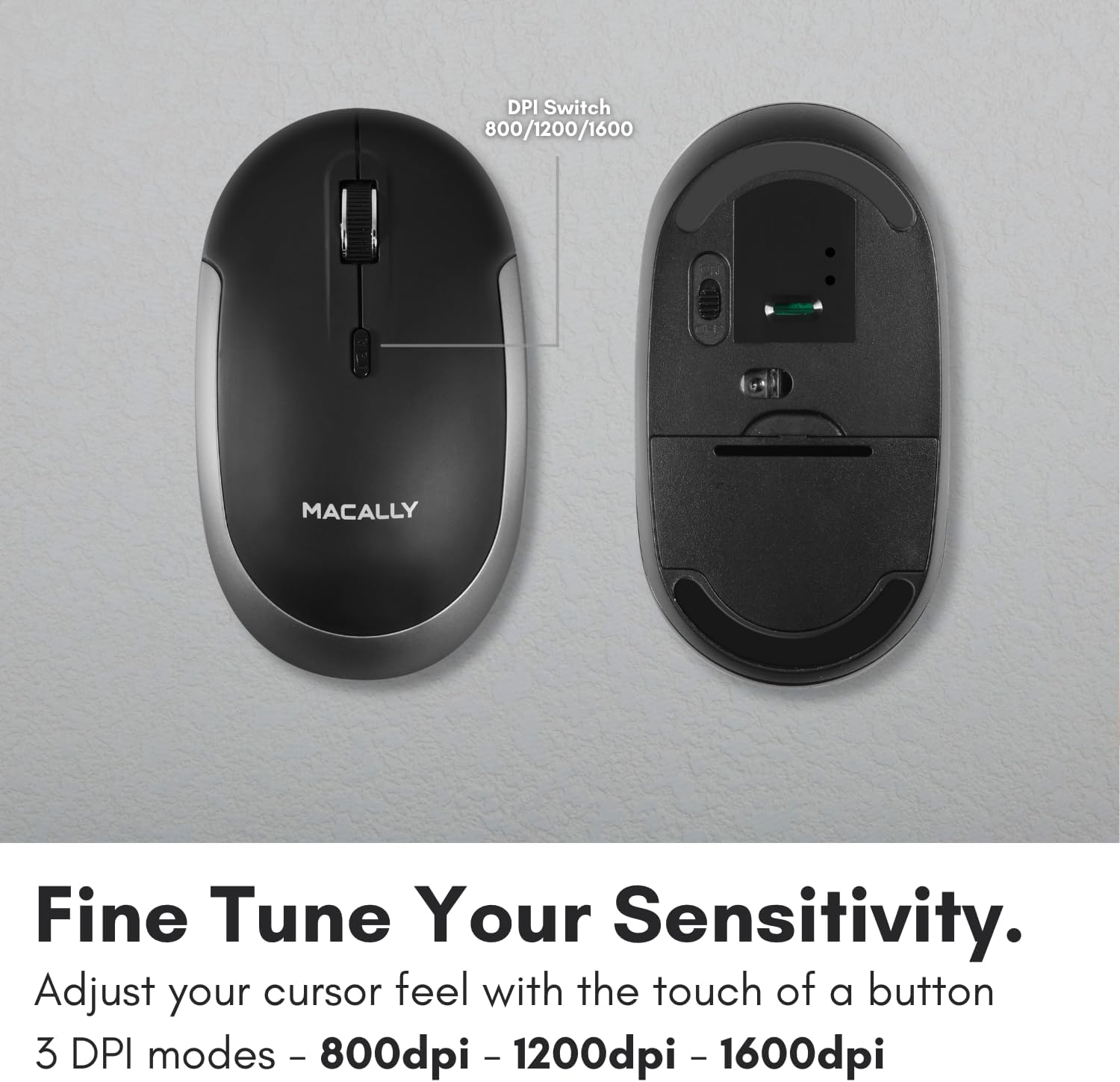
Figure 5: DPI Switch Location
7. Maklumat Bateri
The Macally BTDYNAMOUSE uses two AAA batteries. For optimal performance and battery life, it is recommended to use high-quality alkaline batteries.
- Jenis Bateri: 2 x AAA
- Anggaran Hayat Bateri: Up to 3 months (based on 8 hours of daily use). Actual battery life may vary based on usage patterns and computing conditions.
When the battery level is low, the mouse's LED indicator may flash or change color to alert you. Replace batteries promptly to ensure uninterrupted use.
8. Penyelenggaraan
To ensure the longevity and optimal performance of your Macally BTDYNAMOUSE, follow these maintenance guidelines:
- Pembersihan: Gunakan kain lembut dan kering untuk membersihkan tetikus. Untuk kotoran degil, sedikit damp kain boleh digunakan, tetapi pastikan tiada kelembapan memasuki peranti.
- Elakkan Cecair: Do not expose the mouse to liquids or excessive moisture.
- Storan: Simpan tetikus di tempat yang sejuk dan kering apabila tidak digunakan untuk tempoh yang lama.
- Penggantian Bateri: Replace batteries as needed. Dispose of old batteries according to local regulations.
9. Penyelesaian masalah
| Masalah | Kemungkinan Punca | Penyelesaian |
|---|---|---|
| Tetikus tidak bersambung melalui Bluetooth | Mouse is off or batteries are low. Not in pairing mode. Device's Bluetooth is off. | Ensure mouse is on and batteries are fresh. Put mouse in pairing mode. Check device's Bluetooth settings. Try re-pairing. |
| Cursor is erratic or unresponsive | Dirty optical sensor. Mouse used on unsuitable surface. Low battery. | Clean the optical sensor. Use a mouse pad or a smooth, non-reflective surface. Replace batteries. |
| Mouse clicks are not silent | This mouse is designed for 90% noise reduction, not complete silence. | The mouse provides a significantly quieter click than standard mice, but a faint sound may still be audible. |
| Hayat bateri pendek | Frequent usage. Low-quality batteries. | Use high-quality alkaline batteries. Turn off the mouse when not in use for extended periods. |
10. Spesifikasi
| Ciri | Perincian |
|---|---|
| Jenama | Secara Macal |
| Nama Model | BTDYNAMOUSE |
| Teknologi Ketersambungan | Bluetooth, Wayarles |
| Teknologi Pengesanan Pergerakan | Optik |
| Tetapan DPI | 800 / 1200 / 1600 |
| Butang | 4 (Left, Right, Scroll Click, DPI Switch) |
| Orientasi Tangan | Ambidextrous |
| Peranti Serasi | Laptop, Personal Computer (Windows, macOS) |
| Julat Tanpa Wayar | Sehingga 10 m (30 kaki) |
| Jenis Bateri | 2 x AAA (termasuk) |
| Hayat Bateri | Up to 3 months (estimated) |
| Berat Barang | 73 Gram |
| bahan | Silicone (Enclosure) |
| warna | Hitam |
11. Video Produk Rasmi
11.1. Bluetooth Optical Silent Click Mouse - White
Video ini memberikan penamatview of the Macally BTDYNAMOUSE, highlighting its slim design, ambidextrous body, simple 3-button layout, 90% noise reduction, and easy DPI adjustability (800/1200/1600).
11.2. Macally Wireless Bluetooth Mouse for Windows PC and Mac
This video demonstrates the Macally BTDYNAMOUSE's features, including its Bluetooth wireless technology, comfortable ambidextrous design, simple 3-button/scroll wheel layout, silent click buttons, and easy DPI adjustability.
12. Waranti dan Sokongan
For warranty information and technical support, please refer to the official Macally webtapak atau hubungi perkhidmatan pelanggan mereka. Simpan resit pembelian anda untuk tuntutan waranti.