
pengenalan
The Fanvil X4S is an enterprise-grade VoIP IP phone designed for professional communication environments. It features a 2.8-inch main color screen and a secondary 2.4-inch DSS color screen, enhancing user experience and productivity. This manual provides detailed instructions for the proper setup, operation, and maintenance of your Fanvil X4S IP Phone.
Kandungan Pakej
Sebelum meneruskan pemasangan, sila sahkan bahawa semua item ada di dalam pakej:
- Fanvil X4S IP Phone Unit
- Telefon Bimbit dan Kord Telefon Bimbit
- Kabel Ethernet
- Power Adapter (X4S-AC model)
- Stand Meja
- Panduan Pemasangan Pantas
Penerangan Fizikal
The Fanvil X4S features a modern design with dual color screens. The primary display is a 2.8-inch color screen for call information and menu navigation. A secondary 2.4-inch DSS color screen provides dynamic DSS/BLF functions, offering up to 30 virtualized DSS keys across five pages. The phone supports both desktop and wall-mount installation.
Persediaan
1. Sambungan Kuasa
The Fanvil X4S IP Phone can be powered using either the included AC power adapter or Power over Ethernet (PoE).
- Using AC Power Adapter: Connect the small end of the power adapter cable to the DC 12V port on the back of the phone. Plug the other end of the power adapter into a standard electrical outlet.
- Menggunakan Power over Ethernet (PoE): If your network switch supports PoE, connect an Ethernet cable from the network switch to the LAN port on the back of the phone. The phone will receive power directly through the Ethernet cable, eliminating the need for the AC power adapter.
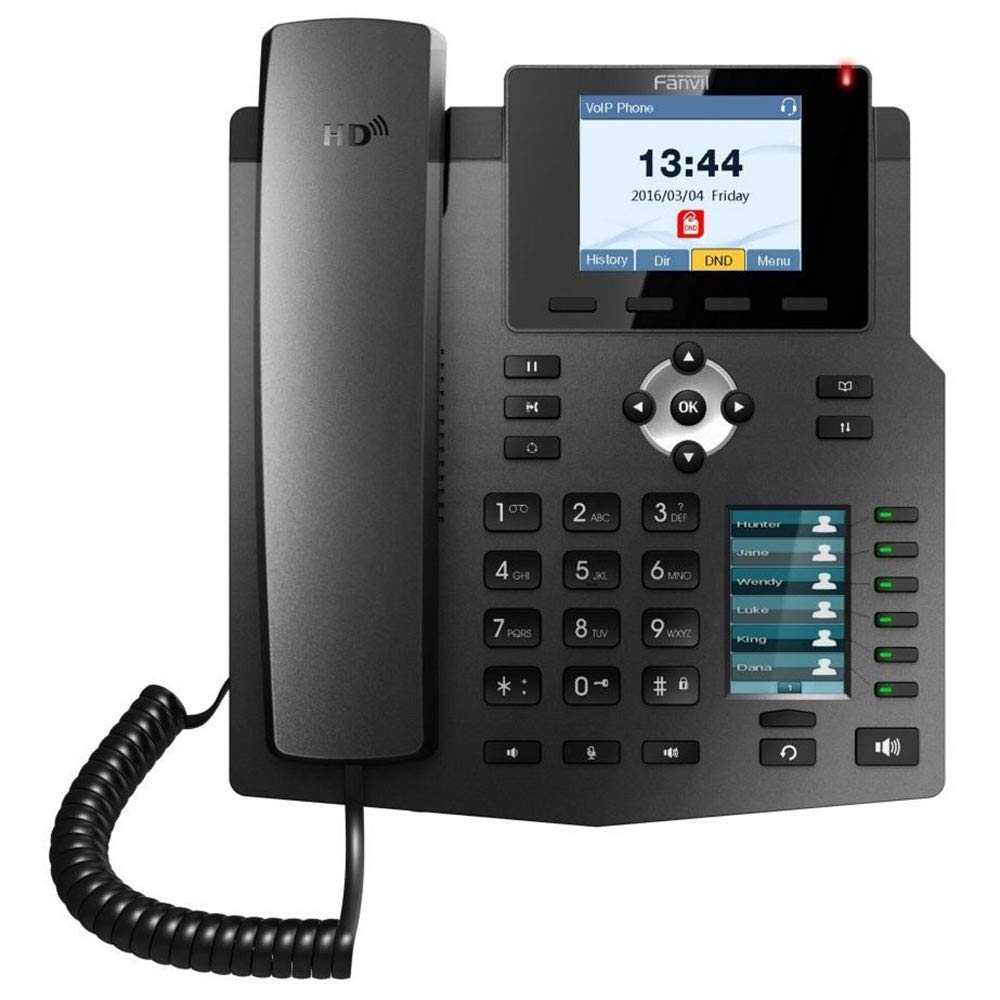
Image: The included AC power adapter for the Fanvil X4S IP Phone. This adapter is used to supply power to the device when PoE is not available.
2. Sambungan Rangkaian
Connect one end of the Ethernet cable to the LAN port on the back of the phone and the other end to an available port on your network switch or router. If you are connecting a computer through the phone, connect a second Ethernet cable from the PC port on the phone to your computer's Ethernet port.
3. Handset and Headset Connection
- Telefon bimbit: Connect the coiled handset cord to the handset port on the side of the phone and to the handset itself.
- alat dengar: For hands-free communication, connect a compatible headset to the headset port. The Fanvil X4S supports Electronic Hook Switch (EHS) for Plantronics headsets.
4. Desktop / Wall-Mount Installation
- Desktop: Attach the desk stand to the back of the phone unit. Adjust the stand to your preferred viewsudut ing.
- Pemasangan Dinding: The phone can also be mounted on a wall. Refer to the separate wall-mount bracket instructions (if included) for proper installation.
Arahan Operasi
1. Fungsi Panggilan Asas
- Membuat Panggilan: Lift the handset, press the speakerphone button, or press a line key. Dial the number and press the Dial soft key or wait a few seconds.
- Menjawab Panggilan: Lift the handset, press the speakerphone button, or press the Answer soft key.
- Menamatkan Panggilan: Replace the handset, press the speakerphone button, or press the End Call soft key.
- Panggil semula: Tekan butang Dail Semula untuk memanggil nombor yang terakhir didail.
- Tahan: During an active call, press the Hold soft key. Press the Resume soft key to retrieve the call.
2. Kunci DSS
The secondary 2.4-inch DSS color screen displays programmable DSS (Direct Station Select) keys. These keys can be configured for various functions such as Speed Dial, Busy Lamp Field (BLF), Intercom, Call Park, and more. The phone supports up to 30 virtualized DSS keys across five pages, which can be navigated using the page navigation buttons.
3. Buku telefon
The Fanvil X4S supports a phonebook with the capacity to store up to 500 entries. Access the phonebook via the menu to add, edit, or search for contacts. You can also access call logs to view panggilan masuk, keluar dan terlepas baru-baru ini.
Penyelenggaraan
1. Pembersihan
Untuk membersihkan telefon, gunakan kain lembut dan kering. Untuk kesan degil, gunakan sedikit kainamp cloth with mild, non-abrasive cleaner can be used. Avoid using harsh chemicals, solvents, or abrasive materials, as these can damage the phone's surface and screens.
2. Penyimpanan
When not in use for extended periods, store the phone in a cool, dry place away from direct sunlight and extreme temperatures. Disconnect the power adapter and network cable before storage.
Menyelesaikan masalah
This section addresses common issues you might encounter with your Fanvil X4S IP Phone.
- Tiada Kuasa:
- Ensure the power adapter is securely connected to both the phone and a working electrical outlet.
- If using PoE, verify that the Ethernet cable is connected to a PoE-enabled port on your network switch and that the switch is powered on.
- Tiada Nada Dail:
- Periksa sambungan kabel rangkaian ke port LAN.
- Verify that the phone has successfully registered with your VoIP server. Check the phone's display for registration status.
- Ensure the handset cord is properly connected.
- Tidak Boleh Membuat/Terima Panggilan:
- Sahkan sambungan rangkaian.
- Check SIP account registration status on the phone's display.
- Contact your VoIP service provider or system administrator for assistance with account configuration.
- Kualiti Audio Lemah:
- Check network connection stability.
- Pastikan telefon bimbit atau set kepala disambungkan dengan betul.
- Adjust volume settings on the phone.
For more complex issues, consult your system administrator or Fanvil technical support.
Spesifikasi
| Jenama | Fanvil |
| Model | X4S |
| Talian SIP | 4 |
| Paparan Utama | Skrin Warna 2.8" |
| DSS Display | 2.4" Color Screen (30 virtual DSS keys across 5 pages) |
| Pelabuhan Ethernet | 2 x 10/100 Mbps (LAN, PC) |
| Suara HD | ya |
| Sokongan PoE | ya |
| Sumber Kuasa | Power Adapter (included) or PoE |
| Kapasiti Buku Telefon | 500 penyertaan |
| EHS Support | For Plantronics headsets |
| Pemasangan | Desktop / Wall-mount |
| Dimensi (L x W x H) | 12 x 12 x 5 inci |
| Pengenalan Pemanggil | ya |
| Operasi Berbilang Baris | ya |
| Platform yang Serasi | 3CX, Asterisk, Broadsoft, Elastix, Zycoo, etc. |
Maklumat Waranti
Fanvil products typically come with a standard manufacturer's warranty. For specific warranty terms and conditions, including duration and coverage, please refer to the warranty card included with your product or visit the official Fanvil webtapak. Simpan resit pembelian anda sebagai bukti pembelian untuk tuntutan waranti.
Sokongan
For technical assistance, product inquiries, or further support, please contact your vendor or visit the official Fanvil support website. Online resources, FAQs, and firmware updates may also be available.
Rasmi Fanvil Webtapak: www.fanvil.com