pengenalan
The Forge Doosl DSER102 is a versatile device designed to enhance your audio experience. It functions as both a Bluetooth receiver, allowing you to stream audio wirelessly to non-Bluetooth devices, and an FM transmitter, enabling you to broadcast audio to your car radio. This manual provides detailed instructions for setup, operation, and maintenance to ensure optimal performance.
Maklumat Keselamatan
- Jauhkan peranti daripada air, kelembapan dan suhu yang melampau.
- Jangan cuba membuka atau membaiki peranti sendiri. Rujuk kepada kakitangan perkhidmatan yang berkelayakan.
- Gunakan hanya kabel pengecasan yang disediakan atau setara yang diperakui.
- Elakkan pendedahan berpanjangan kepada cahaya matahari langsung.
- Buang peranti dan baterinya secara bertanggungjawab mengikut peraturan tempatan.
Kandungan Pakej
Sila semak pakej untuk item berikut:
- Forge Doosl DSER102 Bluetooth Receiver & FM Transmitter
- Kabel Pengecas USB Mikro
- Kabel Audio 3.5mm
- Manual Pengguna (dokumen ini)
Produk Selesaiview
Biasakan diri anda dengan komponen peranti:
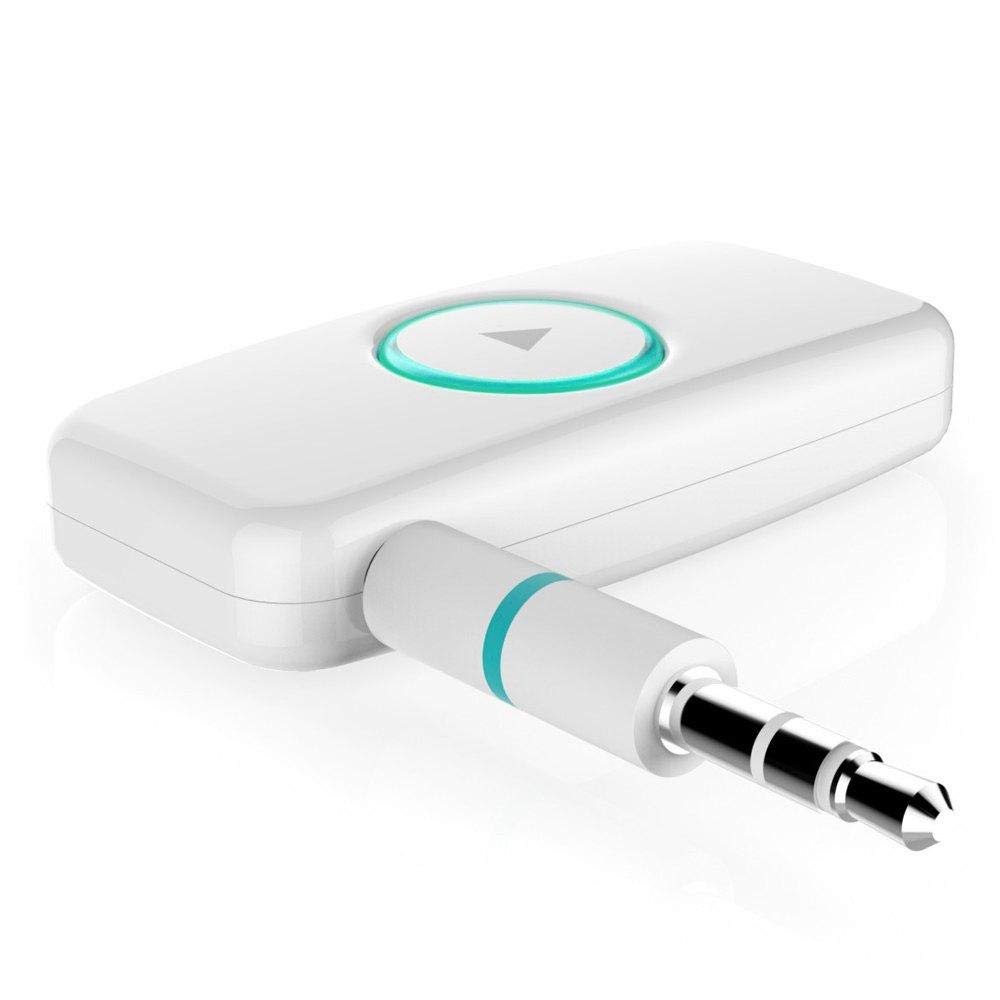
Rajah 1: Depan view of the DSER102 device.
- Butang pelbagai fungsi: Power on/off, Play/Pause, Answer/End Call, Mode Switch.
- Penunjuk LED: Shows power, charging, and connection status.
- 3.5mm Audio Output/Input Port: Connects to audio devices.
- Port Pengecasan USB Mikro: Untuk mengecas bateri dalaman.
Persediaan
1. Mengecas Peranti
Before first use, fully charge the DSER102.
- Connect the Micro USB charging cable to the device's charging port.
- Sambungkan hujung kabel yang satu lagi ke penyesuai kuasa USB (tidak disertakan) atau port USB komputer.
- The LED indicator will show red during charging and turn off when fully charged. A full charge takes approximately 2 hours and provides up to 16 hours of music playback.
2. Bluetooth Receiver Mode Setup
Use this mode to stream audio from your Bluetooth-enabled phone to a non-Bluetooth speaker or car stereo.
- Hidupkan kuasa: Press and hold the Multi-function Button for 3 seconds until the LED indicator flashes blue rapidly, indicating pairing mode.
- Sambung ke Peranti Audio: Plug the DSER102 into the 3.5mm AUX input of your car stereo, home stereo, or speaker using the 3.5mm audio cable.
- Gandingkan dengan Telefon: On your mobile phone, enable Bluetooth and search for "DSER102" in the list of available devices. Select it to pair.
- Connection Confirmed: Once paired, the LED indicator will flash blue slowly. You can now play music from your phone through the connected audio device.
3. FM Transmitter Mode Setup
Use this mode to broadcast audio from the DSER102 to your car's FM radio.
- Hidupkan kuasa: Tekan dan tahan Butang Pelbagai fungsi selama 3 saat.
- Switch to FM Transmitter Mode: Double-press the Multi-function Button to switch modes. The LED indicator will change color or pattern (refer to device for specific indication).
- Tune FM Radio: On your car's FM radio, tune to an unused FM frequency (e.g., 87.5 MHz or 108.0 MHz).
- Set DSER102 Frequency: The DSER102 will transmit on a specific FM frequency. If adjustable, match the DSER102's frequency to your car radio's frequency. If not adjustable, find the frequency the DSER102 is broadcasting on and tune your car radio to it.
- Sambungkan Sumber Audio: Connect your audio source (e.g., phone via Bluetooth) to the DSER102. The audio will now be transmitted to your car's FM radio.
Arahan Operasi
Hidupkan/Mati Kuasa
- Hidupkan kuasa: Press and hold the Multi-function Button for approximately 3 seconds until the LED indicator lights up.
- Matikan: Press and hold the Multi-function Button for approximately 3 seconds until the LED indicator turns off.
Music Playback (Bluetooth Receiver Mode)
- Main/Jeda: Tekan sebentar Butang Pelbagai fungsi.
Call Management (Bluetooth Receiver Mode)
- Jawab/Tamatkan Panggilan: Tekan sebentar Butang Pelbagai fungsi.
- Tolak Panggilan: Tekan dan tahan Butang Pelbagai fungsi selama 2 saat.
- Dail Semula Nombor Terakhir: Tekan dua kali Butang Pelbagai fungsi.
Penyelenggaraan
- Bersihkan peranti dengan kain lembut dan kering. Jangan gunakan pembersih cecair atau aerosol.
- Simpan peranti di tempat yang sejuk dan kering apabila tidak digunakan.
- Elakkan daripada menjatuhkan atau meletakkan peranti kepada kesan yang kuat.
Menyelesaikan masalah
| Masalah | Penyelesaian |
|---|---|
| Peranti tidak dihidupkan. | Pastikan peranti dicas sepenuhnya. Sambungkannya ke sumber kuasa menggunakan kabel Mikro USB. |
| Tidak boleh berpasangan dengan peranti Bluetooth. | Make sure the DSER102 is in pairing mode (rapidly flashing blue LED). Ensure your phone's Bluetooth is enabled and within range. Try restarting both devices. |
| No audio in Bluetooth Receiver mode. | Check if the 3.5mm audio cable is securely connected to both the DSER102 and your audio system's AUX input. Ensure your audio system is set to the correct AUX input. Adjust volume on both devices. |
| Poor audio quality in FM Transmitter mode. | Find a clear, unused FM frequency on your car radio and match the DSER102's frequency to it. Avoid frequencies used by local radio stations. Reduce interference by moving the device away from other electronics. |
Spesifikasi
- model: DSER102
- Versi Bluetooth: V4.0
- Kapasiti Bateri: 250mAh Li-battery
- Masa Main Balik Muzik: Sehingga 16 jam
- Port Pengecasan: USB mikro
- Output Audio: 3.5mm AUX
- Dimensi: 1.4 x 4.6 x 3.7 cm
- Berat: 200 g
- Peranti Serasi: Fon kepala, Telefon Pintar, Pembesar Suara
Waranti dan Sokongan
For warranty information or technical support, please refer to the retailer where the product was purchased or visit the official Forge webtapak. Simpan resit pembelian anda sebagai bukti pembelian.