
1. Pengenalan
This manual provides instructions for the installation, operation, and maintenance of the Cisco CP-68KEM-3PCC Expansion Module. This module is designed to enhance the functionality of your Cisco IP Phone 6851 by providing additional programmable keys.
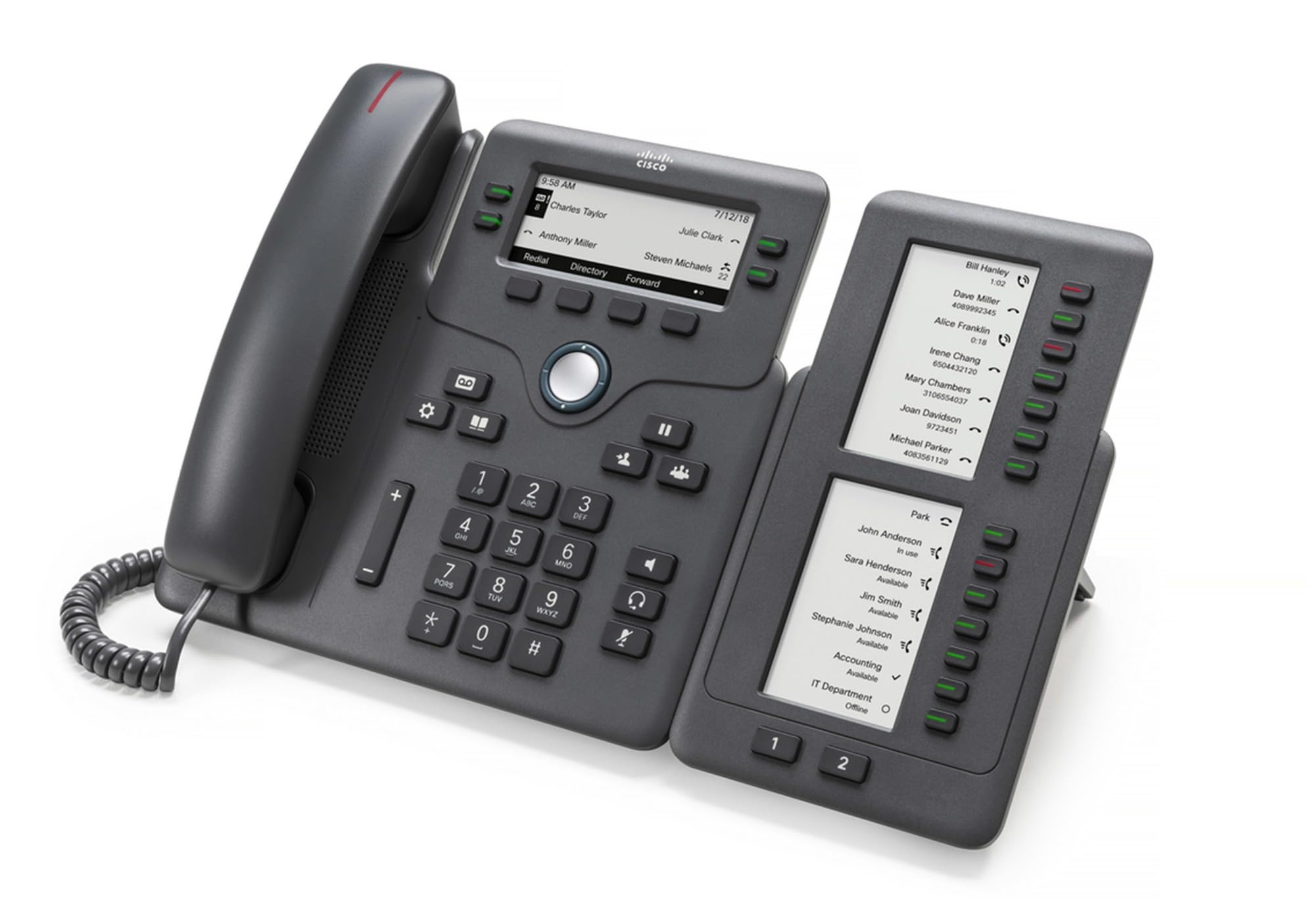
Figure 1: Cisco CP-68KEM-3PCC Expansion Module. This image shows the front view of the expansion module with its grayscale LCD screen and programmable keys.
The Cisco CP-68KEM-3PCC Expansion Module adds 14-line keys and 2-page keys, totaling 28 additional keys, with an easy-to-read grayscale LCD screen. It is ideal for monitoring and managing call status, directory numbers, and speed dial functions.
2. Apa yang ada di dalam Kotak
Buka bungkusan kotak dengan berhati-hati dan pastikan semua item ada:
- Cisco CP-68KEM-3PCC Phone Expansion Module
- Connecting Cable (typically included for linking to the phone)
- Dokumentasi (manual pengguna ini, maklumat keselamatan)
Jika terdapat sebarang barang yang hilang atau rosak, sila hubungi vendor atau sokongan Cisco anda dengan segera.
3. Arahan Persediaan
Follow these steps to connect your Cisco CP-68KEM-3PCC Expansion Module to your Cisco IP Phone 6851.
- Prepare the IP Phone: Ensure your Cisco IP Phone 6851 is powered off and disconnected from the network.
- Connect the Expansion Module: Locate the expansion port on the back or side of your Cisco IP Phone 6851. Connect the provided connecting cable from the expansion module to this port.
- Selamatkan Sambungan: Pastikan kabel dipasang dengan kukuh untuk mengelakkan pemutusan sambungan secara tidak sengaja.
- Hidupkan kuasa: Reconnect your Cisco IP Phone 6851 to the network and power it on. The expansion module should be detected automatically.
- Sahkan Fungsi: Once the phone has booted, check the expansion module's display and keys to ensure they are responsive.
For detailed visual instructions, refer to the official Cisco documentation or support webtapak.
4. Operating the Expansion Module
The expansion module provides additional keys for various functions, enhancing your call management capabilities.
4.1 Kekunci Boleh Aturcara
The 28 programmable keys (14 keys across 2 pages) can be configured for:
- Directory Numbers (DNs): Assign specific phone lines or extensions.
- Dail Cepat: Program frequently called numbers for quick access.
- Feature Keys: Assign functions like call transfer, conference, or call park.
- Call Status Monitoring: Monitor the status of other lines (e.g., busy, ringing).
4.2 Page Navigation
Use the dedicated page keys (usually located near the display) to switch between the two pages of programmable keys. The grayscale LCD screen will update to show the labels for the currently active page.
4.3 Konfigurasi
Configuration of the programmable keys is typically managed through your organization's phone system administrator or via the web interface of the Cisco IP Phone 6851. Consult your IT department for specific configuration instructions.
5. Penyelenggaraan
To ensure the longevity and optimal performance of your Cisco CP-68KEM-3PCC Expansion Module, follow these maintenance guidelines:
- Pembersihan: Use a soft, dry, lint-free cloth to clean the exterior surfaces. For stubborn marks, slightly dampen the cloth with water. Avoid using harsh chemicals, abrasive cleaners, or solvents, as these can damage the finish and electronic components.
- Persekitaran: Keep the module in a clean, dry environment, away from direct sunlight, excessive heat, and moisture.
- Pengendalian: Handle the module with care. Avoid dropping it or subjecting it to strong impacts.
- Pengurusan Kabel: Ensure connecting cables are not kinked, pinched, or under strain.
There are no user-serviceable parts inside the expansion module. Do not attempt to open or repair the device yourself.
6. Penyelesaian masalah
If you encounter issues with your expansion module, try the following troubleshooting steps:
| Masalah | Kemungkinan Punca | Penyelesaian |
|---|---|---|
| Module not recognized by phone | Loose cable connection, phone not restarted, incompatible phone model. |
|
| Kunci tidak bertindak balas | Software glitch, configuration issue. |
|
| Paparan kosong atau berkelip | Masalah kuasa, kerosakan dalaman. |
|
If these steps do not resolve the issue, please contact Cisco technical support or your authorized reseller.
7. Spesifikasi
| Ciri | Perincian |
|---|---|
| Nombor Model | CP-68KEM-3PCC |
| Jenama | Cisco |
| Peranti Serasi | Telefon IP Cisco 6851 |
| warna | Hitam |
| bahan | logam |
| Dimensi Item (LxWxH) | 5.1 x 10.2 x 20.3 cm |
| Sumber Kuasa | Corded (powered via host IP Phone) |
| Bilangan Kunci | 28 (14 keys across 2 pages) |
| Paparan | Grayscale LCD |
| GTIN/UPC | 889728068383 |
8. Maklumat Waranti
The Cisco CP-68KEM-3PCC Expansion Module comes with a Waranti produk 2 tahun dari tarikh pembelian. Waranti ini meliputi kecacatan bahan dan mutu kerja di bawah penggunaan biasa. Ia tidak meliputi kerosakan yang disebabkan oleh salah guna, kemalangan, pengubahsuaian tanpa kebenaran atau punca luaran.
For warranty claims or detailed terms and conditions, please refer to the official Cisco warranty policy available on their webtapak atau hubungi tempat pembelian anda.
9. Sokongan
For technical assistance, product information, or to report issues, please contact Cisco support:
- Sokongan Cisco Webtapak: Lawati pegawai Sokongan Cisco webtapak for documentation, downloads, and contact options.
- Authorized Reseller: Contact the reseller from whom you purchased the product.
When contacting support, please have your product model (CP-68KEM-3PCC) and serial number ready.