
pengenalan
This manual provides essential information for the proper use and maintenance of your Easytry123 replacement infrared remote control. This remote is designed to be compatible with specific Philips LED HDTV TV models, including 49PUS6501/12, 49PUS6551/12, 49PUS6561/12, 49PUS7101/12, 49PUS7181/12, 49PUT6801/98, and 55PUS6501/12. Please verify your TV model number to ensure compatibility.
Important Note: This is a replacement remote control and may not support all functions of your original TV remote. It is not a universal remote control.
Produk Selesaiview

Imej 1: Depan view of the Easytry123 replacement remote control, showing the power button, navigation pad, channel/volume controls, and numeric keypad.
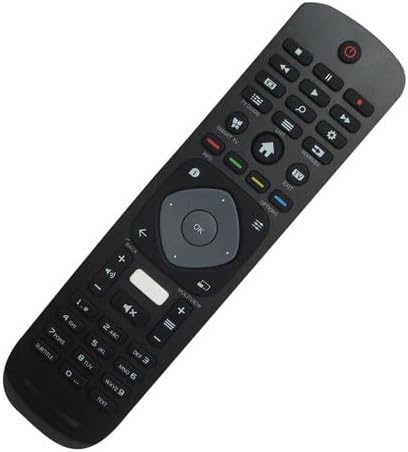
Imej 2: hadapan bersudut view alat kawalan jauh, menonjolkan reka bentuk ergonomik dan susun atur butangnya.

Imej 3: belakang view of the remote control, showing the battery compartment cover.
The Easytry123 replacement remote control features a standard button layout for TV operation, including power, channel, volume, navigation, and numeric input. It is designed for comfortable handling and intuitive use.
Persediaan
1. Pemasangan Bateri
- Cari petak bateri di belakang alat kawalan jauh.
- Luncurkan penutup petak bateri ke bawah atau ke luar untuk membukanya.
- Masukkan dua (2) bateri AAA, pastikan terminal positif (+) dan negatif (-) sepadan dengan gambar rajah di dalam petak.
- Tutup penutup petak bateri dengan selamat.
No setup or coding is required for this remote control. Once batteries are installed, it is ready for use with compatible Philips TV models.
Arahan Operasi
This remote control operates using infrared (IR) technology. Ensure there is a clear line of sight between the remote control and the IR receiver on your television for optimal performance.
- Butang Kuasa: Tekan untuk menghidupkan atau mematikan TV.
- Pad Kekunci Berangka (0-9): Use to directly enter channel numbers.
- Saluran Atas/Bawah: Press to change channels sequentially.
- Kelantangan Naik/Turun: Press to adjust the sound volume.
- Butang Bisukan: Press to mute or unmute the TV sound.
- Navigation Pad (Arrow Buttons & OK): Use to navigate menus and confirm selections.
- Back/Exit Buttons: Used to return to the previous screen or exit menus.
- Smart TV/Home Button: Accesses the TV's smart features or home screen.
Functionality may vary depending on your specific TV model. Some advanced features or specific buttons present on your original remote may not be replicated on this replacement unit.
Penyelenggaraan
Penggantian Bateri
Gantikan bateri apabila tindak balas alat kawalan jauh menjadi lembap atau berhenti berfungsi. Sentiasa gantikan kedua-dua bateri pada masa yang sama dengan bateri AAA baharu. Jangan campurkan bateri lama dan baharu, atau jenis bateri yang berbeza.
Pembersihan
Untuk membersihkan alat kawalan jauh, gunakan kain lembut dan kering. Untuk kotoran degil, gunakan sedikit kainampen kain dengan air. Elakkan menggunakan bahan kimia yang keras, pembersih yang melelas, atau kelembapan berlebihan, kerana ini boleh merosakkan alat kawalan jauh.
Menyelesaikan masalah
- Jauh tidak bertindak balas:
- Periksa sama ada bateri dimasukkan dengan betul dengan polariti yang betul.
- Gantikan bateri lama dengan bateri AAA baharu.
- Pastikan tiada halangan antara alat kawalan jauh dan penerima IR TV.
- Sahkan bahawa alat kawalan jauh dihalakan terus ke arah TV.
- Some functions do not work:
- As a replacement remote, it may not support all functions of the original TV remote. This is normal for some replacement units.
- Verify that your TV model is listed as compatible.
- Julat operasi pendek:
- Gantikan bateri.
- Ensure no strong light sources (like direct sunlight) are interfering with the IR signal.
Spesifikasi
| Jenama | Easytry123 |
| Nombor Model | Easytry5633 |
| Peranti Serasi | Television (Specific Philips LED HDTV models) |
| Teknologi Ketersambungan | Inframerah (IR) |
| Jenis Pengawal | Kawalan Butang |
| Julat Maksimum | 10 Meter (lebih kurang 33 kaki) |
| Bateri Diperlukan | 2 x bateri AAA (tidak termasuk) |
| Ciri Khas | Replacement item; may not work with all original functions. Not a universal remote. |
Waranti dan Sokongan
Maklumat Waranti
This Easytry123 remote control comes with a 90-day warranty from the date of purchase. This warranty covers manufacturing defects under normal use. It does not cover damage caused by misuse, accidents, unauthorized modifications, or battery leakage.
Sokongan Pelanggan
For any questions, issues, or warranty claims regarding your Easytry123 remote control, please contact the seller or manufacturer directly through your purchase platform. Provide your order number and a detailed description of the issue for prompt assistance.