1. Pengenalan
This manual provides essential information for the safe and efficient operation of your Hoover 2-in-1 Steam Mop and Handheld Steam Cleaner, model HS86-SFC-M. This versatile appliance is designed for comprehensive cleaning of various surfaces using steam and, when desired, a cleaning solution. Please read all instructions carefully before first use and retain this manual for future reference.
2. Maklumat Keselamatan
AMARAN: Sentiasa ikuti langkah berjaga-jaga keselamatan asas apabila menggunakan peralatan elektrik untuk mengurangkan risiko kebakaran, renjatan elektrik atau kecederaan.
- Pastikan voltage indicated on the product corresponds to your mains supply voltage.
- Jangan rendamkan perkakas dalam air atau cecair lain.
- Never leave the appliance unattended when plugged in. Unplug from the outlet when not in use and before servicing.
- Jangan gunakan dengan kord atau palam yang rosak. Jika perkakas tidak berfungsi sebagaimana mestinya, telah terjatuh, rosak, ditinggalkan di luar atau terjatuh ke dalam air, kembalikan ke pusat servis.
- Do not direct steam at people, animals, or electrical outlets. Steam is hot and can cause burns.
- Use only manufacturer-recommended accessories and cleaning solutions.
- Jauhkan rambut, pakaian longgar, jari dan semua bahagian badan daripada bukaan dan bahagian yang bergerak.
- Do not use on unsealed hardwood floors or surfaces that are sensitive to heat and moisture. Test on an inconspicuous area first.
3. Kandungan Pakej
Carefully unpack your Hoover HS86-SFC-M and ensure all items are present:
- Hoover 2-in-1 Steam Mop and Handheld Steam Cleaner Unit
- 10-piece accessory kit (various brushes, nozzles, and tools)
- Kord kuasa
- 2 Microfiber cleaning pads
- Small bottle of cleaning solution

Imej 3.1: Unit utama dan aksesori yang disertakan.
4. Persediaan
4.1 Assembling the Steam Mop
- Pasangkan pemegang pada badan utama mop stim sehingga ia berbunyi klik dengan selamat pada tempatnya.
- Place a microfiber cleaning pad onto the floor head. Ensure it is centered and securely attached.
- Connect the floor head to the main unit by aligning the connection points and pushing firmly until it locks.

Image 4.1: Attaching the microfiber cleaning pad to the floor head.
4.2 Filling the Water and Detergent Tanks
- Locate the water tank and detergent tank on the main unit.
- Remove the water tank by pulling it upwards. Fill it with clean tap water. Do not overfill.
- Reinsert the water tank until it clicks into place.
- Open the cap of the detergent tank and fill with the recommended cleaning solution. Close the cap securely.
Video 4.2: Demonstrates assembly, attaching pads, and filling tanks for the Hoover Steam Mop.
5. Arahan Operasi
5.1 Steam Mop Mode
- Pasangkan kord kuasa ke soket elektrik yang sesuai. Lampu penunjuk kuasa akan menyala.
- Wait approximately 30 seconds for the unit to heat up and produce steam.
- Tekan picu stim pada pemegang untuk melepaskan stim.
- For detergent use, turn the detergent dial to the 'On' position. Adjust the steam output using the variable steam control dial to suit your floor type and cleaning needs.
- Move the steam mop slowly and steadily over the floor surface.
- When finished, turn the detergent dial to 'Off' (if used), release the steam trigger, and unplug the unit.
5.2 Handheld Steam Cleaner Mode
- To detach the handheld unit, press the release button and lift the main body from the floor head.
- Attach the flexible hose to the handheld unit.
- Select the appropriate accessory from the 10-piece kit for the task (e.g., small brush for grout, nozzle for tight spaces). Attach it to the end of the hose or directly to the handheld unit if preferred.
- Pasangkan unit dan tunggu sehingga ia panas.
- Press the steam trigger to release steam and clean the desired surface.
- After use, release the steam trigger and unplug the unit. Allow it to cool before detaching accessories.
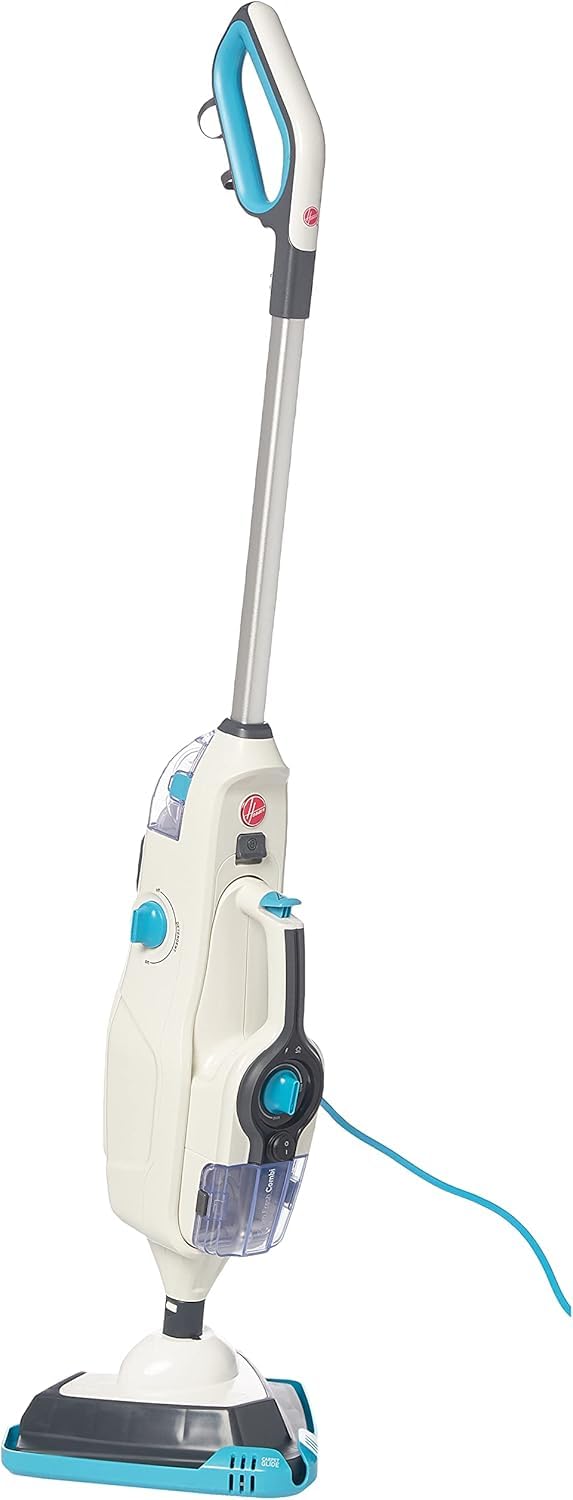
Image 5.1: The Hoover 2-in-1 Steam Mop ready for use.
6. Penyelenggaraan
6.1 Pad Pembersihan
The microfiber cleaning pads are machine washable. Remove them from the floor head after each use and wash according to the care instructions on the label. Do not use bleach or fabric softeners.
6.2 Emptying Tanks
After each use, ensure the unit is unplugged and cooled. Remove and empty any remaining water from the water tank and detergent from the detergent tank. Rinse the tanks with clean water and allow them to air dry before storing.
6.3 Pembersihan dan Penyimpanan Am
Lap bahagian luar perkakas dengan lembut, damp cloth. Do not use abrasive cleaners. Store the steam cleaner in a cool, dry place, out of reach of children.
7. Penyelesaian masalah
If you encounter issues with your steam cleaner, refer to the following common problems and solutions:
| Masalah | Kemungkinan Punca | Penyelesaian |
|---|---|---|
| Tiada wap dihasilkan | Unit not plugged in; Water tank empty; Not heated up; Steam trigger not pressed. | Plug in the unit; Fill water tank; Wait 30 seconds for heat-up; Press steam trigger. |
| Hasil pembersihan yang buruk | Dirty cleaning pad; Incorrect steam setting; Detergent tank empty (if using detergent). | Replace or wash cleaning pad; Adjust steam control; Refill detergent tank. |
| Air bocor | Water tank not properly seated; Overfilled tank. | Ensure water tank is securely in place; Do not overfill tanks. |
Jika masalah berterusan selepas mencuba penyelesaian ini, sila hubungi sokongan pelanggan.
8. Spesifikasi
- Jenama: Hoover
- Nombor Model: HS86-SFC-M
- warna: Perak
- Dimensi Produk: 22.4 x 65.4 x 28.6 cm
- Berat Barang: 5.5 Kilogram
- Kuasa/Wattage: 1600 watt
- Sumber Kuasa: Elektrik Bertali
- Kapasiti Tangki Air: 0.26 Liter
- Kapasiti Tangki Penyelesaian: 200 ml
- Masa pemanasan: Kurang daripada 30 saat
- Steam Cleaning Time: Sehingga 12 minit
- Kadar Aliran Stim: 15 gram seminit
- Ciri Khas: 2-in-1 design (Steam Mop & Handheld), 10 accessories, small cleaning brush, variable steam control.
- Syor Permukaan: Floors (suitable for various sealed hard floor types)
9. Waranti dan Sokongan
Your Hoover HS86-SFC-M Steam Mop and Handheld Steam Cleaner comes with a standard manufacturer's warranty. Please refer to the warranty card included in your package for specific terms and conditions. For technical support, spare parts, or warranty claims, please contact Hoover customer service through their official webtapak atau maklumat hubungan yang diberikan bersama pembelian anda.