
1. Pengenalan
The Cangaroo 3-in-1 device is a versatile instrument designed to monitor indoor temperature and humidity, while also functioning as a digital clock with an alarm feature. This manual provides detailed instructions for its setup, operation, and maintenance, ensuring you get the most accurate readings and functionality from your device.
2. Ciri-ciri Produk
- Pengukuran Suhu dan Kelembapan: Accurately measures ambient temperature and relative humidity.
- Digital Clock with Alarm Function: Displays time and includes a programmable alarm.
- Paparan Besar: Clear and easy-to-read digital screen.
- Julat Pengukuran Luas: Temperature from -50°C to 70°C; Humidity from 10% to 99%.
- Ketepatan Tinggi: Temperature accuracy of +/- 1°C; Humidity accuracy of +/- 5%.
- Dikendalikan Bateri: Requires one AA 1.5V battery (not included) for portable use.
- Reka Bentuk Moden: Compact and aesthetically pleasing for various environments.
3. Kandungan Pakej
Sila semak pakej untuk item berikut:
- 1 x Cangaroo 3-in-1 Thermometer, Hygrometer, Digital Clock with Alarm (Model 103548)
Note: AA 1.5V battery is not included and must be purchased separately.
4. Persediaan
4.1 Pemasangan Bateri
- Cari petak bateri di bahagian belakang peranti.
- Buka penutup petak bateri.
- Insert one AA 1.5V battery, ensuring the correct polarity (+ and -).
- Tutup penutup petak bateri dengan selamat.
Upon successful battery installation, the display will power on and show current temperature, humidity, and time.

Imej: Belakang view of the device, highlighting the battery compartment and control buttons (ADJ, MODE, °C/°F).
4.2 Penempatan Awal
Place the device on a flat, stable surface or mount it on a wall using the integrated hanging hole. For accurate readings, avoid placing the device near heat sources, direct sunlight, or areas with extreme drafts.
5. Arahan Operasi
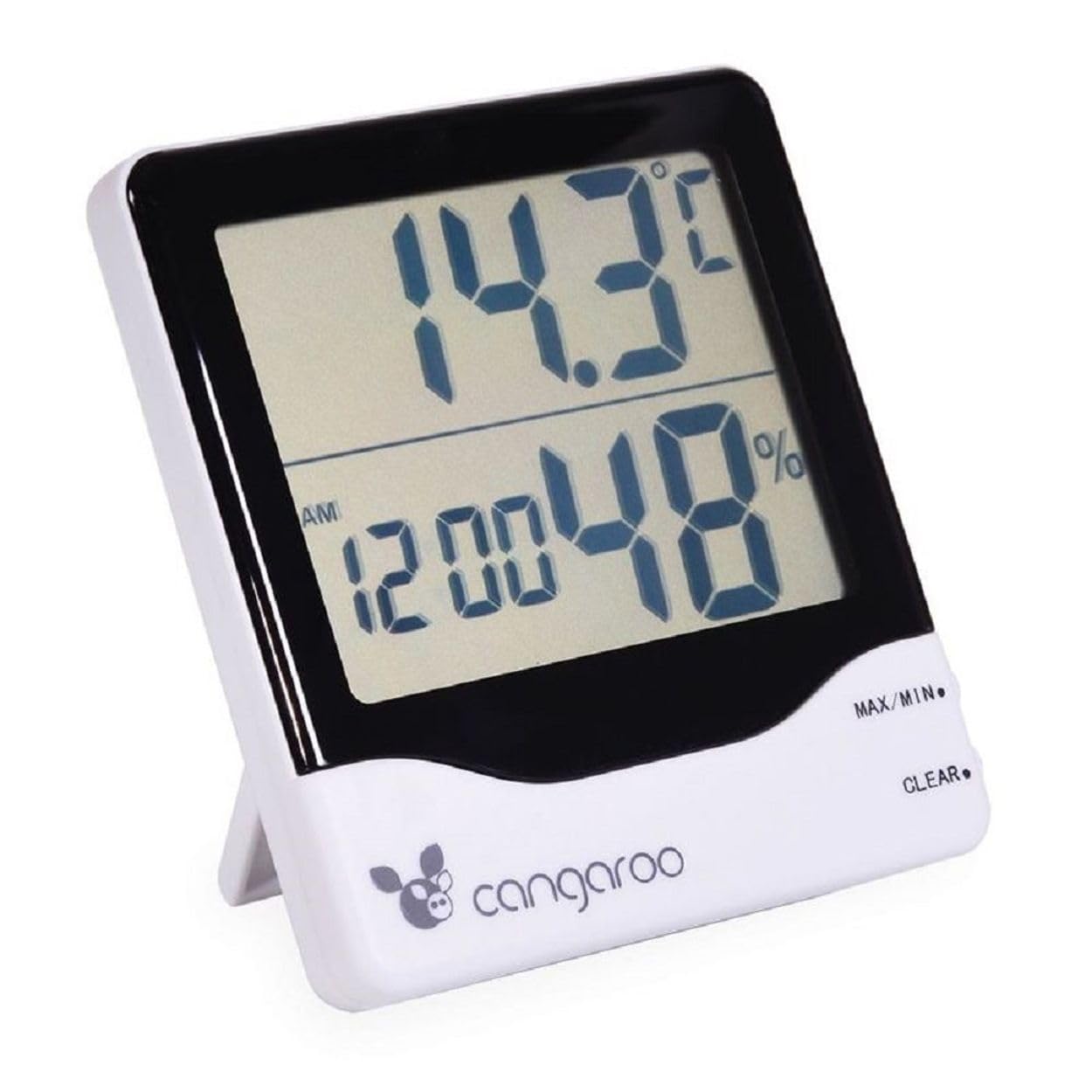
Imej: Depan view of the Cangaroo 3-in-1 device, showing the main display with temperature, time, and humidity readings.
5.1 Paparan Terlaluview
Skrin LCD besar memaparkan maklumat berikut:
- Paparan Atas: Current temperature in °C or °F.
- Paparan Bawah: Current time (AM/PM indicator) and relative humidity in %.
5.2 Menetapkan Masa dan Tarikh
- Tekan ke MODE button on the back of the device to cycle through display modes until the time setting is active (usually indicated by flashing digits).
- While in time setting mode, press the ADJ (Adjust) button to change the flashing digit (hours, minutes).
- Teruskan menekan MODE to move to the next setting (e.g., minutes, 12/24 hour format, date if available).
- Gunakan ADJ button to set the desired value for each.
- Setelah semua tetapan selesai, tekan MODE sekali lagi untuk keluar dari mod tetapan.
5.3 Menetapkan Penggera
- Tekan ke MODE button until the alarm time is displayed (often indicated by an alarm icon or 'AL').
- Tekan dan tahan butang MODE button for a few seconds until the alarm hours start flashing.
- Gunakan ADJ butang untuk menetapkan jam penggera yang diingini.
- Tekan MODE to move to alarm minutes, then use ADJ untuk menetapkan.
- Tekan MODE again to confirm and exit alarm setting.
- Untuk mengaktifkan/menyahaktifkan penggera, tekan butang ADJ button while in alarm display mode (not setting mode). An alarm icon will appear/disappear on the display.
5.4 Menukar Unit Suhu (°C/°F)
Tekan ke ° C / ° F button on the back of the device to toggle between Celsius and Fahrenheit temperature display.
5.5 Bacaan Suhu dan Kelembapan MAKSIMUM/MINIT
Peranti ini merekodkan nilai suhu dan kelembapan maksimum dan minimum sejak tetapan semula terakhir.
- Tekan ke MAX/MIN button (located on the front right side) once to display the maximum recorded temperature and humidity.
- Tekan MAX/MIN again to display the minimum recorded temperature and humidity.
- Tekan MAX/MIN a third time to return to current readings.
- To clear the MAX/MIN records, press the JELAS button (located on the front right side, below MAX/MIN) while MAX or MIN values are displayed.
6. Penyelenggaraan
6.1 Pembersihan
Wipe the device with a soft, dry cloth. Do not use abrasive cleaners or immerse the device in water. Avoid spraying liquids directly onto the display or buttons.
6.2 Penggantian Bateri
When the display becomes dim or the device stops functioning, it is time to replace the battery. Follow the steps in Section 4.1 Battery Installation to replace the AA 1.5V battery.
6.3 Penyimpanan
If the device will not be used for an extended period, remove the battery to prevent leakage and damage. Store the device in a cool, dry place away from direct sunlight.
7. Penyelesaian masalah
- Tiada Paparan: Check if the battery is inserted correctly with the right polarity. Replace the battery if it is depleted.
- Bacaan Tidak Tepat: Ensure the device is not placed near heat sources, direct sunlight, or in areas with extreme drafts. Allow the device to stabilize for 15-30 minutes after initial setup or relocation.
- Penggera Tidak Berbunyi: Verify that the alarm function is activated (check for the alarm icon on the display). Ensure the alarm time is set correctly.
8. Spesifikasi
| Nombor Model | 103548 |
| warna | Putih dan Hitam |
| Julat Suhu | -50°C hingga 70°C (-58°F hingga 158°F) |
| Ketepatan Suhu | +/- 1°C |
| Julat Kelembapan | 10% hingga 99% RH |
| Ketepatan Kelembapan | +/- 5% RH |
| Sumber Kuasa | 1 x AA 1.5V Battery (not included) |
| Dimensi (L x W x H) | 11 x 10 x 2.5 cm (lebih kurang) |
| Berat badan | 120 Grams (approximately) |
9. Waranti dan Sokongan
This product is covered by a standard manufacturer's warranty. For specific warranty details, please refer to the documentation provided with your purchase or contact Cangaroo customer support. If you encounter any issues or require assistance, please reach out to the retailer or manufacturer's support channels.
10. Maklumat Pelupusan
Please dispose of the device and its batteries responsibly according to local environmental regulations. Do not dispose of electronic devices or batteries with household waste. Contact your local authorities for information on recycling programs.