
pengenalan
This manual provides essential information for the safe and efficient installation, operation, and maintenance of the MEAN WELL RD-65A Dual Output Switching Power Supply. Please read this manual thoroughly before using the product and retain it for future reference.
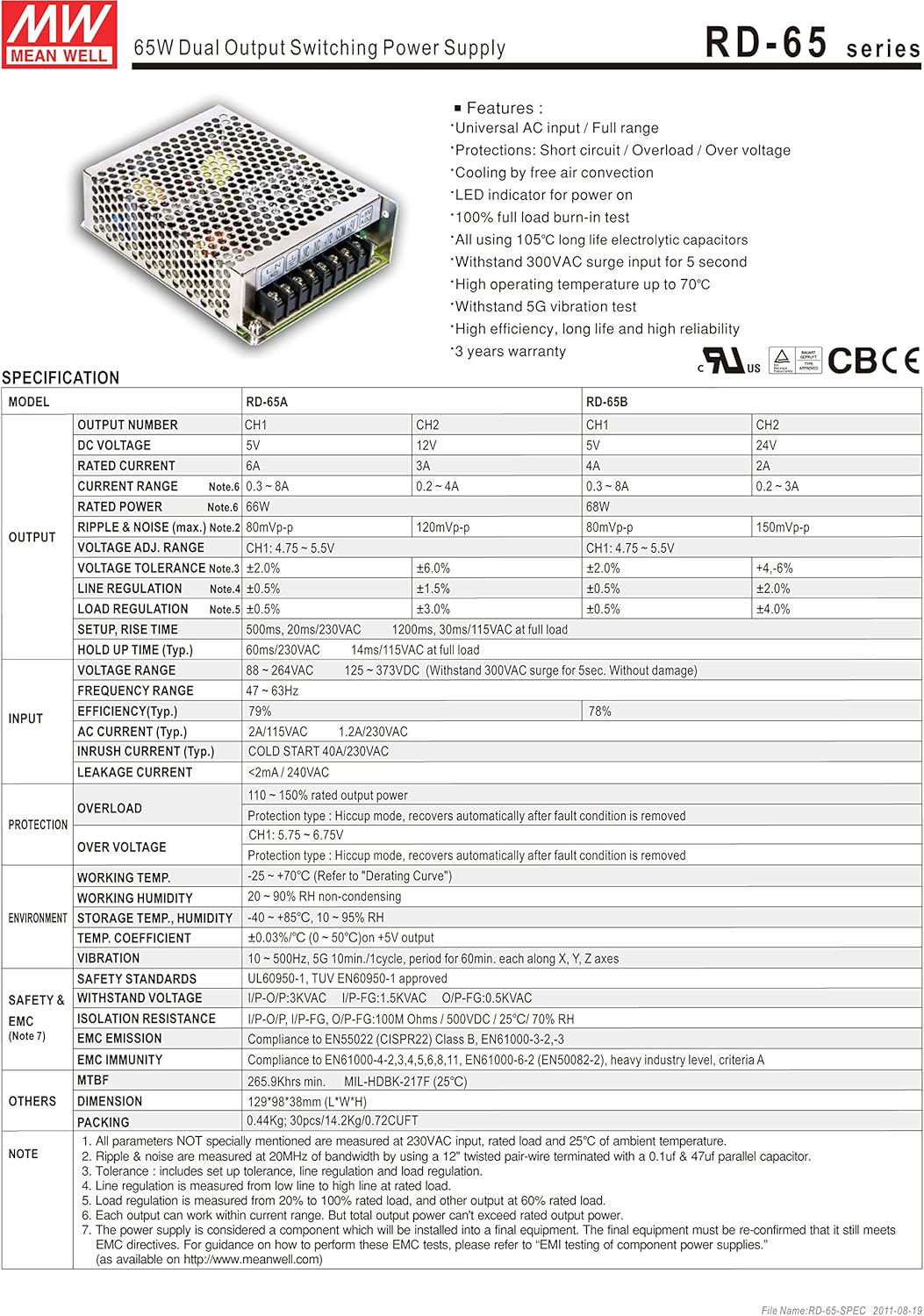
Figure 0: MEAN WELL RD-65A Dual Output Switching Power Supply.
The RD-65A is a 66W dual output power supply designed for various electronic applications, providing stable 5V and 12V DC outputs.
Ciri-ciri Produk
- Input AC universal / Julat penuh
- Perlindungan: Litar pintas / Lebihan / Lebih voltage
- Penyejukan melalui perolakan udara bebas
- Penunjuk LED untuk menghidupkan kuasa
- 100% ujian terbakar beban penuh
- Semua menggunakan kapasitor elektrolitik jangka hayat 105 ° C
- Menahan input lonjakan 300VAC selama 5 saat
- Suhu operasi tinggi sehingga 70°C
- Menahan ujian getaran 5G
- Kecekapan tinggi, jangka hayat dan kebolehpercayaan yang tinggi
- Waranti 3 tahun
Spesifikasi
Output Characteristics (RD-65A)
| Nombor Keluaran | CH1 | CH2 |
|---|---|---|
| DC Voltage | 5V | 12V |
| Nilai Semasa | 6A | 3A |
| Julat Semasa | 0.3 - 6A | 0.2 - 3A |
| Kuasa Dinilai | 66W | |
| Riak & Kebisingan (maks.) | 120mVp-p | 120mVp-p |
| Voltage ADJ. Range | CH1: 4.75 - 5.5V | |
| Voltage Toleransi | ±2.0% | ±6.0% |
| Peraturan Talian | ±0.5% | ±1.0% |
| Peraturan Beban | ±1.0% | ±3.0% |
| Persediaan, Naik Masa | 500ms, 20ms/230VAC; 1200ms, 20ms/115VAC pada beban penuh | |
| Hold Up Time (typ.) | 80ms/230VAC; 14ms/115VAC pada beban penuh | |
Ciri-ciri Input
| Ciri | Nilai |
|---|---|
| Voltage Julat | 88 ~ 264VAC; 125 ~ 373VDC (Withstand 300VAC surge for 5sec. Without damage) |
| Julat Kekerapan | 47 ~ 63Hz |
| Kecekapan (jenis) | 78% |
| Arus AC (jenis) | 2A/115VAC; 1.2A/230VAC |
| Arus Masuk (taip.) | MULA SEJUK 40A/230VAC |
| Arus Kebocoran | <2mA / 240VAC |
Perlindungan
| taip | Penerangan |
|---|---|
| Lebihan beban | 105 ~ 160% rated output power. Protection type: Hiccup mode, recovers automatically after fault condition is removed. |
| Lebih Voltage | CH1: 5.75 ~ 6.75V. Protection type: Hiccup mode, recovers automatically after fault condition is removed. |
Environmental & Safety
| Ciri | Nilai |
|---|---|
| Suhu Bekerja. | -25 ~ +70°C (Refer to "Derating Curve") |
| Kelembapan Bekerja | 20 90 ~% RH tidak terkondensasi |
| Tempoh simpanan., Kelembapan | -40 ~ +85°C, 10 ~ 95% RH |
| Temp. Pekali | ±0.03%/°C (0 ~ 50°C) on 5V output |
| Getaran | 10 ~ 500Hz, 5G 10min./1kitaran, tempoh selama 60min. setiap satu di sepanjang paksi X, Y, Z |
| Piawaian Keselamatan | UL60950-1, TUV EN60950-1 approved |
| Menahan Voltage | I/P-O/P:3KVAC; I/P-FG:1.5KVAC; O/P-FG:0.5KVAC |
| Rintangan Pengasingan | I/P-O/P, I/P-FG, O/P-FG: >100M Ohms / 500VDC / 25°C / 70% RH |
| EMI Emission | Pematuhan kepada EN55022 (CISPR22) Kelas B, EN61000-3-2,-3 |
| EMI Immunity | Compliance to EN61000-4-2,3,4,5,6,8,11, EN61000-6-2 (EN50082-2), heavy industry level, criteria A |
| MTBF | 265.9Khrs min. MIL-HDBK-217F (25°C) |
Dimensi Fizikal
- Dimensi item L x W x H: 5.08 x 3.86 x 1.5 inci (129 x 98 x 38 mm)
- Berat Barang: 5 Grams (Note: This weight seems unusually low for a power supply of this type. Please verify with product packaging.)
- Pembungkusan: 0.7kg; 20pcs/14.7kg/1.72CUFT
Persediaan dan Pemasangan
Pemasangan Mekanikal
The power supply should be mounted in a location that allows for adequate air circulation for cooling. Refer to the mechanical drawing for dimensions and mounting hole positions.
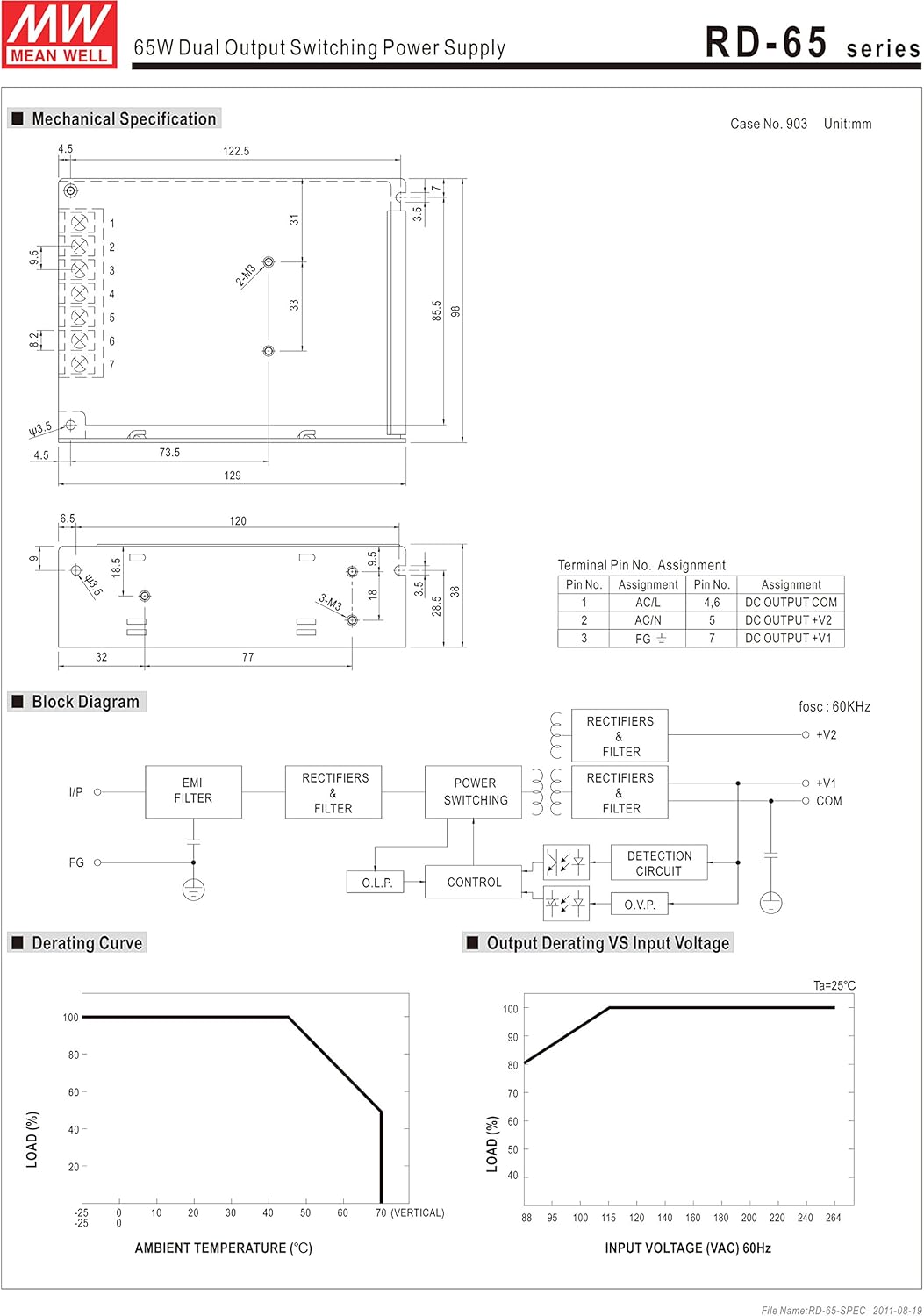
Figure 1: Mechanical dimensions and mounting points for the RD-65A power supply. Dimensions are in millimeters.
Ensure the power supply is securely mounted to prevent movement or vibration during operation.
Sambungan Pendawaian
Connect the input and output wires according to the terminal pin assignments. Ensure all connections are secure and properly insulated to prevent short circuits.
| Pin no. | Tugasan | Pin no. | Tugasan |
|---|---|---|---|
| 1 | AC / L | 4,5 | DC OUTPUT COM |
| 2 | AC / N | 6 | OUTPUT DC +V2 |
| 3 | FG | 7 | OUTPUT DC +V1 |
Sambungan Input:
- Connect the AC Live wire to Pin 1 (AC/L).
- Connect the AC Neutral wire to Pin 2 (AC/N).
- Connect the Frame Ground (FG) to Pin 3. This connection is crucial for safety.
Sambungan Keluaran:
- Connect the common ground for DC outputs to Pins 4 and 5 (DC OUTPUT COM).
- Connect the +12V DC output to Pin 6 (DC OUTPUT +V2).
- Connect the +5V DC output to Pin 7 (DC OUTPUT +V1).
Note: Always ensure the power supply is disconnected from the AC mains before making any wiring connections.
Arahan Operasi
Once the power supply is correctly installed and wired, it is ready for operation. The RD-65A is designed for continuous operation within its specified limits.
Hidupkan/Mati Kuasa
Connect the AC input to a suitable power source. The LED indicator on the unit will illuminate, indicating that the power supply is active and providing output voltage.
To turn off the power supply, disconnect the AC input from the power source.
Diagram Blok Selesaiview
Figure 2: Internal block diagram of the RD-65A power supply.
The block diagram illustrates the internal functional stages:
- EMI Filter: Reduces electromagnetic interference from the AC input.
- Rectifiers & Filter: Converts AC input to DC voltage.
- Power Switching: High-frequency switching to regulate the output voltage.
- Kawalan: Monitors and regulates the output, including Over Load Protection (O.L.P.) and Over Voltage Protection (O.V.P.) circuits.
- Output Rectifiers & Filter: Converts the switched voltage back to stable DC outputs (+V1, +V2, COM).
The power supply is designed to operate efficiently and reliably within its specified load and environmental conditions.
Keluk Derating
The derating curve indicates the maximum permissible output load as a function of ambient temperature and input voltage. Operating the power supply within these curves ensures optimal performance and longevity.
Figure 3: Output Derating Curve vs. Ambient Temperature and Input Voltage.
- Ambient Temperature Derating: As the ambient temperature increases, the maximum allowable output load decreases. Ensure adequate ventilation to maintain the temperature within safe operating limits.
- Input Voltage Derating: The power supply can deliver full rated power across its specified input voltage range. However, for prolonged operation at the lower end of the input voltage range, it is advisable to refer to the input voltagkeluk penurunan nilai.
Exceeding these limits can lead to reduced lifespan or damage to the unit.
Langkah-langkah Keselamatan
To ensure safe operation and prevent damage to the power supply or connected equipment, observe the following precautions:
- Keselamatan Elektrik: Always disconnect the AC input power before performing any installation, wiring, or maintenance. Ensure proper grounding (FG) is established.
- Pengudaraan: Do not obstruct the ventilation holes. Ensure sufficient airflow around the unit to prevent overheating.
- Persekitaran: Operate the power supply within the specified temperature and humidity ranges. Avoid exposure to moisture, dust, and corrosive substances.
- Kapasiti Muatan: Do not exceed the rated output power or current for each channel. Overloading can trigger protection mechanisms or cause damage.
- Ciri-ciri perlindungan: The unit includes short circuit, overload, and over voltage protections. While these protect the unit, continuous triggering of these protections should be avoided. Investigate and resolve the cause of any protection activation.
- Kakitangan Berkelayakan: Pemasangan dan servis hanya boleh dilakukan oleh kakitangan yang berkelayakan.
Menyelesaikan masalah
If the power supply is not functioning as expected, consider the following common issues and solutions:
- Tiada Keluaran Voltage / LED Off:
- Check if the AC input power is connected and active.
- Sahkan input voltage berada dalam julat yang ditentukan (88-264VAC).
- Inspect input fuses (if external).
- Keluaran Voltage Fluctuating or Low:
- Ensure the load connected does not exceed the rated output current or power.
- Check for loose wiring connections at the output terminals.
- Verify the ambient temperature is within the operating range and ventilation is adequate.
- Unit Ditutup:
- This may indicate activation of overload or over voltage protection. Disconnect the load and re-apply power. If it operates normally, the issue is with the load.
- Check for short circuits in the output wiring or connected device.
- Ensure the unit is not overheating due to insufficient ventilation or high ambient temperature.
If the problem persists after checking these points, contact qualified service personnel or MEAN WELL support.
Penyelenggaraan
The MEAN WELL RD-65A power supply is designed for long-term, reliable operation with minimal maintenance. However, periodic checks can help ensure its longevity:
- Pembersihan: Periodically clean the exterior of the unit to prevent dust accumulation, especially around ventilation openings. Use a soft, dry cloth. Do not use liquid cleaners.
- Pemeriksaan Sambungan: Occasionally inspect all wiring connections for tightness and signs of corrosion or damage.
- Pemantauan Alam Sekitar: Pastikan persekitaran operasi kekal dalam had suhu dan kelembapan yang ditetapkan.
No user-serviceable parts are inside. Do not attempt to open or repair the unit yourself. Refer all servicing to qualified personnel.
Waranti dan Sokongan
The MEAN WELL RD-65A Dual Output Switching Power Supply is generally covered by a Waranti 3 tahun from the date of purchase, ensuring high quality and reliability.
For technical support, warranty claims, or service inquiries, please contact your authorized MEAN WELL distributor or reseller. Provide your product model number (RD-65A) and purchase details when seeking assistance.
For more information, you may visit the official MEAN WELL webtapak.