
1. Pengenalan
This manual provides essential information for the proper installation, setup, and operation of your YoLuKe P1-4X-2.5 PTZ Dome IP Security Camera. This camera is designed for both indoor and outdoor surveillance, offering high-definition video, pan-tilt-zoom capabilities, and advanced features to enhance your security monitoring.
2. Komponen Produk
Familiarize yourself with the various parts of your camera and included accessories:

Figure 2.1: YoLuKe PTZ Dome IP Camera Components. This image displays the main camera unit with its high-intensity antenna, HD zoom lens, waterproof IP66 body, microphone, reset button, power interface, audio port, and network interface.
- PTZ Dome IP Camera: Main surveillance unit.
- High-Intensity Antenna: Untuk sambungan wayarles.
- HD Zoom Lens: Provides clear, magnified views.
- Waterproof Body (IP66): Ensures durability in various weather conditions.
- mikrofon: Untuk input audio.
- Butang Tetapkan Semula: For device reset.
- Antara Muka Kuasa: Untuk menyambungkan penyesuai kuasa.
- Port Audio: For external audio connections.
- Antara Muka Rangkaian: Untuk sambungan rangkaian berwayar.
- Penyesuai Kuasa: To supply power to the camera.
- Kabel Ethernet: For initial setup and wired connection.
- Perkakasan Pemasangan: Screws and anchors for installation.
- CD: Contains software and drivers.
- Panduan Operasi Pantas: Additional setup instructions.
3. Persediaan
3.1 Pemasangan Fizikal
Follow these steps for secure physical installation of your camera:

Figure 3.1: Detailed steps for mounting the PTZ camera. This image illustrates rotating the base, determining screw hole locations, drilling holes, inserting the base, and securing the camera.
- Rotate and Remove Base: Rotate the camera base to align with the arrow and remove it from the tail line.
- Tentukan Lokasi Pemasangan: Identify and mark the desired location for the mounting screw holes on the ceiling or wall.
- Lubang gerudi: Drill holes at the marked positions and insert the expansion screws.
- Sisip Tapak: Insert the camera base into the tail line and lift it into position.
- Kamera Selamat: Insert the screws into the expansion screws to firmly secure the camera.
3.2 Persediaan Rangkaian dan Perisian
Connect your camera to the network and set up the monitoring software:

Figure 3.2: Steps for setting up the camera using the CamHiPro app. This image shows downloading the app, powering on the camera, connecting the network cable, configuring Wi-Fi settings, and remote viewing.
- Download CamHiPro APP: Scan the QR code in the quick operation guide or search for "CamHiPro" in your mobile app store (Google Play or Apple App Store).
- Hidupkan dan Sambungkan: Power on the camera and connect it to your network router using the provided Ethernet cable.
- Tetapan Wi-Fi: Follow the in-app instructions to configure Wi-Fi settings for wireless operation.
- Remote Watch: Once configured, you can monitor your camera anytime, anywhere via the app.
3.3 Pairing with NVR (Network Video Recorder)
If you are using an NVR system, follow these steps to pair your camera:
Video 3.1: Manual Camera Addition to NVR. This video demonstrates the process of manually adding a camera to an NVR system, including powering on the devices, resetting the camera, and searching for it on the NVR interface.
- Power On NVR and Camera: Ensure both your NVR and the camera are powered on.
- Tetapkan Semula Kamera: Long press the reset button on the camera until you hear a sound indicating a successful reset.
- Cari untuk Cameras on NVR: On your NVR interface, navigate to the camera setup or add device section and initiate a search for new cameras.
- Sahkan Gandingan: Once the camera is detected and a "Wireless connection is successful" sound is heard, confirm the pairing on the NVR.
4. Arahan Operasi
4.1 Kawalan Sorot, Condong dan Zum (PTZ)
Kawal kamera viewing angle and zoom level remotely:
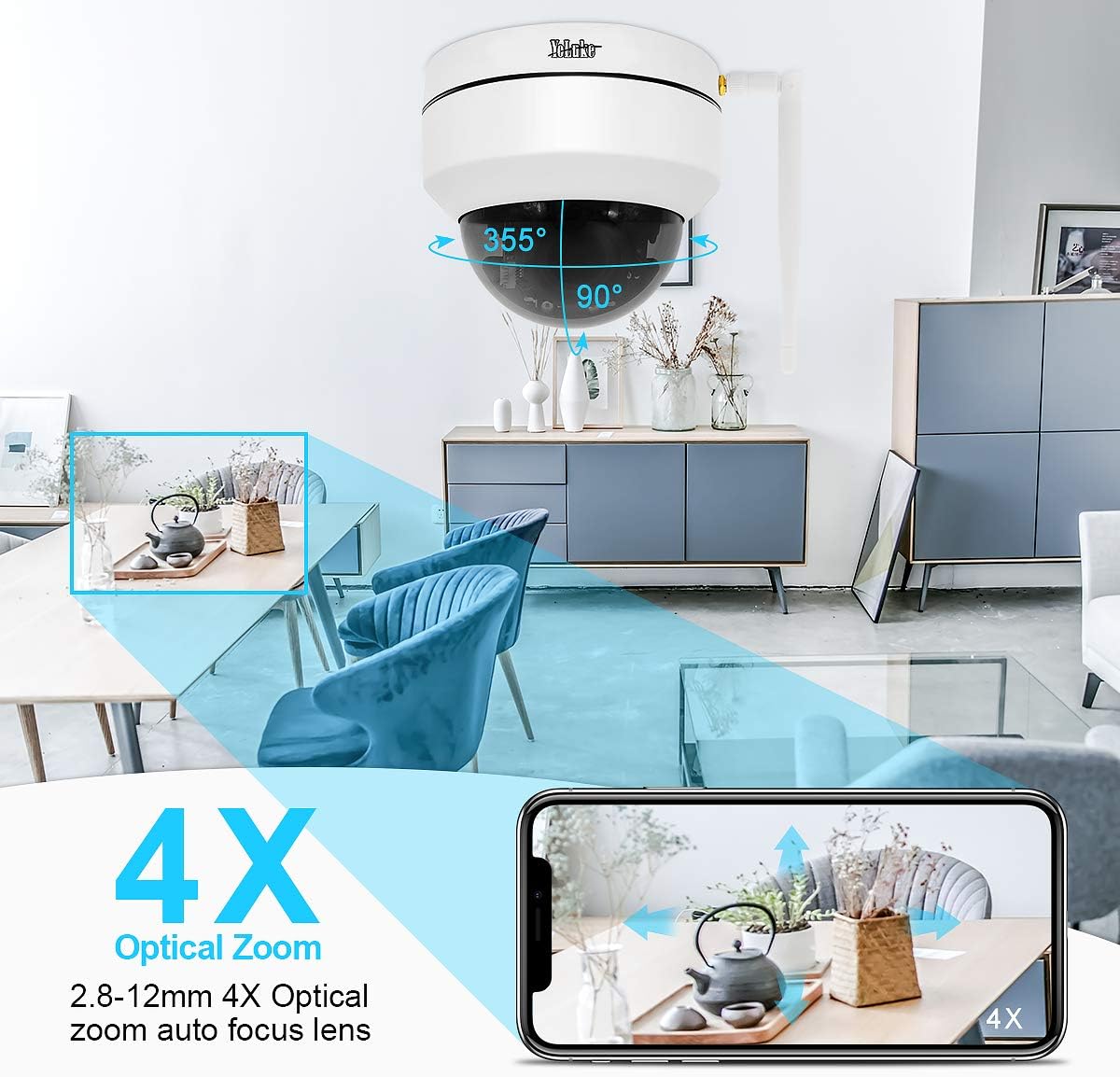
Figure 4.1: Remote PTZ and 4X Optical Zoom. This image demonstrates the camera's 355° horizontal rotation and 90° vertical pan, along with its 4X optical zoom capability, controllable via a smartphone app.
- Roti: Putar kamera secara mendatar sehingga 355°.
- Condong: Laraskan kamera secara menegak sehingga 90°.
- Zum: Utilize the 4X optical zoom lens (2.8-12MM) for detailed views.
- Kawalan: All PTZ functions are easily operable through the mobile application or PC client.
4.2 Penglihatan Malam
The camera provides clear surveillance even in low-light conditions:

Figure 4.2: Day and Night Vision Comparison. This image illustrates the camera's ability to provide 24-hour surveillance with clear day vision and effective 20m night vision using LED arrays.
- Penukaran Automatik: The camera automatically switches between day and night vision modes based on ambient light.
- Penglihatan Malam yang Dipertingkatkan: Equipped with two LED arrays, extending night vision range up to 65.6 feet (20 meters) in complete darkness.
4.3 Motion Detection and Alarm
Stay informed of any detected activity:
- Sensitiviti boleh laras: Motion detection area and alarm sensitivity can be customized via the app.
- Pemberitahuan Segera: Upon motion detection, the camera sends notifications to your mobile phone and video clips to your email.
- Siren penggera: The camera supports an alarm siren feature for deterrence.
4.4 Audio Dua Hala
Communicate through the camera:
- Mikrofon terbina dalam: Captures audio from the camera's vicinity.
- Speaker Support: Connect an external speaker for two-way communication.
4.5 Rakaman dan Penyimpanan
Manage your video recordings:
- Sokongan Kad SD: Supports up to 128GB SD card (not included) for local storage.
- Smart H.265 Video Coding: Efficient compression allows for up to 15 days of 24-hour recording on a 128GB card.
- Main Semula Jauh: View recorded videos on your PC client, mobile app, or web pelayar.
5. Penyelenggaraan
- Pembersihan tetap: Bersihkan kanta dan perumah kamera secara berkala dengan lembut, damp kain untuk memastikan kualiti imej yang jelas. Elakkan pembersih yang kasar.
- Kemas kini Firmware: Semak pengeluar webtapak atau aplikasi untuk kemas kini perisian tegar yang tersedia untuk memastikan prestasi dan keselamatan yang optimum.
- Pemeriksaan Bekalan Kuasa: Ensure the power adapter and cables are securely connected and free from damage.
- Kesambungan Rangkaian: Verify stable network connection (wired or Wi-Fi) for uninterrupted monitoring.
6. Penyelesaian masalah
Jika anda menghadapi masalah dengan kamera anda, rujuk kepada penyelesaian biasa berikut:
| Masalah | Kemungkinan Punca | Penyelesaian |
|---|---|---|
| Kamera tidak dihidupkan | Power adapter disconnected or faulty. | Check power connections; try a different power outlet or adapter. |
| Tidak dapat menyambung ke Wi-Fi | Incorrect Wi-Fi password; camera too far from router; network interference. | Verify Wi-Fi password; move camera closer to router; reset camera and reconfigure. |
| Tiada suapan video | Network issue; camera offline; software glitch. | Check network connection; reboot camera and router; restart monitoring app/software. |
| Pengesanan gerakan tidak berfungsi | Detection area not set; sensitivity too low; schedule not configured. | Adjust motion detection settings in the app/software; ensure schedule is active. |
| Kualiti penglihatan malam yang lemah | Obstruction in front of lens; insufficient ambient IR light. | Clear any obstructions; ensure IR LEDs are not blocked; consider additional IR illuminators if needed. |
7. Spesifikasi
| Ciri | Perincian |
|---|---|
| Resolusi Video Berkesan | 5 MP (1920*1080p@20fps) |
| Lensa | 2.8-12MM 4X Optical Zoom Lens |
| Julat Pan/Sendeng | 355° Mendatar, 90° Menegak |
| Penglihatan Malam | Up to 65.6 feet (20 meters) with two LED arrays |
| Penyimpanan | 128GB Max SD card support (H.265 coding) |
| Ketersambungan | Wireless (Wi-Fi) and Wired (Ethernet) |
| Audio | 2-Way Audio (Built-in Mic, external speaker support) |
| Peringkat Cuaca | IP66 |
| Pengesanan Pergerakan | Adjustable area and sensitivity, alarm siren |
| kuasa | 12 Volt, 24 Watt |
| Dimensi | 5.91 x 5.91 x 5.91 inci |
| Berat badan | 2.27 paun |
8. Waranti dan Sokongan
Your YoLuKe P1-4X-2.5 PTZ Dome IP Security Camera is backed by a Waranti Tahun Penuh from the date of purchase. For any questions regarding installation, technical support, or warranty claims, please contact our support team via Amazon or through the contact information provided in your quick operation guide. We are always here to help.
For additional support and resources, please refer to the official YoLuKe store on Amazon: Visit YoLuKe Store