
1. Pengenalan
Thank you for choosing the AWEI A950BL ANC Noise Reduction Headset. This manual provides detailed instructions on how to set up, operate, and maintain your new headphones. Please read this manual thoroughly before use to ensure optimal performance and longevity of your device.

Imej: Depan view of the AWEI A950BL ANC Noise Reduction Headset.
2. Ciri-ciri Produk
- Pembatalan Bunyi Aktif (ANC): Reduces ambient noise for an immersive audio experience.
- Kesambungan Tanpa Wayar & Berwayar: Bluetooth V4.1 for wireless freedom and a 3.5mm jack for wired connection.
- Mikrofon Bersepadu: Untuk panggilan bebas tangan dan arahan suara.
- Hayat Bateri yang Panjang: Up to 10 hours of talk or music time on a single charge.
- Reka Bentuk Lipat: Untuk penyimpanan mudah dan mudah dibawa.

Image: The AWEI A950BL headset featuring a convenient folding design for portability.
3. Kandungan Pakej
- AWEI A950BL ANC Noise Reduction Headset
- Kabel Pengecas USB
- Kabel Audio 3.5mm
- Manual Pengguna
4. Kawalan dan Komponen
Familiarize yourself with the various buttons and ports on your AWEI A950BL headset:
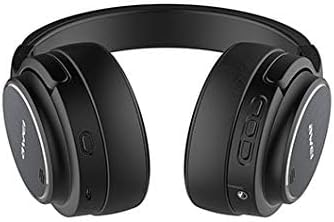
Imej: Sisi view of the headset highlighting the control panel.
- Butang Hidup / Mati: Located on the right earcup. Press and hold to power on or off.
- Volume Up / Previous Song Button: Short press for Volume+, Long press for Previous song.
- Volume Down / Next Song Button: Short press for Volume-, Long press for Next song.
- Butang berbilang fungsi (MFB): Used for Play/Pause, Answer/End calls, and Reject calls.
- Butang ANC: Activates or deactivates Active Noise Cancellation.
- mikrofon: Bersepadu untuk input suara.
- AUX Jack (3.5mm): Untuk sambungan audio berwayar.
- Port Pengecasan USB: Untuk mengecas set kepala.
- Lampu Penunjuk LED: Memaparkan kuasa, berpasangan dan status pengecasan.
5. Persediaan
5.1 Mengecas Alat Dengar
- Connect the USB charging cable to the headset's USB charging port.
- Sambungkan hujung kabel yang satu lagi ke sumber kuasa USB (cth, port USB komputer, penyesuai dinding).
- Penunjuk LED akan menunjukkan status pengecasan (cth., merah semasa mengecas, mati atau biru apabila dicas penuh).
- Pengecasan penuh mengambil masa kira-kira 2-3 jam.
5.2 Berpasangan Bluetooth
- Pastikan alat dengar dimatikan.
- Press and hold the Power On/Off button until the LED indicator flashes blue and red alternately, indicating pairing mode.
- Pada peranti anda (telefon pintar, tablet, komputer), dayakan Bluetooth dan cari peranti yang tersedia.
- Pilih "AWEI A950BL" daripada senarai peranti yang ditemui.
- Setelah disambungkan, penunjuk LED akan berkelip biru perlahan-lahan atau bertukar menjadi biru padu.
5.3 Sambungan Berwayar
Untuk menggunakan set kepala dalam mod berwayar:
- Connect one end of the 3.5mm audio cable to the AUX jack on the headset.
- Sambungkan hujung satu lagi ke bicu output audio peranti anda.
- The headset can be used in wired mode even if the battery is depleted.
6. Arahan Operasi
6.1 Hidupkan/Mati Kuasa
- Hidupkan kuasa: Tekan dan tahan butang Hidup/Mati selama lebih kurang 3 saat sehingga penunjuk LED menyala.
- Matikan: Tekan dan tahan butang Hidup/Mati selama lebih kurang 3 saat sehingga penunjuk LED padam.
6.2 Main balik Muzik
- Main/Jeda: Tekan pendek Butang Pelbagai fungsi (MFB).
- Kelantangan: Tekan pendek butang Kelantangan Naik.
- Perlahankan suara: Tekan pendek butang Kurangkan Kelantangan.
- Lagu Seterusnya: Tekan lama butang Kurangkan Kelantangan.
- Lagu Sebelumnya: Tekan lama butang Kelantangan Naik.
6.3 Pengurusan Panggilan
- Jawab Panggilan: Short press the Multi-function Button (MFB) when a call comes in.
- Tamatkan Panggilan: Short press the Multi-function Button (MFB) during a call.
- Tolak Panggilan: Long press the Multi-function Button (MFB) when a call comes in.
6.4 Pembatalan Bising Aktif (ANC)
The ANC feature reduces ambient noise, providing a clearer audio experience.

Image: Diagram illustrating the concept of Active Noise Cancellation.
- Aktifkan ANC: Press the ANC button. The LED indicator for ANC will light up (usually green).
- Nyahaktifkan ANC: Tekan butang ANC sekali lagi. Penunjuk LED ANC akan padam.
7. Penyelenggaraan
- Bersihkan set kepala dengan kerap menggunakan kain lembut dan kering.
- Elakkan menggunakan bahan kimia yang keras atau bahan yang melelas.
- Simpan alat dengar di tempat yang sejuk dan kering jauh dari cahaya matahari langsung dan suhu yang melampau.
- Jangan dedahkan alat dengar kepada air atau kelembapan berlebihan.
- Elakkan daripada menjatuhkan atau meletakkan set kepala kepada kesan yang kuat.
8. Penyelesaian masalah
| Masalah | Kemungkinan Punca | Penyelesaian |
|---|---|---|
| Alat dengar tidak dihidupkan | Bateri lemah | Caskan set kepala sepenuhnya. |
| Tidak boleh berpasangan dengan peranti | Alat dengar tiada dalam mod berpasangan / Bluetooth Peranti dimatikan | Ensure headset is in pairing mode (flashing red/blue). Turn on Bluetooth on your device. Move headset closer to device. |
| Tiada bunyi | Volume too low / Not connected / Wrong audio source | Increase volume on headset and device. Reconnect Bluetooth or check 3.5mm cable. Ensure correct audio output is selected on your device. |
| ANC tidak berfungsi dengan berkesan | ANC not activated / Environmental noise too high | Tekan butang ANC untuk mengaktifkannya. ANC paling berkesan terhadap hingar frekuensi rendah dan malar. |
9. Spesifikasi
| Nama Model | A950BL |
| Teknologi Ketersambungan | Wireless (Bluetooth V4.1), Wired (3.5 mm Jack) |
| Faktor Bentuk Fon Kepala | Atas Telinga |
| Kawalan Bunyi | Pembatalan Bunyi Aktif |
| Kapasiti Bateri | 1050mAh (Ion Litium) |
| Masa Berbual | Sehingga 10 jam |
| Masa Muzik | Sehingga 10 jam |
| Dimensi Produk | 22 x 6 x 23 cm |
| Berat Barang | 165 g |
| warna | Hitam |
10. Waranti dan Sokongan
AWEI products are manufactured to the highest quality standards. For warranty information or technical support, please refer to the warranty card included with your purchase or contact your local retailer or AWEI customer service. Keep your proof of purchase for warranty claims.