
1. Pengenalan
Thank you for choosing the iggual QR Barcode Scanner. This device is designed for efficient and reliable scanning of both 1D and 2D barcodes, offering both manual and automatic scanning modes. It features an ergonomic design for comfortable use and broad compatibility with various operating systems. This manual provides essential information for setting up, operating, and maintaining your scanner.
Ciri-ciri Utama:
- Ergonomic design with a comfortable trigger button.
- Detects all common 1D and 2D barcodes, including QR codes.
- Supports manual and automatic scanning modes.
- Wired USB connectivity for reliable data transmission.
- Compatible with Windows XP/7/8/10, macOS, Linux, and Android.
2. Kandungan Pakej
Sila semak kandungan pakej untuk memastikan semua item ada:
- iggual QR Barcode Scanner (Model IGG315651)
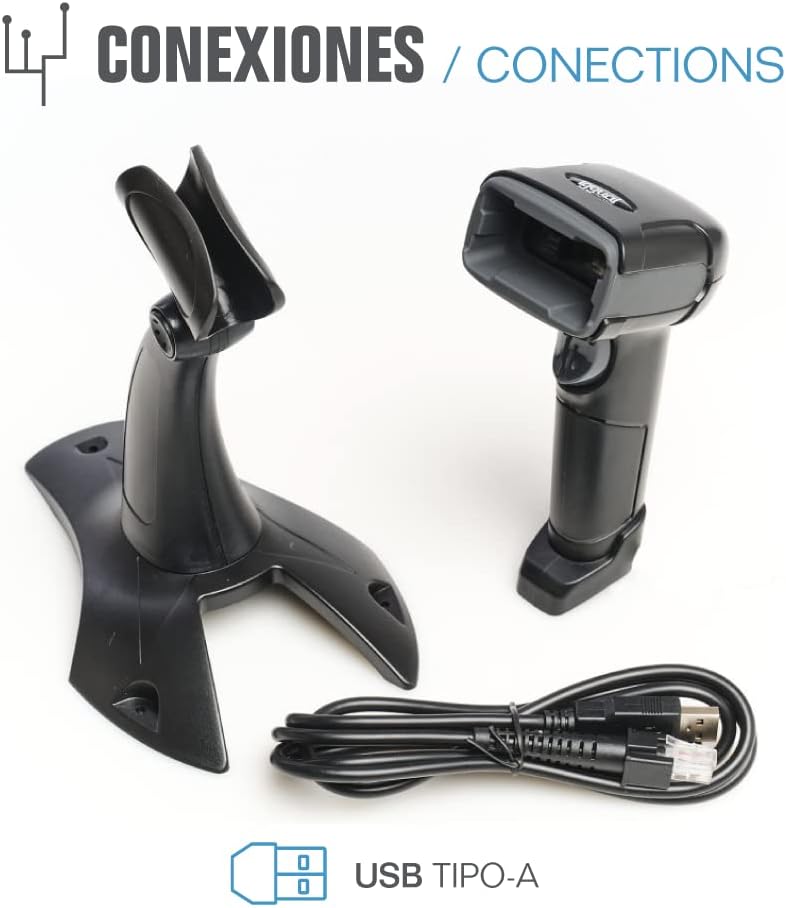
- USB Cable (Type-A)
- Scanner Stand (Optional, depending on package)

Rajah 2.1: Package contents including the scanner, stand, and USB Type-A cable.
3. Produk Lebihview
Familiarize yourself with the main components of your iggual barcode scanner:
- Tetingkap Pengimbasan: Kawasan di mana kod bar dibaca.
- Butang Pencetus: Activates scanning in manual mode.
- Port USB: For connecting the scanner to your computer.
- Penunjuk LED: Provides visual feedback on scanning status.
- bip: Provides audible feedback on scanning status.

Rajah 3.1: The iggual barcode scanner with its optional stand, highlighting the LED indicator and beeper functionality.
4. Persediaan
4.1 Menyambung Pengimbas
- Connect the USB cable to the USB port on the scanner.
- Plug the other end of the USB cable into an available USB port on your computer or host device.
- The scanner will typically be recognized automatically by your operating system as a standard HID keyboard device. No special drivers are usually required.
4.2 Keserasian Sistem
The iggual QR Barcode Scanner is compatible with a wide range of operating systems:
- Windows XP / 7/8/10
- macOS
- Linux
- Android

Rajah 4.1: Operating system compatibility for the iggual barcode scanner.
5. Arahan Operasi
5.1 Mod Pengimbasan
The scanner supports two primary scanning modes:
- Mod Manual: Press the trigger button to activate the scanner and read a barcode. Release the button after a successful scan.
- Mod Automatik: The scanner continuously emits a scanning beam, reading barcodes as they are presented within its field of view without needing to press the trigger. Refer to the full product manual (if available from iggual.com) for instructions on switching between modes, usually done by scanning specific configuration barcodes.
5.2 Jenis Kod Bar yang Disokong
This scanner is capable of reading a wide range of 1D and 2D barcode symbologies, including:
- 2D Codes: QR Code, Maxi Code, MicroPDF, PDF417
- 1D Codes: Code 128, EAN-13, EAN-8, Code 39, UPC-A, UPC-E, Code 93, Interleaved 2 of 5, Codabar, MSI, RSS, etc.

Rajah 5.1: Scanner capabilities including 200 scans/second, 2D scanning, and supported code types.
5.3 Scanning Procedure
- Ensure the scanner is properly connected to your host device.
- Open an application where you want the scanned data to appear (e.g., a text editor, spreadsheet, or POS software).
- Point the scanning window at the barcode you wish to read.
- If in manual mode, press and hold the trigger button. If in automatic mode, simply present the barcode.
- A successful scan will be indicated by a short beep and/or a flash of the LED indicator. The scanned data will appear in your active application.
- If the barcode is not read, adjust the distance and angle of the scanner relative to the barcode.
6. Penyelenggaraan
6.1 Pembersihan
- To clean the scanner's exterior, use a soft, damp kain.
- For the scanning window, use a lint-free cloth and a mild glass cleaner. Avoid abrasive materials or harsh chemicals that could scratch the surface.
- Ensure no liquid enters the scanner's housing.
6.2 Penyimpanan
Apabila tidak digunakan, simpan pengimbas di tempat yang sejuk dan kering, jauh daripada cahaya matahari langsung dan suhu yang melampau.
7. Penyelesaian masalah
| Masalah | Kemungkinan Punca | Penyelesaian |
|---|---|---|
| Scanner not recognized by computer. | Loose USB connection, faulty USB port, or cable issue. | Ensure USB cable is securely connected. Try a different USB port or cable. Restart the computer. |
| Pengimbas tidak membaca kod bar. | Barcode damaged, incorrect scanning angle/distance, scanner in wrong mode, or dirty scanning window. | Check barcode integrity. Adjust scanning angle and distance. Ensure scanner is in the correct mode (manual/automatic). Clean the scanning window. |
| Data yang diimbas dipaparkan dengan salah. | Keyboard layout mismatch or corrupted data. | Ensure your computer's keyboard layout matches the scanner's default output (usually US English). If issues persist, consult the full product manual for advanced configuration. |
8. Spesifikasi
| Ciri | Perincian |
|---|---|
| Model | IGG315651 |
| Dimensi (L x W x H) | 160 x 80 x 100 mm (6.3 x 3.15 x 3.94 inci) |
| Berat badan | 120 g (0.26 paun) |
| Kelajuan Imbasan | 200 imbasan/saat |
| Penderia Imej | 640(H) x 480(V), 256 Grayscale |
| Ketersambungan | Wired USB (Type-A) |
| Sumber Kuasa | Elektrik Bertali (berkuasa USB) |
| Sistem Operasi | Windows XP/7/8/10, macOS, Linux, Android |
| Kod Bar yang Disokong | 1D & 2D (QR, Maxi Code, MicroPDF, Code, PDF417, RSS, etc.) |
Rajah 8.1: Physical dimensions of the iggual barcode scanner.
9. Waranti dan Sokongan
For warranty information, technical support, or to download the complete product manual with advanced configuration options, please visit the official iggual webtapak atau hubungi pengedar tempatan anda.
rasmi Webtapak: www.inggual.com