
1. Pengenalan
The Zeblaze Vibe 4 Hybrid Smartwatch (Model SI-BW03) combines traditional watch aesthetics with smart features to help you monitor your daily activities and health. This manual provides detailed instructions on how to set up, operate, and maintain your device.
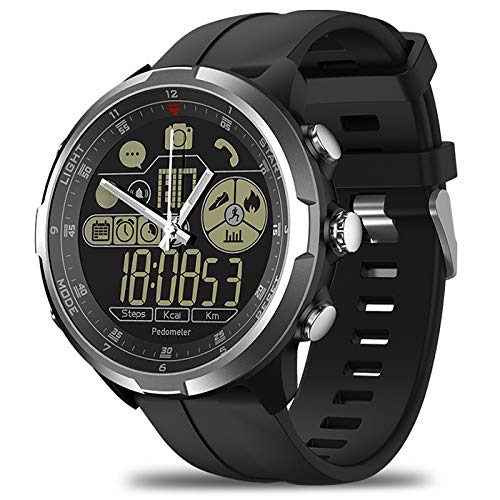
Rajah 1.1: Depan view of the Zeblaze Vibe 4 Hybrid Smartwatch.
2. Produk Lebihview
The Zeblaze Vibe 4 Hybrid Smartwatch features a 1.24-inch FSTN high-resolution display and is equipped with a 610mAh button cell battery. Key functionalities include:
- Pemantauan Kesihatan: Pedometer, Heart Rate Monitor, Sleep Monitor, Sedentary Reminder, Drinking Reminder.
- Penjejakan Aktiviti: Displays time, date, steps, distance, and calories burned.
- Pemberitahuan Pintar: Alarm reminders, message notifications (e.g., WeChat), anti-lost alerts.
- Kawalan Jauh: Remote camera function for your smartphone.

Rajah 2.1: Sisi view of the smartwatch showing the control buttons.
3. Persediaan
3.1 Kuasa Awal Hidup
Your smartwatch is powered by a button cell battery. To activate, ensure the battery is correctly installed. Refer to the battery compartment on the back of the watch.
3.2 Berpasangan dengan Telefon Pintar Anda
- Pastikan Bluetooth didayakan pada telefon pintar anda.
- Download and install the companion application for the Zeblaze Vibe 4 Hybrid Smartwatch from your phone's app store.
- Open the application and follow the on-screen instructions to search for and connect to your smartwatch. The watch will vibrate upon successful pairing.
- Once paired, the watch will synchronize time and date with your phone.

Rajah 3.1: Belakang view of the smartwatch, displaying the sensor and model details.
4. Arahan Operasi
4.1 Navigasi Asas
Use the physical buttons on the side of the watch to navigate through different functions and menus. Specific button functions are detailed within the companion app.
4.2 Activity Tracking (Pedometer, Distance, Calories)
The smartwatch automatically tracks your steps, distance traveled, and calories burned throughout the day. This data can be viewed directly on the watch display and in more detail within the connected smartphone application.
4.3 Pemantauan Kadar Jantung
The built-in HRM heart rate monitor provides real-time feedback on your heart rate. To get an accurate reading, ensure the watch is worn snugly on your wrist. Access this feature via the watch's menu or the companion app.
4.4 Pemantauan Tidur
Wear the smartwatch while sleeping to monitor your sleep patterns and quality. Detailed sleep analysis is available in the smartphone application.
4.5 Reminders (Sedentary, Drinking, Alarm)
- Peringatan Sedentari: The watch will vibrate to remind you to move if you have been inactive for a preset duration. Configure this setting in the app.
- Peringatan Minum: Set reminders to drink water at regular intervals through the companion app.
- Peringatan Penggera: Set alarms via your smartphone application. The watch will vibrate at the set time.
4.6 Pemberitahuan Pintar
When connected to your smartphone, the watch can display notifications for incoming messages (e.g., WeChat) and calls. Ensure notification permissions are granted in your phone's settings and the companion app.
4.7 Kawalan Kamera Jauh
Use your smartwatch to remotely trigger your smartphone's camera shutter. Activate this feature through the watch's menu or the companion app.
4.8 Anti-Lost Function
If your paired smartphone moves more than 10 meters away from the smartwatch, the watch will beep to alert you, helping prevent loss of your phone.
5. Penyelenggaraan
5.1 Pembersihan
Wipe the watch and strap regularly with a soft, dry cloth. For stubborn dirt, a slightly damp kain boleh digunakan, diikuti dengan pengeringan. Elakkan penggunaan bahan kimia yang keras atau bahan yang melelas.
5.2 Tahan Air
The Zeblaze Vibe 4 Hybrid Smartwatch has a degree of water resistance. However, it is not suitable for swimming or showering. Avoid prolonged exposure to water and do not press buttons underwater.
5.3 Penggantian Bateri
The watch uses a button cell battery. When the battery is low, replace it with a new one of the same type (610mAh button cell). Consult a professional if you are unsure how to replace the battery.
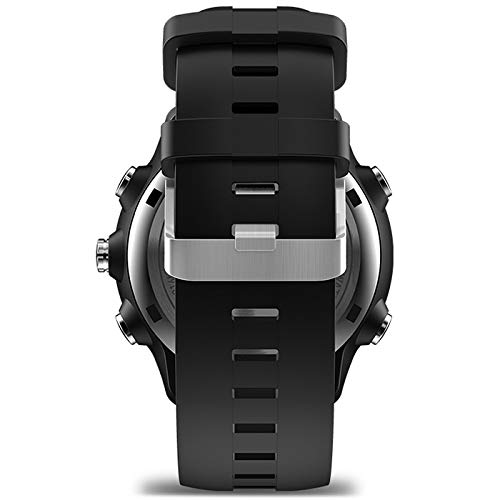
Rajah 5.1: Sisi view of the smartwatch, highlighting the strap design.
6. Penyelesaian masalah
- Jam tangan tidak bersambung ke telefon: Ensure Bluetooth is enabled on both devices. Restart both the watch and your phone. Check if the companion app is running and has necessary permissions.
- Data kesihatan tidak tepat: Ensure the watch is worn correctly, snugly on the wrist, and the sensor is clean. Avoid excessive movement during heart rate measurements.
- Tiada pemberitahuan: Verify that notification permissions are granted for the companion app and the specific apps you want notifications from, both in the app and your phone's system settings.
- Hayat bateri pendek: Ensure the battery is fully charged or replaced if it's a button cell. Reduce the frequency of certain features if possible.
7. Spesifikasi
| Jenama | Zeblaze (Manufacturer: SHANG TONG) |
| Model | SI-BW03 |
| Paparan | 1.24 inch FSTN high-resolution display |
| Ketersambungan | Bluetooth 4.0 |
| Bateri | 610mAh Button Cell |
| Peranti Serasi | Telefon pintar |
| Ciri Khas | Pedometer, Heart Rate Monitor, Sleep Monitor, Sedentary Reminder, Drinking Reminder, Remote Camera, Anti-lost, Message Reminder, Distance Tracker |
| Antara Muka Peranti | Butang |
| GPS | Tiada GPS |
8. Waranti dan Sokongan
For warranty information and customer support, please refer to the documentation provided with your purchase or contact the retailer. Keep your proof of purchase for warranty claims.