
pengenalan
This manual provides instructions for the Easytry123 replacement remote control, model Easytry4921. This remote is designed to be compatible with various Saba LED and LCD HDTV models, including LED26V11, SBV1943H, SBV2243H, SCB1909W, SCB1910VX, LED32PV412, and S19104DVD. Please read this manual carefully before use to ensure proper operation.
Nota Penting:
- This is a replacement remote control. Some advanced functions of your original TV remote may not be supported.
- Ensure your TV model is listed in the compatible models for full functionality.
- Bateri tidak disertakan dengan alat kawalan jauh ini.
Persediaan
1. Pemasangan Bateri
Alat kawalan jauh memerlukan dua (2) bateri AAA untuk operasi. Ikuti langkah-langkah berikut untuk memasang bateri:
- Cari penutup petak bateri di belakang alat kawalan jauh.
- Tekan ke bawah pada tab dan luncurkan penutup ke bawah untuk membuka petak.
- Insert two AAA batteries, ensuring the positive (+) and negative (-) terminals align correctly with the markings inside the compartment. Incorrect installation can prevent the remote from functioning.
- Luncurkan penutup petak bateri kembali ke tempatnya sehingga ia berbunyi dengan selamat.
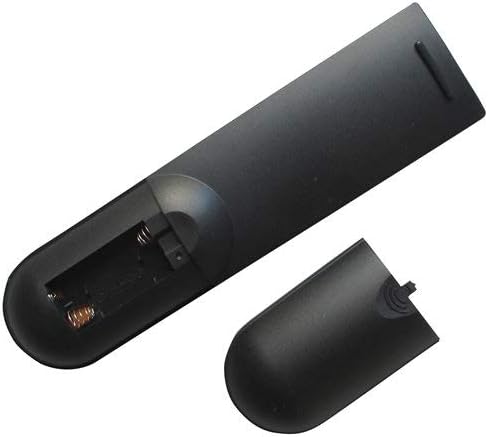
Image: Back of the remote control with the battery cover removed, revealing the battery compartment. This shows where to insert the AAA batteries.

Image: Back of the remote control with the battery cover partially removed, illustrating the correct orientation for battery insertion.
Selepas memasang bateri, alat kawalan jauh sedia untuk digunakan. Pengaturcaraan biasanya tidak diperlukan untuk alat kawalan jauh gantian ini.
Arahan Operasi
This remote control operates using infrared (IR) technology. Ensure there is a clear line of sight between the remote control and the TV's IR receiver for optimal performance.
Fungsi Asas:
- Butang Kuasa: Menghidupkan atau mematikan TV.
- Saluran Atas/Bawah: Menukar saluran TV.
- Kelantangan Naik/Turun: Adjusts the TV's audio volume.
- Butang Bisukan: Membisukan atau menyahredamkan audio TV.
- Butang Input/Sumber: Cycles through available input sources (e.g., HDMI 1, AV, Component).
- Butang Nombor (0-9): Directly select TV channels.
- Butang Menu: Accesses the TV's on-screen menu.
- Navigation Buttons (Up, Down, Left, Right, OK/Enter): Used to navigate through TV menus and confirm selections.
Refer to your television's original user manual for specific functions and menu navigation details, as these may vary by TV model.
Penyelenggaraan
Membersihkan Alat Kawalan Jauh
Untuk membersihkan alat kawalan jauh, gunakan kain lembut dan kering. Untuk kotoran degil, gunakan sedikit kainampen the cloth with water or a mild, non-abrasive cleaner. Do not use harsh chemicals or immerse the remote control in water.
Penggantian Bateri
Replace the batteries when the remote control's response becomes sluggish or stops working. Always replace both batteries at the same time with new AAA batteries. Do not mix old and new batteries, or different types of batteries, as this can lead to leakage or damage.
Keselamatan Bateri:
- Remove batteries if the remote control will not be used for an extended period.
- Buang bateri terpakai mengikut peraturan tempatan.
- Jauhkan bateri daripada kanak-kanak.
Menyelesaikan masalah
| Masalah | Kemungkinan Punca | Penyelesaian |
|---|---|---|
| Alat kawalan jauh tidak berfungsi. |
|
|
| Sesetengah fungsi tidak berfungsi. |
|
|
| Alat kawalan jauh berfungsi secara berselang-seli. |
|
|
Spesifikasi
- model: Easytry4921
- Jenama: Easytry123
- Peranti Serasi: Saba LED/LCD HDTVs (LED26V11, SBV1943H, SBV2243H, SCB1909W, SCB1910VX, LED32PV412, S19104DVD)
- Teknologi Ketersambungan: Inframerah (IR)
- Jenis Pengawal: Kawalan Butang
- Sumber Kuasa: 2 x Bateri AAA (tidak termasuk)
- Ciri Khas: Reka bentuk ergonomik
Waranti dan Sokongan
Information regarding specific warranty terms for this Easytry123 replacement remote control is not provided in the product details. For any support inquiries or further assistance, please contact the seller directly through the platform where the purchase was made.
Please refer to the original product listing or your purchase documentation for any available warranty information.