
1. Produk Lebihview
The Sato One-Touch Timer TM-22 is a versatile digital timer designed for various timing needs, from kitchen use to laboratory applications. It combines ease of use with practical features to enhance your daily tasks.
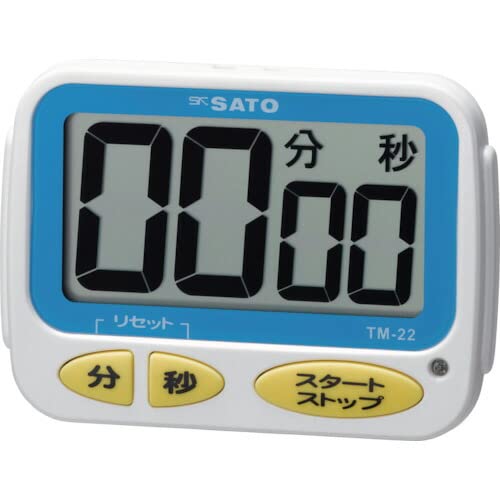
Imej 1: Depan view of the Sato One-Touch Timer TM-22. The timer features a clear digital display and control buttons.
Ciri-ciri Utama:
- Automatic Reset Alarm: The alarm sounds for 5 seconds at the set time and automatically resets to the initial set time.
- Operasi Mudah: The primary key is for starting; no complex operations are required to stop the timer's alarm cycle.
- Dual Notification: Alerts users with both sound (70dB) and light.
- Drip-Proof Construction: Designed to resist splashes, making it suitable for kitchen environments.
- Pelbagai Pilihan Pemasangan: Equipped with a magnet on the back for attachment to metal surfaces and a strap for hanging.
- Fungsi Kira Detik dan Kira Detik: Supports both decreasing dan increasing time measurements.
2. Persediaan
Pemasangan Bateri:
The TM-22 timer requires one AAA battery for operation. A battery is included with the unit.
- Cari penutup petak bateri di bahagian belakang pemasa.
- Luncurkan atau buka klip penutup untuk membuka petak.
- Masukkan satu bateri AAA, pastikan terminal positif (+) dan negatif (-) sejajar dengan betul dengan tanda di dalam petak.
- Gantikan penutup petak bateri dengan selamat.
The timer should power on, and the display will show '00:00' or the last set time.
3. Arahan Operasi
The TM-22 timer features both countdown and count-up functionalities.
3.1. Pemasa Undur
This function allows you to set a specific duration, and the timer will count down to zero.
- Tetapkan Masa: Use the 'M' (Minute) button and 'S' (Second) button to adjust the desired countdown duration. The timer can be set from 1 second up to 99 minutes and 59 seconds.
- Mula Undur: Press the 'START' button to begin the countdown.
- Pemberitahuan Penggera: When the time reaches zero, an alarm will sound for 5 seconds, accompanied by a flashing light.
- Tetapan Semula Automatik: After the 5-second alarm, the timer automatically resets to the initial set time, ready for the next countdown without manual intervention.
- Jeda/Berhenti: To pause the countdown, press the 'START' button again. To resume, press 'START' once more. To clear the set time, press the 'RESET' button (if available) or hold the 'START' button for a few seconds.
3.2. Count-up Timer
This function measures elapsed time from zero.
- Start Count-up: Ensure the timer display shows '00:00'. If not, press the 'RESET' button to clear any previous settings. Press the 'START' button to begin counting upwards from zero.
- Jeda/Sambung semula: To pause the count-up, press the 'START' button. To resume, press 'START' again.
- Tetapkan semula: To reset the count-up timer to '00:00', press the 'RESET' button (if available) or hold the 'START' button for a few seconds while paused.
4. Penyelenggaraan
Pembersihan:
To maintain the timer's appearance and functionality:
- Wipe the exterior of the timer with a soft, dry cloth.
- Do not use abrasive cleaners, solvents, or chemical agents, as these may damage the casing atau paparan.
- The timer is drip-proof, but do not immerse it in water or expose it to heavy splashing.
Penggantian Bateri:
Replace the battery when the display becomes dim or the timer's functions become erratic.
- Follow the battery installation steps outlined in the "2. Setup" section.
- Sentiasa gunakan bateri AAA yang baharu.
- Buang bateri terpakai mengikut peraturan tempatan.
5. Penyelesaian masalah
If you encounter issues with your TM-22 timer, refer to the following common problems and solutions:
| Masalah | Kemungkinan Punca | Penyelesaian |
|---|---|---|
| Pemasa tidak dihidupkan. | Bateri mati atau tidak dipasang dengan betul. | Check battery polarity. Replace with a new AAA battery. |
| Display is faint or flickering. | Kuasa bateri rendah. | Gantikan bateri AAA. |
| Penggera tidak berbunyi. | Volume obstruction or internal issue. | Ensure the speaker is not covered. Check battery level. If problem persists, contact support. |
| Timer does not reset automatically after alarm. | This feature is specific to the countdown function. | Ensure you are using the countdown function. For count-up, manual reset is required. |
6. Spesifikasi
| Ciri | Perincian |
|---|---|
| Nombor Model | TM-22 |
| Masa Maksimum | 99 minit 59 saat |
| Minimum Timing | 1 saat |
| Dimensi (H x W x D) | 67 mm x 93 mm x 20 mm |
| Berat badan | 96 g |
| Sumber Kuasa | Bateri AAA x 1 (termasuk) |
| Kelantangan Penggera | 70 dB |
| Fungsi | Countdown, Count-up |
| Ciri Khas | Drip-proof construction, Magnet on back, Hanging strap, Sound and light notification |
7. Waranti dan Sokongan
For warranty information, technical assistance, or customer support regarding your Sato One-Touch Timer TM-22, please contact your authorized retailer or the manufacturer, Sato Corporation. Keep your purchase receipt as proof of purchase.
Please visit the official Sato webtapak untuk mendapatkan maklumat sokongan dan butiran perhubungan yang paling terkini.