
1. Produk Lebihview
The ETHERMA eTOUCH-eco Thermostat is an advanced, touch-sensitive device designed for precise temperature control in your living spaces. Its sleek, high-gloss white design integrates seamlessly into modern interiors, while its robust construction ensures long-lasting performance. This thermostat is specifically engineered for flush-mount installation and adheres to Ecodesign guidelines for energy efficiency.
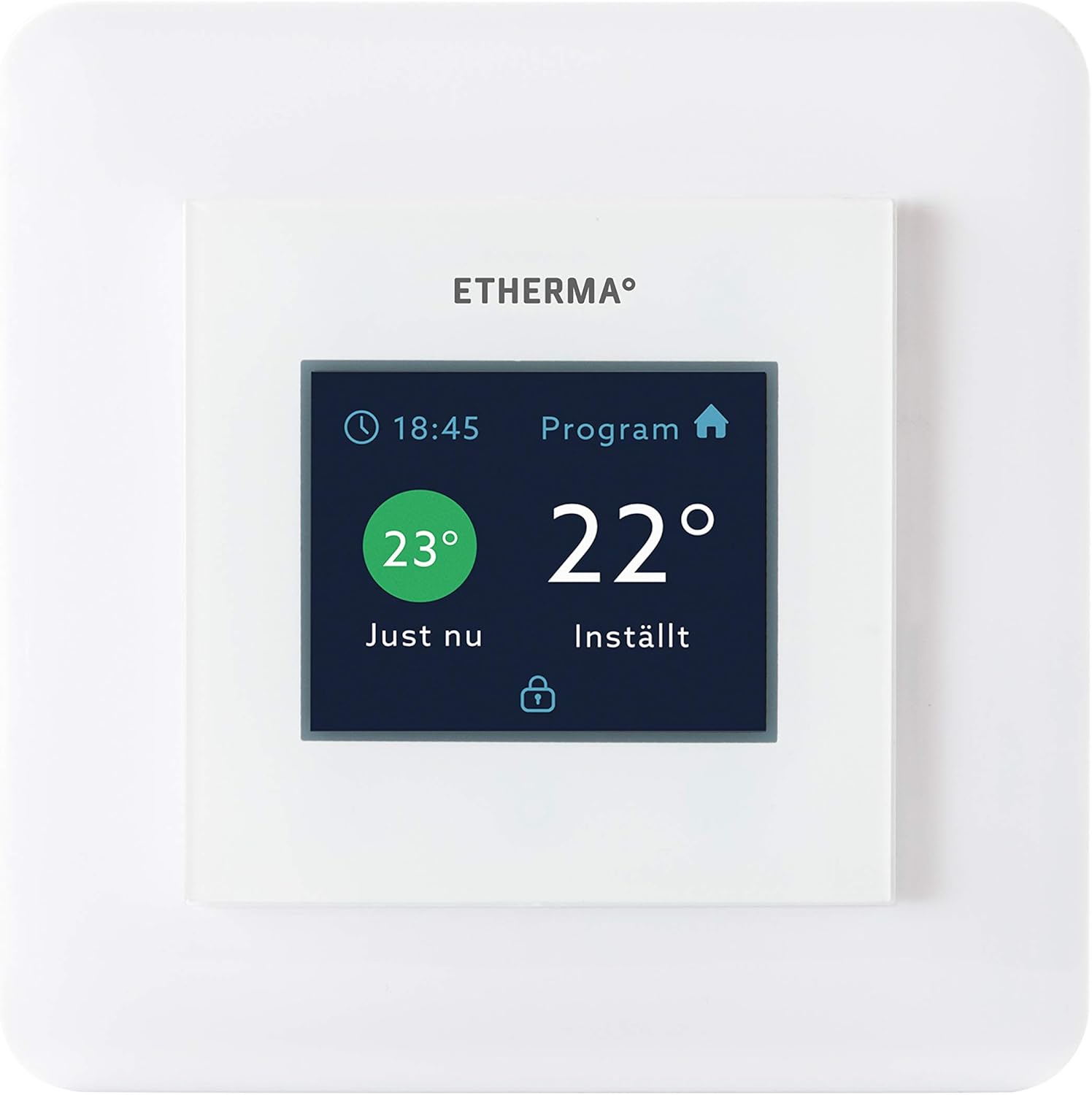
Rajah 1: Depan view of the ETHERMA eTOUCH-eco Thermostat, displaying its intuitive touch interface.
Ciri-ciri utama termasuk:
- Touchpad Interface: Easy and intuitive temperature adjustment and program navigation.
- Julat Suhu Luas: Capable of controlling temperatures from 5 to 35 degrees Celsius.
- Ecodesign Compliant: Designed for energy efficiency and environmental responsibility.
- Pembinaan Tahan Lama: Built for reliability and longevity.

Figure 2: The ETHERMA eTOUCH-eco Thermostat seamlessly integrated into a contemporary living space.
2. Persediaan
2.1 Membongkar
Carefully remove the thermostat from its packaging. Verify that all components are present and undamaged. If any items are missing or damaged, contact your retailer immediately.
2.2 Pemasangan
The ETHERMA eTOUCH-eco Thermostat is designed for flush-mount installation. Due to the electrical nature of this device, professional installation by a qualified electrician is strongly recommended to ensure safety and proper functionality. Ensure the power supply to the installation area is disconnected before beginning any work.
- Lokasi Pemasangan: Pilih lokasi di dinding dalaman, jauh daripada cahaya matahari langsung, draf atau sumber haba yang boleh menjejaskan bacaan suhu.
- Pendawaian: Follow the wiring diagram provided with the product packaging. Connect the thermostat to a 230 Volt power supply.
- Dimensi: The thermostat is designed to fit standard switch boxes, with dimensions of approximately 55 x 55 mm for the visible face. The overall product dimensions are 33 x 34 x 13 cm.
2.3 Hidupkan Kuasa Awal
Once installed and wired correctly, restore power to the circuit. The thermostat display should illuminate, and it may prompt you to set the date, time, and initial temperature settings. Follow the on-screen instructions.
3. Arahan Operasi
The eTOUCH-eco Thermostat features a user-friendly touchpad interface for all operations.
3.1 Basic Temperature Adjustment
To manually adjust the temperature, simply touch the temperature display area. Use the up/down arrows or slide gestures (if supported by the model) to set your desired temperature. The new setting will typically be applied immediately or after a short confirmation period.
3.2 Jadual Pengaturcaraan
The thermostat allows for programmable heating schedules to optimize comfort and energy savings. Access the 'Program' menu (as indicated on the display, see Figure 1) to set daily or weekly heating schedules. You can typically define different temperature settings for various times of the day (e.g., morning, day, evening, night).
- Accessing Program Menu: Tap the 'Program' icon or text on the display.
- Setting Time Periods: Define specific time blocks for each day.
- Assigning Temperatures: Set the desired temperature for each time block.
- Menyimpan Tetapan: Ensure you save your programmed schedule before exiting the menu.
3.3 Mod Pengendalian
Your thermostat may offer various operating modes, such as:
- Mod Keselesaan: Maintains your preferred comfort temperature.
- Mod Ekonomi: Sets a lower, energy-saving temperature.
- Mod Perlindungan Fros: Prevents temperatures from dropping below a critical point (e.g., 5°C) to protect pipes.
- Mod Cuti: Allows you to set a specific temperature for an extended period while you are away.
Refer to the on-screen menu for specific mode selection and configuration.
4. Penyelenggaraan
4.1 Pembersihan
To maintain the appearance and functionality of your thermostat, clean it regularly. Use a soft, dry, or slightly damp cloth. Do not use abrasive cleaners, solvents, or chemical sprays, as these can damage the display and casing.
4.2 Penjagaan Am
Avoid exposing the thermostat to extreme temperatures, direct sunlight for prolonged periods, or excessive moisture. Do not attempt to open the thermostat casing, as this may void the warranty and expose you to electrical hazards. All internal servicing should be performed by qualified personnel.
5. Penyelesaian masalah
If you encounter issues with your ETHERMA eTOUCH-eco Thermostat, refer to the following common problems and solutions:
| Masalah | Kemungkinan Punca | Penyelesaian |
|---|---|---|
| Paparan termostat kosong. | Tiada bekalan kuasa. | Check circuit breaker. Ensure proper wiring connections (consult an electrician). |
| Bacaan suhu tidak betul. | Termostat terdedah kepada draf atau sumber haba. | Letakkan semula termostat jika boleh, atau lindunginya daripada pengaruh luar. |
| Heating not turning on/off. | Incorrect program settings or wiring issue. | Verify program schedule and temperature settings. Check wiring (professional assistance recommended). |
| Touchpad unresponsive. | Gangguan perisian sementara. | Try restarting the thermostat by temporarily cutting power at the circuit breaker. |
Jika masalah berterusan selepas mencuba penyelesaian ini, sila hubungi khidmat pelanggan atau juruteknik yang berkelayakan.
6. Spesifikasi
| Atribut | Nilai |
|---|---|
| Jenama | Etherma |
| Nombor Model | 40511 |
| Nombor Artikel | 9120061393444 |
| warna | White (Hochglanz) |
| Dimensi Produk | 33 x 34 x 13 cm |
| Berat Barang | 260 Gram |
| Voltage | 230 Volt |
| Julat Suhu | 5-35 Darjah Celsius |
| Jenis Paparan | LED |
| Jenis Pengawal | Touchpad / Push Button |
| Jenis Pemasangan | Wall Mount (Flush-mount) |
7. Waranti
Your ETHERMA eTOUCH-eco Thermostat is covered by a manufacturer's warranty. Please refer to the warranty information provided with your purchase documentation for specific terms, conditions, and duration. Keep your proof of purchase for any warranty claims.
8. Sokongan
For technical assistance, troubleshooting beyond this manual, or warranty inquiries, please contact your authorized ETHERMA retailer or visit the official Etherma website. Ensure you have your product model number (40511) and purchase details ready when contacting support.
Etherma Official Webtapak: www.etherma.com